
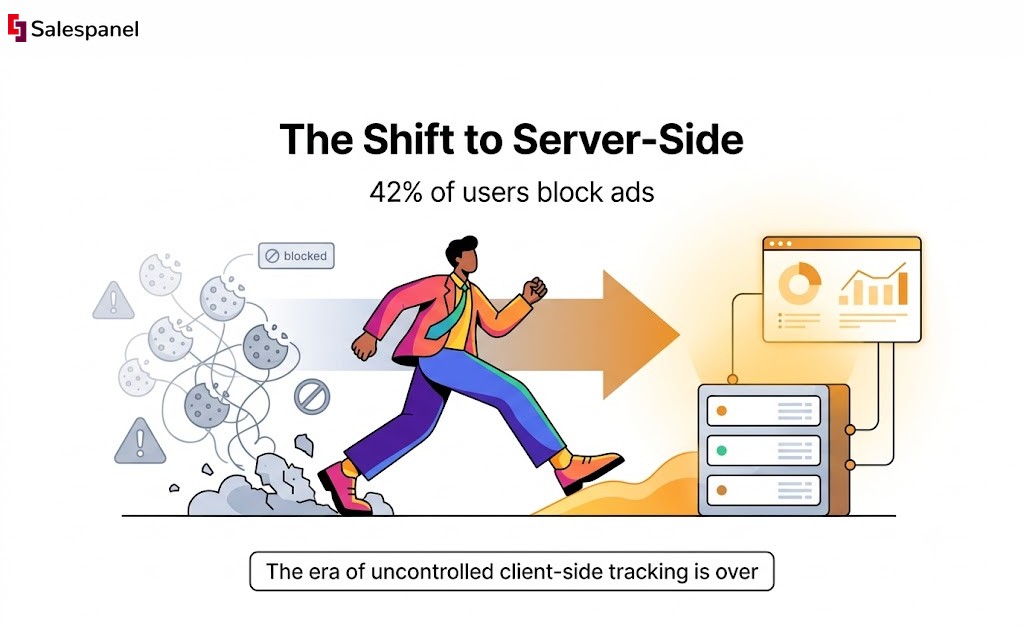
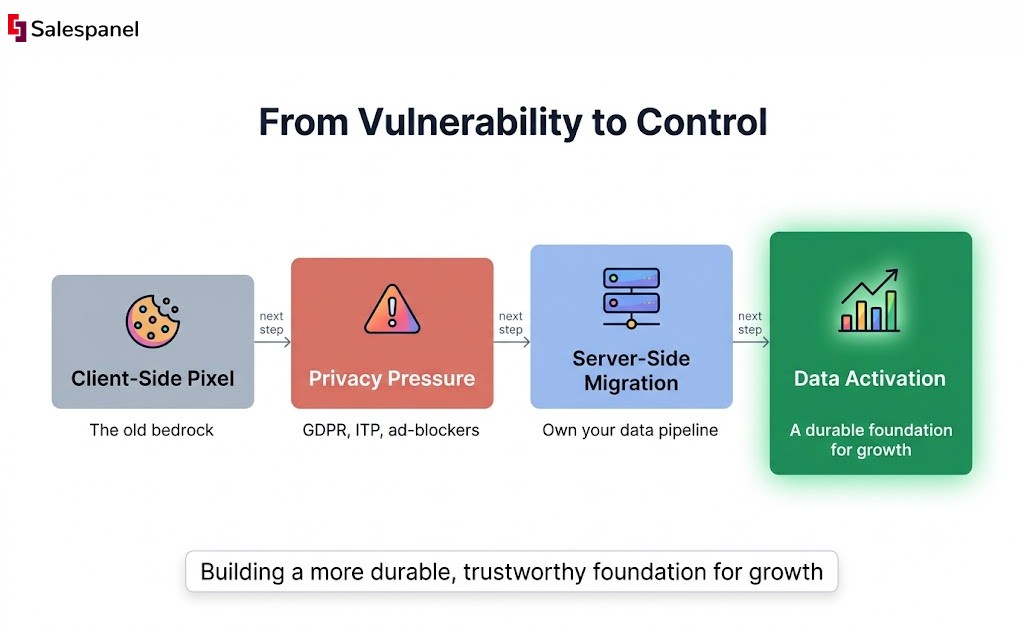
For over a decade, the client-side pixel was the bedrock of digital marketing: a simple, effective tool for understanding user behavior. But its era is ending. A convergence of privacy regulations like GDPR, browser-led initiatives such as Apple’s Intelligent Tracking Prevention (ITP) that restrict third-party cookies, and the rise of ad-blockers (now used by over 42% of internet users globally) has rendered client-side tracking unreliable and increasingly risky. The data you’re collecting is likely incomplete, inaccurate, and exposed to compliance vulnerabilities.
This shift isn’t a future trend; it’s a present-day reality demanding a fundamental architectural change in how you collect and manage customer data. The future of reliable, first-party data ownership lies with the server. Moving to server-side tracking provides a more reliable and complete data stream, essential to accurately analyze website traffic effectively. By shifting data collection from the user’s volatile browser to a secure, controlled server environment you own, you regain control over your analytics stack. This transition ensures higher data fidelity, enhances security, and allows for more sophisticated data enrichment before sending it to downstream destinations.
This article is your technical guide to navigating this critical transition. The central theme is simple: regaining control over your data pipeline to build a resilient, future-proof marketing stack. We will dissect the leading server side tracking tools, offering a journalistic analysis of their capabilities, implementation nuances, and strategic fit for B2B marketing and sales operations. You’ll find a detailed breakdown of each platform, complete with practical examples and a clear takeaway to help you find the best solution to rebuild your data foundation for the new era of the internet.
1. Salespanel
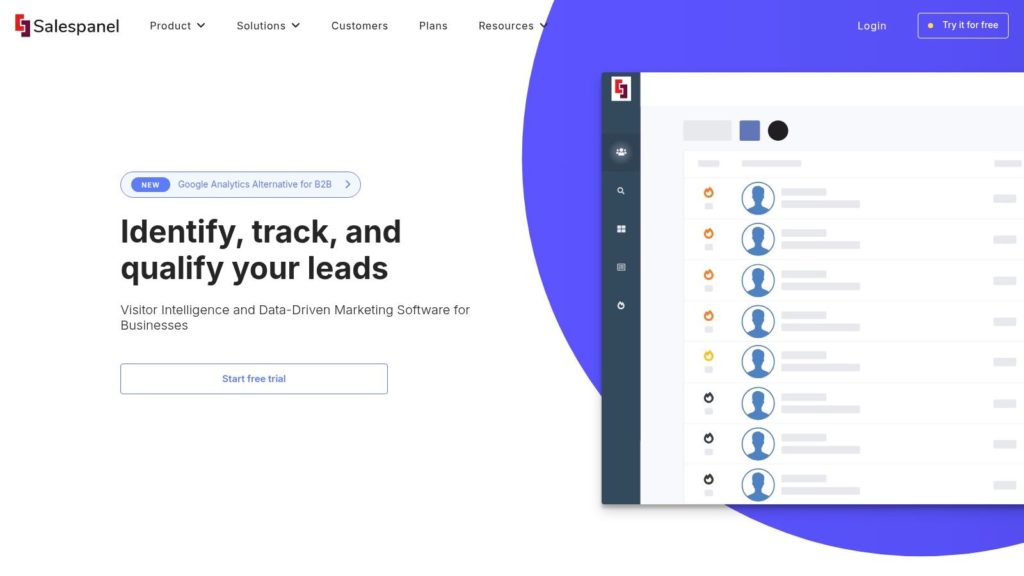
Salespanel stands out as a robust, privacy-centric platform designed specifically for B2B marketing and sales teams looking to harness the power of server-side tracking. It moves beyond simple analytics by integrating first-party data collection with sophisticated identity resolution and AI-driven lead qualification, making it an excellent choice for organizations aiming to convert anonymous web traffic into a predictable sales pipeline. The platform is engineered to create a resilient and compliant data infrastructure, a critical advantage in an era of diminishing cookie reliability and heightened data privacy regulations.
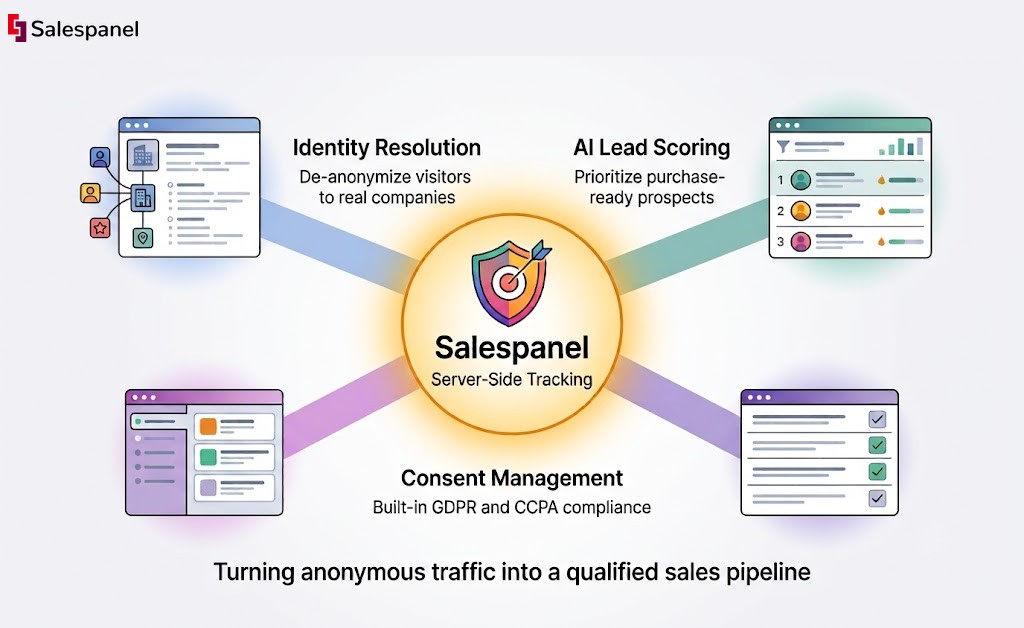
Its core strength lies in its ability to consolidate disparate data signals from cookies, pixels, and scripts into a unified, server-managed stream. This process not only enhances data accuracy by bypassing client-side interruptions but also gives businesses full control over what information is shared with third-party vendors. For B2B use cases, this means reliably tracking the entire buyer’s journey, from the first anonymous visit to a signed contract, and attributing activities to specific accounts.
Key Capabilities and Use Cases
- Advanced Identity Resolution: Salespanel excels at de-anonymizing website visitors by connecting behavior to real-world companies. This is invaluable for account-based marketing (ABM) teams who can identify high-fit accounts showing buying intent long before a form is ever filled out.
- AI-Driven Lead Scoring: The platform uses behavioral data collected server-side to score leads automatically. This helps sales teams prioritize outreach by focusing on prospects who are actively engaged and demonstrating purchase-ready signals, directly improving sales efficiency.
- Integrated Consent Management: Salespanel provides built-in tools to manage user consent, ensuring that data collection practices align with GDPR, CCPA, and other global privacy laws. This makes it one of the more comprehensive server side tracking tools for compliance-focused organizations.
Why It’s a Top Choice
Salespanel is more than just a tool; it positions itself as a strategic partner with an extensive library of resources, including forward-looking guides on consent frameworks and AI in B2B marketing. While the lack of public pricing requires direct contact for a quote, its specialized B2B focus and privacy-first architecture provide a powerful foundation for future-proofing your marketing stack. Teams can leverage their insights to enhance campaigns, including by integrating their data with some of the best email outreach tools available today.
Website: https://salespanel.io/resources/
2. Google Tag Manager – Server-Side (sGTM)
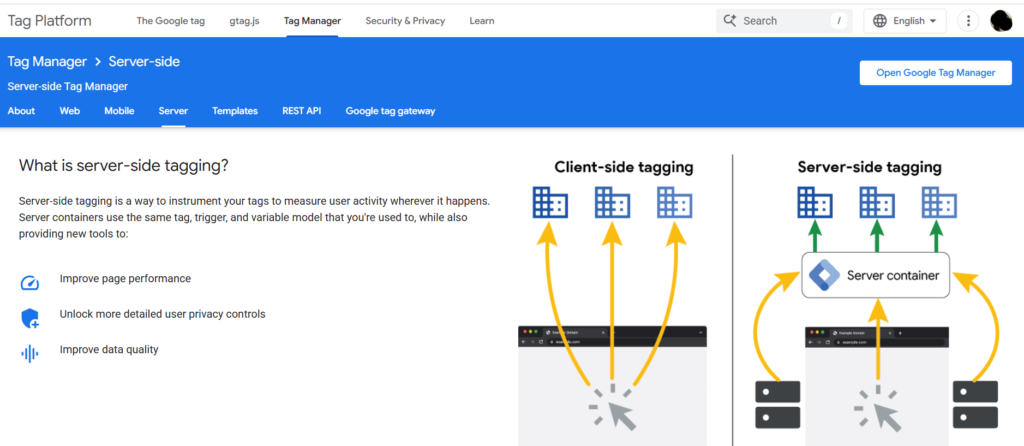
Google Tag Manager’s server-side offering (sGTM) extends its popular client-side container, creating a robust framework for teams already invested in the Google ecosystem. It functions as a proxy between a user’s browser and third-party data collection endpoints. By deploying a server container, typically on Google Cloud, you route all measurement tags through a first-party subdomain, which significantly enhances data resilience against ITP and ad-blockers.
This makes sGTM one of the most powerful server side tracking tools for achieving data governance and improving site performance by offloading tracking scripts from the client.
Pricing
While sGTM itself is free, you are responsible for the underlying cloud infrastructure costs. Google Cloud offers a perpetually free tier for a single server, which is suitable for low-traffic sites. For production environments, costs for Google Cloud Run or App Engine hosting, plus logging, will typically range from $50-$150/month per container and scale with traffic.
Implementation and Use Cases
- Setup: Implementation requires provisioning a server container through Google Cloud. While Google provides guided setup wizards, it demands familiarity with cloud concepts like projects, billing, and basic container operations.
- B2B Use Case: A B2B SaaS company can use sGTM to enrich GA4 data with proprietary information from its CRM (e.g., lead status, account tier) before sending it to analytics platforms. This server-side enrichment keeps sensitive logic and data off the client’s browser.
- Key Advantage: sGTM’s primary strength is its native integration with the Google Stack (GA4, Google Ads) and the extensive community-built templates available in the gallery, allowing for a highly customizable yet familiar workflow.
Pros and Cons
Pros:
- First-Party Control: Mitigates tracking prevention by routing data through your own domain.
- Data Governance: Provides granular control to filter, modify, or redact sensitive data before forwarding it to vendors.
- Performance Boost: Reduces the number of third-party scripts running in the user’s browser.
Cons:
- Operational Overhead: Requires active management of cloud infrastructure, including monitoring and cost control.
- Technical Learning Curve: Not a plug-and-play solution; requires understanding of server-side concepts.
Learn more at Google Developers
3. Twilio Segment – Connections
Twilio Segment positions its Connections product as a high-powered customer data pipeline, functioning as a sophisticated Customer Data Platform (CDP) for unifying event data. It uses both client-side and server-side SDKs to collect user interactions and then routes this information to over 700 destinations, including analytics tools, ad platforms, and data warehouses. By centralizing data flow through its servers, Segment provides a governed environment for managing and transforming events before they reach downstream vendors.
This makes it one of the most established server side tracking tools for organizations aiming to create a single, reliable source of truth for customer data. Its ability to manage data from both server and cloud sources, combined with regional infrastructure options (US/EU), ensures both compliance and performance.
Pricing
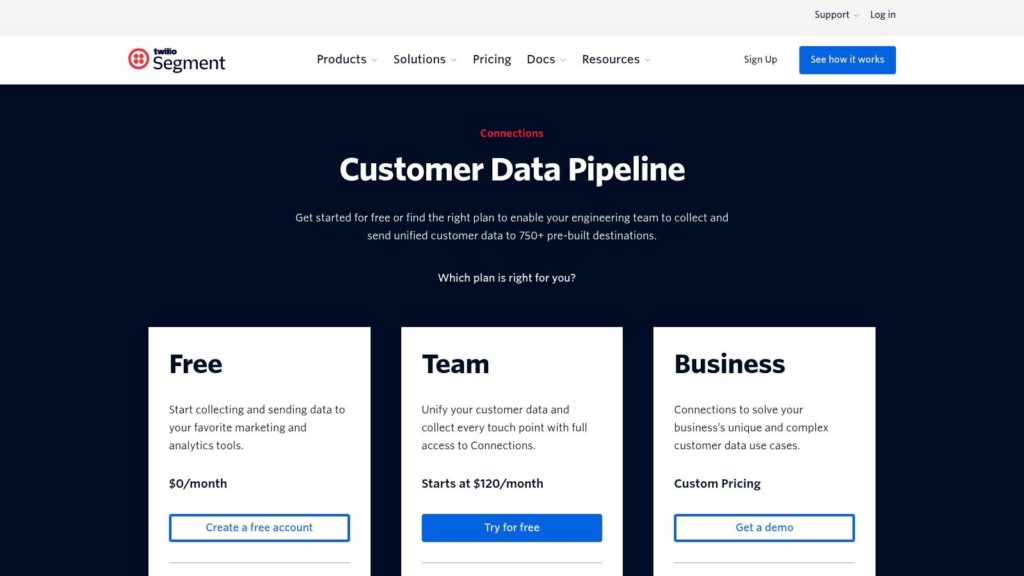
Segment Connections offers a generous free tier for up to 1,000 Monthly Tracked Users (MTUs) and two destinations, making it accessible for startups. Paid plans scale with MTU volume, starting at $120/month for 10,000 MTUs. Costs can increase with MTU overages and add-ons for advanced features like data governance or protocol management, so careful monitoring of usage is necessary as you grow.
Implementation and Use Cases
- Setup: Implementation involves installing Segment’s SDKs (like analytics.js or server-side libraries for Python, Node, etc.) and configuring “Sources” and “Destinations” in the UI. The process is well-documented and developer-friendly.
- B2B Use Case: A B2B enterprise can use Segment’s server-side sources to combine website behavior data with product usage events from their backend. This unified user profile can then be sent to a CRM for sales and to a data warehouse for in-depth churn analysis, all without exposing complex logic to the client.
- Key Advantage: Segment’s core strength is its massive integration ecosystem and mature, developer-centric platform. It abstracts away the complexity of individual vendor APIs, allowing teams to route validated data with a consistent schema.
Pros and Cons
Pros:
- Extensive Integrations: A vast catalog of pre-built source and destination integrations simplifies tool adoption.
- Data Governance: Strong controls for data validation, privacy, and user permissions are available.
- Developer-Friendly: Excellent documentation, APIs, and SDKs make it a favorite among engineering teams.
Cons:
- Cost at Scale: The MTU-based pricing model can become expensive for high-traffic B2C businesses or as usage grows.
- Feature Gating: Advanced governance and privacy features are often locked behind higher-tier plans or expensive add-ons.
Learn more at Twilio Segment
4. RudderStack
RudderStack is a developer-focused, open-source customer data platform that provides a robust framework for server-side event collection and routing. It allows you to collect event data via its server-side SDKs and forward it to over 200 destinations, including analytics tools and data warehouses. Its architecture centers on giving engineers control over the entire data pipeline, from collection to transformation and delivery.
This makes RudderStack one of the most flexible server side tracking tools for companies that want to avoid vendor lock-in and build a composable CDP. By routing data through its gateway, you can transform payloads in-flight, enrich events with first-party data, and ensure consistent data structures before the information reaches any downstream application.
Pricing
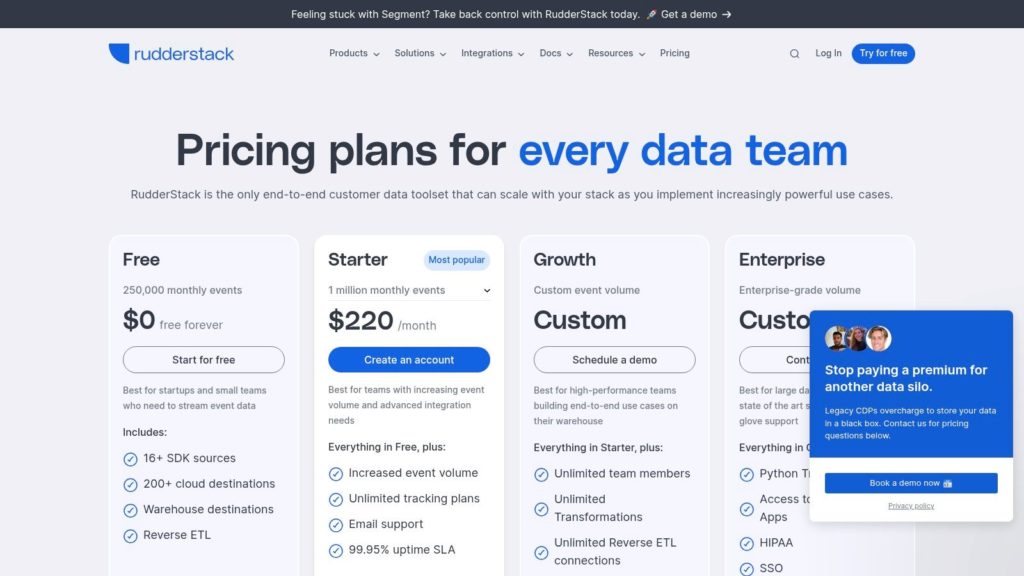
RudderStack offers a generous free tier that includes up to 500,000 events per month. The paid “Pro” plan starts at $500/month for 3 million events, adding features like advanced transformations and more destinations. Enterprise plans offer premium support and deployment options. The open-source version can be self-hosted, eliminating licensing fees but requiring infrastructure and maintenance investment.
Implementation and Use Cases
- Setup: Implementation involves installing server-side SDKs (e.g., Python, Node.js, Go) into your backend applications. For self-hosting, it requires deploying the open-source stack using Docker or Kubernetes, demanding significant DevOps expertise.
- B2B Use Case: A B2B platform can use RudderStack to capture server-side events like “Subscription Upgraded” or “Project Created.” This data can be routed simultaneously to a CRM for sales alerts, a data warehouse for analysis, and a marketing automation tool to trigger targeted email campaigns, all from a single event stream.
- Key Advantage: RudderStack’s primary strength is its open-source foundation and warehouse-native approach, offering ultimate flexibility and control for technical teams who want to own their data infrastructure without being tied to a single vendor’s ecosystem.
Pros and Cons
Pros:
- Open-Source Flexibility: Can be self-hosted for maximum control and cost savings on infrastructure.
- Developer-Centric: Strong API, extensive SDKs, and excellent documentation appeal to engineering teams.
- Warehouse-Native: Designed to integrate deeply with data warehouses like Snowflake, Redshift, and BigQuery.
Cons:
- Technical Complexity: The self-hosted version and advanced features require significant engineering resources to manage.
- Focus Shift: Some previously available ETL functionalities have been deprecated as the platform focuses more on its core CDP capabilities.
Learn more at RudderStack
5. Tealium EventStream API Hub
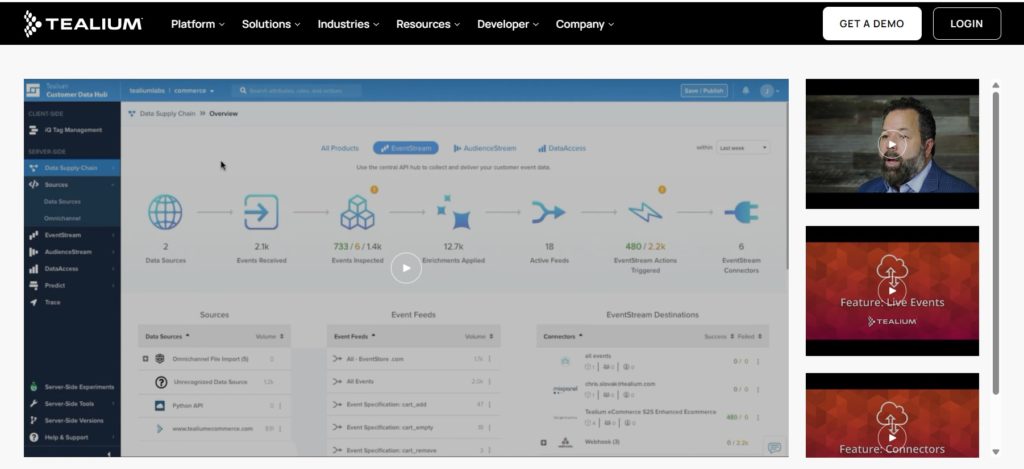
Tealium’s EventStream API Hub is an enterprise-grade component of its broader Customer Data Hub, designed for large-scale, server-side data collection and activation. It operates as a central API gateway, collecting first-party data from various sources (web, mobile, IoT) and forwarding it to a vast library of vendor integrations. This architecture is built with strict governance and consent management at its core, making it a powerful choice for organizations in regulated industries.
By processing data flows on the server, EventStream helps companies enforce data quality standards, manage user consent preferences centrally, and enrich event data before it reaches downstream tools. It stands out as one of the most robust server side tracking tools for enterprises that require a proven, compliant, and scalable data infrastructure.
Pricing
Tealium does not offer public or self-serve pricing. The platform is sold through a sales-led process with custom quotes based on event volume, features, and the number of integrations required. Its total cost of ownership is significantly higher than SMB-focused tools, reflecting its enterprise-level support and governance capabilities. It can also be purchased via the AWS Marketplace, which can simplify procurement for large organizations.
Implementation and Use Cases
- Setup: Implementation is a guided process led by Tealium’s professional services or certified partners. It involves configuring data sources, event specifications, and connector destinations within the Tealium Customer Data Hub UI.
- B2B Use Case: A global financial services firm can use EventStream to collect user interaction data from its secure portal, validate it against a predefined data schema, check it against a master consent database, and then forward compliant, enriched data to its CRM, analytics, and marketing automation platforms without exposing sensitive operations on the client-side.
- Key Advantage: Tealium’s core strength is its enterprise-grade governance, security certifications, and extensive integration marketplace, making it a trusted solution for complex organizations with stringent compliance requirements.
Pros and Cons
Pros:
- Enterprise Governance: Top-tier controls for data quality, privacy, and consent management suitable for regulated sectors.
- Scalability: Proven to handle massive data volumes for large, global deployments.
- Procurement Flexibility: Available through enterprise channels like the AWS Marketplace.
Cons:
- High Cost: Significant investment required, making it inaccessible for small to mid-sized businesses.
- Sales-Led Model: The lack of self-serve options creates a longer evaluation and purchasing cycle.
Learn more at Tealium
6. Adobe Experience Platform – Event Forwarding
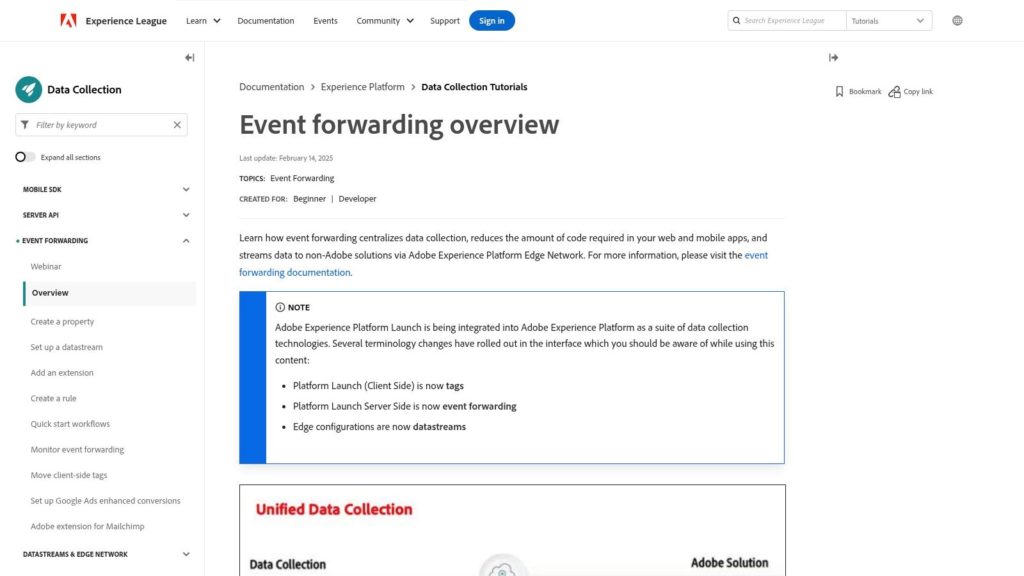
For enterprises deeply integrated into the Adobe ecosystem, Event Forwarding within Adobe Experience Platform (AEP) offers a native, server-side solution. It works by capturing data via the AEP Web SDK on the Edge Network and then forwarding those events directly from Adobe’s servers to third-party destinations. This approach consolidates data collection and reduces reliance on client-side scripts, which is crucial for performance and data accuracy in a cookieless world.
Unlike standalone server side tracking tools, Adobe’s solution is a component of its larger Real-Time Customer Data Platform (RT-CDP). It leverages AEP’s unified profile and governance frameworks to ensure data sent to partners like Facebook CAPI or other marketing endpoints is consistent, consented, and secure, providing a single source of truth for customer interactions across the Adobe stack.
Pricing
Event Forwarding is not available as a standalone product. It is a feature included within the Adobe Experience Platform and Real-Time CDP licensing, which involves custom, enterprise-level pricing. This model makes it inaccessible for SMBs and is tailored for large organizations with significant investment in Adobe’s marketing and analytics suites.
Implementation and Use Cases
- Setup: Implementation is managed within the Adobe Experience Platform interface, requiring configuration of datastreams and event forwarding rules. It presupposes an existing AEP setup with the Web SDK deployed on your digital properties.
- B2B Use Case: An enterprise retailer can use Event Forwarding to send enriched conversion data from Adobe Analytics to its paid media partners. When a known B2B buyer makes a bulk purchase online, AEP can combine this event with profile attributes from Adobe Real-Time CDP before forwarding it, ensuring ad platforms receive high-quality, server-validated conversion signals.
- Key Advantage: Its primary strength is the seamless, native integration with the Adobe Experience Cloud, allowing for sophisticated audience segmentation and identity resolution before data is ever forwarded to a non-Adobe destination.
Pros and Cons
Pros:
- Deep Ecosystem Integration: Unifies server-side tagging with Adobe Analytics, Target, and Real-Time CDP for a cohesive data strategy.
- Enterprise-Grade Governance: Leverages AEP’s built-in consent and data governance policies across all forwarded events.
- Unified Identity: Utilizes Adobe’s powerful identity graph to stitch user profiles before sending data to third parties.
Cons:
- Vendor Lock-In: Tightly coupled with the Adobe stack, making it unsuitable for businesses not committed to the ecosystem.
- High Barrier to Entry: Requires significant investment in AEP/RT-CDP and is not a self-serve or SMB-friendly solution.
Learn more at Adobe Experience Leaguex
7. mParticle
mParticle is an enterprise-grade customer data platform (CDP) designed for large-scale data collection and orchestration. It provides both server-side and client-side SDKs, allowing businesses to create a unified data pipeline that routes events from various sources to over 300 destinations. Its architecture is built for reliability and governance, making it a common choice in mobile-first industries, media, and sectors with strict compliance needs like healthcare.
The platform positions itself as one of the more robust server side tracking tools by offering advanced features for consent management, data quality validation, and enterprise-level SLAs. This focus on governance allows organizations to enforce privacy rules and ensure data integrity directly within the pipeline before it reaches downstream analytics or marketing automation tools.
Pricing
mParticle’s pricing is not publicly listed and requires engaging with their sales team. They offer a composable, unbundled pricing model, allowing you to pay only for the features you need. Plans are typically billed annually and may include fees for event volume overages, reflecting its enterprise focus.
Implementation and Use Cases
- Setup: Implementation involves integrating mParticle’s server-side SDKs (e.g., Node.js, Java, Python) into your backend applications. It requires engineering resources to configure data ingestion plans, set up data filters, and map event forwarding to various integrations.
- B2B Use Case: A financial services company can use mParticle’s HIPAA-eligible environment to securely collect user interaction data from its web and mobile apps. Server-side, it can enrich this data with non-PII information from its core systems before routing it to a secure data warehouse for analysis, ensuring compliance throughout the data’s journey.
- Key Advantage: mParticle’s strength lies in its composable architecture and extensive governance features, giving enterprise teams the flexibility to build a compliant, high-quality data stack tailored to their specific needs.
Pros and Cons
Pros:
- Enterprise-Ready: Offers strong support, SLAs, and compliance features suitable for regulated industries.
- Flexible Architecture: Its modular approach allows for a highly customized setup.
- Data Governance: Advanced tools for consent management and data quality enforcement.
Cons:
- Complex Pricing: Lack of public pricing and sales-led process can be a barrier.
- High Cost of Entry: Geared towards larger enterprises with significant data volume and budgets.
Learn more at mParticle
8. Snowplow
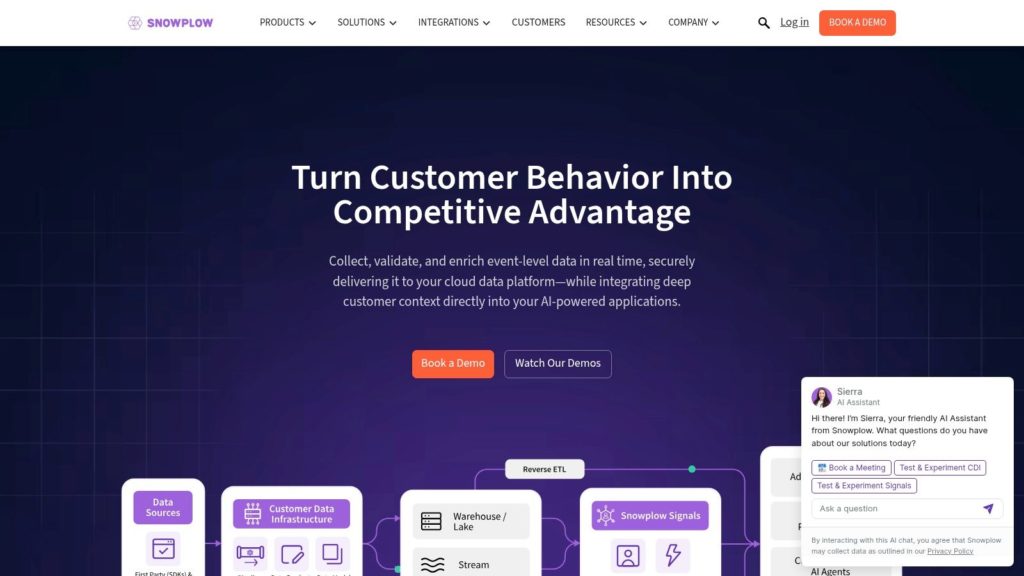
Snowplow is a behavioral data platform that offers both open-source and managed solutions for instrumenting granular event tracking. It positions itself not just as a tool but as a data creation infrastructure, giving teams complete ownership over raw event data streams that are sent directly to their own cloud data warehouse or lake, like Snowflake, BigQuery, or Redshift. It provides a full suite of client-side and server-side trackers to ensure comprehensive data capture.
The platform is renowned for its strong schema management and data quality tooling, allowing teams to define and enforce data structures from the point of collection. This makes Snowplow one of the most robust server side tracking tools for organizations that require auditable, high-fidelity data for advanced analytics, machine learning, and complex business intelligence use cases.
Pricing
Snowplow has an open-source version that is free to use but requires self-hosting and significant data engineering resources. Its commercial offerings, including a managed cloud solution, are enterprise-focused and sales-led, with custom pricing based on data volume and support levels. Public pricing information is not readily available.
Implementation and Use Cases
- Setup: Implementing Snowplow is a data engineering-intensive task. It involves deploying trackers, setting up a data pipeline, and configuring a data warehouse. The managed versions simplify the infrastructure aspect, but it still requires technical expertise to define schemas and manage the data flow.
- B2B Use Case: An enterprise software company can use Snowplow’s server-side trackers to collect detailed product usage events from their web app and backend services. This raw, structured data can be fed directly into their data lake to build custom attribution models and user journey analyses without being constrained by a vendor’s data model.
- Key Advantage: Snowplow’s core strength is its “data-first” approach. It provides unparalleled ownership and control over raw, unopinionated event data, making it the foundation for a company’s data stack rather than just another marketing tool.
Pros and Cons
Pros:
- Data Ownership: Complete control and ownership of raw event-level data in your own warehouse.
- Schema & Quality Control: Enforces data contracts at collection, ensuring high-quality, reliable data.
- Open-Source Flexibility: The open-source core provides ultimate customization and avoids vendor lock-in.
Cons:
- High Technical Barrier: Requires significant data engineering expertise to implement and maintain effectively.
- Opaque Enterprise Pricing: The cost of managed services is not transparent and is geared towards larger enterprises.
Learn more at Snowplow
9. Matomo
Matomo is a privacy-first, open-source web analytics platform that provides an alternative to mainstream tools by giving users full control over their data. It facilitates server-side tracking primarily through its HTTP Tracking API, allowing developers to send data directly from their servers. This method bypasses client-side complexities and is ideal for organizations prioritizing data ownership and compliance with regulations like GDPR and CCPA.
Whether you self-host the open-source version or use the Matomo Cloud offering, the platform ensures no data sampling, providing a complete and accurate picture of user behavior. This direct server-to-server data collection makes Matomo a compelling choice among server side tracking tools for businesses in sensitive industries like healthcare and finance, where data sovereignty is non-negotiable.
Pricing
Matomo’s on-premise version is free to use, with costs limited to your own server infrastructure. Optional premium features and support plans are available for purchase. The Matomo Cloud plan starts at approximately $23/month for up to 50,000 hits, with pricing that scales based on traffic volume, offering a managed solution without the infrastructure overhead.
Implementation and Use Cases
- Setup: For self-hosting, implementation involves setting up a LAMP stack and installing the Matomo software. Server-side tracking is then configured by sending POST requests to the HTTP Tracking API. Alternatively, it can be integrated as a destination for data forwarded from an sGTM container.
- B2B Use Case: A European e-commerce company can use a self-hosted Matomo instance to track user journeys server-side. They can enrich this data with order details from their backend systems via the API, all within their own infrastructure, ensuring full GDPR compliance without sharing PII with third-party analytics vendors.
- Key Advantage: Matomo’s core strength is its commitment to data privacy and ownership. The ability to self-host gives businesses complete control over their analytics environment, eliminating external data processing dependencies.
Pros and Cons
Pros:
- Full Data Ownership: On-premise option guarantees you own and control 100% of your analytics data.
- Compliance-Focused: Designed with privacy regulations like GDPR in mind, offering strong compliance features.
- No Data Sampling: Provides complete and accurate reporting, regardless of traffic volume.
Cons:
- Limited Tag Management: Matomo’s Tag Manager does not yet support a fully server-side environment, unlike dedicated solutions.
- Fewer Native Integrations: Lacks the extensive library of turnkey advertising connectors found in larger CDPs.
Learn more at Matomo
10. Piwik PRO Analytics Suite
Piwik PRO Analytics Suite offers an integrated platform designed for organizations with strict privacy and compliance requirements. It bundles analytics, a tag manager, and a consent manager into a single environment, providing a robust foundation for server-side tracking. This unified approach allows teams to manage data collection, consent, and tag deployment through one interface, ensuring that all tracking activities adhere to internal governance and external regulations like GDPR and HIPAA.
The platform’s server-side capabilities are focused on data sovereignty, offering hosting in the EU or on private infrastructure. By processing data on secure servers before it reaches any endpoints, Piwik PRO enhances user privacy and data security. This makes it one of the go-to server side tracking tools for industries like healthcare, finance, and government that handle sensitive user information.
Pricing
Piwik PRO has historically offered a free “Core” plan, but this is being discontinued as of February 2026, shifting its focus entirely to paid enterprise clients. Pricing for its Business and Enterprise plans is customized based on data volume, number of domains, and required features. Costs typically start in the low thousands of dollars per year and scale up, requiring a direct sales consultation for a quote.
Implementation and Use Cases
- Setup: Implementation involves deploying the Piwik PRO tag and configuring the tag manager and consent manager. For server-side deployments, it requires setting up appropriate hosting infrastructure, which can be managed by Piwik PRO or self-hosted.
- B2B Use Case: A financial institution can use Piwik PRO to collect user interaction data on its secure portal. Server-side tracking ensures sensitive financial data is never exposed client-side, and the integrated consent manager logs every user consent action for GDPR audit trails. For insights into a practical implementation, consider this Piwik PRO case study.
- Key Advantage: Piwik PRO’s main strength is its all-in-one, privacy-centric design. The tight integration of analytics, tag management, and consent management simplifies compliance for organizations in highly regulated sectors.
Pros and Cons
Pros:
- Strong Compliance Posture: Built-in tools for GDPR, CCPA, and HIPAA, with flexible data residency options.
- All-in-One Suite: Combines multiple marketing technology functions into a single, unified platform.
- Data Sovereignty: Offers full control over where data is stored and processed, including on-premises options.
Cons:
- Shifting to Paid-Only: The sunsetting of its free plan makes it inaccessible for smaller businesses or those with limited budgets.
- Custom Pricing Model: Lack of transparent, standardized pricing can make it difficult to budget without a formal sales process.
Learn more at Piwik PRO
11. Stape.io
Stape.io simplifies the adoption of server-side tracking by offering managed hosting specifically for Google Tag Manager server-side containers. It effectively removes the need for companies to manage their own Google Cloud infrastructure, providing a ready-to-use environment with pre-built templates and performance optimizations. This approach democratizes access to sGTM, making it an accessible option for teams without dedicated cloud engineering resources.
By handling the operational complexities, Stape allows marketing and analytics teams to focus on implementation rather than infrastructure. With regional hosting choices in the US and EU, it helps address data residency requirements for GDPR and other privacy regulations, positioning it as a practical choice among server side tracking tools for global companies.
Pricing
Stape offers a compelling pricing model that includes a free tier suitable for testing or very low-traffic websites. Paid plans start at just $20/month for a single container and scale up based on the number of requests and features required. This structure provides an inexpensive entry point into server-side tagging, with predictable costs as traffic grows.
Implementation and Use Cases
- Setup: Getting started is remarkably fast. Users can deploy a new sGTM container in minutes through a simple web interface, without ever touching a cloud console. Stape also provides easy-to-install integrations for platforms like Shopify and WordPress.
- B2B Use Case: A B2B e-commerce brand can use Stape’s managed sGTM environment to quickly deploy server-side tags for GA4 and Meta CAPI. They can leverage Stape’s library of “Power-ups,” such as a data enrichment tag, to append user data from a CRM before sending events, all without managing servers.
- Key Advantage: Stape’s primary strength is its ability to lower the barrier to entry for sGTM. It abstracts away the technical complexity of cloud hosting, offering a fast, low-ops path to a robust server-side setup.
Pros and Cons
Pros:
- Rapid Deployment: Go from zero to a live server-side container in under five minutes.
- Low Operational Overhead: No need to manage, monitor, or patch cloud infrastructure.
- Cost-Effective: Free tier and affordable entry plans make it highly accessible.
Cons:
- Vendor Dependency: Relies on a third-party service instead of your own self-hosted cloud environment.
- Plan Limitations: Advanced features and high-volume traffic may necessitate more expensive, higher-tier plans.
Learn more at Stape.io
Top 11 Server-Side Tracking Tools – Feature Comparison
| Product | Core features | Best for | Key strengths | Deployment & Pricing |
|---|---|---|---|---|
| Salespanel | Server-side tracking, identity resolution, AI lead scoring, consent management, analytics | B2B sales & marketing teams needing lead ID + privacy-first workflows | B2B-focused, AI-driven prospecting, privacy-first, rich resource library | MAU-based tiers (contact/sales); free trial; confirm tiers for traffic |
| Google Tag Manager – Server-Side (sGTM) | Server containers, subdomain endpoint, forward to GA4/ad networks | Teams in Google stack seeking first-party endpoint & control | First-party resilience vs blockers, granular data control, autoscaling | Self-host on Google Cloud (Cloud Run/App Engine); pay cloud hosting & logging; ops expertise required |
| Twilio Segment – Connections | SDKs + server sources, 700+ integrations, governance controls | Teams needing broad native integrations & governed pipelines | Large ecosystem, mature docs, clear MTU-tiering | MTU-based pricing with free tier; MTU overages can add cost |
| RudderStack | Server SDKs, 200+ destinations, open-source + managed cloud | Dev-heavy teams who want flexible deployment & OSS option | Open-source option, transparent starter pricing, dev-friendly | Free plan & paid tiers; costs scale with volume/features |
| Tealium EventStream API Hub | Server-side collection, orchestration, enterprise governance & consent | Large enterprises and regulated industries | Strong governance, consent controls, proven at scale | Sales-led purchasing; no public pricing; higher total cost of ownership |
| Adobe Experience Platform – Event Forwarding | AEP Edge server-side forwarding, identity & activation | Organizations already invested in Adobe ecosystem | Deep Adobe integration, enterprise identity & activation | Part of AEP/RT-CDP packaging; custom pricing; not SMB-friendly |
| mParticle | Server & client SDKs, 300+ integrations, governance & SLAs | Mobile, media, and regulated environments needing SLAs | Modular pricing approach, enterprise SLAs, HIPAA-eligible | Limited public pricing; sales engagement often required; annual billing |
| Snowplow | Open-source + managed behavioral tracking, warehouse integrations, schema tooling | Data teams needing full ownership of raw event data at scale | High-volume control, strong schema & data-quality tools | Self-managed or managed cloud; requires data engineering; managed tiers sales-led |
| Matomo | Privacy-focused analytics, HTTP tracking API, self-host or cloud | Organizations prioritizing data ownership & compliance | On-prem ownership, cost-effective, no sampling | Self-host (open source) free; cloud plans paid; fewer ad connectors |
| Piwik PRO Analytics Suite | Tag Manager, Consent Manager, server-side support, EU hosting options | Privacy-first and regulated teams (GDPR/HIPAA needs) | Compliance & data sovereignty, all-in-one suite | Modular enterprise pricing; Free Core sunsetting; sales-led quotes |
| Stape.io | Managed sGTM hosting, templates, prebuilt apps, regional hosting | Teams wanting low-ops sGTM without running Google Cloud | Fast setup, free tier, templates & region choices, compliance certs | Free tier + paid plans; adds third-party vendor dependency |
Your Next Move: Choosing a Path, Not Just a Product
Navigating the landscape of server-side tracking tools can feel overwhelming, but the journey from client-side vulnerability to server-side control is a strategic imperative. As we’ve explored, this shift is not just a technical upgrade; it’s a fundamental move towards data ownership, enhanced security, and a more resilient marketing and analytics infrastructure in a privacy-first world. The central theme of this guide has been about reclaiming control over your data pipeline, and your choice of tool is the linchpin in that strategy.
The tools we’ve analyzed, from the foundational power of a self-hosted Google Tag Manager server to enterprise-grade Customer Data Platforms like Segment and Tealium, each offer a distinct path. Your decision hinges on a clear-eyed assessment of your organization’s unique circumstances: technical maturity, budget, existing martech stack, and ultimate business objectives.
Synthesizing Your Strategy: From Theory to Action
The key takeaway is that selecting the best server-side tracking tools requires a roadmap, not just a feature comparison. Before you commit to a solution, your team must align on several critical questions. A rushed implementation without a clear strategy can lead to squandered resources and a data infrastructure that fails to deliver on its promise.
Start by defining your first-party data strategy. What are the most critical user actions and data points you need to capture? How will this data be used to improve the customer journey, inform product development, or empower your sales team? Answering these questions first will prevent you from collecting data for data’s sake.
Next, map your essential data flows. Identify all the destinations where your data needs to go, from your analytics platforms and advertising networks to your CRM and data warehouse. This exercise will clarify whether you need a simple point-to-point solution or a more sophisticated, multi-destination data hub.
A Framework for Your Decision
To simplify your evaluation process, consider these three core pillars when comparing your options:
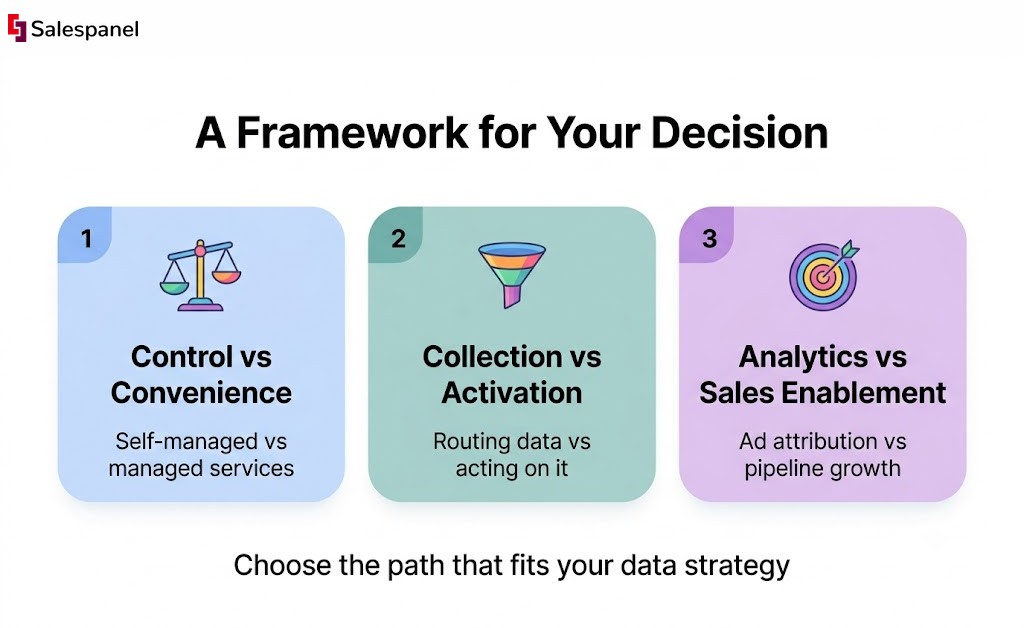
- Control vs. Convenience: A self-managed solution like sGTM with Stape.io or a framework like Snowplow offers maximum control and customization. However, this path demands significant technical expertise and ongoing maintenance. Managed services and CDPs prioritize convenience and ease of use, abstracting away much of the infrastructural complexity at a higher cost.
- Data Collection vs. Data Activation: Many tools excel at collecting, enriching, and routing event data. But for B2B organizations, the real value lies in activation. The challenge isn’t just knowing that a user visited a pricing page; it’s identifying which company they work for and alerting the correct account executive in real-time. This is where specialized tools shine.
- Analytics vs. Sales Enablement: Are you primarily solving for marketing analytics and ad attribution, or is your goal to bridge the gap between anonymous website activity and your sales pipeline? A B2B-focused solution is purpose-built for the latter. For instance, Salespanel’s server-side Website visitor tracking is designed not only for robust, privacy-compliant data capture but specifically to activate that data through firmographic identification, lead scoring, and seamless CRM integration.
Ultimately, the right server-side tracking tool is the one that best empowers your organization to execute its data strategy effectively. The era of relying on third-party cookies and uncontrolled client-side scripts is over. By making a deliberate, well-researched choice, you are not just adopting a new piece of technology; you are building a more durable, trustworthy, and effective foundation for growth.
Ready to move beyond simple data collection and start activating your website visitor data for sales? Salespanel provides a purpose-built B2B solution that leverages the power of server-side tracking to identify anonymous company visitors, score leads, and sync actionable intelligence directly to your CRM. Explore our resources to see how you can turn anonymous traffic into a qualified sales pipeline at Salespanel.