B2B LinkedIn Ads: Turn Ad Spend Into Sales Pipeline
A few years ago, all you could do on LinkedIn was create a digital resume repository. Today, LinkedIn has become the definitive B2B growth engine where high-value deals are created and developed. It has over 1 billion users and ad revenue jumping by 10% year-over-year, making LinkedIn a fundamental requirement for any company serious about growth. This guide will deliver a technical framework for turning LinkedIn’s immense potential into a measurable sales pipeline.
We will focus on the architecture of your campaigns, precision targeting, and conversion-focused creative. My primary goal is to transform ad spend from a cost center into a predictable revenue driver.
Why You Can’t Afford to Ignore LinkedIn Ads
If you still think of LinkedIn as just a place for digital resumes, you are largely missing the point. LinkedIn has become the most crucial professional ecosystem for B2B deals. There is no other platform with the scale and targeting facilities of LinkedIn. Mastering B2B LinkedIn ads isn’t just a niche tactic anymore-it’s a fundamental requirement for any growth-focused company.
This site platform gives you unfiltered access to the very individuals who approve budgets and sign contracts. LinkedIn has changed from a professional network to an active commercial hub. Your ideal customers aren’t just on LinkedIn; they’re actively making business decisions there.
The Epicenter of B2B Decision-Making
LinkedIn has a unique professional context. People are there to be entertained. People are on LinkedIn to think about their careers, find solutions to their problems, and consider industry trends. This is the fertile ground for B2B messaging that would feel intrusive anywhere else.
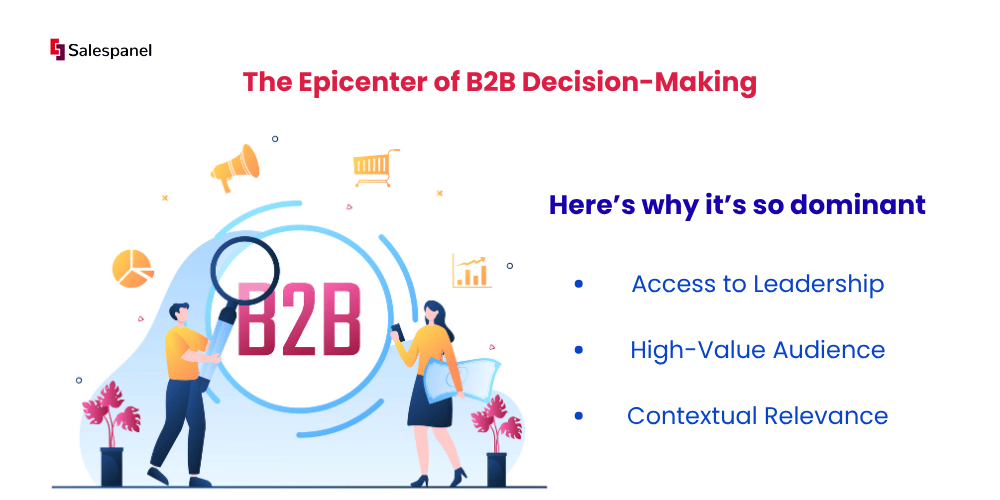
Here’s why it’s so dominant:
- Access to Leadership: You can reach C-suite executives, department heads, and other people who are usually unreachable via Email.
- High-Value Audience: LinkedIn has educated and affluent people who can make real business decisions.
- Contextual Relevance: Your ads show industry news and professional conversations, making your brand a part of business conversations.
This builds trust and credibility. Your ads stop being simple promotions and start becoming valuable insights that command attention.
B2B marketing revolves around a central concept. You need to find buyers where they are searching for answers. Nowadays, they are primarily searching on LinkedIn. It’s the digital boardroom where your next big client is researching their next major investment.
The Numbers Behind the Network
The sheer scale and engagement levels tell the story of the platform’s value. With over 1 billion global users and exceeding 200 countries, LinkedIn is a behemoth in B2B advertising. LinkedIn’s concentration of high-level professionals is impressive, featuring around 120 million senior-level professionals and estimates of more than 100 million decision-makers.
LinkedIn’s advertising platform also jumped by 10% year-over-year. With a 10% increase in ad revenue every year, advertisers recognize the platform’s value and are placing more bets. You can explore LinkedIn’s advertising platform and growth stats to confirm this yourself.
The data paints a clear picture: Without LinkedIn, you are sitting on the sidelines while key conversations happening in your industry. This guide shows you the actionable steps you need to convert this opportunity to a measurable pipeline and real revenue.
Designing Your Campaign Architecture for Success
Instead of writing ad copy, the first step is to construct the technical blueprint for your B2B LinkedIn ads campaign. This architecture dictates the budget allocation, target audience, and required actions. Ineffective campaign architecture will cause budget misallocation and confusing messaging. This will hinder the generation of qualified leads. Every setting must serve the ultimate goal of revenue generation.
Setting the campaign objective is the first technical decision. This is not a trivial start; it is a direct instruction to LinkedIn’s algorithm regarding the expected outcome. LinkedIn will maximize impressions for the “Awareness” objective, while a “Lead Generation” objective will identify users who are most likely to submit a form. Your objective must align precisely with what your business is trying to accomplish and where the B2B buyer is located in the sales funnel.
A costly mismatch of this would be if someone chose “Brand Awareness” when the business goal was to book product demos. In this case, LinkedIn will optimize for reach among a broad audience, resulting in high impressions but minimal conversions. This would mean the campaign fails, but it still accomplished what it was programmed to do.
Aligning Objectives with Your Sales Funnel
LinkedIn’s goals to a classic marketing funnel is a clear framework for what campaign you would like to run. Each stage has a distinct purpose of taking a prospect from the first interaction to a lead that is ready for a sales pitch.
- Awareness (Top of Funnel): Your goal is reach and brand recall, which is really to help people remember your brand. This is best for getting the attention of a new audience, launching a new product, or starting thought leadership.
- Consideration (Middle of Funnel): Your goal is engagement. This is to get people to interact with your content or visit your site to learn more. Objectives like “Website Visits” and “Engagement” fit this level of the funnel, which is good for promoting whitepapers, case studies, or webinars and registrations.
- Conversion (Bottom of Funnel): Your goal is to drive direct, high-intent actions. “Lead Generation” and “Website Conversions” funnel actions to get people to sign up for high-value events like demos and free trials.
Practical Example: A SaaS startup in the logistics industry should initiate a Brand Awareness campaign to build recognition among VPs of Operations, aiming to associate their brand with “supply chain optimization.” Conversely, an established enterprise software firm can bypass this stage and run a Lead Generation campaign to C-suite executives in Fortune 500 companies, offering a “Personalized Demo.” Since those companies already have brand equity, the objective is to capture existing intent.
Strategic Budgeting: Daily vs. Lifetime
With the objective set, the next step is to budget. For budget setting, LinkedIn advertising offers two primary models-daily and lifetime, and this impacts how the platform paces ad spend.
A daily budget sets a fixed spending limit for each 24-hour period. This predictable, consistent control is used for “always-on” campaigns to require a steady lead flow. Its primary limitation is its inability to capitalize on days with unusually high audience activity. This has the potential to cap the performance of the campaign.
A lifetime budget provides the algorithm with more flexibility. You set a total spend for the campaign, and the system automatically increases spend on high-performance days and reduces it on slower ones. This is often more efficient for short-term, date-specific campaigns, such as promoting a webinar.
Determining an appropriate starting budget requires a data-informed approach to your budget, especially researching the average Cost Per Click (CPC) for your B2B niche on LinkedIn, typically $6–$12. When you look at your B2B niche LinkedIn Ads, take the time to gather the average payable CPC data.
To illustrate, if your goal is to drive 200 clicks to a landing page with an estimated CPC of $9, your minimum test budget has to be $1,800 (200 clicks * $9/click). Starting with an insufficient budget is a common technical error. It prevents the algorithm from gathering enough data to optimize effectively, leading to inconclusive results and wasted resources.
By following this structured approach, from objective to budget, you ensure that each segment of your ad spend gets you closer to your goal. You are engineering a campaign where every dollar is strategically aimed at a specific business outcome, transforming ad spend from a speculative expense into a calculated investment designed for measurable returns.
Mastering Audience Targeting to Reach High-Value Leads

Your campaign’s structure is the foundation, but audience targeting is where the magic happens. It’s how you turn ad spend into a pipeline of high-quality leads. This requires a note about casting a wide net and hoping for the best; it’s about surgical precision. With B2B LinkedIn Ads, you have the power to build audiences so specific that your message lands squarely in front of the decision-makers who matter most.
Let’s be blunt: wasted ad spend is a direct result of lazy targeting. It’s pointless to show an ad to a freelance graphic designer that promotes enterprise cybersecurity software. This happens on platforms that aren’t built for business every day. LinkedIn cuts through the noise by giving you direct access to a goldmine of professional data.
Getting to the advertised goal should be simple: stop paying to reach people who will never buy from you. By getting a handle on LinkedIn’s targeting capabilities, you can build an audience that’s a near-perfect mirror of your Ideal Customer Profile (ICP). This flexibility ensures every advertising dollar spent will be profitable.
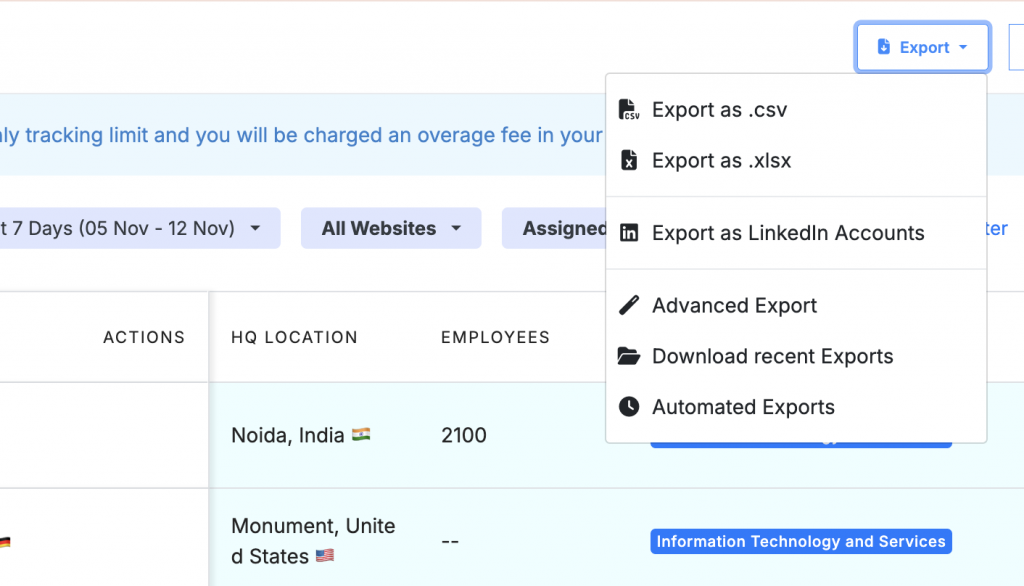
Did you know Salespanel provides you with a quick shortcut to export your inbound leads and accounts as LinkedIn Audiences? You can create a custom audience in a matter of seconds and target a highly qualified account list on LinkedIn with precision.
Building Your Ideal Customer Profile with Layered Targeting
The real power of LinkedIn’s targeting isn’t in any single attribute, but in how you combine them. Rather than focusing on one specific characteristic, this technique, known as layered targeting, lets you stack different criteria and, just as importantly, allows users to exclude parameters to create an ideal audience from millions of users on LinkedIn.
Consider that you’re marketing a project management tool for engineering teams. Targeting anyone with the job title “Engineer” would be a rookie mistake. A pro takes a layered approach.
Here’s how that looks:
- Job Seniority: Start with the job titles that are likely to have purchasing authority, and select “VP”, “Director”, and “Manager” seniorities.
- Job Function: Now, choose the right job function by adding “Engineering”.
- Company Industry: Layer on “Computer Software” and “Information Technology & Services” to remain in the tech industry.
- Company Size: Finally, zero in on your sweet spot by specifying companies with 201–1,000 employees to hit those mid-market accounts
This filter reduces a huge, general audience to a small, relevant group of a few thousand prime prospects. You can even get even more precise by using exclusions to remove current clients, competitors, or specific job titles that aren’t a good fit.
Leveraging Matched Audiences for Re-engagement
Matched Audiences is a solution offered by LinkedIn that gives you a powerful way to take advantage of warm leads and re-engage warm leads and existing contacts. Matched Audiences re-engagement strategies are integral to marketers’ campaigns because they save the time and effort of prospecting for new leads, as new prospects are always competing and new leads are always being fetched. Warm leads and existing contacts represent some of your best opportunities, as they show a previous interest in the services offered.
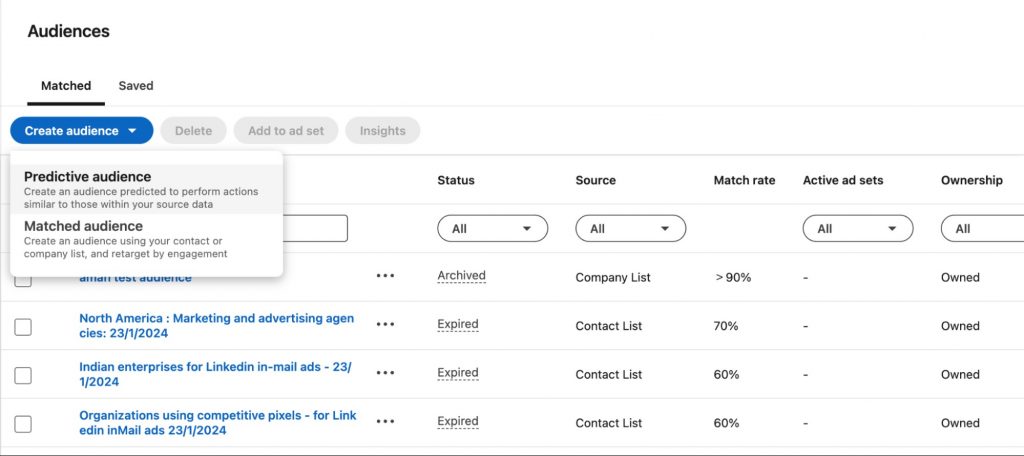
All three main types of Matched Audiences should be used, as they offer powerful ways to encourage re-engagement.
- Contact Targeting: Got a list of emails from your CRM? Upload it for hyper-targeted campaigns, where segmenting clients based on specific segments (e.g., webinar attendees who didn’t book demos) becomes easier. An example is clients who attended a demo and didn’t show interest in becoming a client.
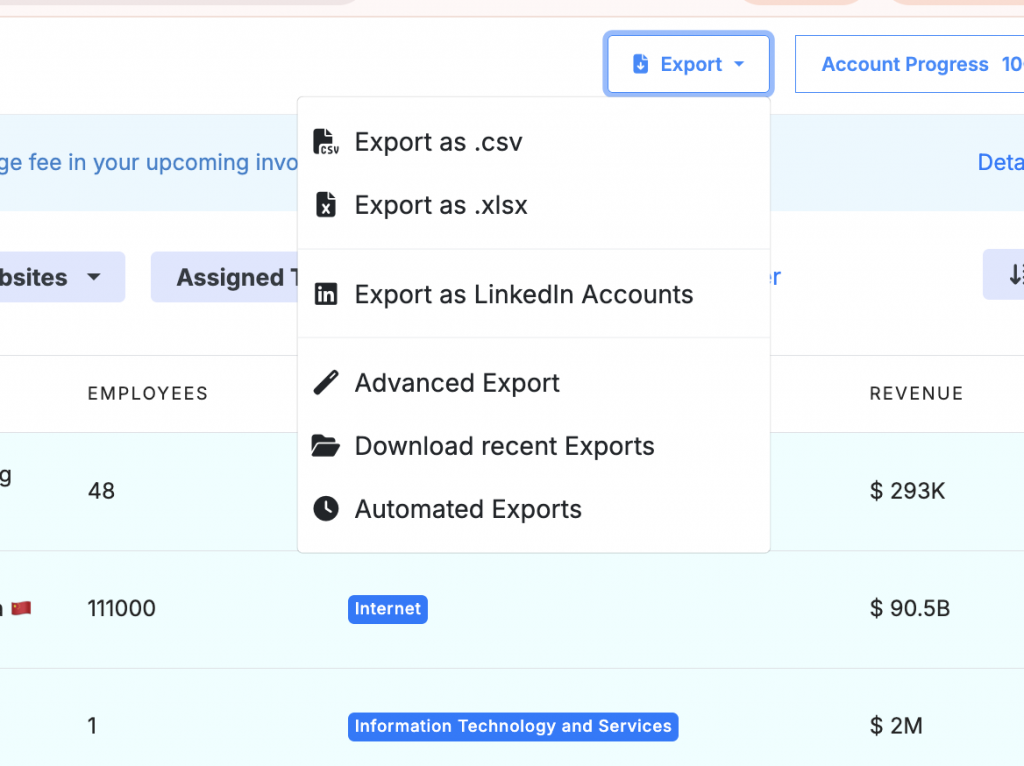
- Company Targeting: This is the heart of any Account-Based Marketing (ABM) strategy in Account-Based Marketing (ABM) strategies. Upload a list of companies you’re targeting and focus the entire budget on decision-makers at your highest-priority accounts of the accounts that matter the most to you. If you are using Salespanel, then it provides a direct export mechanism so that you can instantly export all recent active accounts for a particular date range and instantly create a custom audience.
- Website Retargeting: By installing the LinkedIn Insight Tag, create audiences based on visitor behavior with the LinkedIn Insight Tag. Create separate audiences for visitors to your pricing page and a different audience for those who just skimmed a blog post. Then hit them with a creative that speaks directly to their level of interest.
One of the biggest mistakes I see is how marketers ignore the differences between their site visitors. For example, someone who spent five minutes looking at your product features is a warmer lead than someone who bounced off your homepage in seconds. Create different retargeting campaigns for these high-intent actions to get the best results.
This strategic approach is what turns casual interest into real business. The process below really highlights the core workflow to get B2B LinkedIn ads to work.

Great targeting is the cornerstone of all ads. Without it, even the best-crafted copy will be useless.
Table: B2B LinkedIn Ad Targeting Combinations for Specific Goals
The real art of LinkedIn targeting comes from the many different combinations. Just one card is rarely enough; the real power comes from fully integrating all the others to refine your audience. Below are some combined targeting options to achieve common B2B goals.
| Campaign Goal | Primary Target Attribute | Layered Attribute 1 | Layered Attribute 2 | Exclusion Example |
|---|---|---|---|---|
| Drive Webinar Sign-ups | Job Functions: Marketing | Job Seniorities: Manager, Director, VP | Member Skills: Digital Marketing, SEO, Content Marketing | Exclude: Your current employees and competitor companies. |
| Promote a New SaaS Tool | Company Industries: Computer Software, IT | Company Size: 51–500 employees | Job Titles: Head of IT, IT Manager, Systems Administrator | Exclude: Users with “Sales” or “HR” in job titles. |
| ABM Campaign for Enterprise | Company Names: [Target Account List] | Job Seniorities: C-level, VP-level | Years of Experience: 10+ years | Exclude: “Intern” or “Assistant” seniorities. |
| Lead Gen for Financial Services | Member Groups: Fintech Professionals, CFO Network | Company Industries: Financial Services, Banking | Company Size: 1,001+ employees | Exclude: Companies already in your CRM as customers. |
You can find other examples of ways to create your ICP. The point is to think critically about your ideal customer profile and use LinkedIn’s tools to create your audience as closely as possible.
This is the strength as to why B2B advertisers are pouring more and more budget on the platform. As recent data, LinkedIn is now receiving about 39% of the average B2B marketing budget, compared to 31% last year. This is a clear and strong signal that LinkedIn is a platform that delivers the B2B marketing and advertising needs of its clients to the right professional audience.
Creating Ad Content That Resonates and Converts
Let’s get one thing straight! Yes, precision targeting gets your ad in front of the right people. But it’s the content that gets them to act. I’ve seen plenty of campaigns with perfectly dialed-in audiences that fall completely flat because the message, the content, was weak. Your creative is a combination of your copy, visuals, and call-to-action. This all matters because it is the bridge between a passive scroll and a qualified lead for your B2B LinkedIn ads.

Consider this: Your ad must do three things almost instantly – stop the scroll, speak to a specific pain point, and offer a clear, easy next step. If you miss on any one of these, your audience is gone, and so is your ad budget. The trick is to stop thinking like a marketer and start thinking like a problem-solver for your ideal customer..
Choosing the Right Ad Format for Your Goal
LinkedIn gives you a whole toolkit of ad formats. Each one has a job to do. Choosing the right one is not a matter of personal preference, but rather of matching the format to your campaign goal and the value you’re offering. If you do not do this right, you will kill your engagement before it even has a chance.
Here’s how I think about matching formats to goals:
Video Ads: There is no better way to tell a story or show off a complex product than a video. Use short, punchy videos to give a tour of your software’s UI or feature a killer customer testimonial. In my opinion, videos that are 15-30 seconds long tend to hit that sweet spot for engagement.
Document Ads
These are my go-to for high-value, top-of-funnel content like whitepapers or industry reports. They let users preview the content right in their feed, which builds trust and qualifies their interest before they even think about downloading.
Carousel Ads
Perfect for breaking down a complicated process into simple steps or showing off multiple product features with Carousel Ads. Each card gets its own headline and link, which makes them a fantastic tool for A/B testing different messages inside a single ad.
Single Image Ads
Single-image ads are the classic workhorse of LinkedIn advertising. They’re versatile and incredibly effective for driving traffic to landing pages for demo requests or webinar sign-ups, as long as the image is compelling and the copy gets straight to the point.
The Psychology of High-Converting B2B Ad Copy
B2B buyers are logical in business but are also driven by emotions, chiefly the need to solve a frustrating problem or achieve an ambitious goal. Your ad copy needs to connect with that by addressing their headaches, aspirations, and goals. Filler, vague jargon-filled copy misses the point and just adds to the noise.
Always start with the prospect’s pain point, not your product’s feature list. Instead of saying, “Our software has an integrated analytics suite,” try, “Stop guessing which marketing channels are actually working. See the difference?” Here, your message reframes their problem, making it instantly relevant.
Be sure to inject your copy with powerful, action-oriented verbs. “Discover,” “eliminate,” “build,” and “optimize” create a sense of momentum and position your solution as a tool for progress. This is absolutely critical for your headline and call-to-action (CTA).
Your Call-to-Action also needs to be a crystal-clear command that promises a specific result. “Learn More” is weak and lazy. “Get Your Free Marketing ROI Template” is strong; it tells the user exactly what they’ll get and why they would want it. The more specific your promise, the better your conversion rate will be.
A/B Testing Your Way to Better Performance
You are never, ever going to nail your ad creative on the first try. It just doesn’t happen. The only way to consistently improve your ad performance is disciplined A/B testing. This means you make a few different versions of an ad, and the data tells you which version the audience prefers.
Here’s a simple framework for how to approach it:
- Test the Big Ideas First: Don’t start by testing the colors of the buttons, but rather the overall concept. For example, you can run an ad built around a customer testimonial against one that highlights a key product feature.
- Isolate One Variable: Once you have a winning concept, start the refining process. Test two different headlines while keeping the same image and copy. When you find a winning headline, test two different images.
- Fine-Tune the CTA: Finally, test your calls-to-action. Does “Request a Demo” pull better than “See a Live Demo” or “Get a Custom Demo”? The small details can make a surprising difference.
This systematic approach takes the guesswork out of lengthy and costly delays. By constantly testing and iterating on your headlines, visuals, and CTAs, you will eventually create a feedback loop that will steadily drive down your cost per lead and improve the quality of prospects you’re bringing in. This is what separates stagnant campaigns from ever-growing ROI: active campaigns have self-improving mechanisms.
Measuring Performance and Optimizing for True ROI

Great, your B2B LinkedIn ads are live, impressions and clicks are increasing. The big question is, what do all these clicks mean for your business? This is where the real work begins—moving past surface-level, vanity metrics, and proving the business impact of your ad spend.
In the absence of a sound measurement plan, you can’t tell the difference between a campaign that’s just busy and one that’s genuinely profitable
First things first: get the LinkedIn Insight Tag installed on your website. This little snippet of code is non-negotiable. It’s the bridge connecting what happens on LinkedIn to what users do on your website. It is the only way to track conversions, build powerful retargeting lists from website visitors, and finally see which ads are driving valuable actions like demo requests.
But standard conversion tracking is just the starting point. The real goal is to measure true Return on Investment (ROI), and that means looking beyond simple form fills.
Moving Beyond Vanity Metrics
To get a real handle on performance, like what your ad’s reach looks like. While metrics like impressions are foundational, they don’t tell you anything about business impact. You can get a good primer on “What are LinkedIn Impressions?”. But your focus needs to shift quickly.
The numbers that really matter are the ones that connect, and revenue is the most important. These are the stats that justify your budget.
- Cost Per Lead (CPL): Your baseline efficiency metric. It tells you exactly what you paid to get one lead from a specific campaign.
- Lead-to-MQL Rate: This is the percentage of people who actually take action (like filling out your form) after clicking your ad. A low conversion rate often signals a disconnect between your ad’s promise and your landing page’s offer.
- Customer Acquisition Cost (CAC): Let’s be honest, not all leads are created equal. This metric shows how many of your leads are good enough to be considered a Marketing Qualified Lead. It’s a direct indicator of lead quality
- Customer Acquisition Cost (CAC): The big one. This calculates the total cost to acquire a new customer through your LinkedIn campaigns, giving you the ultimate measure of profitability.
Focusing on these KPIs is the difference between merely “running ads” and making strategic investments in growing your customer base.
De-Anonymizing Traffic for Full-Funnel Attribution
Standard analytics standard set of analytics can tell you that a conversion happened, but they leave out the most interesting part of the story. How many times did that prospect visit your site before converting? What other pages did they check out? Which exact campaign finally got them over the line?
This is where you connect your ad spend directly to real sales opportunities. By using a tool like Website Visitor Tracking from Salespanel, you can start to de-anonymize the traffic coming from your LinkedIn ads. This tech identifies the companies visiting your site from your campaigns, even if they don’t fill out a form. and tracks individual prospect behavior once they do convert.
This complete visibility means you understand the entire customer journey. You can connect a specific LinkedIn ad campaign not just to a lead, but to the high-value deal that ends up in your CRM. Finally, closing the attribution loop, marketing spend, and actual revenue.
This level of insight completely changes the conversation. Instead of telling your boss you generated “50 leads,” you can confidently say, “Our Q3 LinkedIn campaign generated three enterprise-level sales opportunities currently valued at $150,000 in our pipeline. See the difference?”
Automating Lead Qualification to Tie Spend to Sales
Once you have a steady stream of quality leads, the next bottleneck is making sure your sales team spends its time wisely. Manually sifting through every lead is slow and risks letting high-potential prospects go cold. This is where automated qualification becomes a game-changer.
By setting up a system that scores leads based on firmographic data (like company size and industry), and their on-site behavior (like visiting the pricing page), you can automatically separate the hot prospects from the tire-kickers. Salespanel’s lead scoring framework, for instance that lets you build custom rules to qualify your LinkedIn leads on autopilot.
Imagine a prospect from a target industry with over 500 employees who viewed a case study and your pricing page. A system like this could assign them a high score and instantly route them to a sales rep. This ensures your most valuable leads get immediate attention. slashing your speed-to-lead time and boosting your close rate.
This approach is backed by the numbers. LinkedIn’s own data shows its cost per lead (CPL) is about 28% lower than Google AdWords, highlighting its efficiency for B2B. Even better, audiences who see both brand and acquisition ads are six times more likely to convert, proving that a well-measured, full-funnel strategy pays off
Common Questions About B2B LinkedIn Ads
Let’s tackle some of the most common questions that pop up. Getting these right is key to making sure your ad spend actually turns into real business results.
What’s a Good Starting Budget for B2B LinkedIn Ads?
There’s no magic number, but a solid starting point for most small to mid-sized businesses is somewhere between 1,000 to 3,000 a month. This gives you enough runway to collect meaningful data. And start making smart decisions about what’s working.
A better way to think about it is to work backward from your goals. First, figure out the average Cost Per Click (CPC) in your industry, which usually lands between 8 to 12. If you want to drive 250 clicks to your new ebook’s landing page, you’ll need at least a $2,000 budget to make that happen.
Figure out your own benchmarks to start with a dedicated test budget, which allows you to determine the benchmarks for your ads., and then scale up once you’ve got a proven winner on your hands.
How Long Until I See Results from My Campaigns?
Patience is your best friend here. LinkedIn’s algorithm needs about a 7 to 14-day “learning phase” to figure out who to show your ads to for the best results.
You might see a few leads trickle in right away, but you won’t spot any real, meaningful trends in your Cost Per Lead (CPL) or the quality of those leads for at least 3-4 weeks. You need that much consistent data to really know what’s going on.
Remember, B2B sales cycles are long. The immediate win from your LinkedIn campaign isn’t a closed deal-it’s a qualified lead. In the first month, keep a close eye on leading indicators like engagement and lead quality. Then, track how that campaign contributes to your sales pipeline over the next quarter to see the real ROI.
Should I Use Lead Gen Forms or a Landing Page?
This one’s a classic, and the answer really depends on your campaign goal and who you’re targeting. They both have their place.
LinkedIn Lead Gen Forms are fantastic for top-of-funnel offers—think ebooks, whitepapers, or webinar sign-ups. They pre-fill a user’s info straight from their profile, which makes signing up ridiculously easy. This usually means higher conversion rates and a lower CPL.
A Dedicated Landing Page is almost always better for bottom-of-funnel actions like demo requests or sales calls. It gives you the space to build trust, flash some social proof, and really explain your value. The leads you get will be more educated and much higher quality for your sales team.
Sell more, understand your customers’ journey for free!
Sales and Marketing teams spend millions of dollars to bring visitors to your website. But do you track your customer’s journey? Do you know who buys and why?
Around 8% of your website traffic will sign up on your lead forms. What happens to the other 92% of your traffic? Can you identify your visiting accounts? Can you engage and retarget your qualified visitors even if they are not identified?