
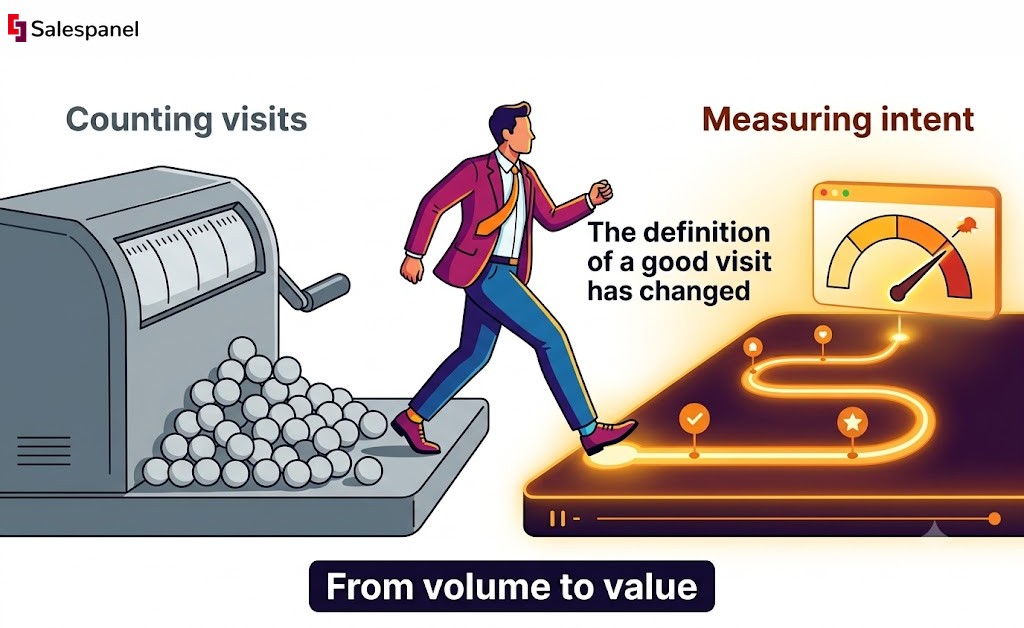
In the world of web analytics, the “session” has long been a foundational metric. Historically, it was a simple counter—a blunt instrument for measuring website traffic. But with the industry-wide shift to Google Analytics 4, the concept has been radically redefined. The future of analytics is no longer about counting visits; it’s about understanding intent. This evolution is critical for any marketer, as the very definition of a “good” website visit has changed. A misunderstanding here can cascade into flawed reporting, misattributed conversions, and wasted marketing budgets. This guide will deconstruct the modern GA4 session, providing a technical yet practical framework for leveraging this new metric to drive meaningful business results.
The Critical Shift from Universal Analytics to GA4 Sessions
The way we define a “session” has been completely upended, forcing marketers to rethink years of established benchmarks. If you’re a B2B marketer, understanding this change isn’t just a technical update—it’s essential for measuring what actually matters: genuine customer engagement.
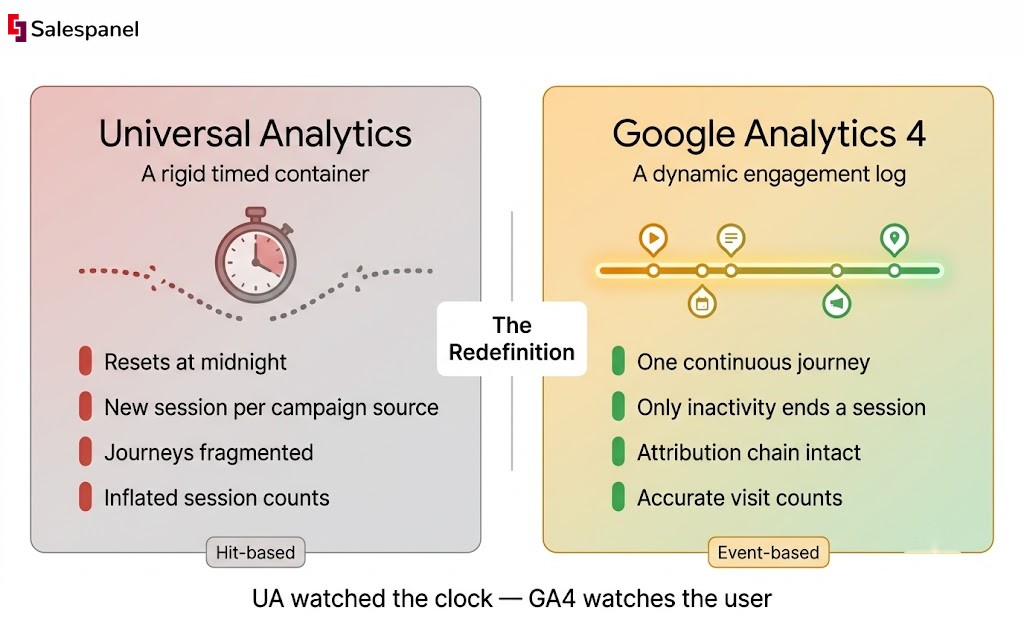
For years, a session in Universal Analytics (UA) was a rigid, time-based container for user activity. It was simple but often misleading. Now, with Google Analytics 4 (GA4), a session has evolved into a dynamic measure of genuine engagement, shifting the focus from the quantity of traffic to the quality of those interactions. This is the central theme we will explore: the transition from measuring volume to measuring value.
From a Timed Visit to a Detailed Log
A UA session can be compared to a timed visit to a retail store. The clock started the moment a customer entered and stopped after 30 minutes of inactivity, regardless of their actions. If they left and re-entered through a different door (e.g., from a new ad campaign), a new session would begin, fragmenting their journey.
In contrast, a GA4 session is like a detailed log of every item that shopper touches, every aisle they explore, and every question they ask an employee. It’s an event-driven model that prioritizes what the user does.
Practical Example:
In UA, a user might click a Google Ad, browse a product page for 25 minutes, then leave. Later that day, they click a Facebook retargeting ad and return to purchase. UA would record this as two separate sessions from two different sources, breaking the attribution chain. In GA4, this is correctly tracked as a single, continuous journey (barring the timeout), providing a much clearer picture of what drove the conversion.
UA was all about the clock. GA4 is all about engagement. That’s a huge strategic change. Let’s dig a bit deeper into the exact calculation changes. The differences might seem small on the surface, but they have a massive impact on your data.
How Session Calculations Changed from UA to GA4
| Metric | Universal Analytics (UA) | Google Analytics 4 (GA4) |
|---|---|---|
| Session Start | Initiated by the first “hit” (e.g., a pageview). | Initiated by the session_start event, which is automatically collected. |
| Session Timeout | By default, after 30 minutes of inactivity. | By default, after 30 minutes of inactivity. This is adjustable. |
| New Session Triggers | 1. After 30 minutes of inactivity. 2. At midnight. 3. When a user arrives via a new campaign source. | Only one: after 30 minutes of inactivity (or the custom timeout period). No new sessions at midnight or for new campaign sources. |
| Underlying Model | Hit-based (pageviews, events, transactions). | Event-based (session_start is just another event). |
The key takeaway is that GA4’s approach is cleaner. By eliminating the midnight and campaign-change resets, GA4 provides a more accurate count of actual user visits, preventing the artificial session inflation common in UA. This evolution isn’t just a technical update; it’s a strategic shift. After the mandatory migration to GA4, many businesses saw their total session counts drop. This was not a red flag, but a sign of more accurate, meaningful tracking. For B2B analytics, this change forces us to move beyond vanity metrics and focus on actions that signal buying intent.
Deconstructing the GA4 Session: What Truly Counts as a Visit
To truly understand a session in Google Analytics, you must focus on meaningful interactions rather than simple “visits.” The entire GA4 system is built upon a single, crucial event: session_start.
This event fires the moment a user lands on your site or opens your app. It generates a unique Session ID (ga_session_id) that acts as a container, grouping all subsequent user actions into one cohesive visit.
This event-based model is a significant departure from Universal Analytics. While a GA4 session retains a default 30-minute inactivity timeout, it scraps the arbitrary limits on session duration. For B2B marketers tracking engagement on long-form content like webinars or in-depth whitepapers, this is a game-changer. Many sites reported 20-30% fewer sessions in GA4 compared to UA, as documented by sources like Contentsquare. This isn’t a bug; it’s a feature, demonstrating the new model’s effectiveness at filtering out low-quality, fleeting traffic.
The Rise of the Engaged Session
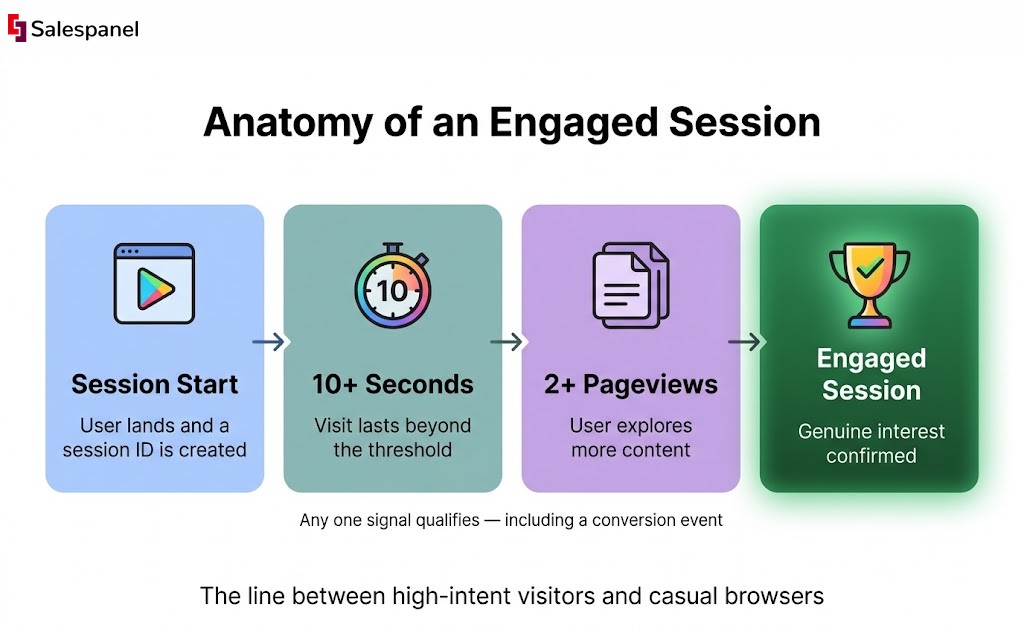
The most important concept GA4 introduces is the Engaged session. This metric draws a clear line between high-intent visitors and casual browsers, effectively replacing the notoriously vague “bounce rate” from Universal Analytics.
A session is labeled “engaged” only if it meets at least one of these conditions:
- It lasts longer than 10 seconds (this duration is adjustable).
- It includes a conversion event (e.g., a form submission or key download).
- It contains at least two pageviews or screenviews.
This reframes the analytical conversation from “how many people left immediately?” to “how many people showed genuine interest?”—a much more positive and actionable signal for marketers.
A Practical Example of an Engaged Session
Consider a B2B scenario: a prospect from a target account clicks a LinkedIn ad and lands on your blog post about industry trends.
- They spend 45 seconds reading the article. This alone surpasses the 10-second threshold, qualifying the visit as an engaged session.
- Next, they see a call-to-action for a related case study and click through to that page, triggering a second pageview.
This single, high-quality session reveals far more about their purchase intent than a dozen fleeting visits that UA would have simply counted as “bounces.” For B2B marketers, that distinction is everything. It’s the difference between chasing noise and identifying genuine opportunities.
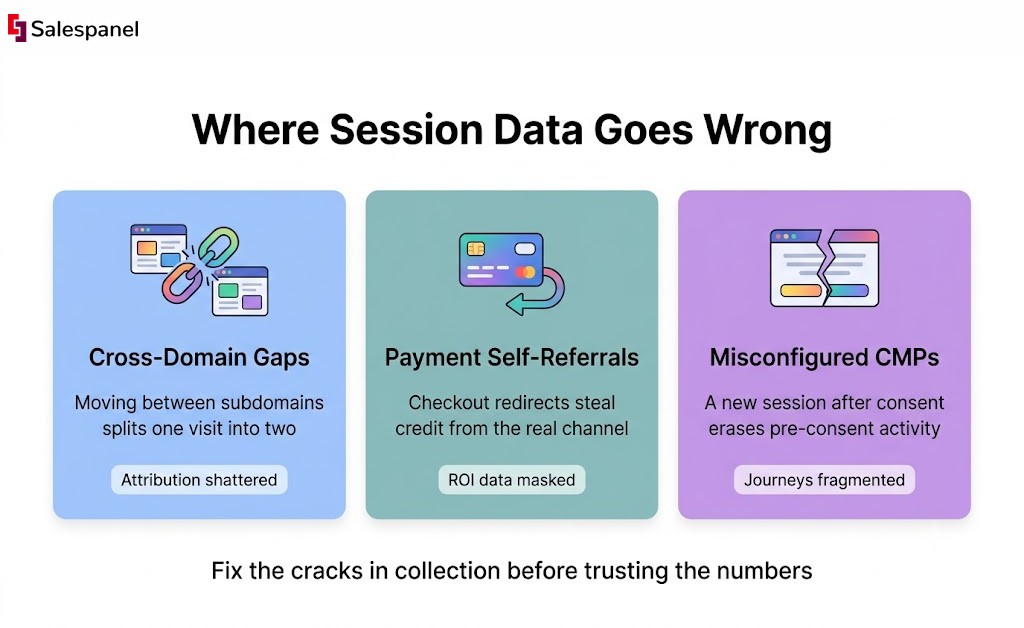
If your session data is inaccurate, your entire marketing strategy could be compromised. Decisions based on faulty information can skew attribution, misrepresent engagement, and ultimately waste budget. Understanding what is a session on Google Analytics is the first step; diagnosing why your data might be flawed is where real expertise lies. There are several common culprits known for either inflating session counts or causing them to disappear—fundamental cracks in data collection that need to be addressed immediately.
Diagnosing Common Session Tracking Errors
The most frequent issues with session counts are often hidden in your website’s technical setup. Identifying them is crucial for achieving data integrity.
Here are some persistent problems:
- Improper Cross-Domain Tracking: This is a classic issue for businesses with multiple subdomains (e.g., www.yourcompany.com and blog.yourcompany.com). Without proper setup, a user moving from the blog to the main site will trigger a new session. This shatters the attribution chain, making it impossible to trace the true conversion path.
- Self-Referrals from Payment Gateways: A user checks out, is redirected to a payment processor like PayPal or Stripe, and then returns to your confirmation page. Frequently, Google Analytics registers this return as a new session, incorrectly attributing the conversion to the payment gateway. This masks the original marketing channel, rendering your ROI data useless.
- Misconfigured Consent Management Platforms (CMPs): With tightening privacy laws, CMPs are essential. However, a poor configuration can corrupt your session data. A common mistake is having the CMP initiate a new session after a user provides consent, effectively splitting one visit into two and erasing any record of their pre-consent activity.
A fragmented user journey is more than a data headache—it’s a blind spot in your customer understanding. When a single prospect’s visit is split across multiple sessions, you lose the narrative of their intent, making it nearly impossible to score their engagement accurately.
This fragmentation is precisely where standard analytics tools fall short. Reconstructing these broken journeys requires a more sophisticated approach. For example, the advanced Website visitor tracking from Salespanel is engineered to unify these scattered interactions. It connects the dots between a visit to the blog and a later view of the pricing page, presenting a single, cohesive timeline of a prospect’s real engagement. By resolving a visitor’s identity across touchpoints, you move beyond counting broken sessions and start analyzing complete customer stories.
Engaged Sessions: Your New North Star Metric for B2B Marketing
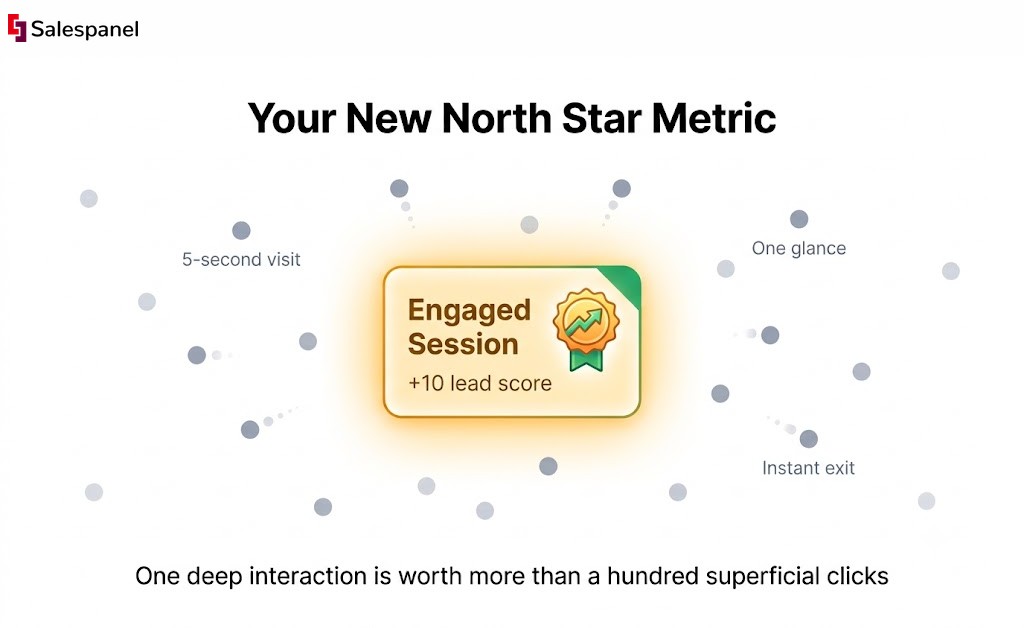
In the GA4 era, the Engaged session is the single most important metric for B2B marketers. It officially retires the often-misleading bounce rate, forcing a mindset shift from a negative signal (who’s leaving?) to a positive one (who’s interacting?). This is not a simple rebranding; it is a fundamental change in how we measure user intent.
In GA4, the bounce rate is now the inverse of the engagement rate. This redefines what a “good” visit looks like, especially in B2B, where one deep, meaningful interaction can be worth more than a hundred superficial clicks. The focus has shifted from counting traffic to understanding the quality behind every visit.
Defining a High-Value B2B Interaction
What constitutes an “engaged” session in GA4? It’s a visit that meets at least one of these criteria: it lasts longer than 10 seconds, includes 2 or more pageviews, or triggers a conversion event.
This completely flips the script on the old bounce rate obsession. In Universal Analytics, a user could find exactly what they needed on a blog post, spend ten minutes reading it, and still be counted as a “bounce.” In GA4, that same valuable interaction is correctly identified as an engaged session. If 65% of your sessions are engaged (a decent benchmark for a tech blog), your bounce rate is a perfectly healthy 35%. Reviewing the Google Analytics’ perspective on bounce rate can provide further context, as a low bounce rate almost always correlates with higher engagement.
An engaged session is proof of life. It’s the digital equivalent of a prospect walking into your office, sitting down, and asking thoughtful questions instead of just glancing through the window and walking away.
Practical Example:
For a B2B SaaS company, a prospect lands on your pricing page. They spend two minutes comparing tiers, then open your live chat widget to ask a question (configured as a conversion event). That single, high-value session is infinitely more important than 20 sessions from users who hit your homepage and leave within five seconds.
Turning Engagement into Sales Opportunities
This focus on quality has a direct impact on sales. High-quality engagement data fuels smarter lead qualification and prioritization, helping reps focus on prospects who are actively signaling interest.
This is where analytics data becomes a powerful sales enablement tool. At Salespanel, our philosophy is to translate these digital breadcrumbs into actionable sales intelligence. For example, Salespanel’s lead scoring framework can be configured to operate on this principle:
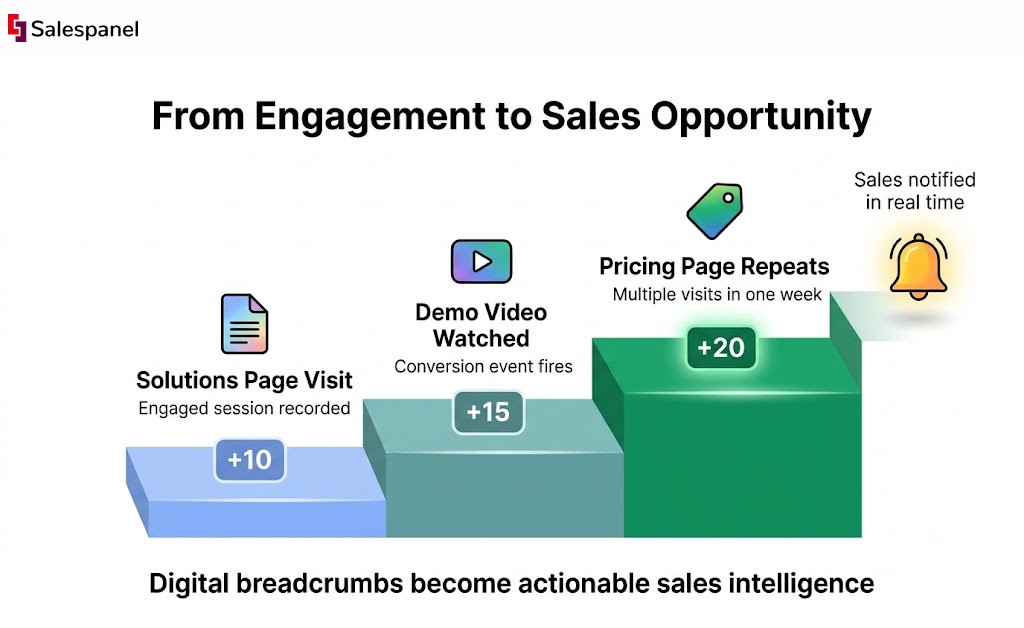
- An engaged session on a key solutions page could automatically add 10 points to a lead’s score.
- Watching a product demo video (a conversion event) might add another 15 points.
- Visiting the pricing page multiple times in a week could add 20 points.
These scores, triggered by specific user actions, can notify your sales team of a high-intent opportunity in real-time. This is how you transform abstract analytics data into a tangible sales pipeline, connecting marketing spend directly to revenue.
Navigating Sessions in a Privacy-First World
Modern analytics is as much about legal compliance as it is about counting clicks. The intersection of sessions, user consent, and privacy laws like GDPR has created significant challenges. A poorly configured consent management platform (CMP), for instance, can corrupt your data before collection even begins.
Consider this: a visitor lands on your site but has not yet consented to tracking. Their initial actions occur in a black box. If your CMP only fires a new session ID after they click “accept,” you have fragmented their journey. That crucial first touchpoint—the ad or search term that brought them to you—is lost, and your attribution models are now based on incomplete data.
The Problem with Client-Side Consent
The primary issue stems from traditional client-side (browser-based) tracking. When tracking logic resides in cookies and scripts that require user permission, any disruption in the consent process results in data loss.
- Broken User Journeys: A session starts anonymously before consent, and a new one begins after, making one visit appear as two and inflating session counts.
- Inaccurate Attribution: The pre-consent session often vanishes, causing the new one to be mislabeled as “Direct” traffic. This can make effective marketing campaigns appear to be failing.
- Vulnerability to Ad Blockers: Client-side tracking is easily blocked by privacy tools, leading to undercounting of traffic.
Future-Proofing Analytics with Server-Side Tracking
To regain accuracy and control, server-side tracking is the path forward. By moving tracking logic from the user’s browser to a secure server you own, you build a more resilient and compliant analytics system. This approach is more durable against browser-level interruptions and gives you complete data ownership.
This is a game-changer for B2B marketers who need to map the entire, often lengthy, prospect journey. Engagement clearly matters; a study on Google Analytics session metrics found that sites with more than 4.0 views per session see 35% higher conversion rates.
Server-side tracking isn’t just a technical workaround for privacy rules. It’s a strategic shift toward creating a single source of truth for your customer data, making sure every interaction is captured accurately and ethically.
Take Salespanel, for instance. Its server-side tracking is designed to stitch together a prospect’s entire journey into one continuous session, pulling data from multiple sources. It accurately logs user activity even if they change cookie consent midway through or use an ad blocker. This provides a clear picture for attribution while respecting user privacy and delivering the clean data needed to understand what a session truly means for your business.
Turning Your Session Data Into Action
The primary takeaway from this guide is this: mastering the GA4 session is no longer optional for modern B2B marketing—it’s essential. We’ve moved from the old definition of a “session” to diagnosing data problems and shifting our focus from raw traffic to genuine engagement.
The core principle is powerful: stop counting visits and start measuring intent.
To help you put this into practice, here is a checklist to audit your GA4 session data:
- Check Your Engagement Rate: How does it compare to industry benchmarks for your content type? Is it a healthy signal or a red flag?
- Hunt Down Self-Referrals: Are you seeing traffic from payment gateways or your own subdomains? This breaks the user journey and must be cleaned up.
- Analyze Sessions by Source: Get real about which channels deliver value. Pinpoint the sources that bring in truly engaged visitors, not just a high volume of clicks.
The principles of leveraging session data extend far beyond basic web analytics, as highlighted in broader discussions on Why Use Ecommerce Analytics.
Once GA4 helps you spot high-intent sessions, the next step is to connect those insights to your sales process. This is where tools that align with Salespanel’s philosophy come into play. By de-anonymizing high-intent traffic, you can identify which companies are showing buying signals. This transforms analytics from a reporting function into a revenue-generation engine, flagging prospects who are telling you—through their actions—that they’re ready for a conversation.
Got Questions? We’ve Got Answers.
We get it. The concept of a “session” can feel a bit abstract. Let’s tackle some of the most common questions marketers have when they’re trying to wrap their heads around sessions in Google Analytics.
How Does a Session End in Google Analytics 4?
By default, a GA4 session ends after 30 minutes of inactivity. Think of it like a pause button. If a user gets a coffee and returns within that 30-minute window, the session resumes with the same ID. This is a significant change from Universal Analytics, which would confusingly end a session at midnight or start a new one if the user arrived from a different campaign. GA4 simplifies this: the session just times out. (And yes, you can adjust the 30-minute timer in your settings).
Can One User Have Multiple Sessions in a Single Day?
Absolutely. A single user can easily generate multiple sessions. Imagine someone visits your website in the morning, gets pulled into a meeting, and then returns in the afternoon. Since the break exceeded the 30-minute timeout, GA4 logs this as two distinct sessions, each with its own session ID. This is useful for understanding how often users re-engage with your site throughout the day.
What Is the Difference Between Users and Sessions in GA4?
Understanding the distinction between users and sessions is crucial for analysis.
- Users: This is the who. It represents the count of unique individuals who visited your site, identified by a cookie or User-ID.
- Sessions: This is the what they did. It represents the count of distinct visits or periods of interaction those users had.
Therefore, one user can be responsible for many sessions over time. Analyzing both metrics reveals not just how many people you’re reaching (Users), but also how engaging your site is and how frequently they return (Sessions).
At Salespanel, we believe that mastering your session data is the first step toward turning anonymous traffic into qualified leads. Explore our full library of guides and resources to see how you can connect your analytics to real revenue outcomes.