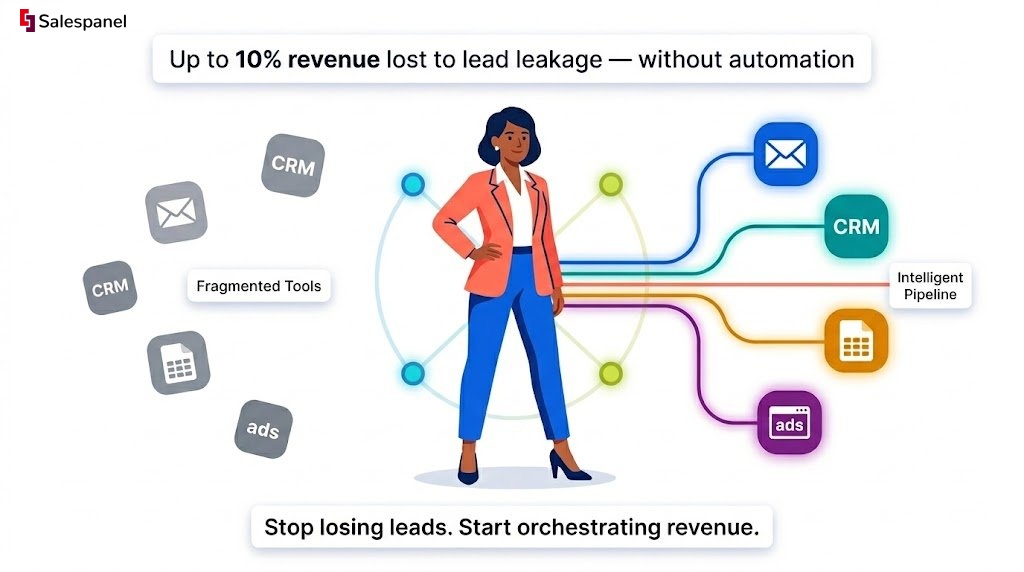
The B2B marketing landscape has irrevocably shifted. The days of fragmented tools and manual lead follow-up, which saw marketing teams lose up to 10% of their revenue to lead leakage, are being replaced by a new paradigm. Today, intelligent, interconnected systems are not just a luxury but a necessity for survival and growth. This isn’t just a trend; it’s a fundamental re-architecture of the customer journey, moving from static funnels to dynamic pipelines fueled by real-time behavioral data.
The core challenge is creating personalized, multi-threaded experiences at scale, a feat impossible without robust automation. The future lies in building adaptive systems that react to prospect behavior instantly, leveraging everything from website visitor tracking to sophisticated lead scoring. As these systems advance, the role of new technologies like AI agents and API integration becomes critical in shaping truly intelligent and predictive marketing pipelines.
This article dissects seven actionable marketing automation workflow examples, providing the technical blueprints and strategic frameworks you need to build a resilient, revenue-generating engine. We move beyond theory to offer replicable strategies from platforms like HubSpot, ActiveCampaign, and Salesforce. The central theme is leveraging first-party data to transform generic communication into highly relevant, timely interactions that directly influence the sales pipeline.
You will learn to:
- Structure complex workflows for lead nurturing, onboarding, and re-engagement.
- Identify key trigger points and decision logic for maximum impact.
- Integrate data across your martech stack for a unified customer view.
- Translate automated actions into measurable ROI and pipeline growth.
Each example includes detailed analysis, step-by-step logic, screenshots, and direct links to help you implement these powerful automations immediately.
1. The High-Intent Content Gating & Lead Scoring Workflow
This foundational B2B workflow automates the process of capturing leads through high-value content and immediately qualifying them based on their engagement and firmographic data. It’s designed to separate curious browsers from serious buyers, ensuring sales only engages with the most promising prospects. This is one of the most essential marketing automation workflow examples for B2B companies focused on generating high-quality, sales-ready leads.
Strategic Objective
The primary goal is to identify and prioritize high-intent leads by tracking their journey from content download to deeper website engagement. This workflow filters out low-quality leads automatically, allowing the sales team to focus its resources on prospects who demonstrate both the right profile (firmographics) and active interest (behavior).
Workflow Logic: A Step-by-Step Breakdown
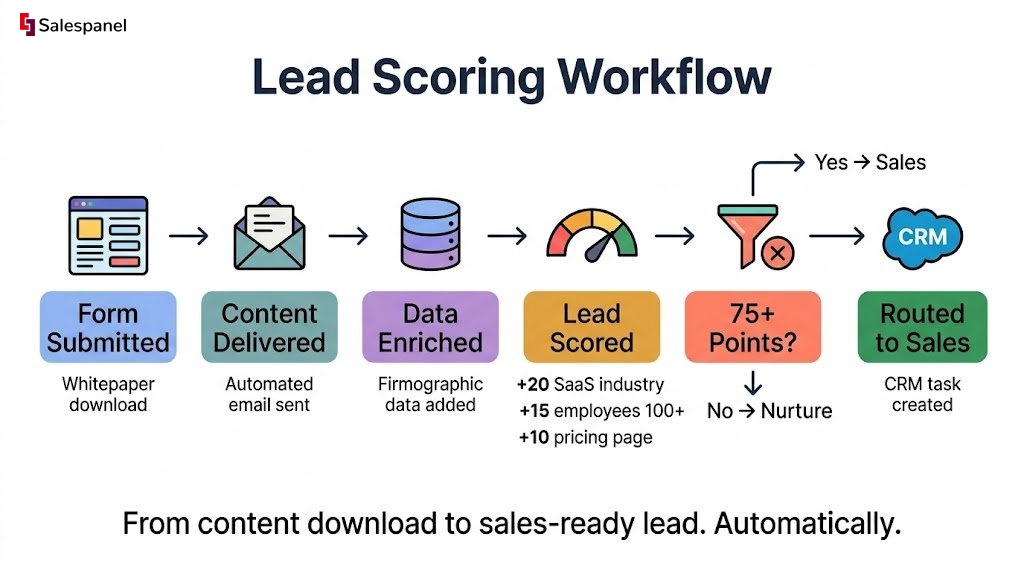
This automation sequence triggers the moment a visitor submits a form to access a gated asset, such as a whitepaper, case study, or webinar recording. The technical implementation requires a marketing automation platform with form submission triggers and a lead scoring engine.
- Trigger: A user submits a form on a landing page for a high-value content piece.
- Initial Action (Marketing): The system delivers the requested content via an automated email. This email can also include links to related resources to encourage further engagement.
- Data Enrichment: The contact’s email is enriched with firmographic data (company size, industry, location, technology stack). This provides crucial context for qualification.
- Lead Scoring Activation: A lead scoring model is applied. The contact immediately receives points based on their submitted information.
- Firmographic Scoring: Points are awarded if the company fits the Ideal Customer Profile (ICP). For example, +20 points for being in the “SaaS” industry, +15 points for having over 100 employees.
- Behavioral Scoring: The system tracks subsequent actions. Points are added for visiting key pages (+10 for pricing page), opening the follow-up email (+5), or clicking a link within it (+10).
- Qualification Threshold: The workflow continuously checks the lead’s score against a predefined threshold (e.g., 75 points).
- Routing to Sales: Once the score surpasses the threshold, the automation creates a task in the CRM, assigns the lead to a sales representative, and sends an internal notification with the lead’s full activity history.
Key Insight: This workflow transforms a simple content download into a dynamic qualification process. It moves beyond just capturing a name and email, building a comprehensive profile that indicates genuine purchase intent before a salesperson ever gets involved.
Actionable Takeaways & Performance Tips
- Define Your ICP First: Before building, clearly define the firmographic and behavioral traits of your ideal customer. Your lead scoring rules must be built on this foundation to be effective. A lead from a 500-person tech company is more valuable than one from a 2-person agency if that’s your target market.
- Utilize Negative Scoring: De-prioritize poor-fit leads by applying negative scores. For instance, assign -20 points for sign-ups using personal email domains (gmail.com, yahoo.com) or for visitors from non-target countries.
- Integrate Visitor Tracking: The true power of this workflow is realized when combined with website visitor tracking. For example, website visitor tracking from Salespanel can connect anonymous visitor sessions to the lead post-conversion, revealing the entire journey, including the pages they viewed before they filled out the form. This provides invaluable context for the sales team.
- Iterate on Score Thresholds: Don’t set your MQL threshold in stone. Regularly review the quality of leads being passed to sales and adjust the scoring rules and threshold based on their feedback and conversion rates. If sales reports low-quality leads, your threshold is likely too low.
2. The Post-Demo Follow-Up & Nurture Workflow
This crucial sales-enablement workflow automates the follow-up process after a prospect has completed a product demonstration. It ensures that no lead goes cold due to manual oversight, delivering a consistent and personalized experience that guides them from initial interest to a final decision. For businesses with a high volume of demos, this is one of the most impactful marketing automation workflow examples for increasing demo-to-close conversion rates.
Strategic Objective
The primary goal is to maintain momentum and engagement immediately following a sales demo. This workflow aims to reinforce the product’s value, address common questions, and provide social proof, all while keeping the lines of communication open and tracking the prospect’s post-demo digital body language to identify buying signals.
Workflow Logic: A Step-by-Step Breakdown
This automation triggers as soon as a sales representative updates a deal stage or contact property in the CRM to indicate the demo has been completed. The technical backbone is a deep, bidirectional sync between the CRM and the marketing automation platform.
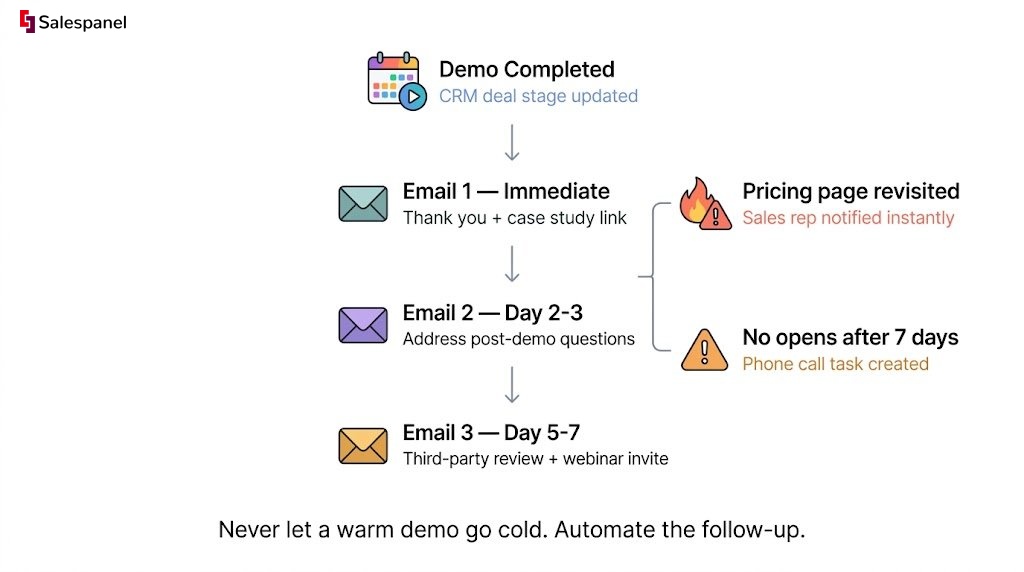
- Trigger: A deal stage in the CRM is updated to “Demo Completed” or a custom tag is applied to the contact.
- Initial Action (Sales Enablement): An automated, personalized email is sent from the assigned sales representative. This email thanks the prospect for their time, recaps key value points discussed, and includes a link to a relevant case study or customer testimonial video.
- Time Delay & Nurture Sequence: The system waits for a set period (e.g., 2-3 days) before initiating a multi-touch nurture sequence.
- Email #2: Addresses common post-demo questions or highlights an advanced feature that aligns with the prospect’s stated needs.
- Email #3: Shares a third-party review, an industry report where the company is featured, or an invitation to a future educational webinar.
- Behavioral Tracking & Sales Alerts: The workflow actively monitors the prospect’s engagement with the follow-up content.
- High-Intent Signal: If the prospect revisits the pricing page or views the case study, the system sends an immediate real-time notification to the sales rep.
- Disengagement Signal: If the prospect has not opened any emails after 7 days, a task is created for the rep to initiate a personal phone call.
- Exit Condition: The contact is removed from this specific workflow once they reply to an email, book another meeting, or the deal stage is updated to “Closed-Won” or “Closed-Lost.”
Key Insight: This workflow bridges the critical gap between a positive demo and a signed contract. By automating the persistence and value-driven follow-up, it empowers the sales team to focus on active conversations and closing, rather than manual administrative tasks.
Actionable Takeaways & Performance Tips
- Personalize from the Rep: Ensure follow-up emails are sent from the sales representative’s email address, not a generic marketing alias. This maintains the personal connection established during the demo.
- Use CRM Data for Hyper-Personalization: Use custom fields in your CRM to note the prospect’s key pain points or feature interests during the demo. Use this data to dynamically insert relevant content into the follow-up emails.
- Monitor Post-Demo Website Activity: The most valuable insights come from what a prospect does after the call. Integrating tools with robust first-party data capture is essential here. It reveals if a “quiet” prospect is actually highly engaged, frequently revisiting your features or pricing page, providing the perfect signal for a timely sales outreach.
- Create Multiple Nurture Paths: Don’t use a one-size-fits-all nurture. Create different content paths based on the prospect’s industry, company size, or the primary problem they are trying to solve.
3. The SMB Welcome & Onboarding Journey with Mailchimp
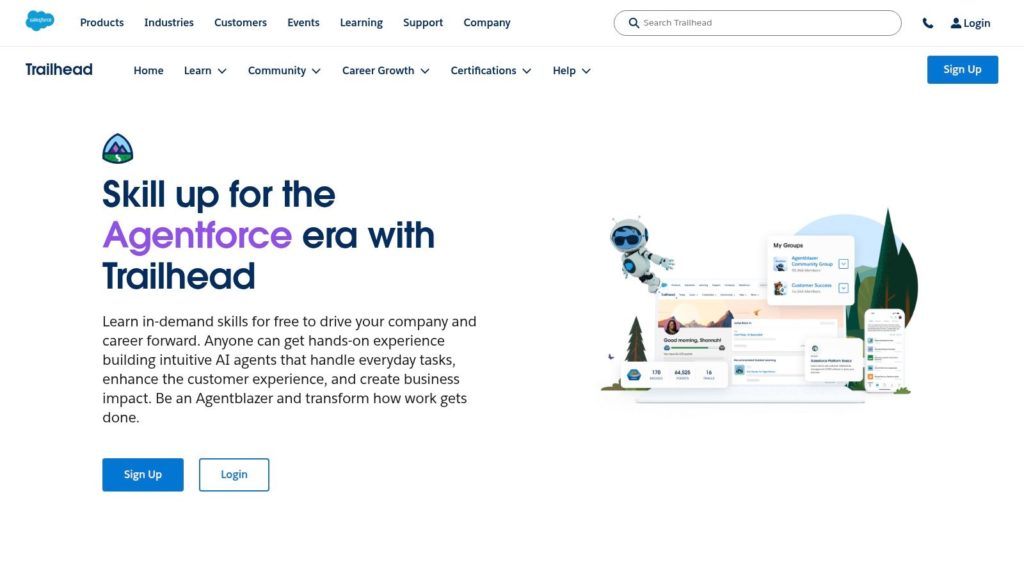
This workflow automates the crucial first interactions a new subscriber or customer has with a brand. Using Mailchimp’s Customer Journey builder, it guides new contacts through a predefined path of emails designed to educate, build trust, and drive a specific first action, such as making a purchase or booking a demo. It’s an essential marketing automation workflow example for small-to-midsize businesses (SMBs) aiming to maximize new lead engagement from day one.
Strategic Objective
The primary goal is to create a consistent and positive initial experience that converts passive subscribers into active customers or qualified leads. By automating the onboarding process, this workflow ensures every new contact receives timely, relevant information, preventing lead drop-off and nurturing them toward a conversion goal without manual intervention.
Workflow Logic: A Step-by-Step Breakdown
This automation sequence is excellent for welcoming new newsletter subscribers or trial users. It triggers the moment a contact is added to a specific audience or segment. The technical execution relies on Mailchimp’s visual journey builder and its tagging and segmentation capabilities.
- Trigger: A new contact subscribes to an email list via a website form or is tagged as “New Trial User” after signing up.
- Initial Action (Marketing): The system immediately sends a welcome email. This email confirms the subscription, sets expectations, and provides a clear next step or a piece of high-value content.
- Time Delay & Conditional Split: The workflow waits for a set period (e.g., 2 days). It then uses a conditional split to check if the user has engaged (e.g., clicked a link in the first email).
- Nurture Path A (Engaged): If the user clicked the link, they are sent a follow-up email that builds on their initial interest, perhaps showcasing a product feature or a relevant case study.
- Nurture Path B (Unengaged): If the user did not click, they are sent a different email designed to re-engage them, such as one highlighting the primary benefits of the service or offering a different piece of content.
- Journey End Goal: The workflow continues with additional steps (delays, emails, tagging) until the contact reaches the end goal, such as clicking a “Book a Demo” link, making a first purchase, or being moved to a long-term nurture segment.
Key Insight: Mailchimp excels by making this sophisticated logic accessible. Its pre-built templates and visual builder allow businesses without dedicated marketing ops teams to implement powerful, multi-path journeys that adapt to user behavior, significantly improving relevance and conversion rates.
Actionable Takeaways & Performance Tips
- Start with a Template: Mailchimp’s strength is its library of pre-built journeys. For your first workflow, choose a template like “Welcome New Contacts” or “Onboard and Educate” and customize it to fit your brand voice and goals. This dramatically shortens the learning curve.
- Define a Single, Clear Goal: A welcome journey should have one primary objective. Is it to drive a first purchase? A demo request? A profile completion? Every email and call-to-action in the sequence should guide the user toward that specific goal.
- Segment Your Entry Points: Don’t use one generic welcome series for everyone. Create different journeys based on the signup source. A contact who downloaded a technical whitepaper should receive a different onboarding experience than someone who signed up for a general newsletter.
- Keep it Simple: The most effective journeys are often the simplest. A sequence of 3-5 well-timed, focused emails is typically more effective than a complex, 12-email behemoth. Monitor your open and click-through rates at each step to identify where users are dropping off.
4. The Automated Re-Engagement & List Hygiene Workflow
This critical workflow automates the process of identifying and re-engaging inactive contacts while systematically cleaning the marketing database. It’s designed to win back disengaged subscribers and prune those who are unresponsive, improving deliverability, open rates, and overall campaign performance. For any business managing a large email list, this stands out as one of the most important marketing automation workflow examples for long-term health and efficiency.
Strategic Objective
The primary goals are to reactivate dormant leads before they are lost for good and to maintain a high-quality, engaged contact list. This workflow automatically identifies subscribers whose engagement has dropped, attempts to win them back with targeted content, and if unsuccessful, tags them for suppression or removal to prevent them from negatively impacting sender reputation.
Workflow Logic: A Step-by-Step Breakdown
This automation sequence is triggered when a contact meets a predefined inactivity criterion, such as not opening an email or visiting the website for a specific period (e.g., 90 days). The technical requirement is a platform that can create dynamic segments based on engagement data over time.
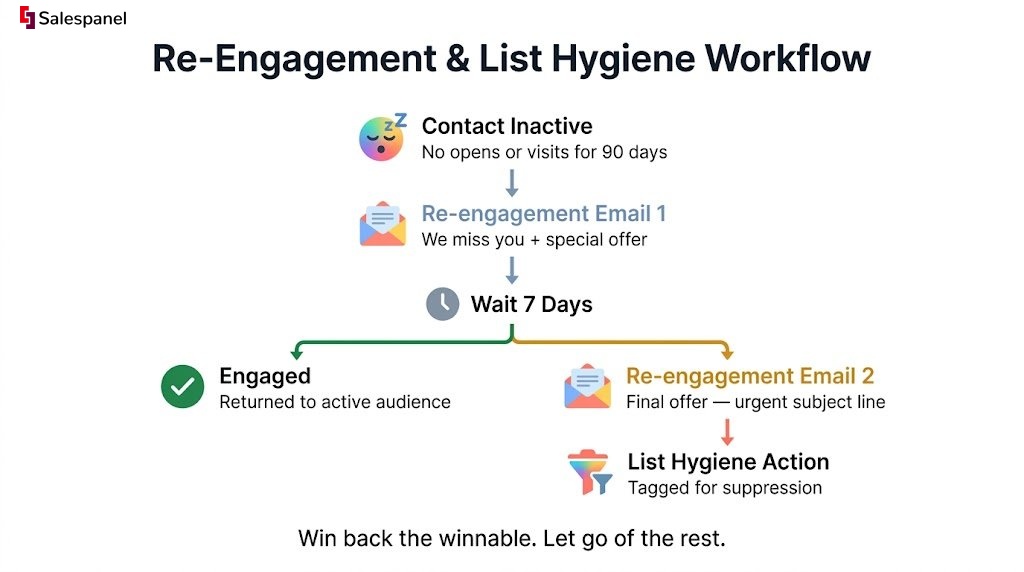
- Trigger: A contact is added to a dynamic “Inactive” list based on the rule: Last Email Open Date > 90 days ago AND Last Website Session Date > 90 days ago.
- Initial Action (Marketing): The system sends the first email in a re-engagement series. This could be a “We Miss You” message with a special offer, a survey asking for feedback, or a summary of valuable content they may have missed.
- Wait & Check: The workflow waits for a set period, such as 7 days, before checking for engagement (email open, click, or a new website visit).
- Branching Logic:
- If Engaged: The contact is removed from the re-engagement workflow and the “Inactive” list, returning them to the standard marketing audience.
- If Not Engaged: The workflow proceeds to the next step, sending a second, different re-engagement email. This could have a more urgent subject line or a final offer.
- Final Attempt: After another waiting period (e.g., 14 days), the system performs a final check. If the contact remains unengaged, a final action is taken.
- List Hygiene Action: The unengaged contact is automatically tagged as “Unsubscribed – Inactive” or “For Suppression” in the CRM and marketing platform. This prevents them from receiving future marketing communications but retains their data for historical analysis.
Key Insight: Proactive list hygiene isn’t just about deleting contacts; it’s a strategic process of recovery and maintenance. This workflow automates that process, ensuring you’re not just broadcasting to a large, indifferent audience but cultivating a smaller, more engaged, and more valuable one.
Actionable Takeaways & Performance Tips
- Define Inactivity Clearly: Your definition of “inactive” is crucial. Is it 60, 90, or 180 days? Base this on your sales cycle and content frequency. A business with a long sales cycle may have a longer inactivity window.
- Offer a Clear Path Back: Your re-engagement emails must provide compelling reasons for a user to interact. This could be exclusive content, a discount, or a simple one-click button to confirm they want to stay subscribed. Make it easy for them to say “yes.”
- Don’t Be Afraid to Say Goodbye: The final email should clearly state that this is the last communication unless they take action. Letting go of unengaged contacts is a healthy practice that improves your sender score and campaign ROI.
- Maintain Clean Data: To ensure your lists remain clean and actionable, an automated re-engagement and list hygiene workflow is essential. For further insights, explore methods for an automated CRM audit for data hygiene to keep your foundational data accurate.
5. Adobe Marketo Engage – Program Library
For enterprise-level marketers seeking robust, pre-built frameworks, the Adobe Marketo Engage Program Library offers a powerful resource. It provides importable nurture program templates complete with engagement streams, smart campaigns, and reporting assets. This isn’t just a list of ideas; it’s a collection of fully deployable, best-practice workflows designed for complex, large-scale marketing operations.
Strategic Objective
The primary goal of the Program Library is to accelerate the implementation of sophisticated nurture campaigns by providing proven, enterprise-grade templates. It aims to reduce setup time, enforce marketing operations best practices, and ensure consistency across large teams and complex campaigns. This resource helps marketers move from concept to execution quickly, leveraging Adobe’s deep expertise in marketing automation.
Workflow Logic: A Step-by-Step Breakdown
The library provides various templates, but a common nurture workflow follows this general logic. The process begins after a user has been identified and added to a specific nurture stream. The technical architecture relies on Marketo’s native program, stream, and smart campaign structure.
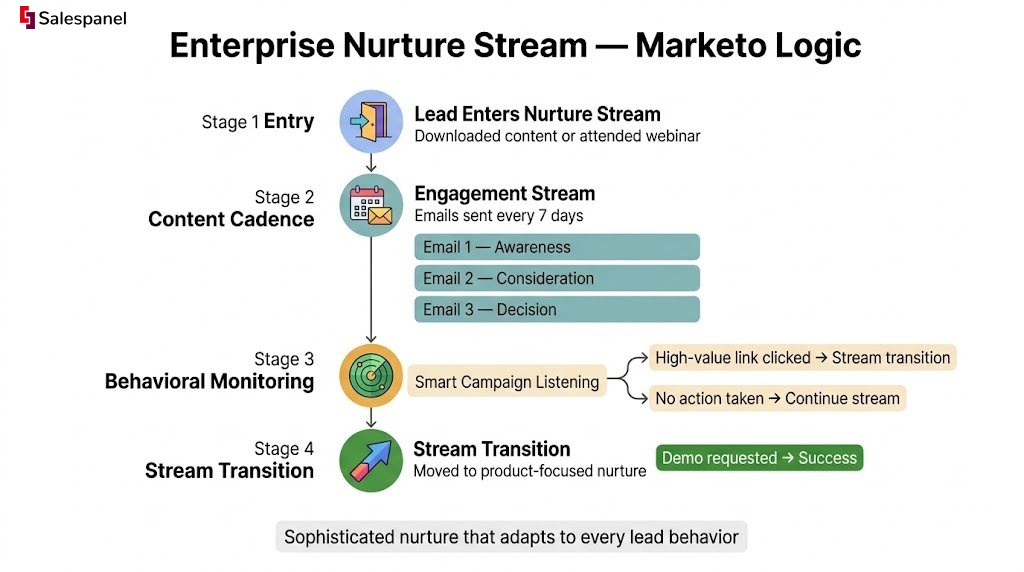
- Trigger: A lead is added to a “Nurture Program” based on specific criteria (e.g., downloaded a specific content type, attended a webinar, or reached a certain lead score).
- Initial Action (Nurture Stream): The lead enters a pre-defined “Engagement Stream” within the program. This stream contains a series of emails (the “content cast”) scheduled to send at a set cadence (e.g., every 7 days).
- Content Delivery: The first email in the sequence is sent. The templates include tokenized assets, allowing for easy personalization of content like subject lines and body copy based on lead data.
- Behavioral Monitoring: “Smart Campaigns” within the program monitor for specific lead actions. For example, a smart campaign listens for clicks on a high-value link within a nurture email.
- Stream Transition Logic: If a lead takes a desired action (like clicking the high-value link), the smart campaign automatically moves them to a different, more product-focused nurture stream. If no action is taken, they continue in the current stream.
- Success and Reporting: Program success is tracked when a lead achieves the campaign goal (e.g., requests a demo). The included reporting assets automatically populate with performance data, providing insights into engagement and conversions.
Key Insight: Marketo’s library elevates the concept of a template from a simple outline to a fully-functional, importable program. It encapsulates not just the email sequence but the entire operational logic, including data management, stream transitions, and performance measurement, mirroring how top-tier marketing teams operate.
Actionable Takeaways & Performance Tips
- Study the Architecture: Even if you don’t use Marketo, study the structure of these programs. The way they organize assets, use naming conventions, and structure smart campaigns offers a masterclass in clean and scalable marketing operations.
- Adapt, Don’t Just Adopt: While these templates represent best practices, always customize the content, cadence, and transition rules to fit your specific buyer’s journey and sales cycle. A one-size-fits-all approach rarely works perfectly.
- Integrate First-Party Data: The true power of these workflows is unlocked when they are fueled by rich, real-time behavioral data. At Salespanel, we believe that first-party data is the cornerstone of effective marketing. Integrating rich visitor history provides the granular triggers needed for sophisticated stream transitions, moving leads based on their actual on-site behavior, not just email clicks.
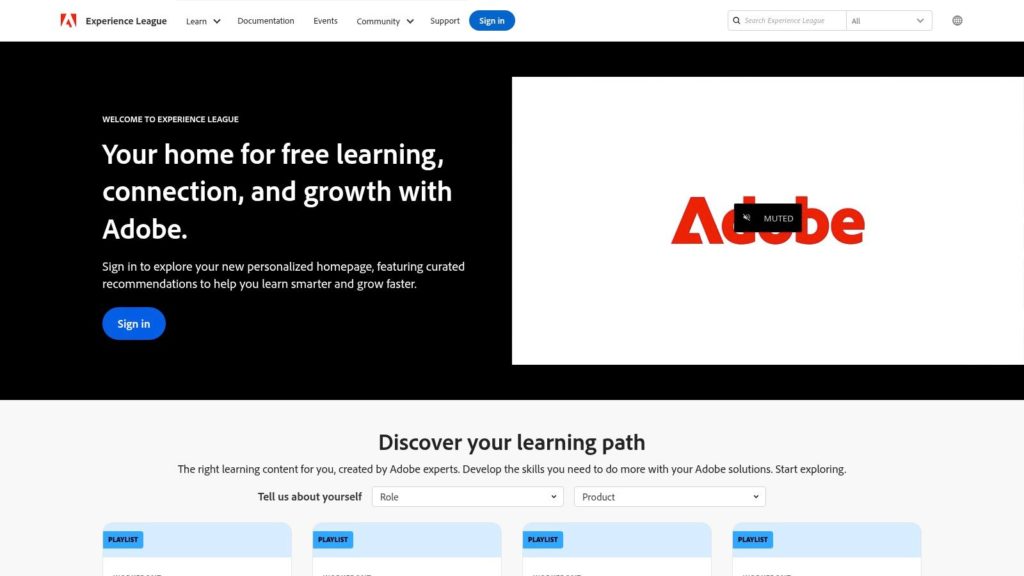
Note on Access: This is an enterprise resource. Access to the program templates is exclusive to Adobe Marketo Engage subscribers, which involves enterprise-level pricing. The documentation and program briefs, however, are often publicly available on the Adobe Experience League website and can be studied for strategic insights.
6. Zapier – Workflow Automation Templates
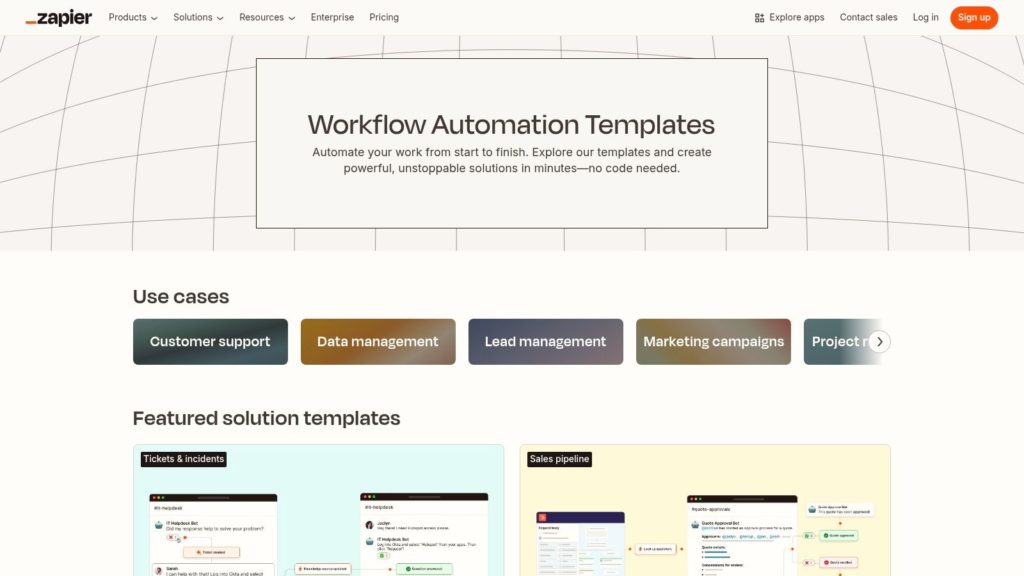
Zapier operates less as a single workflow and more as a massive, searchable library of pre-built automation recipes, or “Zaps.” It serves as the connective tissue between thousands of disparate marketing, sales, and operational apps. Instead of providing one specific strategy, Zapier offers a platform to quickly implement countless simple-to-intermediate automation sequences without writing a single line of code, making it a go-to resource for teams needing to connect their tech stack quickly. This makes it a crucial entry when discussing diverse marketing automation workflow examples.
Strategic Objective
The primary goal of leveraging Zapier’s templates is rapid deployment and system integration. Marketers can use it to plug gaps in their native tool integrations, automate routine data entry, and create simple notification systems that keep teams in sync. The objective is not deep, multi-stage lead nurturing within Zapier itself, but rather to ensure data flows seamlessly and instantly between the specialized tools where that nurturing happens.
Workflow Logic: A Step-by-Step Breakdown
This example illustrates a common use case: syncing new leads from a social media ad platform (e.g., Facebook Lead Ads) directly into a CRM and notifying the team in Slack. The technical process involves authenticating each app within Zapier and mapping fields between them.
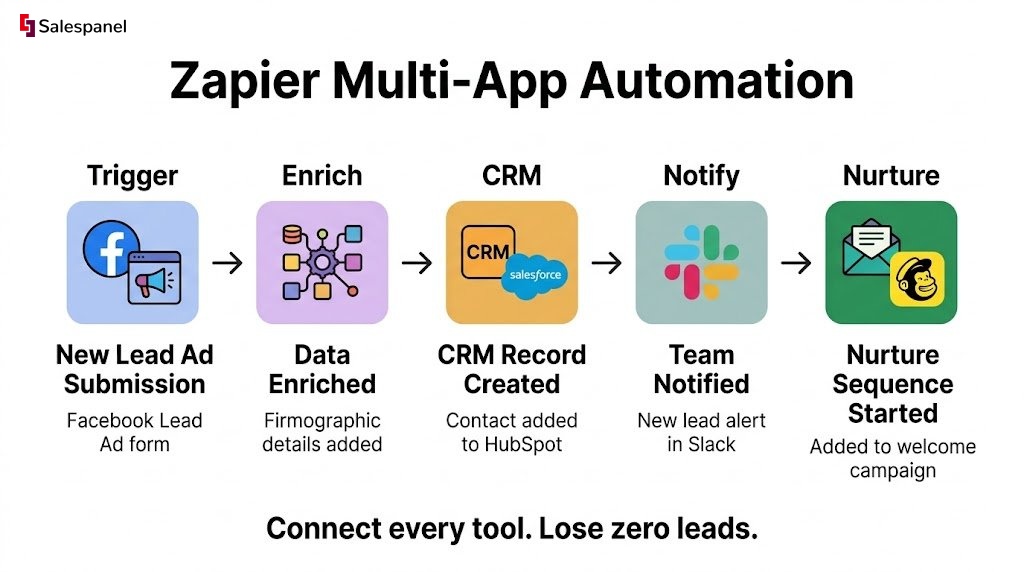
- Trigger: A new lead is submitted through a Facebook Lead Ad form.
- Initial Action (Data Transfer): Zapier instantly captures the lead data (name, email, company, custom field answers).
- Data Enrichment: A second step in the Zap sends the new lead’s email to a data enrichment tool (like Clearbit or a similar service connected via Zapier) to pull in firmographic details.
- CRM Syncing: The workflow creates a new contact or lead record in the primary CRM (e.g., Salesforce, HubSpot) using the enriched data, mapping the fields correctly.
- Internal Notification: A new message is automatically posted to a designated Slack channel (e.g., #new-leads), including the lead’s name, company, and a direct link to their new CRM record.
- Add to Nurture Sequence: A final step adds the contact to a specific audience or list in an email marketing platform (e.g., Mailchimp) to begin a welcome sequence.
Key Insight: Zapier’s strength lies in its “if this, then that” simplicity across an unparalleled number of applications. It democratizes automation, allowing marketers to build bridges between tools that don’t natively connect, eliminating manual data handling and speeding up the entire lead management process.
Actionable Takeaways & Performance tips
- Start with Templates: Don’t try to build from scratch. Search Zapier’s extensive template library for your specific apps (e.g., “Facebook Lead Ads to Salesforce”) and use the pre-configured Zaps as your starting point. You can customize them later.
- Use Multi-Step Zaps for Richer Workflows: The free tier is great for simple A-to-B connections. However, paid plans unlock multi-step Zaps, which are essential for creating more valuable sequences like the one described above (Lead Ad -> Enrich -> CRM -> Slack).
- Focus on High-Friction Tasks: Prioritize automating tasks that are repetitive, time-consuming, and prone to human error. Syncing leads, creating CRM tasks, and updating spreadsheets are perfect candidates for Zapier automation.
- Understand Task Limits: Be mindful of your plan’s task limits. A “task” is a successful action your Zap completes. A single lead triggering a 5-step Zap consumes 5 tasks. Monitor your usage to ensure your critical workflows don’t get paused.
7. The Cross-App Data Sync & Enrichment Workflow (via Make)
This powerful workflow leverages a visual automation platform like Make to connect disparate marketing and sales tools, creating a unified data ecosystem. It automates the process of enriching new leads from one source (like Facebook Lead Ads) with data from another (like a CRM or data enrichment tool), ensuring every new contact is complete and actionable from the moment of capture. This is one of the most versatile marketing automation workflow examples for teams running campaigns across multiple, disconnected platforms.
Strategic Objective
The primary goal is to eliminate manual data entry and prevent lead data from becoming siloed in different applications. By automatically syncing and enriching lead information across the tech stack, this workflow ensures that the sales team has a complete, 360-degree view of every prospect without delay, enabling faster and more personalized follow-up.
Workflow Logic: A Step-by-Step Breakdown
This automation triggers whenever a new lead is generated in a specific application, such as a social media lead form or a webinar registration platform. Make’s visual builder is ideal for mapping these multi-step, multi-app processes. The technical implementation involves configuring modules for each app and using routers and filters to direct data flow.
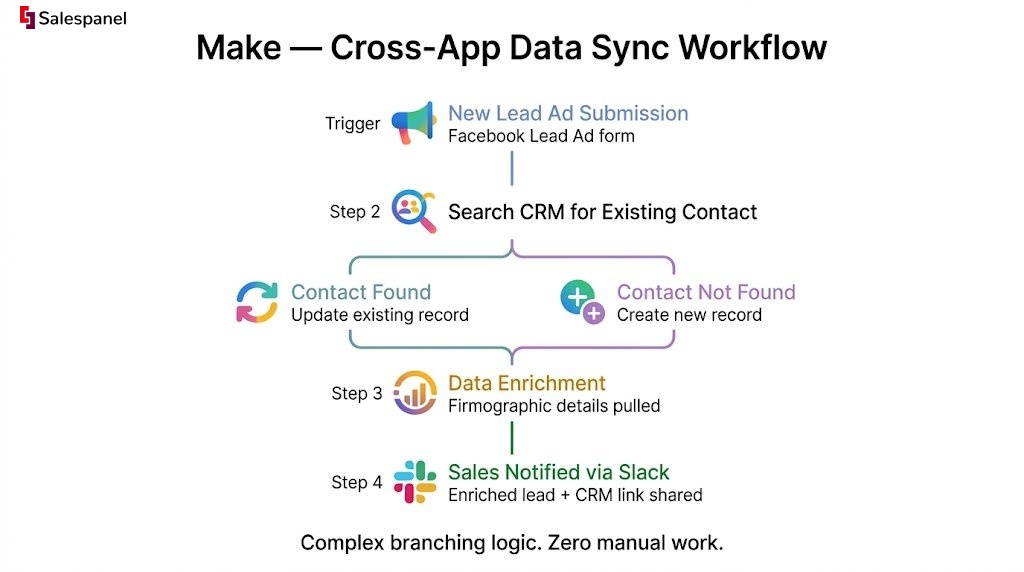
- Trigger: A new lead is submitted through a Facebook Lead Ad form.
- Initial Action (Data Capture): Make’s Facebook Lead Ads module instantly captures the submitted data (e.g., name, email, phone number).
- Create/Update CRM Record: The workflow connects to your CRM (e.g., Salesforce, HubSpot). It first searches for an existing contact with the same email.
- If Found: It updates the existing contact record with any new information from the lead form.
- If Not Found: It creates a new contact record.
- Conditional Routing (Filtering): A router in the Make scenario checks if a key data point, like “Company Name,” is missing.
- Data Enrichment: If the company name is present, the workflow can send the contact’s email or domain to a data enrichment service (like Clearbit) to pull in firmographic details (company size, industry, location). The new data is then synced back to the CRM record.
- Internal Notification: A final step sends a customized Slack message to the appropriate sales channel, alerting them of the new, fully enriched lead and providing a direct link to the CRM record.
Key Insight: This workflow acts as the central nervous system for your marketing operations. By using a flexible platform like Make, you can build complex, conditional logic that connects best-in-class tools, ensuring data flows seamlessly to where it’s most valuable.
Actionable Takeaways & Performance Tips
- Start with Templates: Make’s platform includes a large library of pre-built templates for common pairings like “Facebook Lead Ads to Google Sheets” or “HubSpot to Slack.” Use these as a starting point to understand the logic and then customize them to fit your specific needs.
- Utilize Routers and Filters: The real power of Make lies in its ability to create branching paths. Use routers to send data down different paths based on specific criteria, such as routing leads from different countries to region-specific sales teams.
- Incorporate Error Handling: Complex workflows can sometimes fail if an API is temporarily down. Build error-handling routes in your Make scenarios to catch issues, retry a step, or send a notification to an admin so that no leads are lost.
- Connect to Your Visitor Tracking: Enhance this workflow by integrating it with a first-party data platform. For example, once a lead is in your CRM, website visitor tracking from Salespanel can connect their pre-conversion browsing history to their profile, giving sales full context on their interests before the first call.
Marketing Automation Workflow Examples Comparison
| Platform | Implementation Complexity | Resource Requirements | Expected Outcomes | Ideal Use Cases | Key Advantages |
|---|---|---|---|---|---|
| HubSpot Marketing Hub | Moderate, guided templates | Professional/Enterprise plans needed, annual commitment | Precise targeting with CRM integration | Users needing production-ready, CRM-integrated automation | Native CRM integration, strong onboarding |
| ActiveCampaign Marketplace | Low, one-click import | Some features require higher-tier plans | Fast deployment of engagement workflows | Quick setup with pre-built marketing & sales automations | Large recipe library, clear visual builder |
| Mailchimp Customer Journeys | Low to moderate | Standard/Premium plans for advanced journeys | SMB-focused journeys with triggers | SMBs needing easy-to-use journey builder | Ready-made journeys, transparent pricing |
| Salesforce Marketing Cloud – Journey Builder | High, multi-step complex flows | Enterprise pricing, Salesforce stack recommended | Enterprise-grade multi-channel personalized journeys | Large enterprises with complex marketing needs | Robust multi-channel personalization, strong learning resources |
| Adobe Marketo Engage – Program Library | High, detailed nurture setup | Enterprise subscription via Adobe | Enterprise-level nurture programs & campaign assets | Enterprise marketers requiring best-practice templates | Enterprise-grade examples, comprehensive documentation |
| Zapier – Workflow Automation Templates | Low, plug-and-play templates | Free tier for small automations, paid plans available | Quick automations across 7,000+ apps | Small to medium businesses needing fast integrations | Extensive app ecosystem, easy setup |
| Make (formerly Integromat) | Moderate to high, visual builder | Competitive pricing with generous free tier | Flexible, complex branching marketing workflows | Users needing highly customizable multi-route automations | Highly flexible canvas, public templates, strong free tier |
Beyond the Blueprint: Your Path to Intelligent Automation
We’ve explored seven powerful platforms and dissected a range of marketing automation workflow examples, from HubSpot’s lead nurturing sequences to Make’s intricate cross-platform integrations. The journey through these blueprints reveals a powerful, unifying theme: modern automation is not about simply “setting and forgetting.” It’s about creating dynamic, responsive systems that bridge the critical gap between marketing activity and sales outcomes.
The examples from ActiveCampaign and Mailchimp showcase the importance of segmenting audiences based on behavior, while Salesforce and Marketo highlight the enterprise-level need for scalable, multi-channel journeys. Tools like Zapier and Make demonstrate the immense power of an interconnected tech stack, proving that your automation strategy is only as strong as the data flowing between your tools. Each example serves as more than a template; it’s a strategic lesson in how to translate customer data into timely, relevant, and personalized communication.
Key Takeaways: From Theory to Tactical Execution
The most effective automation strategies are built on a foundation of clean, accessible data. The workflows that generate predictable revenue are not the most complex ones, but rather the ones most attuned to the customer’s actual journey.
Here are the core principles to carry forward:
- Behavior Over Demographics: While firmographics are important for initial qualification, the most potent triggers for automation are behavioral. A prospect downloading a case study or visiting your pricing page multiple times is a far stronger signal of intent than their job title alone.
- Embrace Progressive Profiling: Don’t try to capture every piece of data in a single form. Use automation to build a richer profile over time. Subsequent workflows can be triggered by new information, gradually qualifying leads without creating friction.
- Sales and Marketing Alignment is Non-Negotiable: The most advanced workflows are those that seamlessly hand off marketing-qualified leads (MQLs) to sales with full context. This includes a complete history of page visits, content downloads, and email engagement, enabling sales to have smarter, more relevant conversations.
- Test, Measure, and Iterate Relentlessly: Your first workflow will never be your best. Use A/B testing for email copy, experiment with time delays between steps, and closely monitor conversion rates at each stage. Automation provides the data; it’s your job to use it to refine your approach.
Choosing Your Engine: Selecting the Right Automation Platform
The platform you choose dictates the sophistication of your strategy. A simple email autoresponder is sufficient for basic follow-ups, but a B2B organization aiming for growth needs a more robust solution. When evaluating tools, consider these factors:
- First-Party Data Collection: How does the tool capture and unify visitor data? You need a platform that can identify anonymous visitors, track their entire journey, and merge that data with known lead profiles.
- Lead Scoring and Qualification: A crucial component for B2B success is the ability to score leads based on both demographic fit and behavioral engagement. This ensures your sales team focuses only on the most promising opportunities. Salespanel’s lead scoring framework allows you to precisely define and automate this qualification process.
- Integration Capabilities: Your marketing automation platform must connect seamlessly with your CRM and other critical tools. Native integrations are often best, but a robust API is also essential.
Ultimately, the most powerful marketing automation workflow examples are the ones you build, test, and perfect for your unique audience. The blueprints we’ve covered are your starting point. The real value is unlocked when you adapt these concepts to your specific business goals, powered by a tool that provides a unified view of your entire customer lifecycle. Your path to intelligent automation begins with transforming raw data into meaningful customer conversations, one workflow at a time.
Ready to build workflows based on a complete view of your customer’s journey? Salespanel captures and synthesizes visitor activity, providing the rich first-party data needed to power intelligent lead scoring and trigger highly relevant automations. Explore our resources to see how you can connect marketing actions to real revenue at Salespanel.