In a business landscape where persistence dictates success, the manual follow-up is an artifact of a bygone era. Not long ago, sales and marketing professionals lived in spreadsheets, their days consumed by the soul-crushing task of sending “just checking in” emails. This process was not only slow and inefficient but also guaranteed that opportunities would be missed. That tedious past is a world away from the present, where automated systems are not just a convenience but the central nervous system of a scalable growth strategy. The future belongs to those who can leverage data to create timely, personalized, and valuable interactions without lifting a finger.
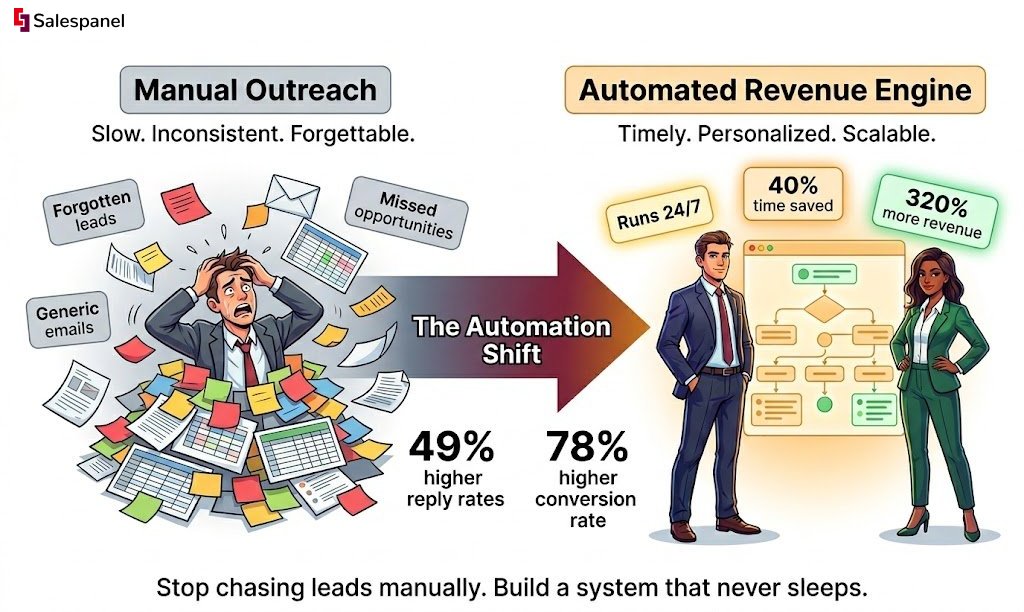
The shift is validated by hard data: research shows that a single follow-up email can boost reply rates by a staggering 49%. Furthermore, sales teams leveraging a structured, multi-touchpoint follow-up process see a 78% higher conversion rate than those relying on manual outreach. The chasm between the old way and the new represents a significant competitive advantage. This guide is a technical blueprint for architecting an automated follow-up machine that nurtures leads, builds relationships, and drives revenue while you focus on high-value tasks.
From Manual Follow-Ups to Automated Revenue
Remember the days of manually tracking every lead in a spreadsheet? Sales professionals would spend hours crafting generic emails, a process fraught with inefficiency and prone to error. Every forgotten follow-up was a potential customer lost, a direct and measurable hit to the sales funnel. The pain of this manual method was a significant bottleneck, preventing teams from focusing on what they do best: building relationships and closing deals.
The Inefficiency of Manual Outreach
Before automation, the follow-up process was fundamentally a memory game, supported by sticky notes and calendar reminders. It was a system that was not only inefficient but impossible to scale. The primary pain points were systemic:
- Inconsistent Timing: Messages were sent based on a salesperson’s availability, not a prospect’s moment of peak interest.
- Lack of Personalization: Crafting a truly unique email for hundreds of leads was an operational fantasy. The result was generic, forgettable communication that failed to resonate.
- High Margin for Error: Manual tracking is inherently flawed. Leads were either spammed with redundant messages or forgotten entirely, damaging brand perception and losing potential revenue.
This manual grind created a massive bottleneck, preventing teams from engaging in strategic, relationship-building activities. Today, businesses can leapfrog this manual treadmill by implementing advanced tools, including sophisticated AI-powered email solutions for e-commerce.
A Smarter, Automated Approach
The advent of automated follow-up emails has fundamentally altered the strategic landscape. Instead of broadcast-style messaging, automation provides a framework for persistent, personalized, and timely communication that operates 24/7. It transforms the follow-up from a tactical chore into a powerful strategic asset for revenue generation.
This is not merely about time savings. It’s about engineering a predictable and scalable engine for nurturing leads. By automating the repetitive touches, your team is free to apply their expertise where it truly counts—in complex negotiations and strategic conversations.
The data corroborates this shift. Automated follow-up sequences can save sales teams up to 40% of their outreach time, freeing them for higher-value work. Moreover, research shows that just one follow-up after the initial email can boost reply rates by 49%. Subsequent messages continue to increase that probability. You can see the full research on the impact of cold email follow-ups.
This guide will provide the blueprint for harnessing that potential, setting you up for an outreach strategy that is both more effective and more profitable.
How Email Automation Actually Works
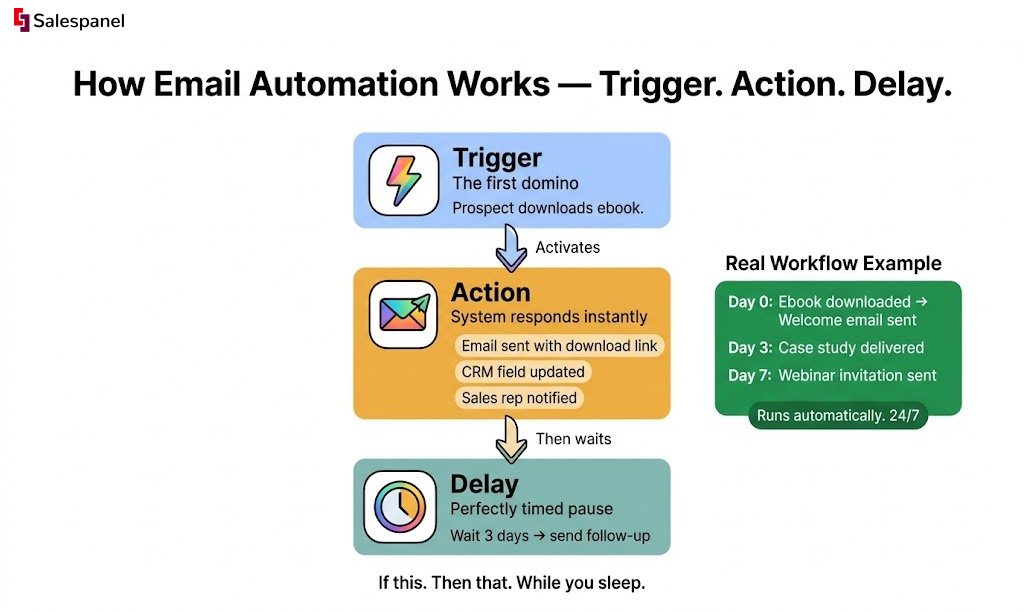
To effectively implement automated follow-ups, one must understand the underlying mechanics. The system operates on a logical progression, a series of digital dominoes set to fall in a predetermined sequence once the initial trigger is activated. At its core, the process is built on three fundamental components working in concert.
Grasping how these components interact is the key to creating follow-up sequences that feel personal and timely, rather than robotic and intrusive.
The Core Components of Automation
Every automated sequence, regardless of its complexity, is governed by a simple “if this, then that” logic that executes autonomously.
- Trigger: This is the event that initiates the entire workflow. A trigger is a specific, predefined condition that, once met, sets the automated sequence in motion. It is the first domino.
- Action: This is the operation the system performs following a trigger event. Most commonly, the action is sending an email, but it can also include adding a tag to a contact, updating a CRM field, or sending a notification to a sales representative.
- Delay: This represents the programmed waiting period between actions. Delays are critical for pacing communication and avoiding message fatigue. A well-calibrated delay makes a follow-up sequence feel natural and considerate, not desperate.
This visual illustrates how automation transforms a manual, time-intensive process into a self-sustaining revenue-generating machine.
This flow highlights the leap from tedious manual tasks to an efficient, automated system that actively contributes to revenue growth.
A Practical Example of an Automated Workflow
Let’s examine how these components function in a real-world scenario. Imagine a prospect visits your website and downloads an ebook titled, “The Ultimate Guide to B2B Lead Generation.” This action is a clear signal of interest.
Here is how a simple automated follow-up sequence would be structured:
- Trigger: The prospect completes and submits the form to download the ebook.
- Action: The system immediately sends an email containing the download link for the resource.
- Delay: The workflow pauses for three days.
- Action: A second email is dispatched, offering a related case study that demonstrates how a similar company increased its leads by 30% using the principles from the ebook.
- Delay: The workflow waits for an additional four days.
- Action: A final email is sent, inviting the prospect to a live webinar on advanced lead generation tactics.
This sequence does more than deliver a PDF. It systematically nurtures the lead by providing incremental value, building trust, and maintaining brand visibility—all without manual intervention from your team.
Technical Validation with Behavioral Data
The most sophisticated automations are not merely triggered by form submissions; they are activated by a prospect’s behavior. This is where the technical aspect of automation becomes a significant competitive advantage.
For example, implementing a solution like Website visitor tracking from Salespanel enables you to identify when a known prospect returns to your site and navigates to a high-value page, such as your pricing page.
This specific action—a visit to the pricing page—is a far stronger buying signal than an ebook download. This behavior can be used as a trigger for a more direct, sales-focused follow-up. The resulting email can be tailored to address potential pricing questions or offer a one-on-one demo, arriving at the precise moment the prospect is evaluating a purchase.
Architecting a High-Converting Follow Up Sequence
This is where strategy is translated into execution. Constructing an effective automated follow-up sequence is not an act of guesswork; it is the architectural design of a logical, value-driven journey for your prospect. A well-designed sequence tells a cohesive story and builds momentum with each message.
The fundamental principle, though often overlooked, is simple: every email must deliver new value. A “checking in” email is the fastest path to the spam folder. Instead, each message should function as a helpful next step, guiding the recipient toward a solution to their problem.
Consider this data point: 80% of sales require at least five follow-ups, yet a majority of sales representatives give up after one or two attempts. This gap represents your opportunity. A well-architected sequence will ensure you stand out.
A Blueprint for the Perfect 5-Step Demo Request Sequence
Let’s translate theory into a practical framework. A prospect requesting a demo of your software is a high-intent signal. Your follow-up sequence must match this intent with speed, precision, and tangible value.
Here is a proven 5-step framework to nurture this initial interest:
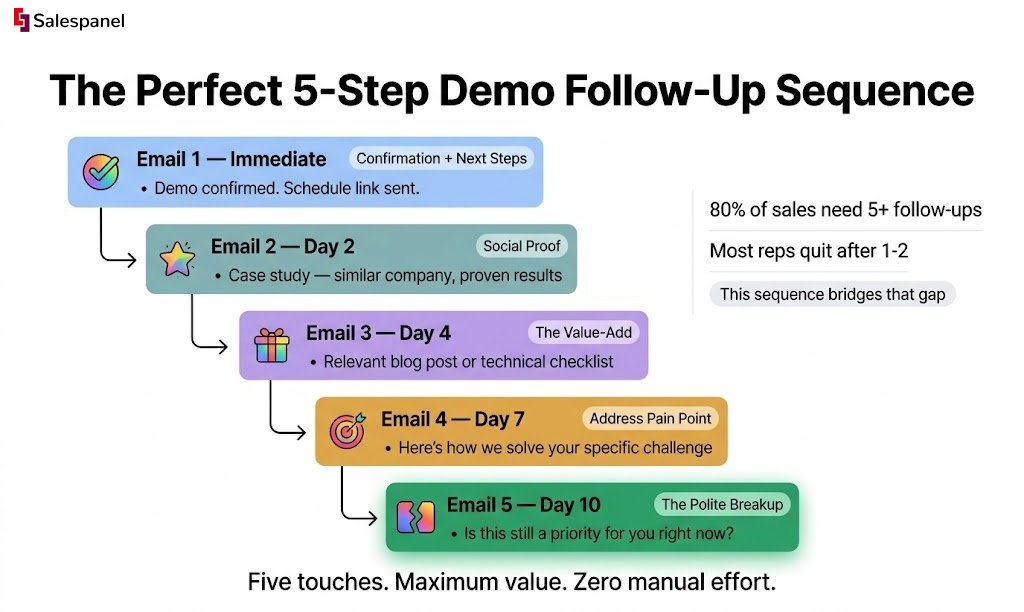
- Email 1 (Immediate): Confirmation and Next Steps. As soon as the form is submitted, this email should be in their inbox. It confirms receipt of their request, provides a link to schedule the demo, and clearly outlines what to expect. While logistical, it also provides immediate reassurance.
- Email 2 (Day 2): The Social Proof. This email is designed to build confidence. Share a concise, powerful case study or a customer testimonial that illustrates how a similar company solved a problem they are likely facing. The subtext is clear: “We understand your challenge, and we have a proven solution.”
- Email 3 (Day 4): The Value-Add. Avoid a simple reminder. Instead, deliver something genuinely useful—a relevant blog post, a technical checklist, or an insightful industry report. This positions you as an expert resource, not just a vendor.
- Email 4 (Day 7): Address a Common Pain Point. Now, be specific. Address a common problem your product solves head-on. For example, “Struggling with [common problem]? Here’s how our platform automates that in under 5 minutes.” This demonstrates a deep understanding of their challenges.
- Email 5 (Day 10): The Polite Breakup. This is a final, no-pressure attempt. Briefly restate your core value proposition and offer an easy exit. A phrase like, “Is this still a priority for you right now?” often elicits a response precisely because it is respectful of their time.
Choosing the Right Sequence for Your Goal
Not all follow-up sequences are created equal. The architecture for a cold lead must differ entirely from one for a recent webinar attendee. The length, timing, and content must be calibrated to the prospect’s level of awareness and intent. To master this, explore these proven cold email follow-up tactics designed to secure replies.
To aid in this decision-making process, here is a breakdown of different sequence strategies based on your primary objective.
Comparing Follow-Up Sequence Strategies
This table outlines different automated follow-up strategies tailored to specific sales and marketing objectives, helping you choose the most effective approach.
| Objective | Typical Sequence Length | Key Content Focus | Optimal Timing Between Emails |
|---|---|---|---|
| Nurture a Cold Lead | 5-7 Emails | Education, building trust, industry insights, soft CTAs (e.g., download a guide). | 3-5 days, increasing over time. |
| Post-Demo Follow-Up | 3-5 Emails | Reinforcing value, social proof (case studies), addressing specific pain points, direct CTAs. | 2-3 days, consistent pacing. |
| Webinar Attendee Nurture | 3-4 Emails | Webinar recording, summary of key takeaways, related resources, demo offer. | 1 day, then 3 days. |
| Abandoned Cart Recovery | 2-3 Emails | Reminder of items, overcoming objections (shipping, price), offering a small incentive. | 1 hour, then 24 hours. |
By aligning your sequence architecture with the specific context, you transition from generic outreach to a strategic communication system that drives measurable results.
Mastering Personalization at Scale
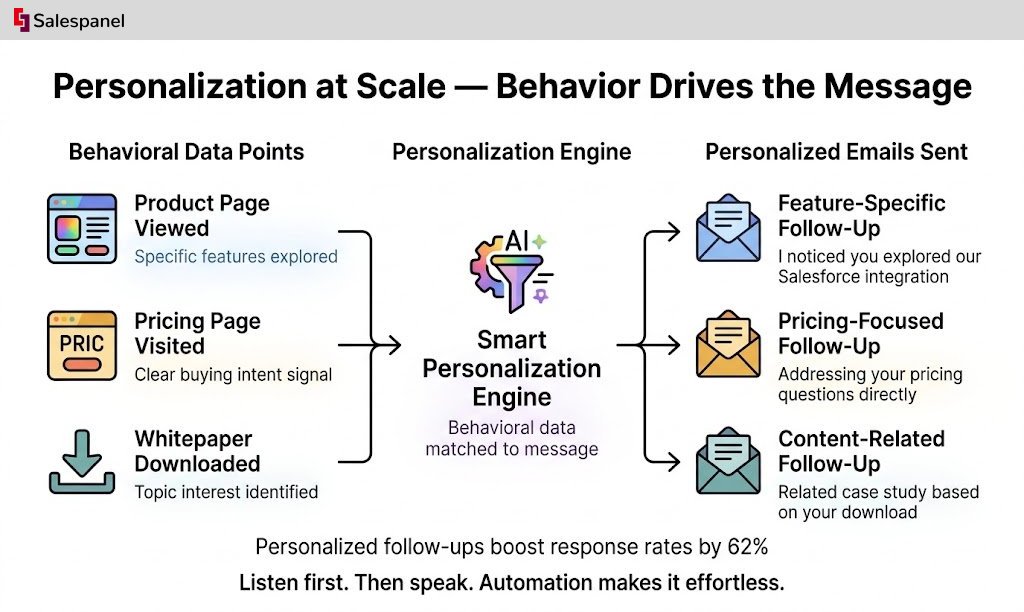
Without genuine personalization, automation is merely sophisticated spam. The true power of automated follow-up emails is realized when each message feels less like a broadcast and more like a one-to-one conversation. This requires moving beyond basic merge tags like [First Name] into the realm of dynamic content driven by user behavior.
Imagine a follow-up that states, “I noticed you spent some time checking out our integration with Salesforce on the features page,” instead of a generic “Thanks for your interest.” The difference in impact is profound. This level of detail is not conjecture; it is powered by tracking scripts and CRM data that capture on-site actions and use them to trigger hyper-relevant messages.
Beyond the Basics of Personalization
True personalization at scale means your system understands not just who a person is, but what they care about at this moment. This is achieved by connecting their actions directly to your automated sequences, creating a feedback loop where their engagement dictates the content they receive next.
This transforms your follow-ups from static, pre-written messages into dynamic conversations that adapt to the user’s journey. It is the difference between a generic flyer and a personal note referencing a shared experience.
Here’s how behavioral data elevates personalization:
- Product Views: Automatically reference the specific products or services a lead viewed on your website.
- Content Consumption: If they read a specific blog post or downloaded a whitepaper, trigger a follow-up sequence with related, high-value content.
- Pricing Page Visits: The moment a lead signals clear buying intent by visiting the pricing page, deploy a timely email discussing value and offering a demo.
Segmenting with Behavioral Lead Scoring
The most effective method for operationalizing this behavioral data is through lead scoring. This is not just a sales tool; it is a powerful segmentation engine for your automated follow-ups. By assigning point values to different actions—such as visiting a key page, opening an email, or attending a webinar—you can create a clear hierarchy of engagement levels.
This is the technical process for separating casual browsers from purchase-ready prospects. At Salespanel, our lead scoring framework allows you to build sophisticated models that automatically segment leads into categories like ‘hot,’ ‘warm,’ and ‘cold.’
This segmentation is the bedrock of relevance. A ‘hot lead’ who has visited your pricing page three times should not receive the same gentle, educational follow-up as a ‘cold lead’ who only downloaded a PDF weeks ago.
This data-driven separation allows you to construct entirely different, highly personalized sequences for each segment. ‘Hot leads’ might receive a direct, action-oriented message from a sales representative, while ‘warm leads’ are placed in a nurturing sequence rich with case studies and helpful resources. The result is a system where the intensity and content of your message perfectly match the prospect’s readiness to buy.
The Impact of Tailored Multi-Touchpoint Sequences
When you implement a structured, multi-touchpoint follow-up process powered by this kind of personalized automation, the results are tangible. Studies have found that sales teams with a standardized process see a 78% higher conversion rate than those still relying on manual outreach. More importantly, the personalization piece is crucial; automated follow-ups that reference previous interactions can boost response rates by as much as 62%. You can dig into the complete findings over at these sales follow-up statistics.
Ultimately, mastering personalization at scale is about building an automated system that listens before it speaks. It uses behavioral data not to be intrusive, but to be exceptionally helpful, ensuring every email provides timely, relevant value that advances the conversation.
Grab These Follow-Up Email Templates for Your Next Campaign
Theory is essential, but practical application is paramount. This section provides effective, battle-tested templates for your automated follow-up campaigns.
Consider these less as rigid scripts and more as foundational frameworks. We will deconstruct not just what to say, but the psychological principles behind why it works—from the subject line that compels an open to the call-to-action that generates a response.
The Post-Demo Nurture Template
The period immediately following a product demonstration is a critical window. The prospect’s interest is at its peak, but so is the risk of distraction. This template is engineered to maintain momentum without appearing overly aggressive.
Subject: Next steps from our [Product Name] walkthrough
Hi [First Name],
Thanks again for your time today. I hope our walkthrough gave you a clear picture of how we can help you [solve specific pain point discussed].
To keep things moving, I’ve attached a one-page summary of the key features we discussed that are most relevant to [Prospect’s Company Name].
Is there anything we covered that you’d like to explore in more detail?
Best, [Your Name]
Why it works: It is immediate, relevant, and provides a tangible asset (the summary). The final question is strategically open-ended, inviting a substantive conversation rather than a simple binary response.
The Inbound Lead Welcome Series (3-Part)
When an individual downloads a resource, they are signaling interest. A welcome series is your opportunity to make a strong first impression and guide them deeper into your ecosystem. This three-part sequence is designed to build trust through the consistent delivery of value.
- Email 1 (Immediate): The Resource Delivery — Subject: Here’s the [Resource Name] you requested. Body: Deliver the requested asset immediately and without friction. Briefly set the expectation that you will be providing more helpful content in the near future.
- Email 2 (Day 3): The Related Value-Add — Subject: Since you liked [Resource Name], you’ll find this useful. Body: Provide a related piece of content—a case study or a technical blog post—that builds upon their initial interest. This begins to establish your authority.
- Email 3 (Day 5): The Soft Conversion — Subject: A question about [Topic of Resource]. Body: Pivot toward a soft conversion. Pose a simple, low-friction question related to their challenges and gently introduce a next step, such as an invitation to a webinar or a link to a relevant product page.
This sequence is powerful because it methodically transforms a simple transaction (a download) into a consultative relationship, setting the stage for a future sales conversation.
The ‘No Response’ Re-engagement Template
Silence is a common response in sales, but it rarely signifies a definitive “no.” More often, it means “not right now.” This template is designed to re-engage a dormant prospect by making it exceptionally easy for them to reply.
Subject: Is this still on your radar?
Hi [First Name],
Just following up on my previous email. I know how quickly the inbox can pile up.
When we last spoke, you mentioned that [mention a key challenge or goal] was a priority. I came across this [article/case study] and thought it might offer some fresh perspective.
If your priorities have shifted, no problem at all. Just let me know, and we can reconnect down the road.
Best, [Your Name]
Why it works: It is highly respectful of their time. You are not merely “checking in”; you are providing new value, which offers a legitimate reason to respond. The closing provides an easy exit, which, paradoxically, increases the likelihood of a reply.
How to Measure and Optimize Your Campaigns
Deploying automated follow-up emails is the beginning, not the end. True success is achieved through continuous optimization based on performance data. An automated system is not a “set and forget” tool; it is a dynamic engine that requires regular tuning to become a predictable source of revenue.
This iterative process of measuring, testing, and refining is what distinguishes moderately successful campaigns from high-performing ones. Focusing on the correct metrics allows you to transform a good sequence into a great one.
Defining the Metrics That Truly Matter
It is easy to become distracted by vanity metrics. To accurately assess the performance of your automated follow-ups, you must focus on metrics that are directly tied to engagement and revenue.
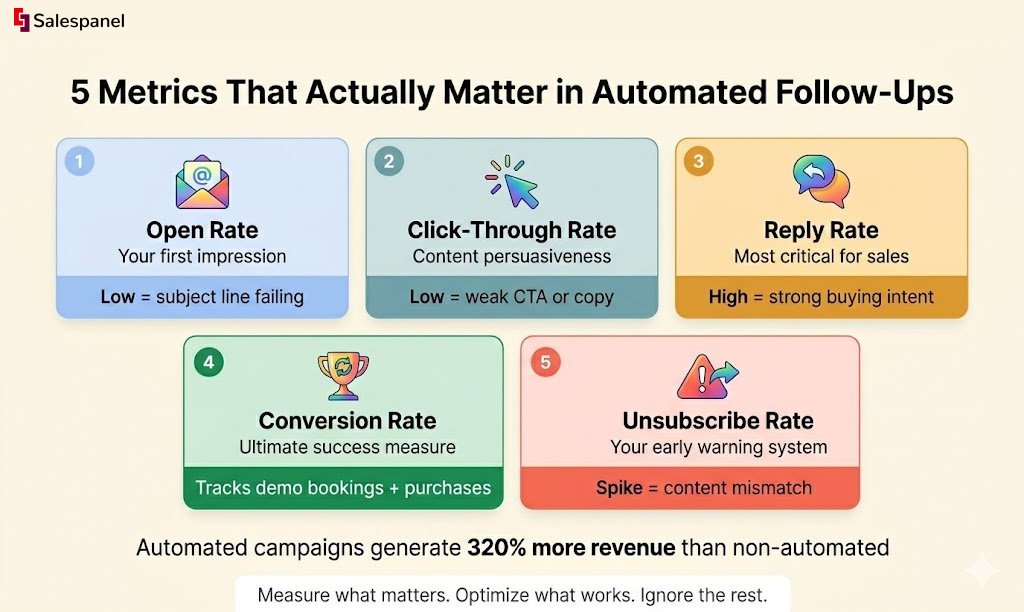
- Open Rate: This is your first impression. A low open rate is a direct indicator that your subject lines and preheader text are failing to capture attention in a competitive inbox.
- Click-Through Rate (CTR): This measures the percentage of recipients who engaged with your email’s content by clicking a link. It is a direct measure of the persuasiveness of your copy and call-to-action.
- Reply Rate: For sales-focused sequences, this is often the most critical metric. It indicates how many prospects were compelled to start a direct conversation, a strong signal of high intent.
- Conversion Rate: This is the ultimate measure of success. It tracks the percentage of recipients who completed the desired action, whether it was booking a demo, purchasing a product, or starting a trial.
- Unsubscribe Rate: A sudden increase in your unsubscribe rate is a critical warning sign. It indicates a potential mismatch in content relevance, sending frequency, or overall messaging.
When executed correctly, the power of automation is undeniable. Well-managed automated email campaigns are reported to generate 320% more revenue than their non-automated counterparts, with significantly higher engagement across the board. You can discover more insights about email marketing statistics that validate its impact.
A Simple Framework for A/B Testing
Optimization is impossible without testing. A/B testing, or split testing, is a methodical approach to comparing two versions of an email to determine which performs better. By isolating and testing a single variable at a time, you can scientifically identify what resonates with your audience.
A/B testing removes guesswork from your strategy. Instead of operating on assumptions, you allow your audience’s behavior to guide your decisions, leading to incremental improvements that compound over time.
Here are the most critical elements to begin testing in your automated follow-ups:
- Subject Lines: Test a direct, benefit-driven subject line against one that is more interrogative or creative to determine which generates higher open rates.
- Call-to-Action (CTA): Experiment with different CTA button text (e.g., “Book a Demo” vs. “Find a Time to Chat”). You can also test variables like button color and placement.
- Sending Times and Delays: This is a crucial, often overlooked variable. For instance, test a 3-day delay between emails against a 5-day delay. You may find that a longer interval increases reply rates by making your follow-up feel less intrusive.
- Value Offers: Pit different types of content against one another. Does a technical case study outperform an invitation to a webinar? The data will reveal what your audience truly finds valuable.
Frequently Asked Questions
Got questions? You’re not alone. Let’s tackle some of the most common head-scratchers people have when they start automating their follow-up emails.
How Many Follow Up Emails Are Too Many?
There is no universal number, but a sequence of 3-5 emails is a well-established baseline for most scenarios. The critical factor is the delivery of new value in each message.
If your follow-ups consist of “just checking in,” even a second email can be perceived as nagging. The key is to introduce a new element with each communication—a helpful resource, a different case study, or a new insight. Monitor your analytics closely; a spike in unsubscribes after email #4 is a clear signal from your audience that you have reached their limit.
How Do I Stop Automated Emails from Sounding Robotic?
The solution lies in a combination of intelligent personalization and a conversational tone. Utilize dynamic tags to insert specific behavioral data, such as the title of a downloaded guide or the specific pricing tier they viewed.
Crucially, your automation must include an exit condition. The moment a prospect replies to an automated email, the system must be configured to immediately remove them from that sequence. This allows a human to take over, blending the efficiency of automation with the personal touch required to build a genuine relationship.
What Is the Best Time to Send Automated Follow Ups?
General advice often points to mid-week mornings (around 10 AM) as an optimal sending window. While this may be a reasonable starting point, relying on generic best practices is a strategic error that can limit your results. The best time is determined entirely by the habits of your specific audience.
The only way to ascertain this is through rigorous A/B testing. Segment your list and send the same email at different times and on different days. The resulting data on open rates and click-throughs will reveal the optimal sending window for your target audience.
At Salespanel, our philosophy is rooted in making decisions with data, not just intuition. We believe that building smarter marketing strategies is the key to turning insights into revenue. To explore this further, check out our library of guides and articles. Dive in at https://salespanel.io/resources.