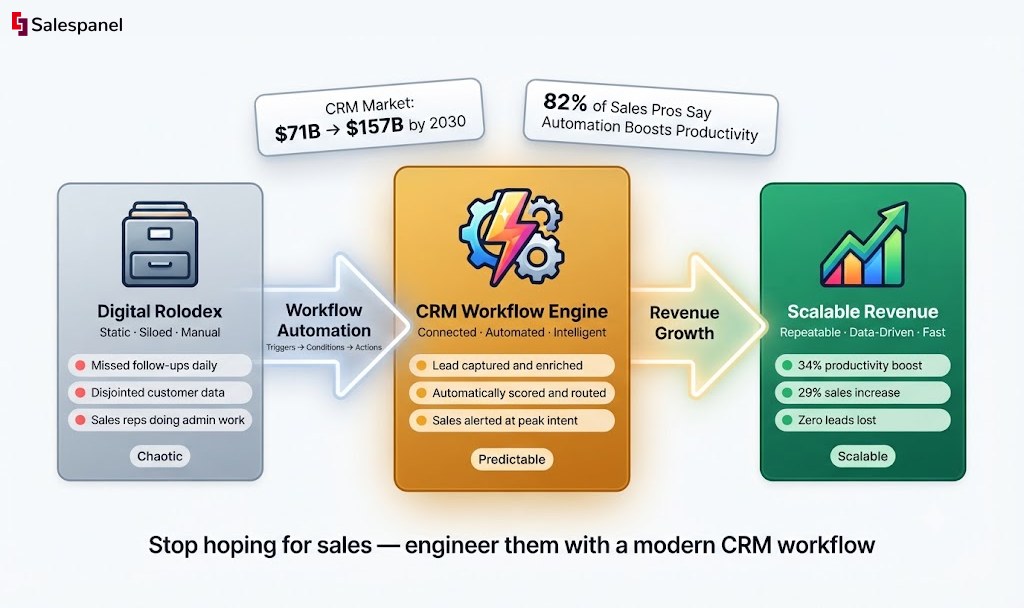
Customer Relationship Management (CRM) has evolved far beyond the digital Rolodex it once was. In the past, CRMs served as static databases—passive repositories for names and numbers, leading to siloed data and chaotic, manual sales efforts. Today, a customer relationship management workflow is the dynamic, automated engine powering a company’s growth, a central nervous system connecting marketing, sales, and service. Looking ahead, this isn’t just a trend; it’s a strategic necessity in a market projected to surge from $71.1 billion in 2023 to over $157.6 billion by 2030. This guide provides an in-depth, technical framework for engineering this transformation, moving from hopeful sales tactics to a predictable, scalable revenue machine. The central theme is clear: mastering this workflow is no longer optional—it’s the key to survival and success.
Think of it as the operating system for your revenue, transforming random interactions into a structured, predictable process that drives sales and keeps customers coming back.
From Digital Rolodex to Revenue Engine
For years, many businesses treated their Customer Relationship Management (CRM) platform like a glorified digital Rolodex—a static database for storing names and numbers. It was a passive approach that left valuable customer data sitting in silos. Sales processes relied on manual effort, creating chaotic, unpredictable results.
Interactions were all over the place, follow-ups got missed, and solid revenue opportunities just vanished into thin air.
The way business works today demands a complete shift away from that old model. A modern customer relationship management workflow is the dynamic, automated engine that powers a company’s growth. It’s the central nervous system connecting marketing, sales, and service into one cohesive unit, making sure no lead gets left behind and no customer feels ignored.
This isn’t just a trend; it’s a strategic necessity in a market projected to surge to over $123 billion.
The High Cost of Inefficiency
Without a defined workflow, businesses are stuck in a reactive state. Sales reps spend hours on admin tasks instead of selling. Marketing teams struggle to prove their ROI. Customer service agents don’t have the context they need to solve problems effectively. A practical example is a sales team where each rep manually logs calls, schedules follow-ups in a personal calendar, and updates deal stages at the end of the day. This lack of a unified process leads directly to missed opportunities and inconsistent customer experiences.
This disorganization comes with a steep price:
- Lost Opportunities: Leads that go unanswered or aren’t nurtured properly go cold, fast. That’s a direct loss in potential revenue.
- Wasted Resources: Teams burn valuable time and energy on low-value manual tasks that could easily be automated, driving up operational costs.
- Poor Customer Experience: A disjointed customer journey creates frustration, leading to higher churn and damage to your brand’s reputation. It’s no surprise that 82% of sales professionals say workflow automation boosts their productivity and efficiency.
Making the Strategic Shift
Putting a structured CRM workflow in place tackles these challenges head-on. It turns abstract sales funnels and marketing campaigns into tangible, automated processes.
Imagine a system where a new lead from your website automatically gets a welcome email, is assigned to the right sales rep based on territory, and has a follow-up task scheduled—all without anyone lifting a finger. This is a practical application of workflow automation: a “form submission” trigger initiates a sequence of actions that ensure immediate and consistent lead handling.
This is the core idea of a modern workflow: to build a predictable, scalable, and efficient machine for generating revenue. It’s about moving from hoping for sales to engineering them with precision.
This guide will walk you through mastering this essential business function. We’ll dissect what makes a high-performing workflow tick, explore practical automation strategies, and give you an actionable framework to build your own. The takeaway is clear: transforming chaotic customer interactions into a predictable growth engine is the critical path to sustainable business success.
The Anatomy of a High-Performing CRM Workflow
Let’s pull back the curtain on what a “customer relationship management workflow” actually is. It’s not just a single tool or a fancy flowchart. Think of it more like a sophisticated assembly line for your business: raw leads go in one end, and loyal customers come out the other. Each stage is carefully engineered to add value and move prospects along with a clear purpose.
An effective workflow is built from a set of tangible components—triggers, conditions, and actions that hum along automatically in the background. The real magic is creating a journey that feels personal and timely to the customer but is incredibly efficient for your teams behind the scenes. A practical example is a workflow that triggers when a lead visits a pricing page three times in a week. This behavior automatically increases their lead score and alerts a sales rep, a level of personalization impossible with manual tracking.
The image below shows this evolution perfectly, moving from a messy, static contact list to a dynamic engine built for growth.
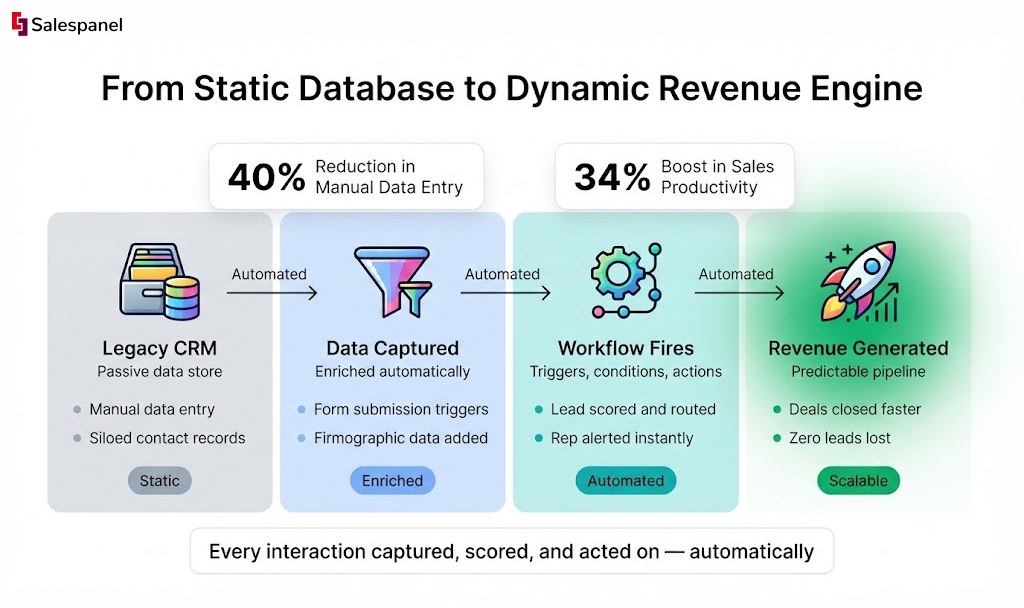
This is the shift we’re talking about: leaving chaotic, manual processes behind for a system designed to scale.
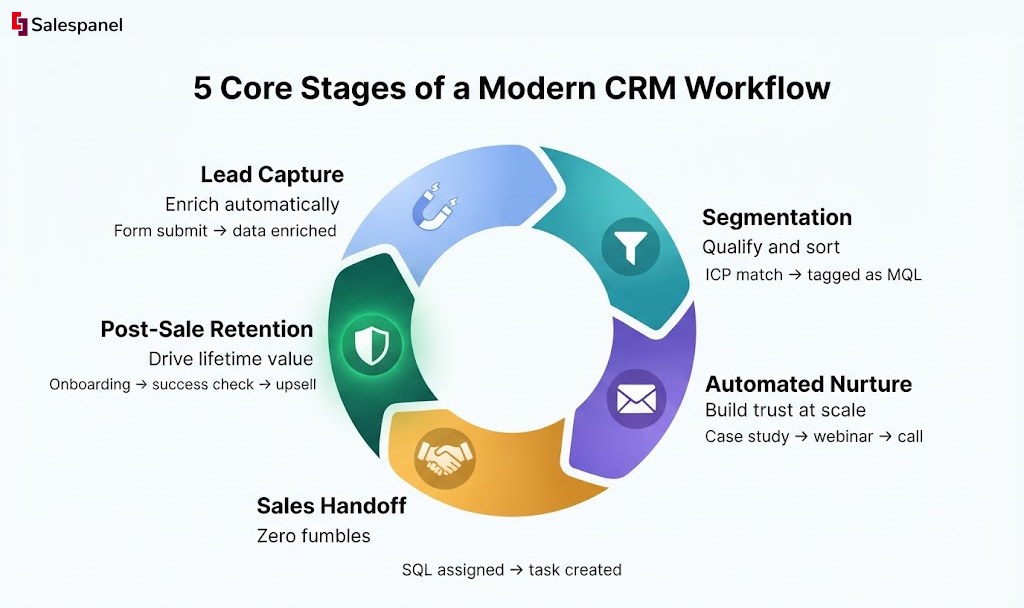
To bring this concept to life, we’ve broken down the entire process into five core stages. This table provides a quick overview of how a lead moves from initial contact to a loyal customer, with automation smoothing the path at every step.
Core Stages of a Modern CRM Workflow
| Stage | Primary Objective | Example Automated Action |
|---|---|---|
| Lead Capture & Enrichment | Collect initial contact information and build a comprehensive profile. | A new form submission triggers data enrichment to add company size and industry. |
| Segmentation & Qualification | Sort and filter leads to identify the most promising opportunities. | Leads matching the Ideal Customer Profile are tagged as “MQLs.” |
| Automated Nurturing | Educate and build trust with qualified leads who aren’t ready to buy yet. | Send a targeted email sequence with case studies relevant to the MQL’s industry. |
| Sales Handoff & Conversion | Seamlessly transfer high-intent leads to the sales team for follow-up. | A high lead score automatically assigns the lead to a rep and creates a follow-up task. |
| Post-Sale & Retention | Onboard new customers and foster long-term loyalty and advocacy. | A “Closed-Won” deal initiates an onboarding email series and schedules a check-in call. |
Each stage plays a critical role in preventing leads from falling through the cracks and ensures that your team’s effort is always focused where it matters most. Let’s dig into what happens at each step.
Stage 1: Lead Capture and Enrichment
The journey starts the second a potential customer interacts with you—maybe they fill out a form, register for a webinar, or just linger on a key page of your website. A modern workflow doesn’t just passively collect this info; it immediately gets to work building a richer profile.
For example, a visitor submits your “Request a Demo” form. This is the trigger that kicks off the workflow. The first action isn’t to just send a notification; it’s to automatically enrich that email address with company data like industry, employee count, and location. Your team gets instant context without lifting a finger.
Stage 2: Segmentation and Qualification
Let’s be honest: not all leads are created equal. This stage is all about intelligent sorting, making sure your sales team invests their energy in the opportunities most likely to close. This is where automation acts as a gatekeeper, preventing good leads from getting lost and filtering out the tire-kickers.
Using that enriched data from Stage 1, the workflow now applies a few rules:
- Condition: Is the company in one of our target industries, like “SaaS” or “Manufacturing”?
- Condition: Does the company have between 50-500 employees?
- Action: If both are true, the lead is tagged as a “Marketing Qualified Lead” (MQL) and zips ahead. If not, they might be placed in a long-term, low-priority nurture sequence.
Stage 3: Automated Nurturing
So what about those MQLs who are a great fit but just aren’t ready to buy today? You can’t let them go cold. This is where automated nurturing takes over, using email sequences and helpful content to build trust and keep your brand top-of-mind.
An MQL might receive a series of three emails over two weeks. The first could be a case study from their industry. The second, an invite to an upcoming webinar. The third, a direct offer for a strategy call. All the while, the workflow is tracking their engagement—opens, clicks, downloads—to refine their profile even further.
Stage 4: Sales Handoff and Conversion
This is the moment of truth. A lead shows clear buying intent, and the workflow needs to pass the baton to sales without fumbling. Delays here can kill deals, so automation is crucial for a smooth transition.
The trigger could be something as simple as the lead clicking a link to your pricing page in a nurture email. That single action can automatically boost their lead score, change their status to “Sales Qualified Lead” (SQL), and assign them to the right sales rep based on territory. It even creates a task in the CRM for that rep to follow up within 24 hours.
Stage 5: Post-Sale and Retention
The work isn’t over when the deal is signed. A great CRM workflow extends beyond the sale to onboard new customers and pave the way for loyalty, repeat business, and future upsells.
Once a deal is marked “Closed-Won,” a whole new workflow can spring to life. This one might trigger an onboarding email sequence, schedule a 30-day check-in for the customer success team, and add the new client to a special “insider” newsletter list. This ensures they feel like a valued partner from day one, setting the stage for a long and profitable relationship.
Accelerating Sales with Automated Workflows
One of the first things you’ll notice with a well-oiled CRM workflow is how much faster your sales cycle gets. Manual processes are the natural enemy of a high-performing sales team; they create friction, cause delays, and pull a salesperson’s focus away from their most critical job—closing deals. Automation systematically breaks down those bottlenecks.
When you automate the routine admin work that eats up a sales rep’s day, you’re freeing them up to focus on the human side of sales—building rapport, running sharp discovery calls, and negotiating contracts. This isn’t just about making life easier. It’s about reallocating your most expensive resource (your sales team’s time) to the activities that actually generate revenue. You shift from administrative drag to strategic acceleration.
From Manual Lag to Automated Precision
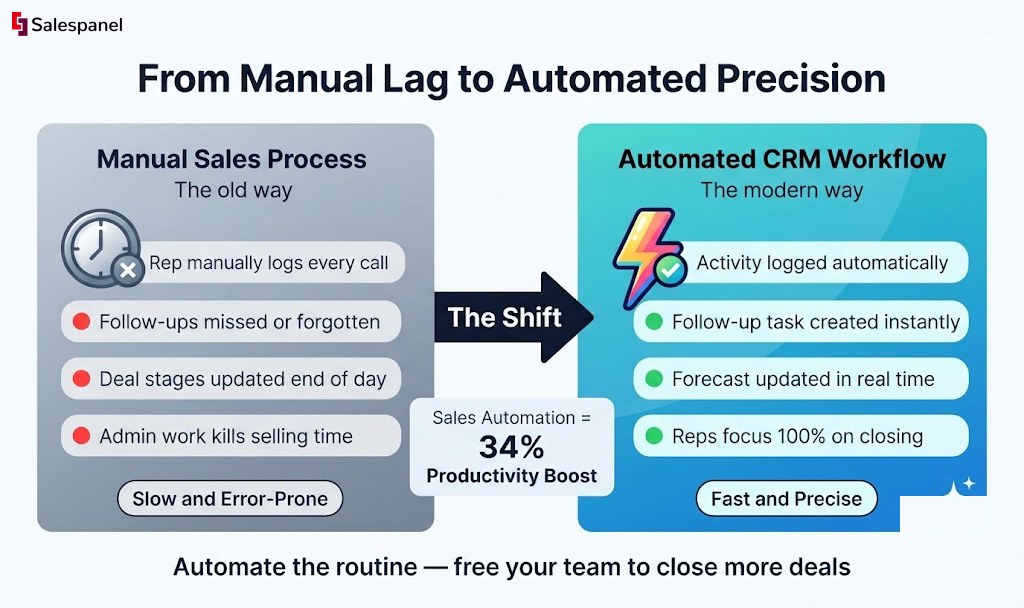
Picture this common scenario for a B2B SaaS company working without a solid workflow. A sales rep updates a deal in the CRM from “Qualified” to “Proposal Sent.” Manually, they now have to log the activity, create a follow-up task in their calendar for three days out, and maybe shoot a note to their manager. Each step is small, but across the entire team, they add up to a massive time sink.
Now, let’s run that same play with a CRM workflow. The second the deal stage is changed, a series of automated actions fire off instantly:
- Action 1: The interaction gets logged automatically in the contact’s timeline, complete with the attached proposal.
- Action 2: A follow-up task is created and assigned to the rep, due in three business days.
- Action 3: The deal value and new stage are updated in the sales forecast dashboard.
This simple sequence eliminates the chance of human error and makes sure critical follow-ups never fall through the cracks. It turns a string of manual chores into a single, decisive action, keeping the sales cycle humming along without any pause.
The Financial Impact of Workflow Automation
This efficiency boost isn’t just a nice-to-have; it has a serious financial impact. In the world of CRM workflows, sales force automation is the undisputed powerhouse, holding a massive 38.15% revenue share. This kind of automation can cut down manual data entry by up to 40% and has been shown to boost sales productivity by 34%.
With the total CRM market projected to hit $123.24 billion by 2030, the dominance of sales automation points to a major shift toward building predictable revenue pipelines. It’s proof that automation is the lifeline to sustainable growth. You can dive deeper into these CRM market trends to see how this is evolving.
An automated workflow turns your sales process from a series of disjointed, manual tasks into a cohesive, high-speed engine. It’s the difference between hoping a deal moves forward and actively ensuring it does.
Practical Automation for High-Velocity Teams
Beyond just creating tasks, a sales workflow can handle more complex situations to keep the momentum going. For example, if a prospect in the “Negotiation” stage goes quiet for five days, the workflow can automatically trigger an alert for the sales manager.
Or, if a deal is marked as “Closed-Lost” because of “Price,” it can automatically add that contact to a future re-engagement campaign designed to highlight new, lower-cost product tiers.
These intelligent automations create a responsive sales environment where the system itself helps reps prioritize their efforts and even salvage deals that might be slipping away. By identifying behavioral triggers on your site—like a prospect revisiting the pricing page right after you send a proposal—a tool like the website visitor tracking from Salespanel can add another layer of intelligence. It can alert a rep to the perfect moment for a timely follow-up call, ensuring your team is always engaging prospects with the right message at exactly the right time.
Turning CRM Data into Strategic Intelligence
Speeding up the sales cycle is a great win, but a modern CRM workflow gives you something far more valuable: strategic intelligence. This isn’t just about making your processes faster; it’s about making them smarter. Let’s shift the focus from simple automation to data-driven decision-making, turning your CRM from a simple process engine into the analytical heart of your business.
At the core of this transformation are embedded analytics and reporting. These features give you a live, real-time view of your entire customer journey, showing you not just what’s happening, but why. This is the key to moving from reactively fixing problems to proactively building predictable growth.
Uncovering Bottlenecks with Funnel Analytics
One of the most powerful things you can do with CRM data is build a dashboard to track conversion rates at each stage of your sales funnel. When you visualize the flow of leads from “Marketing Qualified Lead” all the way to “Closed-Won,” you can see exactly where deals are stalling and prospects are dropping off.
Imagine a B2B tech company that sees a huge drop-off between the “Demo Scheduled” and “Proposal Sent” stages. Their dashboard makes it obvious. While plenty of prospects are excited enough to book a demo, a huge chunk of them disappear right after. This isn’t just a number; it’s a giant red flag pointing to a specific problem.
With this data, the sales manager can start asking the right questions:
- Is the quality of our demos consistent from one rep to another?
- Is the handoff from the demo to the proposal phase clunky or too slow?
- Are our proposals actually addressing the pain points discussed in the demo?
This data-backed investigation helps them find a hidden bottleneck in their process. After making a few targeted changes—like standardizing their demo script and creating better proposal templates—they see a 15% increase in deals moving to the proposal stage. That one change directly boosts their close rates.
The Rise of Data-Driven CRM Strategy
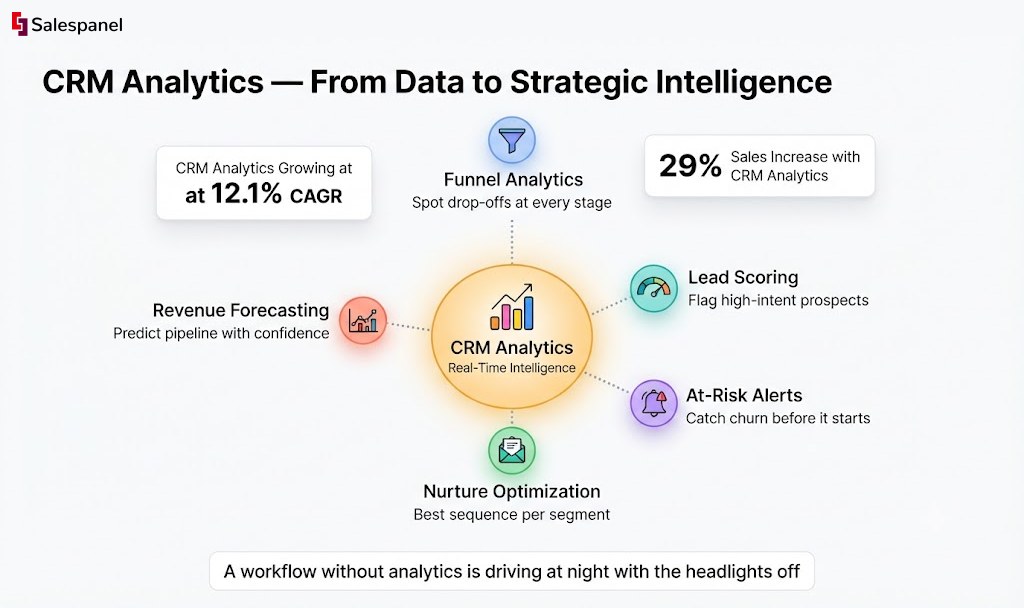
This analytical approach is quickly becoming the new normal. The use of analytics within CRM workflows is growing at a staggering 12.1% CAGR, faster than any other CRM feature. It makes sense when you see the results: companies adopting CRM analytics report an average sales increase of 29% and productivity gains of 34%.
This trend highlights a massive shift. Businesses are ditching gut feelings and embracing data to master their sales process. With the global CRM market expected to hit USD 84.6 billion, analytics has become the strategic brain powering modern workflows. You can dig into the full customer relationship management market analysis to see just how big this transformation is.
A workflow without analytics is like driving at night with the headlights off. You might be moving, but you have no idea where you’re going or what obstacles lie ahead.
From Reactive Fixes to Proactive Growth
The real magic of CRM intelligence is its ability to predict what’s coming next. By analyzing historical data and customer behavior, your workflow can flag potential issues before they ever become problems, moving your strategy from reactive to proactive.
Think about these real-world examples:
- At-Risk Client Alerts: Your workflow can keep an eye on customer engagement. If a key account hasn’t logged into your platform or replied to an email in 30 days, it can automatically create a task for the account manager to reach out. Problem solved before it starts.
- Predictive Lead Scoring: Instead of just scoring leads based on company size or industry, an intelligent workflow can analyze their behavior. A prospect who keeps visiting your pricing and integration pages is showing serious buying intent, and the system can flag them for immediate sales outreach.
- Optimizing Nurture Campaigns: By analyzing which email sequences work best for different customer segments, the system can automatically place new leads into the most effective nurture track for them.
This level of insight elevates your CRM workflow from a simple automation tool into a living, learning system. It continuously sharpens your processes based on real results, creating a powerful feedback loop that fuels sustainable and predictable growth.
How to Build Your First CRM Workflow
Alright, so you understand the moving parts of a customer relationship management workflow. Now, how do you actually build one? Going from theory to a live, automated process can feel like a huge jump, but it’s more methodical than you might think.
It’s really about translating your business goals into a logical sequence of automated steps. Let’s walk through it, from the big-picture objective down to the specific triggers and actions that make it all happen. By the end, you’ll have a clear plan that gets real results.
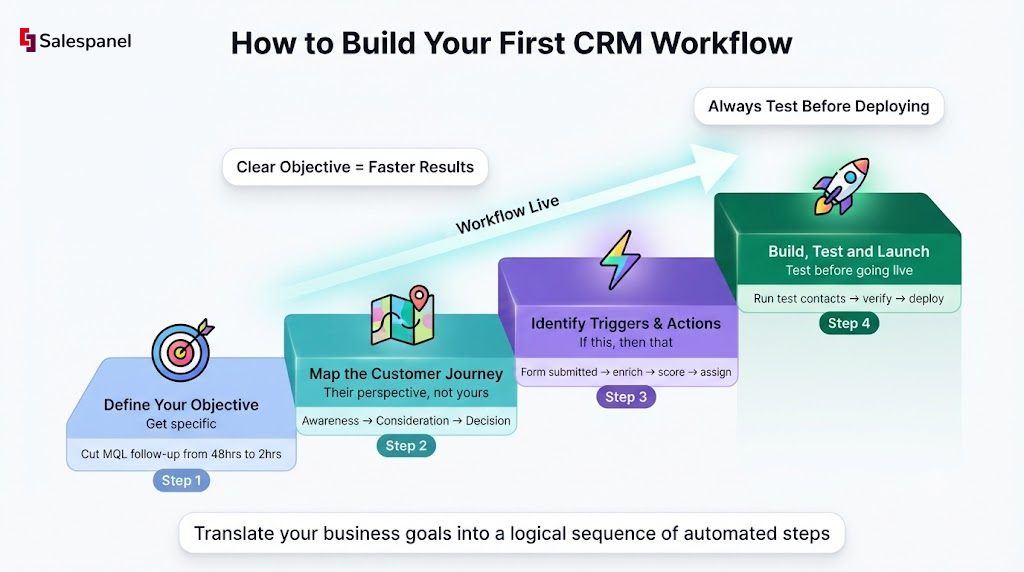
Step 1: Define Your Objective
Before you touch any automation tools or sketch out a single flowchart, you need to answer a simple question: What problem are you trying to solve?
A workflow without a clear goal is just a bunch of actions firing off into the void. Your objective needs to be specific, measurable, and tied directly to a business outcome. Vague goals like “improve sales” won’t cut it. Get specific with targets your workflow can actually hit.
Here are a few examples of strong, clear objectives:
- Slash the average follow-up time for a new MQL from 48 hours to just 2 hours.
- Boost the conversion rate of “Demo Requested” leads to “Closed-Won” deals by 10% this quarter.
- Automatically find and re-engage dormant leads who haven’t opened a marketing email in 90 days.
Nailing down an objective like this makes every other decision in the process a whole lot easier.
Step 2: Map the Customer Journey
With a solid goal in place, it’s time to put yourself in your customer’s shoes. A journey map is just a visual of every touchpoint a customer has with your company on their way to achieving the goal you just set. Forget your internal processes for a minute—this is all about the customer’s perspective.
Let’s stick with the MQL follow-up goal. The customer’s journey might look something like this:
- Awareness: They read a blog post and download your new ebook.
- Consideration: A week later, they get a nurture email and click through to a case study.
- Decision: They land on your pricing page, then fill out the “Contact Sales” form.
- Engagement: They instantly get a confirmation email saying you’ll be in touch.
- Follow-up: A sales rep calls them to book a demo.
Mapping this out shows you exactly where automation can step in to make the biggest difference.
Step 3: Identify Triggers and Actions
Now we get to the fun part: translating that journey map into the language your CRM understands. At its core, a workflow is just a series of “if this, then that” statements made up of triggers, conditions, and actions.
- Triggers: These are the events that kick off the workflow. It’s the “if this” part of the statement.
- Conditions: These are the rules that have to be met for the workflow to continue. They add a layer of logic to filter who goes where.
- Actions: These are the tasks the workflow actually does. This is your “then that.”
Think of triggers as the starting pistol for a race. A prospect fills out a form, and bang—the workflow starts running. The conditions are the hurdles on the track, making sure only the right runners advance, and the actions are the steps the runner takes to get to the finish line.
Let’s apply this to our MQL follow-up objective. A really powerful trigger happens long before a form is ever filled out: the initial website visit. Knowing what an anonymous visitor did before they identified themselves provides incredible context. This is where the website visitor tracking from Salespanel comes in handy, identifying the company and tracking their on-site behavior to enrich the lead profile from the second it’s created.
Step 4: Build and Test Your Workflow
Time to get your hands dirty and build this thing in your CRM. You’ll use the triggers, conditions, and actions you’ve mapped out to construct the automated sequence, step by step.
Let’s build out our B2B example:
- Trigger: A contact submits the “Contact Sales” form.
- Action: The CRM immediately enriches the contact’s record with firmographic data like company size and industry.
- Condition: Is the company size over 50 employees? If Yes: Their lead score jumps by 20 points. If No: Add them to a long-term nurture sequence for now.
- Condition: Is their total lead score now over 75? If Yes: Move to the next step. Salespanel’s lead scoring framework allows you to create these kinds of dynamic rules, so sales only talks to the hottest leads.
- Action: Assign the lead to a sales rep based on their territory. Their Ideal Customer Profile fit influences which rep receives the assignment.
- Action: Create a task for that rep, due in two hours, to follow up.
- Action: Ping the rep with a notification in Slack.
Before you set this loose on your real leads, run a few test contacts through the entire workflow. Make sure every step fires correctly. Are tasks being assigned? Are emails being sent? Is the data updating like it should? This testing phase is non-negotiable—it’s where you catch the glitches before they impact a real customer.
Got Questions About CRM Workflows? We Have Answers.
Even with a solid plan, you’re bound to run into some questions as you start building out your customer relationship management workflows. Let’s tackle some of the most common ones that pop up.
What’s the Difference Between a CRM Workflow and a Sales Funnel?
This is a great question, and the distinction is pretty simple when you break it down.
Think of your sales funnel as the “what”—it’s the big-picture map of the journey your customer takes, from first hearing about you to signing on the dotted line. On the other hand, the CRM workflow is the “how.”
The workflow is the engine that actually moves people through that funnel. It’s the series of specific triggers (‘form submitted’), conditions (‘lead score is over 50’), and actions (‘assign to sales rep’) inside your CRM that automates the journey. The funnel is the concept; the workflow brings it to life.
How Often Should I Optimize My CRM Workflows?
Workflows are definitely not a “set it and forget it” kind of thing. The business world moves too fast for that.
A good rule of thumb is to sit down and review their performance at least once a quarter. This is your chance to dig into the numbers and see if your automations are still hitting the mark and helping you reach your goals.
Keep a close eye on a few key metrics:
- Conversion rates from one stage to the next.
- Time spent in each stage—this is where you’ll spot bottlenecks.
- The overall length of your sales cycle.
If you see a big drop-off at a certain stage, or things are taking way too long, it’s a clear signal that something needs tweaking. Pro tip: constantly A/B test little things like email subject lines or the timing of your follow-ups. Those small changes can make a huge difference over time.
Can Small Businesses Really Benefit from a CRM Workflow?
Absolutely. In fact, you could argue small businesses get the most out of them.
When you’re running a lean team, automation isn’t just a nice-to-have; it’s a game-changer for staying competitive and being able to scale. A well-built workflow lets a small crew manage leads, nurture relationships, and close deals with the kind of polish and consistency you’d expect from a much bigger company.
It makes sure no lead ever slips through the cracks and frees up your team from mind-numbing manual tasks. That means more time to focus on what really matters: growing the business.
Ready to turn your website visitors into a predictable revenue stream? At Salespanel, we provide the tools to identify, track, and engage your most valuable prospects. See how our platform can power your next high-performing workflow by exploring our resources.