Cross Website Tracking: A Practical B2B Setup Guide
By the end of this guide you will be able to connect one consented visitor journey across two or more domains your company owns, keep the original campaign attribution attached to that journey, and prove with a browser test that the connection actually works. That is the whole promise of cross website tracking in a B2B context. Nothing beyond that is needed to fix most broken multi-domain reports.
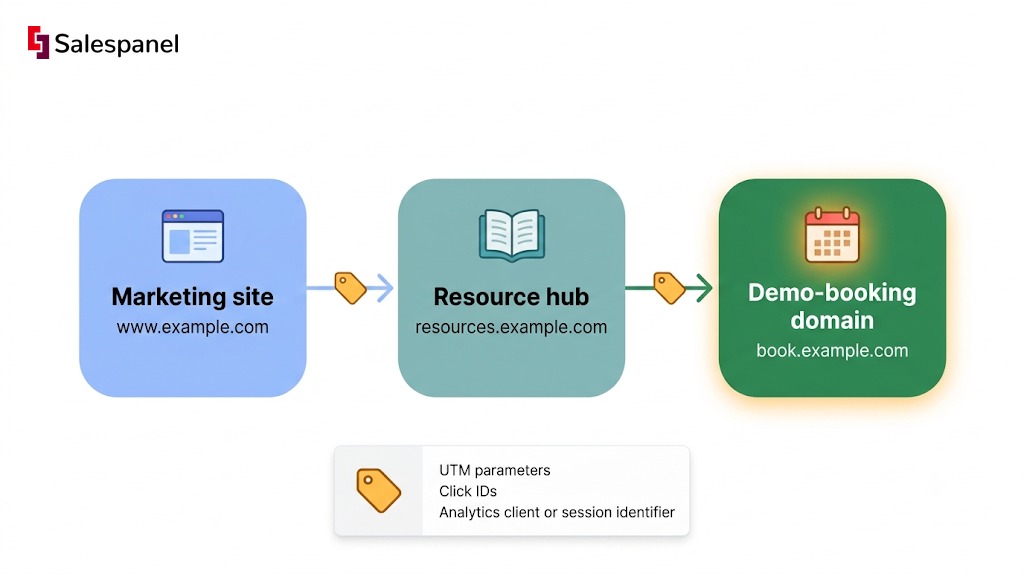
The situation is familiar if you run a B2B site. A prospect lands on www.example.com from a paid search ad, reads two posts, moves to resources.example.com to grab a report, and books a call three days later on book.example.com or inside app.example.com. Three domains. One buying decision. Without a deliberate setup, your analytics tool treats that as three unrelated sessions, and the demo gets credited to “direct / none” instead of the campaign that paid for it.
The process has five parts, and this guide follows them in order:
- Understand what cross website tracking actually means technically and legally.
- Map the journey and decide which identifiers must survive each hop.
- Choose a privacy-safe architecture before touching a tag.
- Configure cross-domain measurement in one analytics system.
- Test it like a buyer would move through it, then monitor it.
A scope note before we start. This guide covers domains your organization owns or controls. Buying third-party behavioral data, or following people across unrelated publisher sites, is a materially different activity with different browser constraints and different legal exposure, and we are not covering it here.
Why the distinction matters more for B2B than for ecommerce: a single evaluation often spans a marketing site, a documentation subdomain, a community forum, a trial app, and a scheduling tool, sometimes with four or five people from the same buyer committee touching different properties. Split that into fragments and you lose both the source attribution and the shape of the evaluation. For broader context on visitor-level measurement, see our B2B website visitor tracking guide.
Google’s own cross-domain measurement documentation is the reference point for the configuration side, and we will come back to it in Step 4.
Step 1: Understand What Cross Website Tracking Means Before Configuring Anything
Cross website tracking connects a person’s activity across separate websites using a shared signal: a cookie, an identifier passed in a link, or an authenticated account. It is legitimate when the sites are owned by one organization and the measurement is disclosed. Where privacy laws apply, it also requires transparency and a lawful basis.
The terminology is used loosely in the wild, so it helps to fix the vocabulary first. “Cross website tracking” is the broader, user-facing phrase; it is what Apple puts in a Safari settings menu and what a prospect means when they ask whether you are following them around. “Cross domain tracking” is the narrower implementation term analytics vendors use for connecting measurement between separate registrable domains, such as company.com and company-events.com. In practice, marketers search for one and configure the other.
Now the technical constraint that makes any of this necessary. Browsers isolate storage by origin. A cookie set on example.com is simply not readable by example.io — not because of a privacy setting, but because of the same-origin model that has governed browser storage for decades. The MDN same-origin policy documentation is worth ten minutes if you have never read it, because most cross-domain bugs make immediate sense once you understand the boundary.
Given that constraint, three identity patterns are available to you:
- First-party analytics identifiers passed between owned domains. The analytics client ID travels in a link parameter, and the destination domain adopts it instead of minting a new one.
- Authenticated user IDs. When a customer logs into your product, your learning portal, or your community, you already know who they are and no browser trickery is involved.
- Email or form identifiers captured after consent and tied to a CRM record, which is how most B2B teams stitch anonymous pre-conversion browsing to a known contact.
The privacy boundary sits outside those three. Third-party cookies and device fingerprinting attempt to recognize the same browser across sites that have no relationship, and they carry a different class of risk: browser vendors actively suppress them, and regulators treat them as a distinct category. Building your measurement on them in 2026 means building on something that is being removed from under you.
Cross-domain measurement vs. cross-site tracking
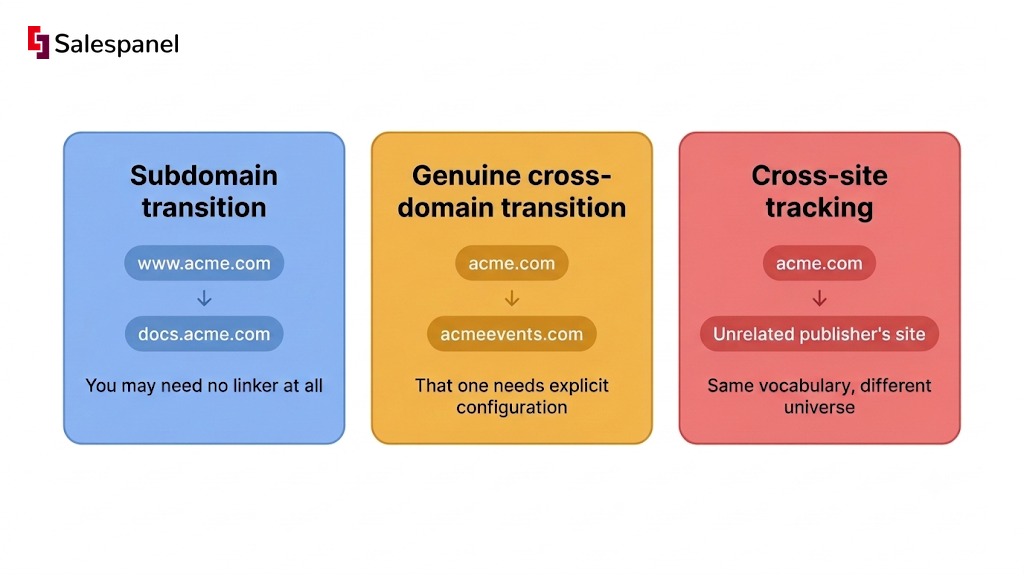
“Site” and “domain” get used interchangeably in conversation, but your implementation decisions depend on hostname, subdomain, cookie scope, and whether the properties sit under the same legal entity.
A hop from www.acme.com to docs.acme.com is a subdomain transition. A cookie scoped to .acme.com is already readable at both ends, and you may need no linker at all — only correct cookie domain configuration and a check that referral exclusions are set.
A hop from acme.com to acmeevents.com is a genuine cross-domain transition. Separate registrable domains, separate cookie jars, separate everything. That one needs explicit configuration.
And a hop from acme.com to an unrelated publisher’s site is cross-site tracking in the sense regulators and browser vendors mean it. Same vocabulary, different universe.
Step 2: Map the Buyer Journey and Decide What Must Persist
Cross website tracking works when the journey, the identifier, and the success event are defined on paper before any code is placed. Teams that skip this step end up debugging link decoration on a page that was never part of the conversion path to begin with.
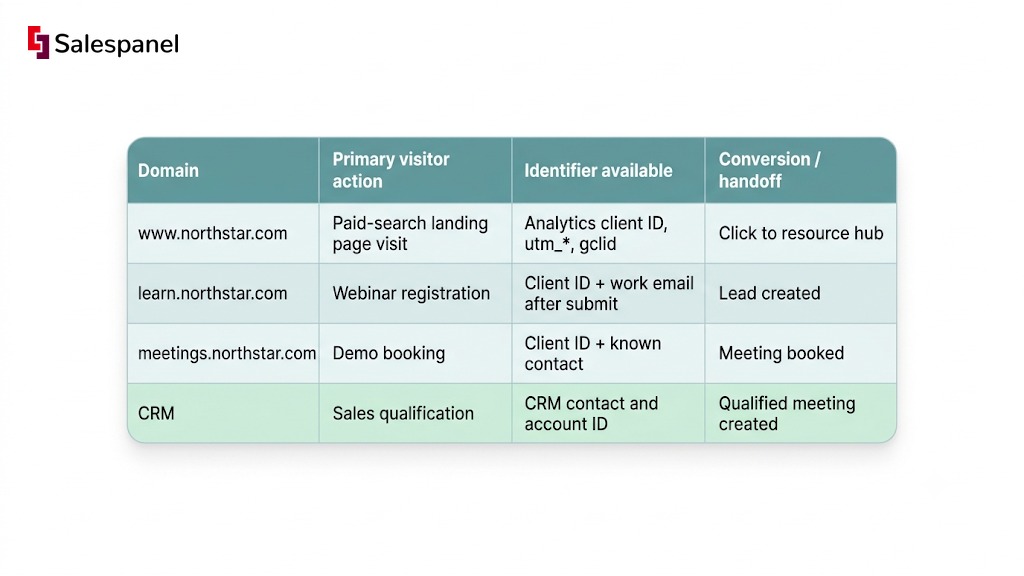
Build a one-page tracking map with four columns: domain or subdomain, the primary visitor action there, the identifier available at that point, and the conversion or handoff event. Keep it to one page. If it needs two, your journey probably includes properties that do not belong in the same reporting view.
A worked example for a fictional vendor, Northstar:
| Domain | Primary visitor action | Identifier available | Conversion / handoff |
|---|---|---|---|
www.northstar.com | Paid-search landing page visit | Analytics client ID, utm_*, gclid | Click to resource hub |
learn.northstar.com | Webinar registration | Client ID + work email after submit | Lead created |
meetings.northstar.com | Demo booking | Client ID + known contact | Meeting booked |
| CRM | Sales qualification | CRM contact and account ID | Qualified meeting created |
What typically needs to persist across those hops: UTM parameters (utm_source, utm_medium, utm_campaign), click IDs where paid media is involved such as gclid or msclkid, and the analytics client or session identifier. A known lead or account identifier joins the chain only after the visitor hands it over or signs in — never before.
Choose the minimum viable identity key
Start with the weakest identifier that answers your question. For most teams that means anonymous first-party analytics IDs plus campaign parameters, and nothing beyond. You can report source, journey shape, and conversion counts with exactly that.
Add an authenticated user ID when, and only when, the visitor logs in or submits a form, and your privacy notice covers the use you intend. That is the condition, not a formality.
One warning worth repeating because it still shows up in B2B stacks: IP address alone is not a reliable individual identifier. It can represent an office, a VPN exit node, a mobile carrier NAT pool, or a coworking floor shared by forty companies. IP is useful as a probabilistic account signal and useless as proof that a specific person visited.
Document domain ownership and vendors
List every party that receives data along the journey: analytics, tag manager, CRM, scheduling tool, form provider, chat widget, ad platform, and any documentation or community host. Most teams discover two or three they had forgotten about.
Then confirm that each domain runs the same consent model and carries compatible privacy disclosures. If learn.northstar.com is a hosted platform with its own cookie banner and its own vendor list, you do not have one consent state across the journey — you have two, and they will disagree.
See our UTM tracking guide for B2B campaigns for naming conventions that survive this kind of multi-domain handoff.
Step 3: Choose a Privacy-Safe Tracking Architecture
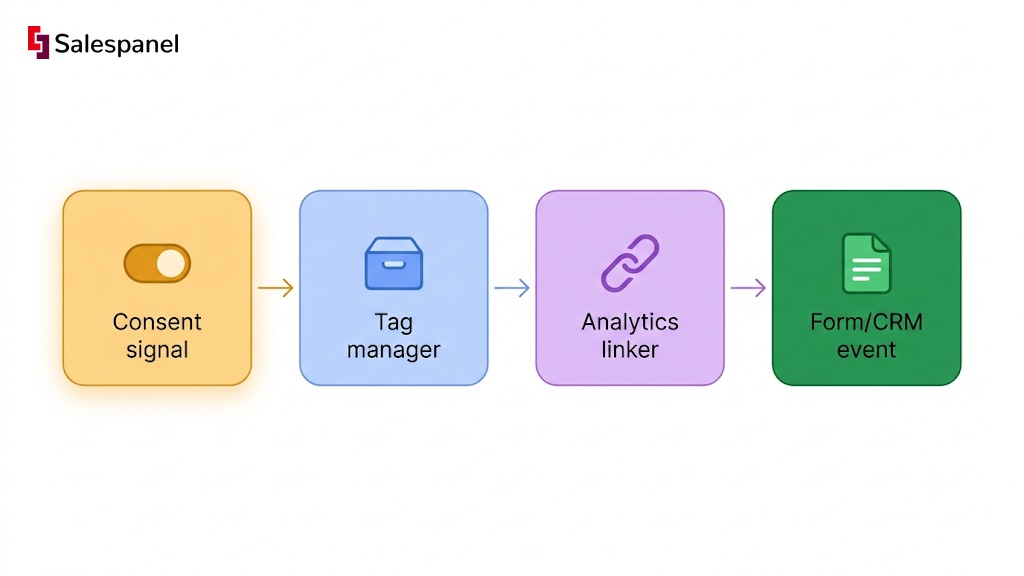
The safest default: first-party measurement on owned domains, only the necessary identifiers passed in links, and non-essential tags fired only after the required consent signal arrives. Everything else in this step is a variation on that default.
The decision framework is short:
- Operate properties under one registrable domain where that is practical.
- Use analytics cross-domain linking when separate owned domains must stay separate.
- Use authenticated IDs for product-to-marketing measurement when users log in.
- Do not try to recreate cross-site identity through fingerprinting, hidden iframes, or CNAME workarounds dressed up as first-party.
Option A: Use one parent domain and subdomains where practical
If you are planning a new resource hub or a new app surface, resources.example.com is operationally simpler than example-resources.com. One registrable domain means one cookie scope, no linker parameters to debug, and far fewer referral-exclusion surprises.
The caveats are real though. Cookie configuration still has to be correct, and your security team may object to a shared cookie domain between a marketing site and an authenticated app, which is a legitimate concern. Consolidating domains also removes none of your consent or disclosure obligations. It simplifies plumbing, not compliance.
Option B: Use analytics cross-domain linking for separate owned domains
When separate domains are unavoidable — an acquired brand, a standalone event site, a vendor-hosted booking page — analytics cross-domain linking is the mechanism. At a high level, the analytics library decorates eligible outbound links with a short-lived identifier, and the destination domain reads that identifier instead of creating a new visitor.
Use your vendor’s current official documentation for the actual configuration. Parameter names, UI locations, and default behaviors change between releases, and a copied snippet from a 2021 blog post is the single most common source of silently broken setups.
Option C: Connect known leads through CRM and form events
Once a visitor submits a work email, you can associate their earlier anonymous activity with a CRM contact — provided your consent notice and data model permit that association. This is the join that makes B2B attribution useful, because it links browsing behavior to pipeline rather than to pageviews.
Keep contact-level identity and account-level intelligence separate in your reporting language. Contact-level means a person identified themselves. Account-level means a company was inferred, usually from IP or reverse-DNS matching, and inference is probabilistic. Telling a sales rep “someone at Siemens viewed pricing” is defensible. Telling them “Anna from Siemens viewed pricing” when Anna never identified herself is not.
Consent and legal checks before launch
Whether a given cross-site setup is lawful depends on jurisdiction, purpose, the data collected, the consent requirements that apply, and the roles your vendors play. There is no universal toggle that makes it fine.
Work from official guidance for the markets you actually serve: the UK ICO guidance on storage and access technologies, EU supervisory authority guidance for ePrivacy and GDPR, and the applicable US state privacy statutes if you sell into California, Colorado, Virginia, Texas, or the growing list behind them.
A practical pre-launch checklist:
- Cookie banner categories updated to reflect what cross-domain linking actually does.
- Privacy notice updated with the domains and purposes involved.
- Tag inventory refreshed, with an owner per tag.
- Data processing agreements in place with every vendor on the list from Step 2.
- Retention periods set and documented.
- Opt-out workflow tested end to end, including on the secondary domains.
Step 4: Configure Cross Domain Tracking in Your Analytics Stack
Configure cross-domain measurement in one system first. Validate it. Only then add CRM, advertising, or visitor-intelligence destinations. Teams that wire everything simultaneously cannot tell which layer broke when the numbers look wrong, and the numbers will look wrong at least once.
We will frame the steps around Google Analytics 4 because it is the most widely deployed option, but the concepts transfer directly to Salespanel, Adobe Analytics, Matomo, Plausible, and anything else with domain-linking support. The vocabulary changes; the logic does not.
1. Standardize your tracking configuration
Domains that belong in one reporting journey must sit in the same analytics property or measurement plan. Two properties means two sets of users, permanently.
Confirm the base tag fires exactly once per page. Duplicate containers are endemic in B2B sites that have survived two website redesigns, and they inflate everything downstream.
Keep a naming sheet for domains, conversion events, and form IDs. It sounds bureaucratic until the quarter someone renames a form and the conversion count drops 40% with no other explanation.
2. Add eligible domains to the cross-domain configuration
Add only owned or formally approved domains to the analytics cross-domain setting. The linker should decorate links to listed destinations and nowhere else — indiscriminate decoration pushes identifiers into URLs that end up in third-party server logs you do not control.
Then test more than your header navigation. Links injected by JavaScript, booking widgets, and single-page application routers often bypass the linker entirely because they never render as a standard anchor element at page load. Those are usually the exact links sitting on the conversion path.
3. Preserve campaign data without duplicating attribution
UTMs, click IDs, and linker parameters can coexist on one URL without conflict. The failure mode is elsewhere: redirect services, URL shorteners, and form tools that strip query strings on the way through. A 301 that drops everything after the question mark will quietly erase your campaign data between the ad click and the landing page.
Decide which system is the source of truth for first-touch, last-touch, and pipeline attribution before you report any results. Analytics and CRM will disagree. Deciding which one wins ahead of time turns a credibility problem into a methodology footnote. Our marketing attribution guide covers how to reconcile the two.
4. Connect form, meeting, and CRM events
Capture each conversion event on the domain where it actually occurs, not on a redirect target. Pass campaign values into hidden form fields only when those values are validated server-side and the practice is disclosed in your notice.
Send a stable event ID with every conversion. Thank-you pages get refreshed, bookmarked, and reloaded by people checking whether their meeting was really booked, and without a deduplication key each reload becomes a new CRM record.
5. Add Salespanel only where visitor-to-revenue context is needed
If your question is “how many sessions converted,” analytics alone answers it and you can stop here. If the question is “which accounts are in an active evaluation across our marketing site, docs, and booking page, and should a rep act on it today,” you need a layer that joins tracked engagement to lead and account signals.
That is where a tool like Salespanel fits — as an optional layer, not a replacement for your analytics configuration. Its deep tracking goes further than session stitching: it ties every page view, form fill, and return visit back to a named lead and account, then carries that identity across your domains so the same person is recognized whether they land on the pricing page, the docs subdomain, or the booking page. That is the practical difference between cross website tracking for reporting and cross website tracking for selling. If you do add it, validate that Salespanel events, form mappings, and CRM fields use the same campaign taxonomy and the same consent rules as your analytics setup, because two taxonomies produce two realities.
The operational outcome is what matters: sales and RevOps review one coherent journey instead of four domain-level fragments that nobody can reconcile in a pipeline review. See how to score website visitors for B2B sales follow-up for the scoring side of that.
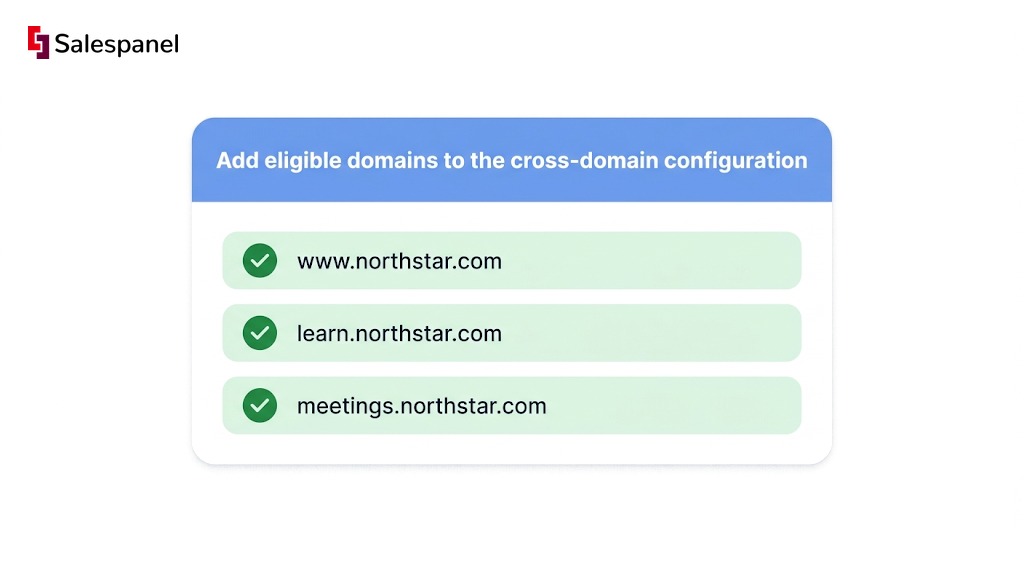
Use the official GA4 cross-domain measurement instructions for the current UI path.
Step 5: Test the Setup Like a Buyer, Not Like an Admin
A cross-domain configuration is not finished until a clean-browser test produces one continuous journey, preserved attribution, and exactly one recorded conversion. Admins test the link they just configured. Buyers wander, hit redirects, and bookmark thank-you pages, which is why the test protocol has to mimic them.
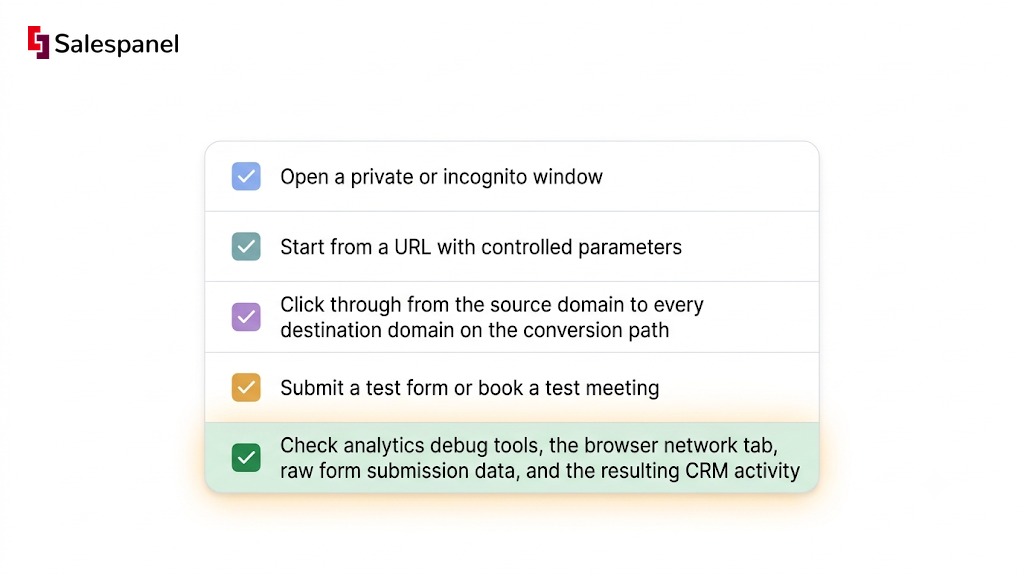
The repeatable protocol:
- Open a private or incognito window. No extensions, no existing cookies.
- Start from a URL with controlled parameters, for example
?utm_source=test&utm_medium=qa&utm_campaign=cross_domain_2026. - Click through from the source domain to every destination domain on the conversion path.
- Submit a test form or book a test meeting.
- Check analytics debug tools, the browser network tab, raw form submission data, and the resulting CRM activity.
Verify the handoff in the browser
Watch the address bar at each transition. Approved destination links should carry the analytics linker parameter; unapproved ones should not.
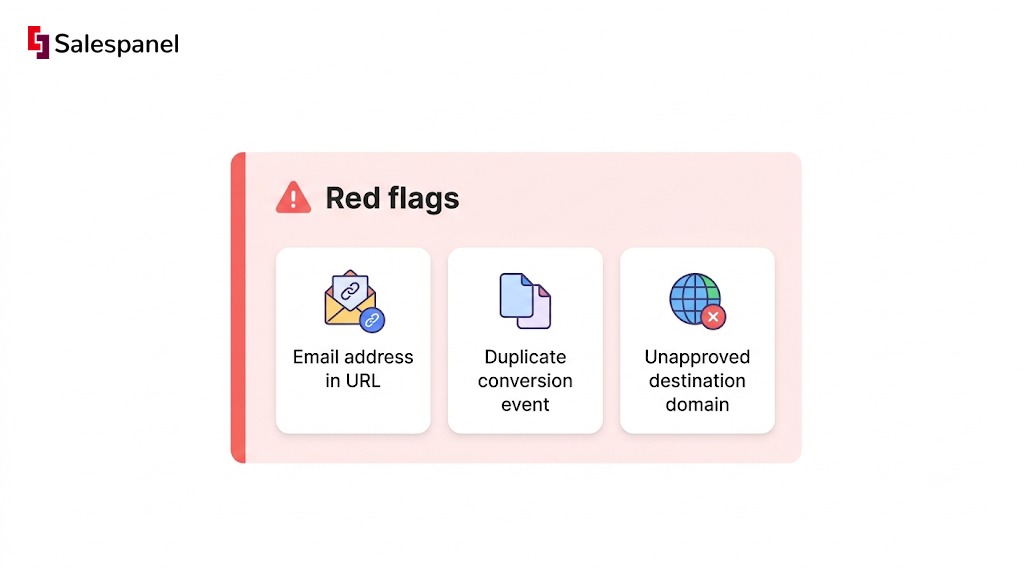
Inspect those URLs for anything sensitive. No email address, no full name, no CRM record ID should ever appear in a query string. If one does, stop and fix it before continuing, because it is already in your server logs.
Then walk the redirect chains — scheduling tools, payment pages, webinar platforms, document hosts. Each hop is a place where parameters quietly disappear, and the browser network panel will show you exactly which one did it.
Verify reporting after processing
Analytics processing lags, so this part happens later. Check whether your test shows up as one user and one journey under the tool’s own reporting model. Compare source/medium and campaign values before and after each domain transition — a silent switch to “referral / meetings.northstar.com” means the linker did not fire.
Confirm the conversion counted once. Not once per domain. Not once per page reload.
Test consent states separately
Run the entire journey twice: once after accepting analytics cookies, once after rejecting everything non-essential. Most teams test only the accept path, which is the path a minority of EU visitors actually take.
In the reject run, confirm that core functionality still works. Form submission, account login, and meeting booking must not depend on non-essential tags. If rejecting cookies breaks your demo booking flow, you have a conversion problem and a compliance problem simultaneously.
Common Cross Website Tracking Mistakes to Watch For
Most broken cross-domain reports trace back to four causes: domain mismatches, redirect behavior, inconsistent consent handling, or treating anonymous activity as confirmed person-level identity. The specific symptoms vary; the root causes rarely do.
Adding domains to analytics but forgetting the actual links
The configuration screen lists the domain, so the setup looks complete. Meanwhile the “Book a demo” button is rendered by a scheduling widget, a React component, or a tag manager custom HTML tag, and the linker never touches it.
Fix: test every link on the conversion path, not just header and footer navigation.
Losing UTMs at redirects or form handoffs
A redirect from www.example.com/demo to a third-party booking page frequently strips the query string, and the booking vendor records the visit as direct traffic.
Fix: use a documented parameter pass-through method for each vendor, then verify it with the controlled QA URL from Step 5.
Counting one conversion multiple times
Thank-you page reloads, duplicate tag containers, and client-side plus server-side events firing without deduplication all produce the same symptom: more conversions in analytics than contacts in the CRM.
Fix: assign stable event IDs and reconcile browser events against CRM records weekly for the first month.
Sending personal data in URLs
Query strings travel further than people expect. They land in browser history, server access logs, analytics systems, and referrer headers sent to other domains.
Fix: never pass email addresses, names, or CRM IDs through UTM fields or linker parameters. Use a hashed or opaque identifier if a join key is genuinely required.
Assuming “anonymous” means exempt from privacy obligations
Online identifiers can still count as personal data under GDPR and similar regimes when they single out or relate to an individual, even without a name attached. A persistent analytics client ID tied to a journey across three owned domains is not obviously anonymous.
Fix: get legal review for the regions you serve, and keep the tag and vendor inventory current rather than rebuilding it under deadline pressure.
What Cross-Website Tracking Means on iPhone and How to Turn It Off
On iPhone, the cross-website tracking setting controls whether Safari and apps may use certain methods that recognize your browsing activity across different websites. Turning protections on generally limits that recognition. It does not erase existing accounts, delete server-side logs, or stop every form of advertising measurement.
Menu wording and placement shift between iOS versions, browsers, and individual apps, so follow the labels shown on your own device rather than a screenshot from an older release.
Is it better to turn cross-website tracking on or off?
Most privacy-focused users are better served by keeping cross-site tracking protections enabled. The tradeoff is occasional friction: some embedded content, single sign-on flows, and personalized ad experiences behave differently or require extra steps. No browser setting guarantees total anonymity, since servers still log requests regardless of the setting.
How to turn off cross-website tracking on iPhone
Cross-site tracking prevention is controlled in Safari’s privacy settings on iPhone, and app-level tracking permissions are controlled separately through App Tracking Transparency. Because exact menu paths change between iOS releases, check Apple’s current Safari privacy documentation and App Tracking Transparency guidance for the version on your device.
Browser controls alone cover only one surface. Combine them with app-level permissions and the advertising preferences inside individual accounts — Google, Meta, LinkedIn — where the more durable profiles usually live.
Is cross-site tracking safe and legal?
Cross-site tracking can be both safe and legal, depending on implementation. Safety depends on who receives the data, which identifiers are used, how well it is secured, and whether users have a real choice. Legality depends on local law, the lawful basis claimed, notices provided, and opt-outs honored. Identical technology can be compliant in one deployment and unlawful in another.
FAQ: Cross Website Tracking
What is cross website tracking?
Cross website tracking means measuring or recognizing a visitor’s activity across multiple websites, typically using cookies, link parameters, login identifiers, or analytics IDs. Businesses commonly apply it across domains they own to preserve campaign attribution across a fragmented journey. Tracking across unrelated third-party sites receives significantly greater browser restriction and privacy-law scrutiny than owned-domain measurement.
Is cross-site tracking legal?
Cross-site tracking can be legal when an organization has an appropriate lawful basis, provides required notices and choices, honors applicable opt-outs, secures the collected data, and limits collection to clearly defined purposes. Requirements differ substantially across jurisdictions, including the EU, UK, and individual US states, so legal review for each market served is necessary rather than optional.
Can Google Analytics track users across domains?
Google Analytics supports cross-domain measurement when an organization adds approved domains to its configuration and enables link decoration, allowing the destination domain to recognize the same analytics identifier. Configuration alone does not guarantee clean attribution. Teams must separately test redirect chains, consent behavior, JavaScript-injected links, and conversion event deduplication before trusting the resulting reports.
Behavior after cookie rejection depends on the consent configuration, the browser, the analytics tool, and the jurisdiction involved. Some tools offer limited consent-mode modeling; others stop collecting entirely. Organizations should not treat rejected consent as a reason to bypass user choices, and should instead test what measurement their approved configuration actually permits.
What should B2B teams track across domains?
B2B teams should track the minimum data needed to connect campaign source, content engagement, form completion, meeting booking, and qualified pipeline events across owned domains. Avoid placing personal data such as email addresses or CRM IDs in URLs. Keep known contact activity clearly separated from probabilistic account-level identification in both reporting and sales handoffs.
Next Step: Turn the Tracking Map Into a Repeatable QA Process
Once the first journey works end to end, the durable asset is not the configuration itself. It is the documented tracking map and the release checklist that every new domain, campaign, form, and vendor has to pass before it ships. Configurations decay. Checklists survive redesigns.
The execution sequence to document: map the journey, minimize the identifiers, configure consented domain linking, test with controlled UTMs in a clean browser, then monitor for attribution breaks.
Run a quarterly audit against that map. Approved domains, tracking vendors, consent categories, redirect chains, duplicate conversion events — five checks, an afternoon of work, and it catches the vendor someone added in month two without telling anyone.
Keep the same journey map in circulation across marketing, RevOps, web development, and sales handoff conversations. When all four teams argue from one document, the argument is about priorities instead of about whose numbers are correct.
If you need visitor-to-lead context across a multi-domain B2B journey — which accounts are engaging, which known contacts are back on the pricing page, and who on the sales side should act — explore Salespanel’s visitor tracking and B2B lead scoring framework resources.
Sell more, understand your customers’ journey for free!
Sales and Marketing teams spend millions of dollars to bring visitors to your website. But do you track your customer’s journey? Do you know who buys and why?
Around 8% of your website traffic will sign up on your lead forms. What happens to the other 92% of your traffic? Can you identify your visiting accounts? Can you engage and retarget your qualified visitors even if they are not identified?