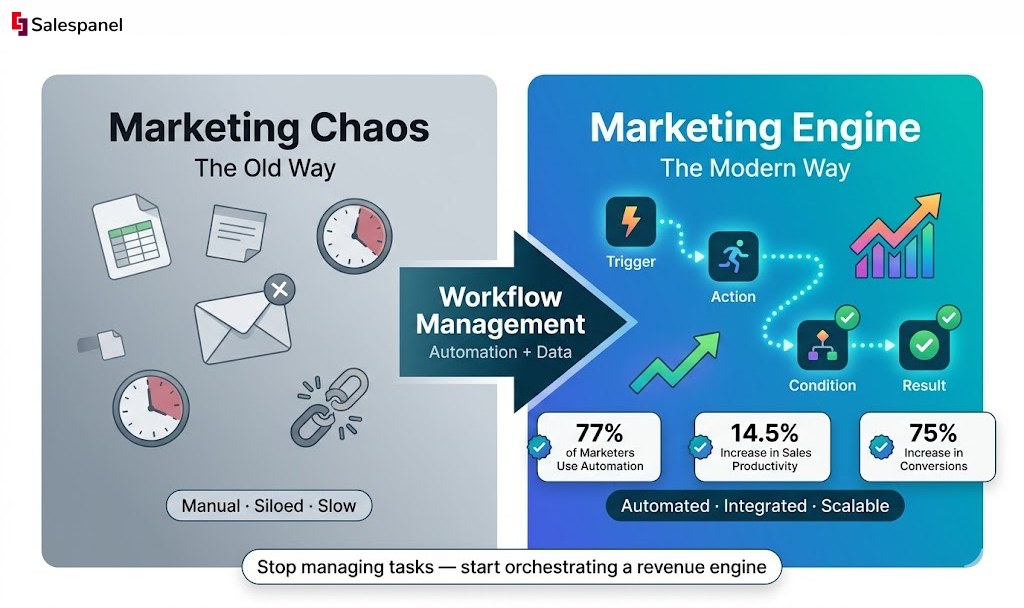
Marketing workflow management has evolved from a simple organizational concept into the central nervous system of modern growth strategy. A decade ago, marketing departments ran on creative sprints, gut feelings, and a patchwork of spreadsheets. Today, the landscape is radically different. We’ve shifted from managing isolated tasks to orchestrating a sophisticated, data-driven system designed for one core purpose: turning anonymous visitors into measurable revenue. According to recent data, 77% of marketing professionals now leverage automation, leading to a documented 14.5% increase in sales productivity and a 12.2% reduction in overhead. This article is your guide to navigating this evolution, providing a technical framework and practical examples to build a high-performance marketing engine that doesn’t just manage tasks but actively drives business growth.
From Creative Chaos to a Strategic System
Marketing has undergone a fundamental operational transformation. Not too long ago, most marketing departments were a whirlwind of creative sprints and last-minute campaign pushes. We operated on instinct and a messy collection of disconnected spreadsheets. Success was measured in abstract terms like “brand awareness” or executing a large-scale event, but drawing a direct line from a specific action to revenue was a persistent challenge.
That manual, often chaotic, methodology is no longer viable. Today’s market demands speed, hyper-personalized experiences, and provable ROI. The modern marketing team must operate less like an art studio and more like a high-performance factory, producing predictable, high-quality results consistently. This commitment to operational excellence is the very heart of marketing workflow management.
The Great Divide: Past vs. Present
The gap between old-school marketing and today’s operations isn’t just about adopting new software; it’s a completely different operational philosophy. It’s the shift from simply managing individual projects to orchestrating an entire system where every component works in sync. Making this leap is essential for any team that wants to scale its efforts without being crushed by complexity.
Let’s examine the technical evolution of marketing operations. This table breaks down the shift from the traditional, often reactive methods to the structured, proactive approach that defines modern marketing workflow management.
The Evolution of Marketing Operations
| Aspect | Traditional Marketing (The Past) | Modern Workflow Management (The Present) |
|---|---|---|
| Process | Relied on manual handoffs, emails, and siloed communication. Information was frequently lost, and delays were common. | Automates handoffs and centralizes communication, ensuring tasks flow seamlessly from one stage to the next with clear audit trails. |
| Data Usage | Data was reviewed post-campaign, often weeks after conclusion. Learnings were slow and retrospective. | Real-time data informs decisions mid-campaign, allowing for immediate adjustments and on-the-fly optimization. |
| Accountability | Without a clear system, ownership was ambiguous. It was difficult to determine who was responsible for specific outcomes. | Structured workflows assign clear ownership at every step, from asset creation to approval and final performance analysis. |
This isn’t just a trend; it’s a necessary response to market pressures. To fully grasp this, a deep dive into Mastering Marketing Workflow Management can offer invaluable strategic frameworks.
Why Workflow Management is Non-Negotiable
Adopting a systematic approach has become a key differentiator for successful marketing teams. The data overwhelmingly supports this shift, showing that workflow automation is now a critical driver of efficiency and growth. Recent statistics reveal that 77% of marketing professionals now use automation to simplify their tasks.
This widespread adoption has led to a documented 14.5% increase in productivity and a 12.2% reduction in marketing spending. More importantly, businesses that implement these structured systems report that automation increases conversions by up to 75%.
These numbers paint a very clear picture: companies that systematize their operations aren’t just more efficient; they are fundamentally better at turning prospects into customers. For a closer look at these findings, you can explore more about workflow automation trends. In today’s competitive landscape, mastering marketing workflow management isn’t just an advantage—it’s a requirement for survival and sustainable growth.
The Building Blocks of Any Marketing Workflow
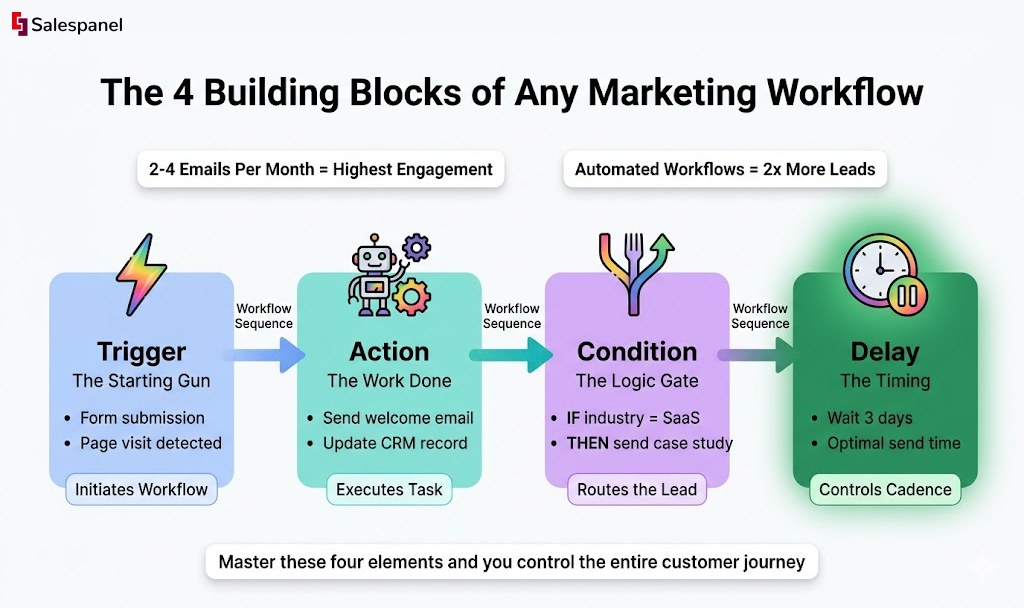
To technically implement marketing workflow management, one must understand its core anatomy. The most effective way to conceptualize any automated process is as a sophisticated digital assembly line. Each component has a specific function, operating in sequence to convert a raw input (like a new website visitor) into a finished product (a qualified lead).
This assembly line is constructed from four fundamental building blocks: Triggers, Actions, Conditions, and Delays. Mastering these elements is the key to transforming a jumble of disconnected marketing tasks into a cohesive, automated system. This represents the technical shift from chaotic manual labor to a structured, systematic approach where processes flow logically and efficiently.
The image above illustrates the journey from operational chaos to a system where every component works in perfect concert. This is the central theme and ultimate goal of effective marketing workflow management.
Triggers: The Starting Gun
A trigger is the event that initiates a workflow. It functions as the “start” button on the assembly line, reacting instantly when a user performs a specific action or a data point changes. Without a trigger, the workflow remains dormant. Triggers form the reactive core of automation, ensuring your marketing apparatus responds precisely when a customer demonstrates intent.
Practical Example: A prospect completes and submits your “Download Our Ebook” form. That form submission event is the trigger that initiates a lead nurturing sequence. The system listens for this specific event to begin the process.
Actions: The Work Being Done
Once a workflow is triggered, an action is the specific task the system executes. These are the robotic arms on the assembly line, performing jobs like sending an email, updating a CRM record, or assigning a task to a sales representative. Every workflow is architected around one or more actions designed to advance a lead or customer through the funnel.
Practical Example: Immediately following the ebook download trigger, the first action is an API call to an email service provider to send a welcome email containing the resource link. The subsequent action might be to update a custom field for that contact in a tool like Salespanel, tagging them as “Content Downloader.”
Conditions: The Intelligent Forks in the Road
Conditions are the logic gates that introduce intelligence into your workflows. They act as quality control checkpoints, evaluating each lead against predefined criteria and routing them down specific paths. This is where true personalization is executed. Instead of a monolithic approach, conditions enable dynamic, responsive journeys that adapt based on lead attributes and behavior.
Practical Example: After the welcome email is dispatched, the workflow encounters a conditional statement: “IF lead.industry == ‘Software’, THEN…” If the condition is met, the lead is sent a case study relevant to SaaS companies. If false, they are routed down a different branch to receive a more general industry report. This branching logic ensures content relevance.
Delays: The Pacing and Timing
Finally, delays (or wait steps) regulate the timing of your workflow. They are the programmed pauses on the assembly line that prevent message saturation. Strategically implemented delays ensure your communications feel natural and are paced for maximum impact, simulating a human-like cadence rather than an aggressive automated barrage.
Delays are crucial for nurturing relationships over time. A study on email marketing found that sending two to four emails a month achieves the highest open and click-through rates, underscoring the technical importance of proper pacing in automation.
Practical Example: After the industry-specific content is delivered, a delay is configured for three days. This provides the lead a reasonable interval to consume the content before the next action is triggered—an email inviting them to a related webinar.
Designing Your First High-Impact Workflow
Theoretical knowledge is the foundation, but practical application is where value is created. This section moves workflow management from concept to a tangible driver of business results. Building your first workflow can seem daunting, so we will focus on one of the most critical processes for any B2B company: lead nurturing.
Lead nurturing functions as the automated bridge between a prospect’s initial curiosity and their readiness for a sales conversation. We will deconstruct the design of a high-impact lead nurturing workflow from the ground up, translating abstract ideas into a functional, automated system that converts passive interest into qualified sales opportunities.
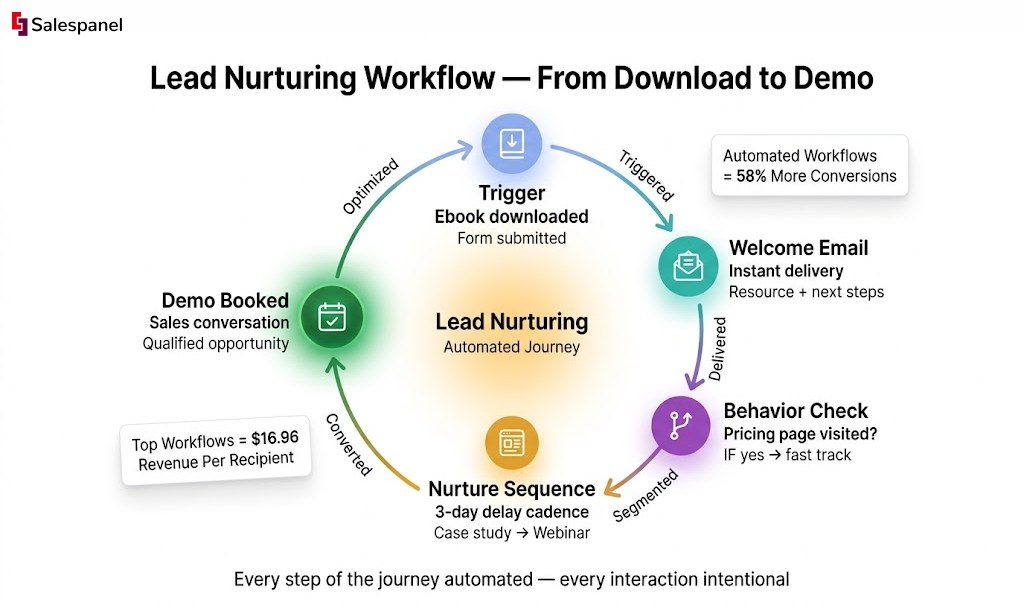
The financial incentive for mastering this is significant. The marketing automation market is projected to reach $13.97 billion by 2025. Companies with automated email workflows generate twice as many leads and see a 58% increase in conversions compared to those using manual methods. Critically, the top 10% of these workflows generate $16.96 in revenue per recipient. The potential for ROI is enormous with proper execution. You can find more data on marketing automation’s financial impact here.
Stage 1: Define the Primary Objective
Every robust workflow begins with a clear, measurable goal. Without a defined objective, automation becomes an activity without purpose, making it impossible to evaluate success. The goal must be a concrete business outcome, not a vague marketing activity.
For our lead nurturing example, the primary objective is specific and quantifiable: to drive a qualified lead to book a product demonstration. This goal is directly tied to the sales pipeline and provides a clear North Star for the entire workflow architecture.
Stage 2: Map the Customer Journey and Identify Touchpoints
Next, you must adopt the prospect’s perspective. What is the logical sequence of questions and information needs they have from the moment they download a resource to when they consider a demo? Mapping this customer journey allows you to identify the precise touchpoints where automated intervention can provide value.
- Awareness Stage: The lead downloads an ebook on a high-level industry problem. They are problem-aware but not yet solution-aware.
- Consideration Stage: The lead is now actively researching solutions. They require case studies, comparison guides, and technical feature deep dives.
- Decision Stage: The lead is evaluating your product specifically. They need pricing information, testimonials, and a clear call-to-action to see the product in action.
Each stage demands distinct content and messaging. A one-size-fits-all approach is a known recipe for failure in sophisticated nurturing campaigns.
Stage 3: Select Automation Triggers and Logic
With the journey mapped, it’s time for technical implementation. The initial trigger is the form submission for the ebook download. From there, we build the workflow’s logic using conditions and delays to create an experience that feels personalized, not robotic.
A core tenet of modern marketing workflow management is reacting to real-time behavior. For instance, using Website visitor tracking from Salespanel allows you to monitor which pages a lead visits after the initial conversion. This behavioral data becomes a powerful secondary trigger.
If a lead visits your pricing page, this is a strong buying signal. This action can trigger a condition in your workflow that automatically re-segments them into a more sales-focused track. Instead of receiving another educational article, they might be immediately sent a direct invitation to schedule a demo.
This type of intelligent routing distinguishes responsive automation from a static, linear sequence. It ensures the right message is delivered at the moment of peak intent, dramatically increasing the probability of conversion. When you architect workflows around these behavioral cues, you create a system that is not just efficient, but also deeply attuned to each customer’s unique journey.
Optimizing Workflows with Advanced Tactics
Deploying foundational workflows is a significant first step, but the true power of marketing workflow management lies in relentless optimization. A functional workflow is merely the baseline; the objective is to refine it into a high-performance engine that drives engagement and revenue. This requires advanced tactics like continuous testing and intelligent personalization.
To move beyond basic automation, you must adopt a mindset of perpetual improvement. Workflows are not “set it and forget it” projects. They are dynamic systems that can always be made more intelligent, efficient, and effective. This means dissecting every component—from an email subject line to the logic of an entire workflow branch—to identify incremental gains that compound over time.
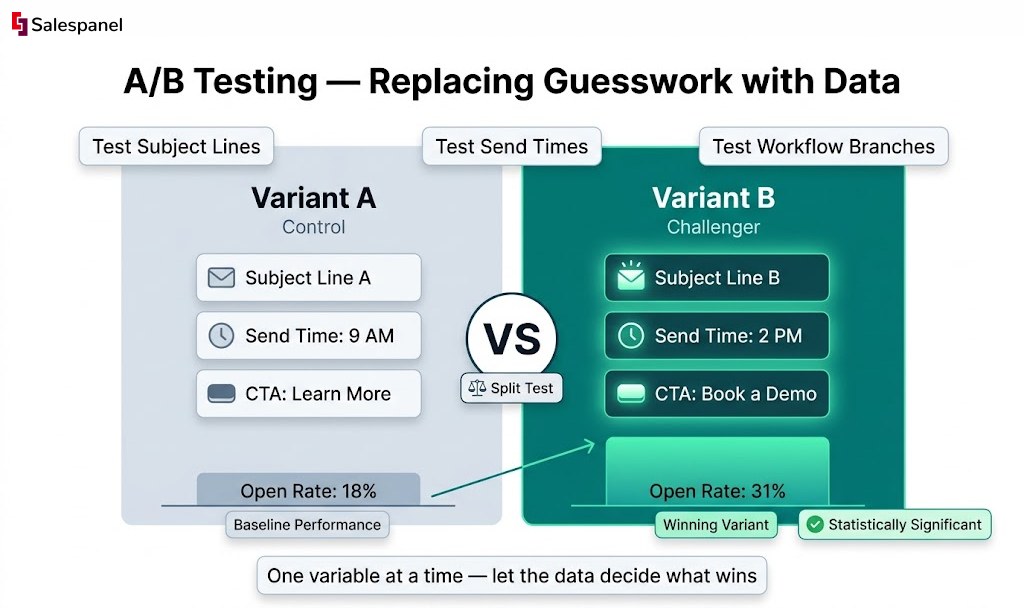
A/B Testing Your Way to Higher Conversions
A/B testing, or split testing, is a core discipline for data-driven optimization. It replaces guesswork with empirical evidence. By testing one variable at a time, you can definitively measure which version performs better and make decisions that directly improve conversion rates.
Your testing protocol should be systematic and cover all key workflow components:
- Email Components: Test subject lines to optimize open rates. Compare call-to-action (CTA) button copy and design to increase click-through rates. Experiment with body copy to improve engagement.
- Send Times and Delays: Timing is a critical variable. Test different send days and times to identify when your audience is most receptive. Analyze the impact of varying delay durations between communications to find the optimal nurturing cadence.
- Workflow Branches: This is where you can test entire strategic paths. For example, if a lead visits your pricing page, does a workflow branch that immediately sends a demo invitation outperform one that sends a customer case study first? Testing these divergent journeys will reveal the most effective conversion path.
Embracing Dynamic Personalization at Scale
While A/B testing optimizes for the group, dynamic personalization optimizes for the individual. This involves leveraging real-time behavioral data to tailor the workflow experience for each lead. It means building a system that adapts on the fly, making every interaction feel contextually relevant and timely.
A robust lead scoring framework is essential for this. By assigning points to leads based on firmographic data and online behaviors (page visits, content downloads, email engagement), you create a quantitative hierarchy of sales-readiness. This score then becomes the primary data input for your dynamic workflows.
Salespanel’s lead scoring framework allows you to automate this qualification process directly within your workflows. This is not about passive data collection; it’s about activating that data instantly.
Consider this practical scenario: a lead has been progressing through a top-of-funnel nurture sequence, accumulating points with each interaction.
- Trigger: The lead, with an existing score of 50, visits your pricing page for the second time. This behavior adds another 25 points to their score.
- Condition: Their total score now reaches 75, the predefined threshold for being “sales-ready.”
- Action: The workflow instantly removes them from the general marketing nurture sequence and adds them to a “Hot Lead” segment.
- Notification: Simultaneously, a real-time notification is sent via API to the assigned sales representative’s communication platform, complete with a link to the lead’s full activity history.
This seamless handoff eliminates manual review cycles and ensures sales engages at the absolute peak of the lead’s interest. By directly connecting lead scoring to workflow actions, you create a tight alignment between marketing efforts and sales outcomes, making the entire revenue process more intelligent. For a deeper look into streamlining these processes, consider Leveraging marketing automation strategies to boost efficiency and free up more time. This strategic integration is a hallmark of mature marketing workflow management.
Building an Integrated Marketing Tech Stack
An automated marketing workflow is only as effective as the data that fuels it. You can architect brilliant, flawless logic, but if your workflows operate on incomplete or siloed information, they will underperform. This is why tool integration is a non-negotiable component—it involves connecting the disparate systems in your marketing tech stack into a single, cohesive data ecosystem.
Without integration, your tools operate as isolated islands of data. Your CRM holds one version of a customer, your email platform another, and your analytics tool a third. This data fragmentation is an operational bottleneck, forcing your team into manual data entry—a process that is not only slow but also highly prone to error. A unified tech stack is the bedrock of effective marketing workflow management.
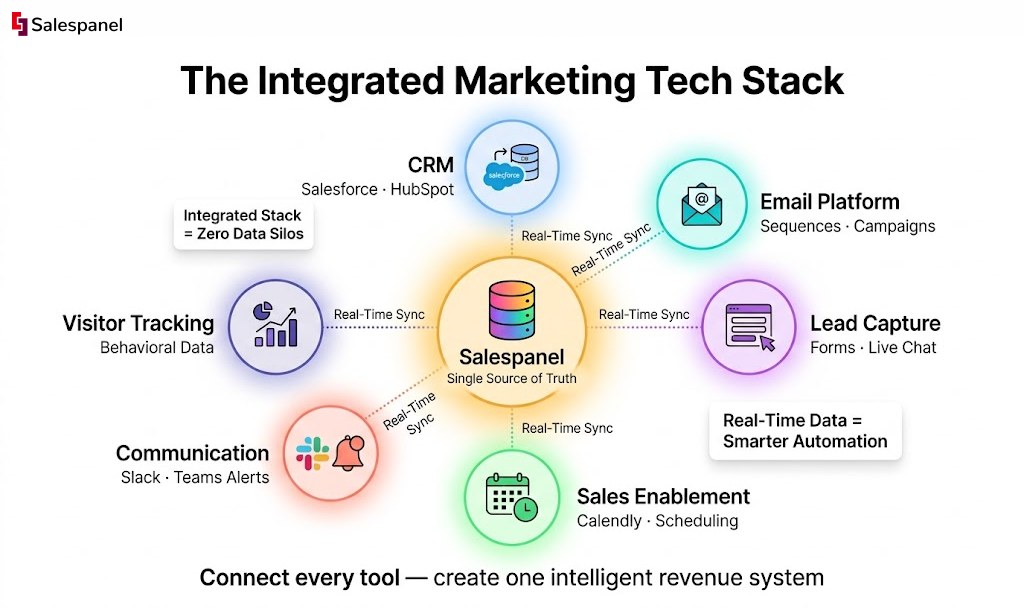
Unifying Your Data Flow
The objective is to create an ecosystem where information flows freely and instantly between your core platforms. When a lead executes a key action on your website, that data event should immediately propagate across your CRM, marketing automation software, and relevant sales tools. This ensures every team member is operating from the same, most up-to-date intelligence.
Technically, this is achieved in two primary ways:
- Native Connectors: These are pre-built integrations provided by software vendors. They are typically easy to configure and are designed to sync specific data objects between two systems, such as connecting a marketing platform directly to a CRM.
- APIs (Application Programming Interfaces): APIs offer a more powerful and flexible method for integration. They provide a set of rules that allow different applications to communicate, enabling custom integrations that can handle complex data transformations and workflows beyond the scope of native connectors.
The ultimate goal of an integrated stack is to establish a single source of truth. When every tool reads from and writes to a central data hub, you eliminate inconsistencies and empower your workflows to act on accurate, real-time information.
Essential Marketing Workflow Integrations
Building a connected marketing machine requires several key integrations. Each connection serves a specific purpose, from enriching lead data to automating the sales handoff. Below are the most critical integrations that form the backbone of a modern marketing workflow.
| Integration Type | Connected Systems | Primary Benefit |
|---|---|---|
| CRM Integration | Marketing Automation <-> CRM | Provides a 360-degree view of the customer, ensuring sales has full context on a lead’s marketing engagement history. |
| Email Marketing | Email Platform <-> CRM/Salespanel | Tracks how leads interact with email campaigns, allowing for behavior-based segmentation and scoring in real time. |
| Lead Capture | Web Forms/Live Chat <-> Salespanel | Instantly captures new leads and their initial intent signals, triggering immediate nurturing or qualification workflows. |
| Sales Enablement | Scheduling Tools (e.g., Calendly) <-> CRM | Enriches meeting data with lead activity history, giving sales reps crucial context before a call begins. |
| Communication | Workflow Tools <-> Slack/Teams | Delivers real-time notifications to sales or marketing when a lead takes a high-value action, such as visiting the pricing page. |
These integrations work in concert to create a closed-loop system where data doesn’t just reside in a single platform—it actively drives the next best action, making the entire process more intelligent and efficient.
Putting Integration Into Practice
A classic point of friction in any organization is the handoff between marketing and sales. This is where data silos cause the most damage and where effective integration can deliver the most significant impact.
For instance, integrating a tool like Salespanel with your CRM creates a seamless loop where behavioral data fuels intelligent automation. When a lead’s score increases due to their website activity, that change is immediately reflected in the system of record for your sales team. For those looking to fine-tune their outreach, selecting the right email outreach tools is another vital piece of this integrated puzzle.
A Workflow Powered by Integrated Data
Consider this sequence: a high-intent lead visits your pricing page, and their score within Salespanel is updated to reflect this behavior. In a properly integrated stack, a chain reaction is triggered automatically.
- Data Sync: The new lead score is instantly pushed from Salespanel to the contact record in your CRM via a native integration or API call.
- Automated Status Change: A workflow rule within the CRM detects that the lead’s score has crossed the “sales-ready” threshold. It immediately changes the lead’s status from “Marketing Qualified” to “Sales Qualified.”
- Task Creation and Notification: The same workflow assigns a new task to the appropriate account executive: “Follow up with high-intent lead.” Concurrently, a notification is pushed to the sales rep’s Slack channel or email.
This entire sequence executes in seconds without any manual intervention. The sales team receives the most actionable intelligence precisely when it matters, enabling them to engage with promising leads faster and more effectively than ever before. This is the tangible power of a well-integrated marketing tech stack.
Measuring Success and Proving ROI
“If you can’t measure it, you can’t improve it.”
This axiom is the foundation of effective marketing workflow management. It is not sufficient to simply deploy automated systems; you must quantify their performance to justify the investment, identify optimization opportunities, and prove their value to stakeholders.
We must move beyond superficial “vanity metrics” like clicks and open rates. To understand the true business impact of your workflows, you must focus on metrics that connect directly to operational efficiency and revenue generation.
Key Metrics for Workflow Performance
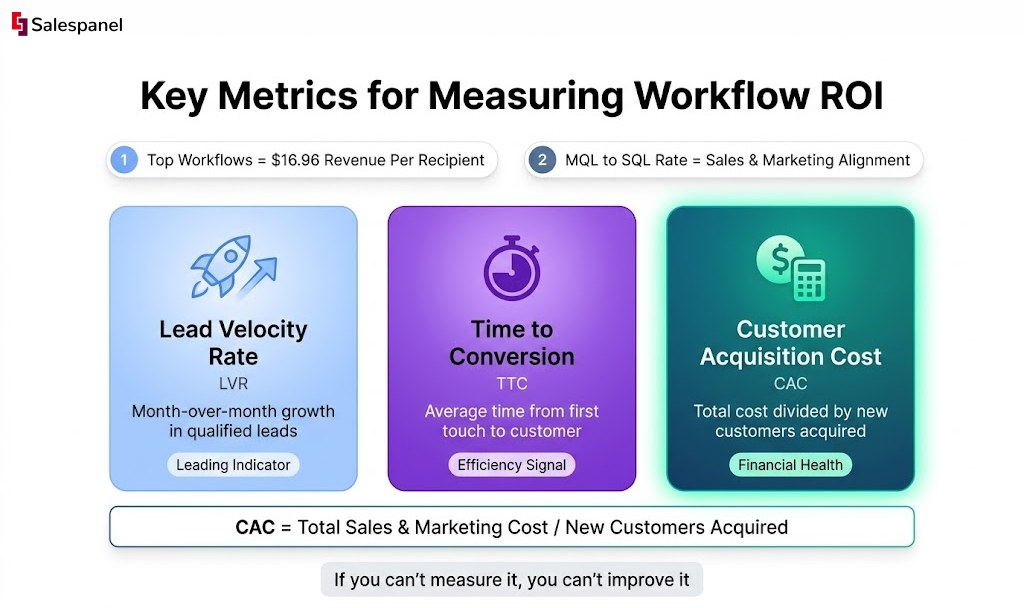
A few key performance indicators (KPIs) provide a clear view into how effectively your workflows are converting interest into revenue. Tracking these metrics reveals the speed, efficiency, and cost-effectiveness of your funnel.
- Lead Velocity Rate (LVR): This measures the month-over-month growth in qualified leads. LVR is a leading indicator of future revenue, as it shows whether your pipeline is expanding or stagnating.
- Time to Conversion: This metric calculates the average time it takes for a lead to move from their initial interaction (e.g., form fill) to a key conversion event (e.g., becoming a customer). A decreasing Time to Conversion indicates increasing workflow efficiency.
- Funnel Conversion Rates (MQL to SQL): This is a critical metric for sales and marketing alignment. It tracks the percentage of Marketing Qualified Leads (MQLs) that are accepted by sales as Sales Qualified Leads (SQLs). A high conversion rate here signifies that marketing is delivering high-quality leads.
Calculating Your Customer Acquisition Cost
Customer Acquisition Cost (CAC) is arguably the most critical metric for proving ROI. It quantifies, in monetary terms, the average cost to acquire a new customer. A well-optimized workflow should directly contribute to reducing this number over time.
The Formula: CAC = (Total Cost of Sales & Marketing) / (Number of New Customers Acquired)
This calculation must include all relevant costs: advertising spend, software subscriptions, team salaries, and contractor fees for a specific period. Monitoring CAC helps determine channel profitability and the overall financial viability of your acquisition strategy.
The Role of Data in Continuous Optimization
Metrics are not just for retrospective reporting; they are the fuel for continuous improvement.
Is your Time to Conversion too long? This signals a need to refine your email nurture sequences or adjust lead scoring thresholds. Is your MQL to SQL conversion rate low? This indicates a need to realign with the sales team on the definition of a “qualified” lead.
This is where having deep, visitor-level analytics becomes a strategic advantage. For example, website visitor tracking from Salespanel can reveal precisely where leads are stalling in the funnel. You can identify underperforming content or points of friction, allowing you to make surgical, data-backed adjustments.
This approach transforms workflow management from a static “set it and forget it” process into a dynamic system that continuously improves and delivers a stronger ROI over time.
Frequently Asked Questions
Even with a solid plan, a few questions always pop up when teams start putting marketing workflows into action. Let’s tackle some of the most common ones to give you a bit more clarity as you get your own processes dialed in.
What Is the First Workflow a Team Should Automate?
For most B2B companies, the biggest win right out of the gate is lead nurturing. Think about it: someone downloads an ebook or fills out a contact form. That’s the moment their interest is at its peak.
Automating the follow-up ensures no opportunity slips through the cracks. It immediately engages those fresh prospects, bridging that critical gap between a marketing touchpoint and a sales-ready conversation.
How Do You Handle Creative Approvals in a Workflow?
Ah, creative approvals. The classic bottleneck. The best way to smooth this out is to build a structured, multi-stage approval process right inside your workflow tool.
- Define Clear Stages: Don’t just have one “approval” step. Break it down into logical phases like “Draft Review,” “Final Design Approval,” and “Ready for Publication.”
- Use Automated Handoffs: When a designer checks off their task, the system should automatically ping the next person in line, whether that’s the copy editor or the marketing manager. No more “Hey, is this ready for me?” emails.
- Centralize Feedback: This is crucial. Make it a rule that all comments and edits happen within the task itself, not scattered across emails or Slack DMs. This creates a single, undeniable source of truth for all feedback.
Can Marketing Workflow Management Help Small Teams?
Absolutely. In fact, you could argue it’s more critical for smaller teams.
When you’re running lean, every hour spent on manual, repetitive work is a massive drain. Workflow automation lets a small team punch above its weight, executing with the consistency of a much larger department. It puts essential tasks like lead follow-up, social media scheduling, and data reporting on autopilot.
This frees up your people to focus on the high-impact strategic work that actually moves the needle, instead of getting buried in administrative busywork.
Ready to stop guessing and start building intelligent, data-driven workflows? Salespanel provides the tracking and analytics foundation you need to understand your customer journey and automate with precision. Explore our resources to learn how to turn website visitors into qualified leads.