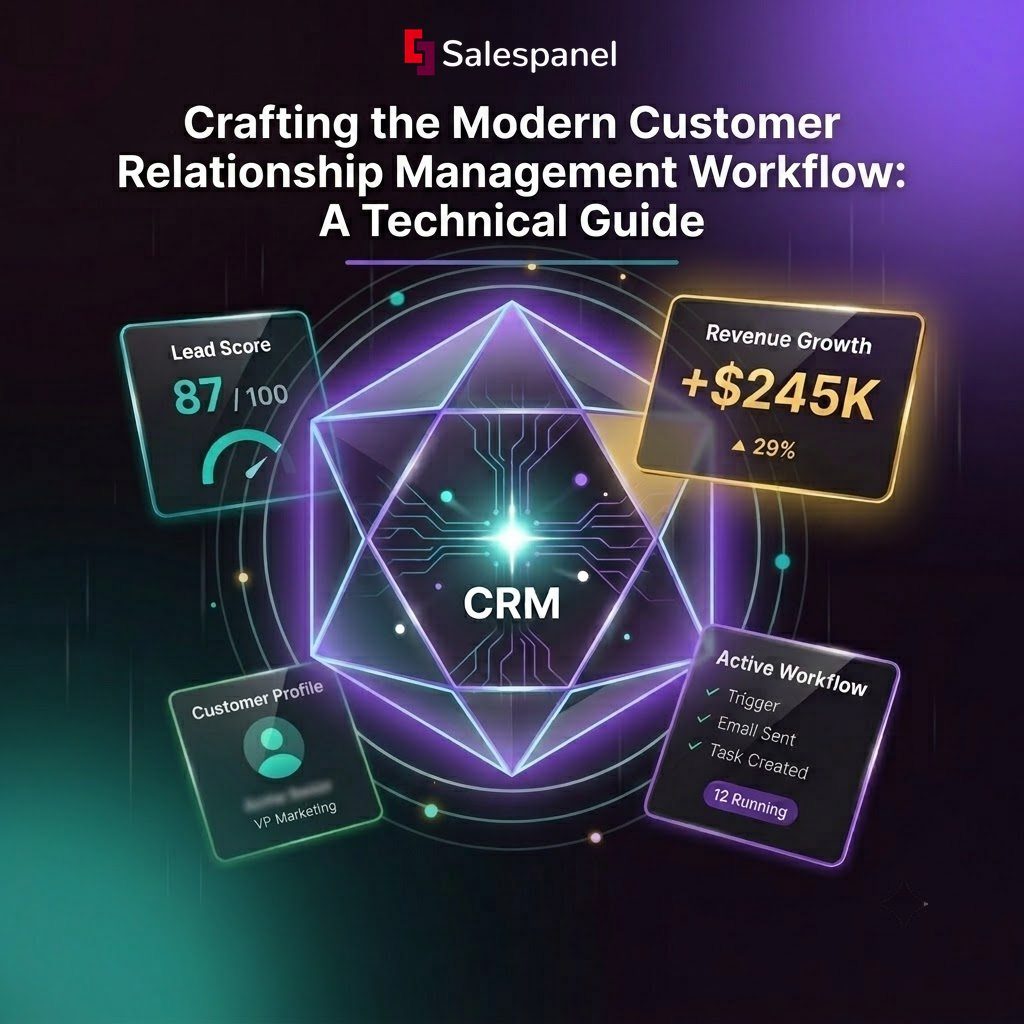
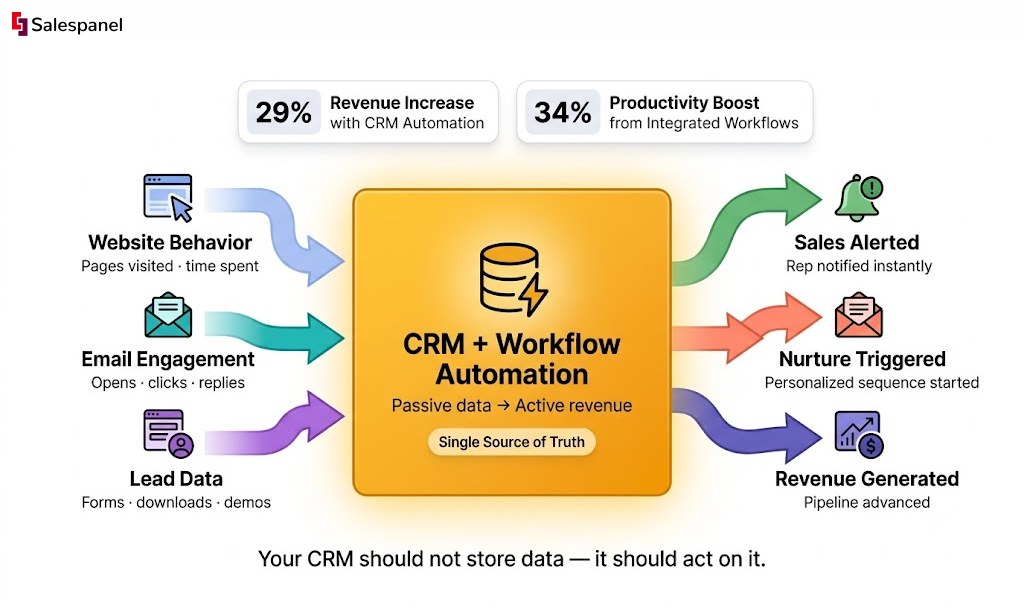
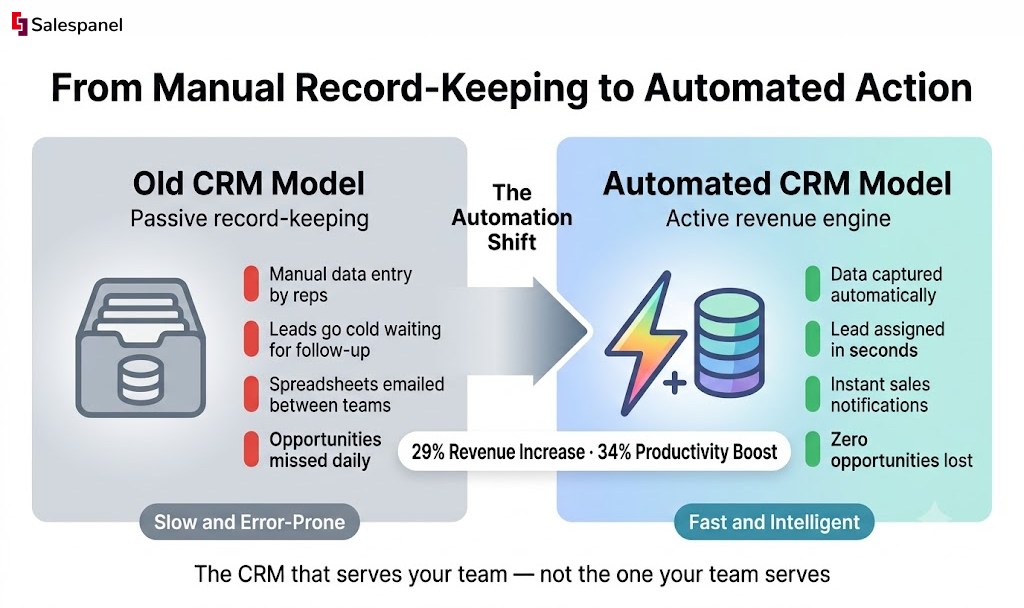
The chasm between collecting customer data and converting it into revenue has historically been bridged by manual effort, guesswork, and wasted time. In the past, Customer Relationship Management (CRM) systems were little more than digital Rolodexes—static databases requiring teams to manually sift through records to find opportunities. Today, that model is obsolete. The fusion of CRM and workflow automation represents a fundamental shift from passive record-keeping to proactive, intelligent engagement. Research shows that companies effectively leveraging this combination see a 29% increase in revenue and a 34% boost in productivity. This guide is a technical blueprint for navigating that evolution, moving from the inefficiencies of the past to a future where every piece of customer data triggers an immediate, strategic action, ensuring no opportunity is ever lost. The central theme we will pursue is transforming your CRM from a data repository into the dynamic, automated heart of your growth engine.
From Static Data to Strategic Growth
Imagine an operational environment where every customer interaction initiates a precise sequence of actions, instantly and without human intervention. This is the reality when a CRM system is integrated with intelligent workflow automation. This guide moves beyond the outdated concept of a CRM as a mere contact list. We will explore the technical and strategic steps required to transition from a world of disconnected data and manual labor to a future driven by automated workflows that fuel tangible growth. Ultimately, a CRM’s value is only realized when it is actively converting customer insights into revenue.
The Shift From Record-Keeping to Action
Historically, a CRM served as a system of record, housing critical data—contact information, interaction logs, sales notes—but requiring manual effort to be useful. Sales teams spent hours on data entry, marketing laboriously segmented lists, and customer service had to excavate notes to understand client history. This manual approach is inherently slow and prone to error. Leads grow cold awaiting follow-up, marketing campaigns lack precision, and the customer journey feels fragmented. The data existed, but the organization lacked the velocity to act on it effectively.
Today, this operational model is a liability. Integrating your CRM with workflow automation inverts this dynamic, creating a new paradigm where data triggers immediate, intelligent action.
The core principle is transformative: instead of your team serving the CRM, the CRM and its automated workflows serve your team. This strategic shift liberates personnel to focus on high-value activities such as strategic planning, relationship building, and closing deals.
Quantifying the Impact of Integration
The transition to automated systems yields concrete, quantifiable business outcomes. Companies that integrate their CRM into core workflows report a 29% increase in revenue and a 34% boost in productivity. These figures represent a significant impact on both top-line growth and operational efficiency. In the technology sector, this is already standard operating procedure, with 94% of tech companies relying on a CRM to manage complex B2B sales cycles. You can explore additional data on CRM performance metrics on designrush.com.
To fully appreciate the delta between these two operational models, let’s analyze a side-by-side comparison of manual versus automated processes.
The Impact of Manual vs Automated Workflows
| Business Function | The Old Way (Manual Approach) | The New Way (Automated Workflow) | Key Business Outcome |
|---|---|---|---|
| Lead Nurturing | Sales reps manually compose and send individual follow-up emails, leading to inconsistency. | A new lead is programmatically enrolled in an automated email sequence tailored to their specific interests and behavior. | Consistent Follow-Up: No lead is neglected, ensuring persistent and relevant communication. |
| Sales Handoffs | Marketing compiles and emails a spreadsheet of “hot leads” to the sales manager, introducing delays. | A lead reaches a predefined score threshold, is automatically re-categorized as an MQL, assigned to a sales rep, and a task is created in the CRM. | Speed to Lead: Sales engages qualified leads within minutes, not days, capitalizing on peak interest. |
| Customer Onboarding | A support representative manually assembles and sends a welcome packet and a series of onboarding emails. | A “deal won” status change in the CRM triggers a welcome email, a sequence of setup guides, and a task for the account manager to schedule a kickoff call. | Better Customer Experience: New customers receive immediate, structured support, enhancing satisfaction from day one. |
| Data Entry | Sales reps dedicate significant post-call time to logging notes and updating contact fields manually. | Call logs, emails, and meeting notes are automatically synchronized with the contact record from integrated communication tools. | Increased Productivity: Sales reps reallocate time from administrative tasks to core selling activities. |
This transition redefines operational capacity. By automating routine tasks, you empower teams to concentrate on the strategic moments that drive business forward. This guide serves as a roadmap for building a business that not only stores data but acts upon it—transforming every piece of customer information into a strategic asset for sustainable growth.
How CRM and Workflows Create Synergy
The technical integration of CRM and workflow automation is where operational efficiency is born. The synergy between these systems transforms a passive data repository into an active, intelligent business engine.
Consider your CRM as the central nervous system of your customer operations. It houses every critical piece of data—every interaction, purchase, and preference. It is the single source of truth for all customer-related information. By itself, however, this “brain” is a passive database. Workflow automation acts as the motor function, taking the signals and data stored in the CRM and translating them into tangible actions across the organization. This connection is what elevates a CRM from a digital filing cabinet into a proactive driver of growth.
This system operates in a continuous feedback loop: incoming data triggers a predefined action. A customer event captured by the CRM initiates an automated sequence of tasks, ensuring that valuable data is immediately operationalized to drive relevant engagement.
The Anatomy of a CRM-Driven Workflow
This relationship is built on a simple yet powerful technical principle: a trigger initiates one or more actions. This structure allows for the automation of complex processes that were previously slow and susceptible to human error, introducing consistency and speed into operations.
- Triggers: These are specific events logged within the CRM that initiate a workflow. A trigger can be a change in a contact’s data field (e.g., status change), a specific behavior (e.g., visiting a key webpage), or a time-based event (e.g., contract renewal date approaching).
- Actions: These are the tasks the system automatically executes once a trigger condition is met. Actions can be internal, such as sending a Slack notification to a team member, or external, such as sending a targeted email to a customer.
Practical Example: A prospect visits your pricing page for the third time in a week. This behavior is captured by your website visitor tracking system and fed directly into your CRM.
This visit serves as the trigger. The workflow immediately executes a series of automated actions:
- Update Lead Status: The prospect’s status field in the CRM is programmatically updated from “Lead” to “Marketing Qualified Lead” (MQL). This requires no manual intervention.
- Notify Sales: An instant notification is sent to the assigned sales representative via Slack, alerting them to the high-intent activity.
- Create a Task: A task is automatically generated in the representative’s CRM dashboard: “Call [Prospect Name] within 24 hours.”
- Enroll in Nurture Sequence: Simultaneously, the prospect is enrolled in a targeted email campaign that provides content addressing common questions about pricing and value proposition.
Without this integrated workflow, this critical buying signal could have been lost. With it, the system converted raw behavioral data into a timely, actionable sales opportunity, seamlessly bridging the gap between marketing intelligence and sales execution.
This data-action feedback loop is the core of effective CRM and workflow management. It ensures the right actions are executed at the right time, every time, based on verifiable customer behavior rather than assumption.
Expanding Beyond Sales and Marketing
This powerful combination extends beyond sales and marketing, capable of streamlining operations across the entire customer lifecycle. To gain a broader perspective on how integrated systems drive enterprise-wide growth, it is useful to examine platforms like Microsoft Dynamics 365, which are architected to unify disparate business applications.
Consider these applications in other business units:
- Customer Onboarding: The moment a deal’s status is changed to “Closed-Won” in the CRM (the trigger), a workflow can automatically dispatch a welcome email, provision a new project in your project management tool, and assign an onboarding specialist.
- Customer Support: When a support ticket is submitted from a high-value account, a workflow can instantly escalate its priority level and notify the designated account manager for immediate intervention.
- Billing and Finance: A workflow can be triggered 30 days prior to a customer’s annual contract renewal. This can create a task for the finance team to generate an invoice and another for the account manager to schedule a renewal discussion.
In each scenario, the CRM provides the critical context—the “who” and “why”—while workflow automation executes the “what” and “when.” This partnership eliminates manual handoffs, reduces the risk of error, and creates a polished, professional customer experience. It transforms your business into a finely tuned machine engineered for efficiency and scale.
Building High-Impact Sales and Marketing Workflows
Let’s move from theory to practical application. Understanding that CRM and workflow automation can be integrated is foundational; designing the specific sequences that drive measurable results is where strategic value is created.
The objective is not automation for its own sake, but the construction of intelligent, responsive journeys that react to actual customer behavior. The goal is to abandon rigid, one-size-fits-all funnels in favor of orchestrating timely, relevant, and personalized interactions at scale. It begins with a clear objective. Are you trying to improve lead qualification, accelerate the sales cycle, or increase customer retention? Define the goal first, then engineer the automation around it.
The fundamental flow is straightforward: a customer action triggers a data-driven process within your system, which in turn initiates a specific, automated response.
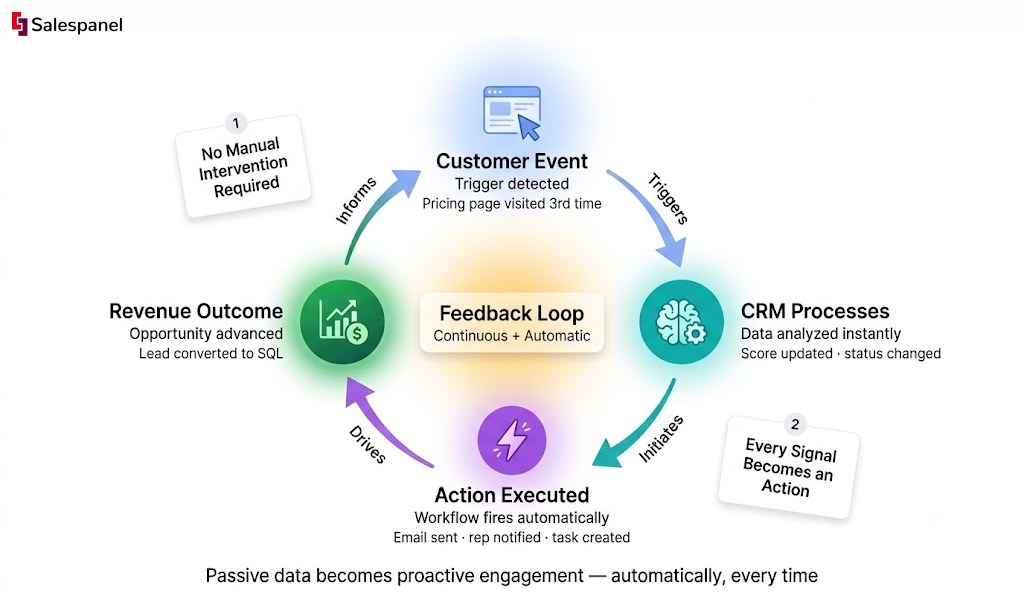
This simple loop—event, process, action—is the engine behind any powerful workflow. It is the mechanism by which passive data is converted into proactive engagement that guides customers forward.
Core Automation Patterns for Growth
While the possibilities for workflow construction are nearly limitless, a few foundational patterns consistently deliver the most significant ROI for sales and marketing teams. These are proven templates that solve common business challenges.
- Intelligent Lead Nurturing: This transcends basic email drip campaigns. A modern nurturing workflow utilizes behavioral data to deliver contextually relevant content. For instance, if a lead downloads an ebook on a specific product feature, the workflow follows up with content related to that topic, rather than a generic company newsletter.
- Dynamic Lead Scoring: This replaces static, demographic-based scoring. An automated workflow adjusts a lead’s score in real-time based on their interactions. A visit to the pricing page might add 10 points, while watching a product demo could add 15. This ensures sales representatives always focus on the most engaged, sales-ready leads. Salespanel’s lead scoring framework allows you to build these sophisticated models.
- Instant Task Assignment: Speed is a critical factor in sales success. When a lead’s score surpasses a predefined threshold (e.g., 100 points), a workflow should immediately assign them to the appropriate representative and create a high-priority task in the CRM. This eliminates manual handoff delays and dramatically reduces lead response time.
These patterns are the essential building blocks of a robust automation strategy, ensuring that marketing efforts translate directly into qualified sales opportunities without manual intervention.
A Practical Example: The Lead-to-Opportunity Workflow
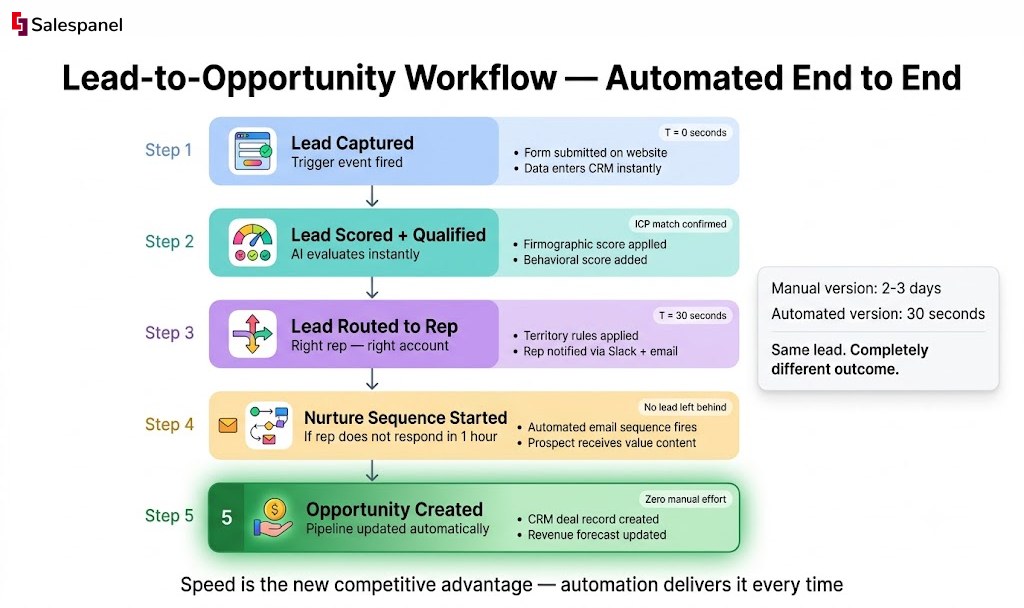
Let’s examine a real-world B2B scenario to illustrate how these components function in concert.
The Trigger: An anonymous website visitor completes a form to download a whitepaper. The submission event initiates the process.
The Workflow in Action:
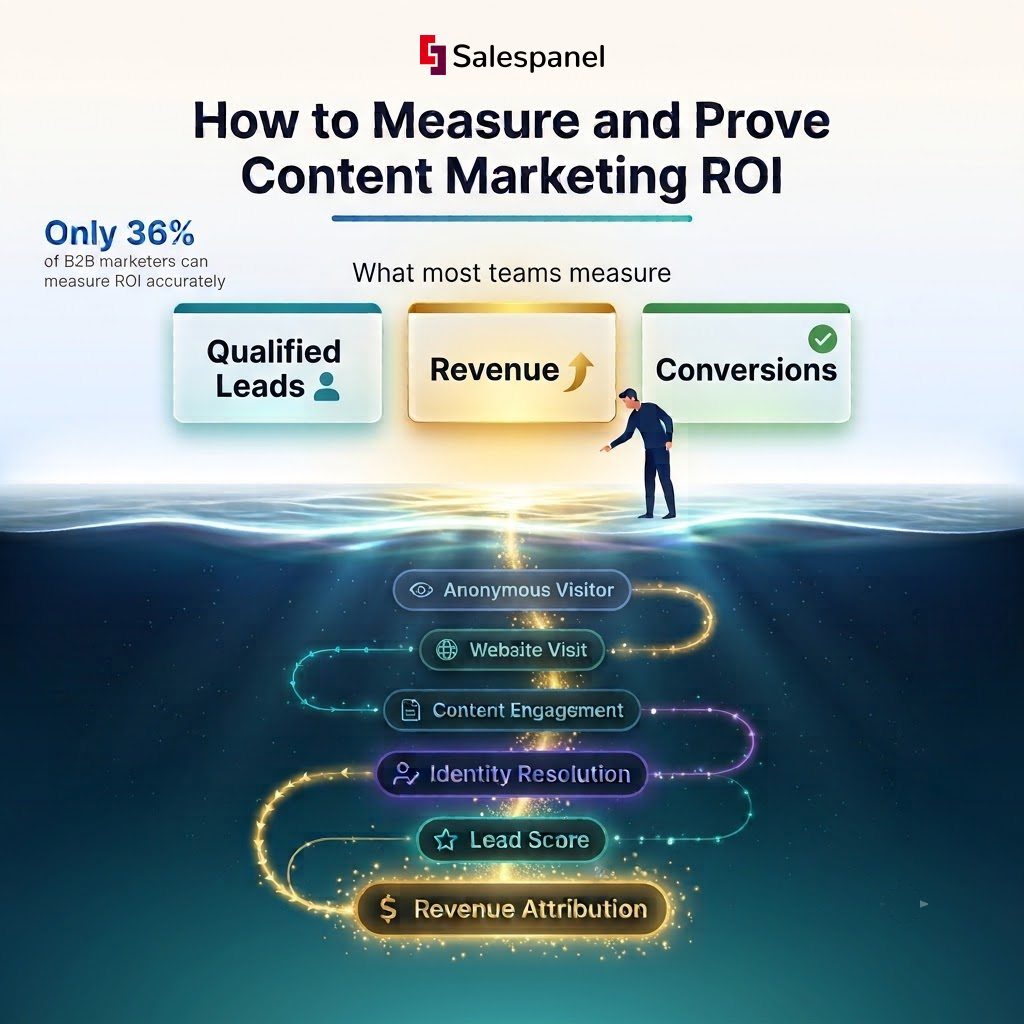
- Identity Resolution: The form submission instantly connects the lead’s new contact information with their entire pre-conversion browsing history. The marketing team now has a complete record of every page visited.
- Initial Scoring: The workflow, powered by website visitor tracking from Salespanel, automatically scores the lead based on firmographic data (target industry, job title) and behavioral data (viewing high-value pages like pricing and case studies).
- Nurturing Sequence: The lead is automatically enrolled in a three-part email sequence directly related to the content of the whitepaper, maintaining contextual relevance. You can enhance this step by leveraging our guide on the best email outreach tools.
- High-Intent Signal: Two days later, the lead returns and spends three minutes on the pricing page. This high-intent behavior serves as a secondary trigger.
- Score Threshold Met: The pricing page visit adds 25 points to their score, pushing them over the “sales-ready” threshold of 100.
- Sales Handoff: The workflow instantly updates their status to “Sales Qualified Lead” (SQL), assigns them to the correct sales representative based on territory rules, and creates a task in the CRM: “Call Jane Doe – Viewed Pricing Page.”
The entire sequence—from anonymous visitor to a qualified, context-rich task on a sales representative’s dashboard—is executed automatically within minutes. This seamless handoff drastically increases the probability of conversion.
The proliferation of cloud-based CRM platforms—from 12% adoption in 2008 to 87% today—has made this level of sophisticated automation widely accessible. This technological shift, coupled with 70% of businesses now using mobile CRM access, provides the real-time data necessary for such dynamic workflows to function. By designing workflows that leverage this technology, you are building a powerful, predictable engine for growth.
The Future Is Predictive with AI-Powered Workflows
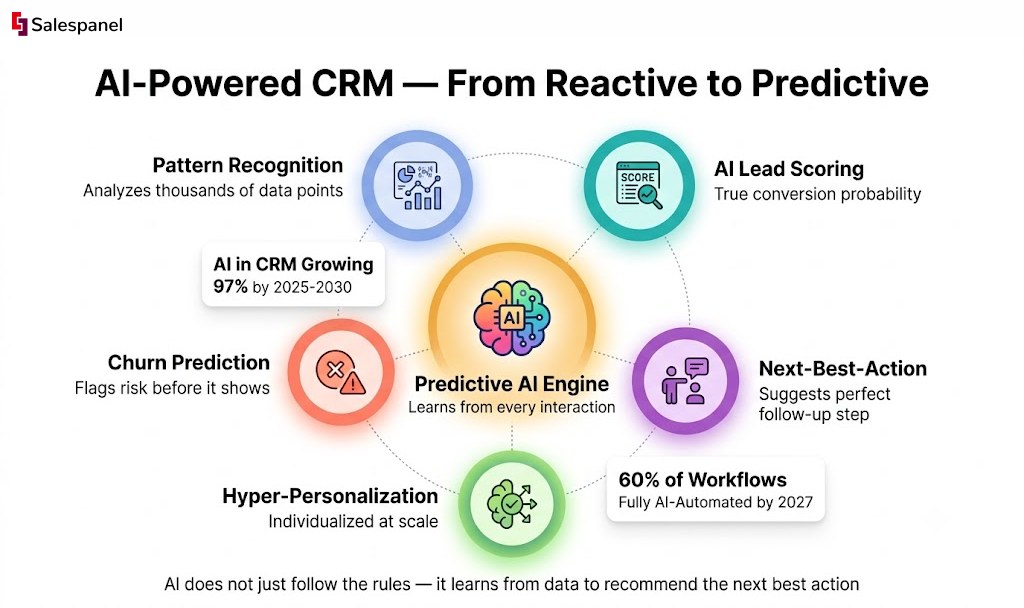
The evolution of CRM and workflow automation is moving beyond simple, rule-based logic. We are entering an era where Artificial Intelligence (AI) is transforming these systems from reactive tools into predictive partners. This represents a fundamental paradigm shift away from the rigid “if-this-then-that” models that have defined automation for years.
Instead of merely executing pre-programmed commands, intelligent systems now analyze vast historical datasets to anticipate customer needs and forecast business outcomes. This new frontier is not about accelerating old processes; it is about re-engineering them to be inherently smarter.
From Reactive Triggers to Proactive Insights
Traditional automation excels at executing predefined commands based on explicit triggers. A lead completes a form, and the system sends a pre-written email. While effective, this model is fundamentally reactive; it depends on the customer taking a specific, predetermined action.
Predictive AI inverts this dynamic. It is designed to identify subtle patterns and correlations within your data that are invisible to human analysis, enabling your systems to act preemptively.
The critical evolution is the transition from automating tasks to automating decisions. AI does not just follow the rules you set; it learns from data to recommend the next best action, creating far more dynamic and effective workflows.
Practical Example: An AI-powered CRM analyzes communication patterns, support ticket frequency, and product usage data for all customers. Long before a client shows overt signs of dissatisfaction, the system identifies a high-risk churn profile based on subtle deviations from baseline behavior. This predictive insight instantly triggers a workflow that alerts the account manager and suggests a tailored retention strategy. This is proactive, not reactive, customer management.
Practical Applications of AI in CRM Workflows
This predictive capability has direct applications that enhance revenue and operational efficiency. AI enables entirely new functions at a scale previously unattainable.
Key applications of AI in CRM and workflow automation include:
- AI-Driven Lead Scoring: Traditional point-based scoring is replaced by predictive models. AI analyzes thousands of data points from past successful deals—including firmographics, demographics, and complex behavioral patterns—to calculate a true conversion probability. This allows sales teams to focus on leads with a statistically higher likelihood of closing.
- Next-Best-Action Recommendations: By analyzing a customer’s profile and recent interactions, AI can provide real-time recommendations to sales representatives. It might suggest sending a specific case study, scheduling a demo for a feature the prospect has researched, or offering a targeted discount to finalize a deal.
- Hyper-Personalization at Scale: AI algorithms analyze customer data to dynamically generate personalized email content, product recommendations, and website experiences in real-time. This goes beyond simple tokenization (e.g., {{first_name}}) to deliver a truly individualized journey for every lead and customer.
The Accelerating Adoption of AI in Business
The market is rapidly adopting this new reality. The integration of AI into CRM is projected to grow by 97% between 2025 and 2030, fueling smarter insights and deeper customer engagement.
This trend is already underway. 61% of sales leaders have automated certain CRM functions, and analysts predict that approximately 60% of CRM workflows will be fully automated by AI within the next three years. This highlights a critical shift in customer relationship management. To explore this topic further, you can discover insights about the future of CRM on sltcreative.com.
This transition is about leveraging predictive intelligence to make sales and marketing efforts not just more efficient, but fundamentally more intelligent. By integrating AI into your workflows, you can stop merely managing relationships and start actively shaping them for optimal outcomes.
Common Mistakes That Can Sabotage Your Workflows
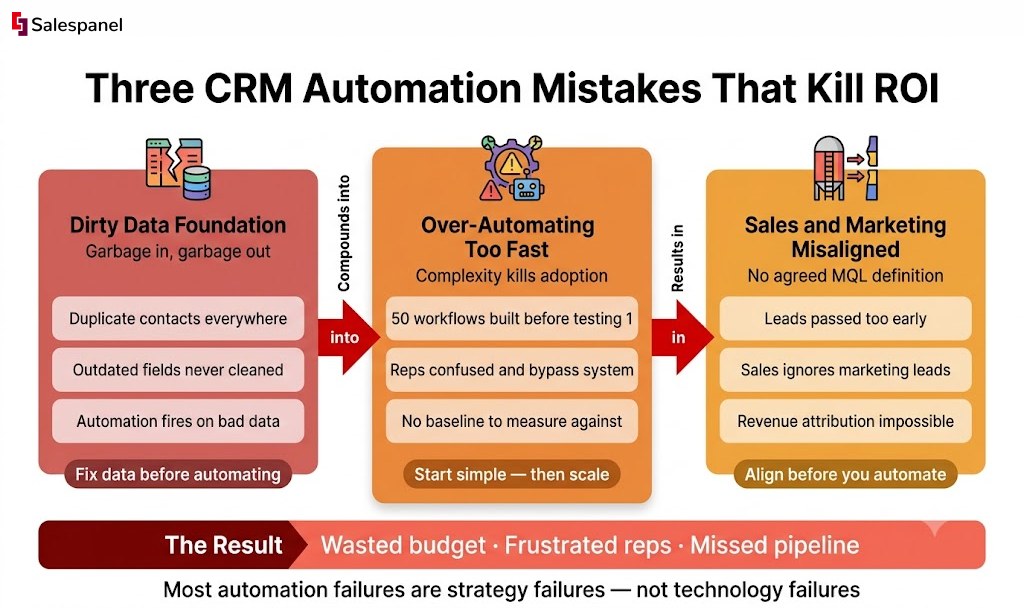
Implementing a robust automation strategy is as much about avoiding common pitfalls as it is about following best practices. Possessing powerful CRM and workflow tools is insufficient if the execution is flawed. This section serves as a field guide to the most common traps that derail automation initiatives and provides clear, practical countermeasures.
The “Boil the Ocean” Approach
A frequent error is attempting to automate a large, multi-faceted process from the outset. Teams, enthusiastic about the potential of automation, design a complex, 20-step workflow that aims to cover every possible contingency. This approach typically results in a tangled, unmanageable system that is difficult to troubleshoot and too rigid to adapt to changing business needs.
The technically superior approach is to start small and iterate. Identify a single, high-impact pain point—such as initial lead assignment or the welcome email sequence—and automate that process first. Validate its performance, then incrementally build upon it. This modular approach simplifies debugging and allows the team to develop proficiency with the system.
Misalignment with Business Goals
Another critical error is creating workflows that are not directly tied to specific, measurable business outcomes. It is easy to automate tasks for the sake of efficiency, but if that automation does not contribute to key objectives like revenue growth or a shorter sales cycle, it is merely tactical noise.
Before constructing any workflow, ask a simple question: “Which business goal does this directly support?” Define your key performance indicators (KPIs) upfront.
- Goal: Reduce lead response time. Workflow: Instantaneous lead assignment with automated sales notifications. KPI: Time from lead creation to first sales touchpoint.
- Goal: Increase MQL-to-SQL conversion rate. Workflow: Dynamic lead scoring based on website engagement. KPI: The percentage of MQLs that are accepted as SQLs.
Tethering every workflow to a tangible business outcome ensures that your automation efforts are strategically aligned and contribute to meaningful progress.
Neglecting Data Hygiene
This is the silent killer of automation initiatives. The efficacy of your automation is directly proportional to the quality of the data it uses. A CRM filled with incomplete profiles, duplicate contacts, or inaccurate information will cause your workflows to fail. This is the classic “garbage in, garbage out” principle in action.
An automated email sequence is useless if a significant portion of your email addresses are invalid. A territory-based lead assignment workflow will break down if the “State” or “Country” fields contain inconsistent or incorrect entries. Poor data quality not only hinders performance but actively sabotages your efforts and erodes customer trust.
The solution is to treat data quality not as a one-time cleanup project, but as an ongoing operational discipline. This begins by implementing strong data capture and validation rules at the point of entry.
This is where the right technology becomes indispensable. For instance, a system that provides identity resolution from Salespanel can capture anonymous website activity and seamlessly merge it with a known contact record the moment a form is submitted. This creates a single, unified customer profile, preventing the creation of duplicate records and enriching every profile with valuable behavioral context. By prioritizing clean, accurate, and consolidated data, you build a solid foundation upon which effective automation can operate.
The Big Picture: Unifying Your System for Real Growth
We have journeyed from the foundational concepts of CRMs and automation to the advanced application of AI-driven workflows. The central, unifying idea is this: your CRM is not a static archive of customer information. It must function as a dynamic engine, actively propelling your business forward. The ultimate objective is to build a seamless, automated system that makes every customer interaction feel both effortless and personal.
Such a system liberates your teams from tedious, low-value manual tasks, allowing them to focus on what humans do best—building relationships and solving complex problems for customers. It creates an environment where data does not simply exist; it acts.
From Data to Conversations to Revenue
When properly implemented, this integration fundamentally transforms business operations. You shift from a reactive posture, responding to customer needs as they arise, to a proactive one, anticipating them. This proactive capability is what distinguishes market leaders. The synergy between your CRM and intelligent workflow automation creates a direct, uninterrupted line from insight to action.
Consider the practical, day-to-day impact:
- Your sales representatives receive notifications about high-intent leads at the precise moment they demonstrate buying signals, equipped with the prospect’s complete engagement history.
- Your marketing team can deliver on the promise of true personalization, creating customer journeys that adapt in real-time to individual behaviors, leading to higher engagement and conversion rates.
- Your customer service team has a unified view of every interaction across all touchpoints, eliminating the need for customers to repeat information and enabling faster, more effective resolutions.
The key takeaway is that connecting your data to intelligent, automated actions is the technical blueprint for sustainable growth. By implementing smart CRM and workflow strategies, you are converting raw data points into meaningful conversations. With the right tools and a disciplined approach, those conversations consistently translate into revenue. This is how you build a powerful, predictable engine for your business.
Frequently Asked Questions
As you begin to integrate your CRM with workflow automation, technical and strategic questions will inevitably arise. Here are answers to some of the most common inquiries.
What Is the First Workflow I Should Automate?
For most businesses, the highest-impact initial workflow to automate is lead assignment and initial follow-up. This is a foundational process for a reason.
When a new lead submits a form, a workflow can instantly route them to the correct sales team member based on predefined rules (e.g., territory, industry, company size). Simultaneously, the system can send a personalized welcome email and create a follow-up task directly in the assigned representative’s CRM. This simple automation eliminates manual routing delays, ensures no lead is overlooked, and engages prospects at the peak of their interest. This single workflow can produce a significant lift in conversion rates.
How Do I Measure the ROI of My Automation Efforts?
Measuring the return on investment (ROI) of automation requires a “before and after” analysis of key metrics. Establish a baseline for these metrics before implementing your workflows, and then track them afterward. The delta provides a clear measure of impact.
Key performance indicators (KPIs) to monitor include:
- Lead Response Time: The average time between lead creation and the first contact from a sales representative. Automation should drastically reduce this metric.
- Sales Cycle Length: The time it takes to convert a prospect into a customer. A shorter cycle is a direct indicator of increased efficiency.
- Lead-to-Customer Conversion Rate: The percentage of leads that ultimately become paying customers. This is a primary measure of sales and marketing effectiveness.
- Customer Acquisition Cost (CAC): The total sales and marketing cost required to acquire a new customer. Effective automation should help lower this cost.
Improvements in these metrics, particularly a shorter sales cycle and a higher conversion rate, demonstrate a direct, tangible return on your technology investment.
Can Small Businesses Benefit from Automation?
Yes, absolutely. Small businesses often derive the most significant benefits from automation. CRM and workflow automation acts as a force multiplier, enabling smaller teams to operate with the efficiency and scale of larger organizations.
By automating repetitive, time-consuming tasks—data entry, follow-up emails, lead nurturing—you free up your team’s most valuable resource: their time. This time can be reinvested into high-value activities that drive growth, such as strategic planning and building customer relationships. With the affordability and scalability of modern cloud-based tools, automation is not only accessible but essential for businesses of any size seeking a competitive edge.
Ready to turn your customer data into a real growth engine? Salespanel gives you the tools to build smart, data-driven workflows that convert anonymous visitors into qualified leads. Take a look at our resources and see how we can help you finally connect your sales and marketing efforts.
Discover more at https://salespanel.io/resources.