B2B Website Personalization: 5 Steps to Qualified Pipeline
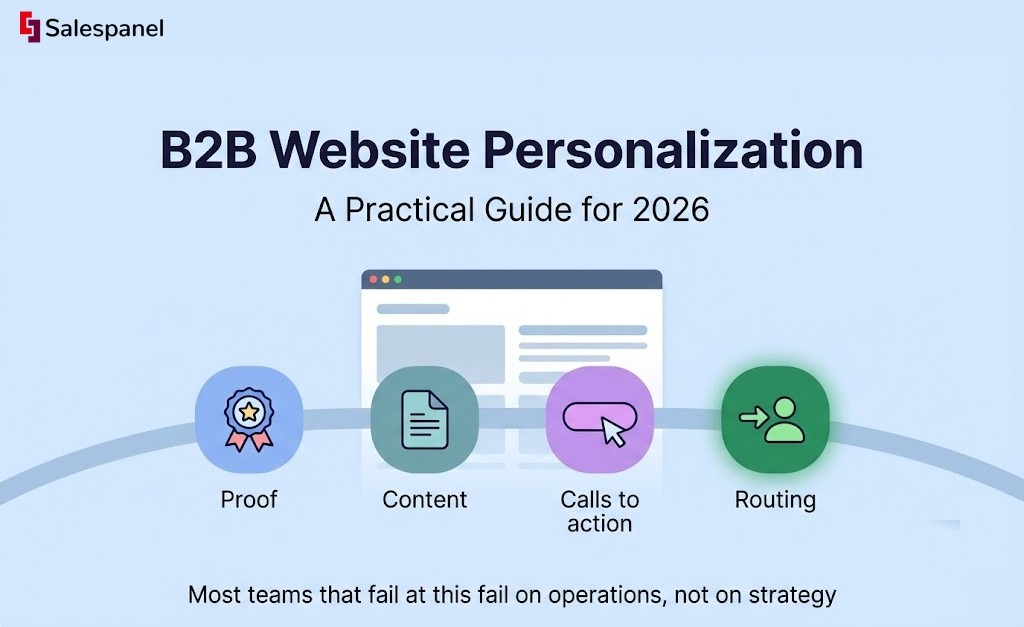
B2B website personalization is the practice of showing different website experiences — proof, content, calls to action, and routing — based on verified signals about a visitor’s account, behavior, intent, and lifecycle stage. Done well, it produces more qualified conversations, because the right buyer finds relevant evidence faster instead of digging through generic pages.
That is the end state this guide builds toward. By the time you finish, you should be able to pick one high-value audience, write one personalization rule you can defend to legal and to your web team, publish it on a single page, and tell whether it produced better conversations or just moved clicks around.
Start small. One or two high-confidence segments is a real program; twelve homepage variants is a maintenance problem waiting to surface three months later when nobody remembers who owns variant nine. Most teams that fail at this fail on operations, not on strategy.
It also helps to be precise about what personalization is and is not. Audience targeting decides who sees an ad or an email. Personalization decides what happens once they arrive. The two use similar data, but the failure modes are different: a badly targeted ad wastes budget, while a badly personalized page makes your company look like it knows less about the visitor than it is pretending to know.
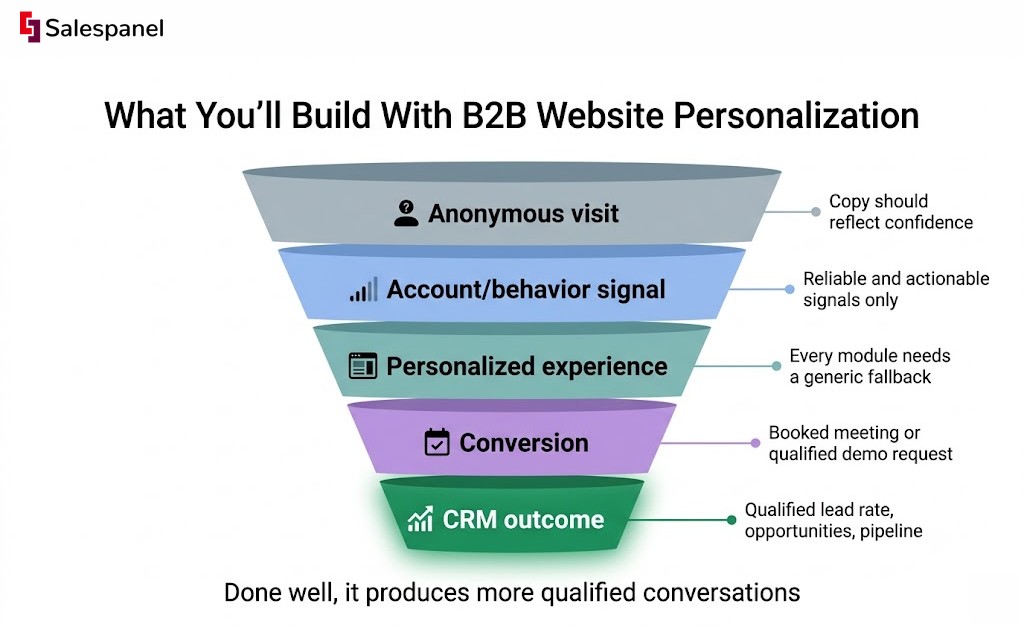
One more expectation to set early. Anonymous visitor identification is probabilistic in most implementations — IP-to-company matching, reverse DNS, and enrichment providers all carry error rates, and remote work has made IP-based matching noticeably less reliable than it was five years ago. If you are new to this layer, our visitor identification guide covers how the matching actually works. The practical consequence is that your copy should reflect confidence. High-confidence matches can earn specific treatment. Everything else gets industry-level or tier-level relevance, which is still useful and never embarrassing.
Before any of this goes live, read the official guidance that applies to you — the ICO’s guidance on cookies and similar technologies is a good starting point for UK and EU-facing sites.
Why B2B Personalization Works When It Uses Useful Signals, Not Cosmetic Copy Swaps
Personalization pays off when it reduces the work a buyer has to do to find the proof, the use case, and the next step that apply to their role and their company. Everything else is decoration.
If you are familiar with ecommerce personalization, the B2B version breaks the model in one specific way. In ecommerce, one visitor is usually one buyer. In B2B, one account contains a practitioner testing feasibility, a champion building an internal case, an evaluator comparing three vendors, a security reviewer, and someone in procurement who has never read your homepage and never will. Let’s simply call them a buyer committee. They arrive on the same pages, at different times, asking incompatible questions, and your generic page tries to answer all of them at once and answers none of them well.
Four signal categories carry the rest of this guide:
- Firmographic — industry, company size, geography, account tier.
- Behavioral — pages viewed, repeat visits, content consumed, pricing page activity.
- Intent — topic interest inferred from onsite behavior or from approved third-party sources.
- Lifecycle — prospect, open opportunity, customer, expansion candidate.
Now, the operational rule that saves the most wasted effort: prioritize signals that are both reliable and actionable. “Visited the pricing page twice in seven days” is reliable (it happened on your own property) and actionable (you know what to offer next). An inferred job title from a third-party enrichment field is often neither — you cannot verify it, and even if it is correct, “Director of Operations” does not tell you what to show.
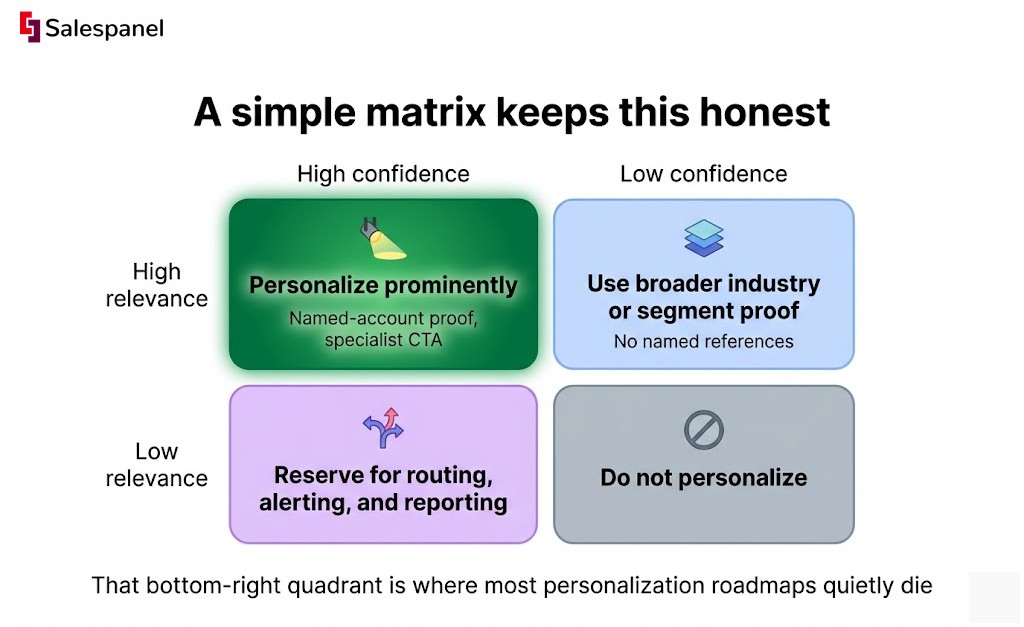
A simple matrix keeps this honest:
| High confidence | Low confidence | |
|---|---|---|
| High relevance | Personalize prominently — named-account proof, specialist CTA | Use broader industry or segment proof, no named references |
| Low relevance | Reserve for routing, alerting, and reporting | Do not personalize |
That bottom-right quadrant is where most personalization roadmaps quietly die. If the signal is weak and the relevance is thin, the correct action is to leave the page alone.
Whatever you build sits on top of your consent implementation, so check your CMP’s own documentation for how audiences behave when a visitor declines tracking.
Step 1: Choose One Revenue Problem and One Audience
Your first personalization campaign should solve one measurable conversion problem for one defined audience. Something like: enterprise SaaS accounts reach the demo page, see a generic form aimed at SMB self-serve buyers, and drop off before requesting anything.
“Personalize the whole website” sounds ambitious and behaves like debt. Every variant multiplies content production, QA passes, analytics segmentation, and approval cycles. A site with six segments across four pages is twenty-four experiences to keep accurate — including the fallbacks — and the accuracy is what decays first when a product name changes.
Write a one-page brief before anything gets built. It needs: audience, signal source, page or pages, the experience change, primary CTA, owner, launch date, success metric, and a stop condition. The stop condition is the field teams skip and later regret.
1. Select a segment with enough traffic and a credible reason to differ
Pick segments that already receive meaningful traffic and genuinely need different evidence. Four candidates usually qualify: named target accounts, a regulated industry, existing customers, and repeat visitors to a high-intent page.
Account tiers and industry segments are not interchangeable, and treating them as one field is a common setup error. An enterprise account needs security architecture, SSO, and procurement-friendly documentation. A healthcare visitor needs compliance evidence — which might be a 40-person clinic with no procurement process at all. Same personalization system, completely different content.
A worked example: visitors from target fintech accounts who land on the security page see a fintech-specific proof block (relevant certifications, a named customer in payments, data residency detail) and a CTA to speak with a security specialist rather than a generic “Book a demo.”
Watch out for segments built on a single weak enrichment field. If the entire audience definition rests on one vendor’s industry classification, spot-check fifty records manually before you build anything on top of it.
2. Define the conversion action before designing the experience
Decide what success looks like first, then design backward. Suitable primary actions include a booked meeting, a qualified demo request, a pricing conversation, a completed product tour, or a request for high-intent content such as an implementation guide.
Always pair it with a secondary action for people who are not ready to talk — a relevant case study, a technical overview, an ROI worksheet. Without one, you convert the small group already in-market and lose the larger group that was two weeks away.
The success metric has to connect to CRM outcomes. A 30% lift in CTA clicks that produces the same number of qualified opportunities is a formatting improvement, not a personalization result. If your qualification logic is still informal, settle that first — our B2B lead scoring guide walks through building thresholds that sales will actually accept.
Step 2: Map the Buying Questions That Your Current Page Does Not Answer
Personalization should change the proof, the message, or the path a segment needs. Inserting a company name into a headline changes none of those things, and buyers have seen the trick enough times that it now reads as a tooling flex rather than relevance.
A question-first content map fixes the sequencing. Before choosing a block, a CTA, or a routing rule, write down what the visitor is trying to verify at that moment. The experience follows from the question; it does not precede it.
1. Build a page-by-segment message map
| Segment | Page | Likely question | Evidence needed | Personalized component | Primary CTA |
|---|---|---|---|---|---|
| Manufacturing visitor | Homepage | “Do companies like mine use this?” | Industry case study, ERP integration | Industry proof block + logo row | View manufacturing case study |
| Enterprise account | Pricing | “Can this pass procurement?” | Security posture, implementation timeline, contract terms | Enterprise buying-guide module | Talk to an enterprise specialist |
| Existing customer | Product page | “What else can we adopt?” | Feature education, adoption examples | Expansion module, customer-only content | Book a success review |
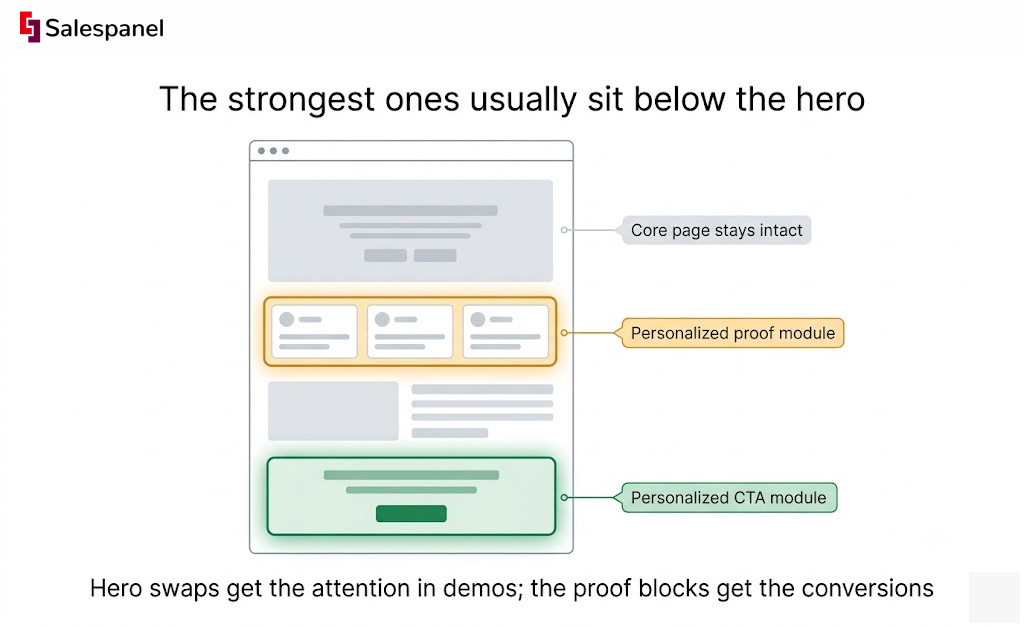
Note where the changes land. The strongest ones usually sit below the hero: proof modules, navigation paths, form language, customer logos, and the supporting content you surface after the fold. Hero swaps get the attention in demos; the proof blocks get the conversions.
2. Match the experience to the visitor’s buying stage
Three stages cover most of what you need:
- Early research — category education, problem framing, benchmarks.
- Evaluation — use cases, integrations, case studies, technical and security evidence.
- Decision — implementation detail, pricing context, stakeholder resources, sales routing.
The guardrail: do not aim an aggressive sales CTA at someone who has read one educational blog post. Behavior thresholds matter more than firmographics here. A target-account visitor on their first page view is still an early-stage reader, and treating them like a buyer costs you the second visit.
Step 3: Set Up Data, Consent, and Routing Rules Before Publishing
A personalization rule is only as good as three things: the data feeding it, the consent governing it, and the fallback that appears when the data is missing. Most broken personalization I have seen in the wild failed on the third one.
The minimum architecture is unglamorous. Website analytics that can segment by audience. CRM or marketing automation fields carrying lifecycle state. A consent management platform whose decisions your personalization layer actually respects. And something that can evaluate visitor and account behavior in real time to decide which experience applies.
Every personalized module needs a documented generic version that stands on its own. Write the fallback first if you can — it forces you to keep the base page strong.
1. Define signal rules in plain language
Before anyone touches a rule builder, write the logic as a sentence: IF a visitor or account condition is true, THEN show this experience, ELSE show this fallback.
A worked rule:
- IF the visitor resolves to a named target account and views the integrations page,
- THEN show the account-tier proof module and the “Talk to an integration specialist” CTA,
- ELSE show the standard integrations module.
Exclusions deserve equal care. Suppress your own employees, known bot and crawler traffic, existing customers when the offer is prospect-only, and any account flagged as sensitive — competitors, active legal matters, or accounts where a named-account message would be inappropriate. Exclusion lists are easier to build before launch than to retrofit after a customer sees a prospecting offer.
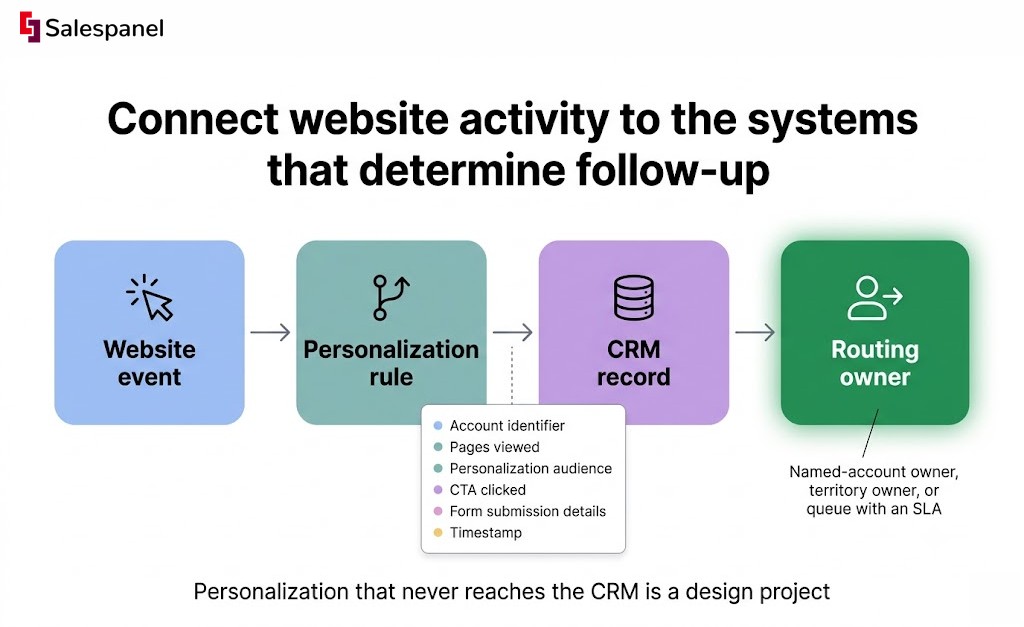
2. Connect website activity to the systems that determine follow-up
Personalization that never reaches the CRM is a design project. Pass through: the account identifier where available, pages viewed, which personalization audience the visitor entered, the CTA clicked, form submission details, and a timestamp.
Routing needs ownership logic, not a notification into a shared inbox. Named-account owner, territory owner, or a defined queue with an SLA — pick one and write it down. Our lead routing workflow guide covers the assignment patterns that survive a headcount change.
Teams using Salespanel can connect identified account activity and behavioral signals directly to lead scoring and sales alerts, which shortens the gap between an on-site signal and the person responsible for acting on it — provided the organization has already defined its qualification and routing rules. The tool does not invent your qualification logic.
Also check your CRM’s official documentation for custom field limits and API rate limits before you design the payload; both have quietly broken more integrations than logic errors have.
3. Check privacy and consent requirements
Consent obligations differ by jurisdiction and by implementation, and nothing here is legal advice. A US-only marketing site, an EU-facing SaaS product, and a healthcare vendor handling sensitive categories are operating under materially different rules.
The practical controls are consistent, though: disclose your tracking clearly, honor consent choices in the personalization layer itself (not only in analytics), minimize what you retain, restrict audiences built on sensitive attributes, and keep a documented list of vendors processing visitor data. Link your privacy policy and cookie policy from every location where tracking is initiated.
The EDPB guidelines are the authoritative reference for EU processing; pair them with your own CMP’s implementation documentation.
Step 4: Build the Experience in Modules, Then QA the Fallbacks
Modular personalization changes the few page elements that affect relevance while leaving the core page intact. That stability matters for analytics continuity, for maintenance cost, and for search visibility — a page that renders differently for every crawler visit is a problem you do not need.
Sequence the changes by risk. Proof first, then supporting content, then CTA, then navigation. Hero changes come last and only for segments where confidence is genuinely high, because the hero is the one element a wrong match will make obviously wrong.
Every variant must still carry a complete value proposition on its own. If the personalization data fails to resolve — and it will, on some percentage of visits — the visitor should never see a gap, a placeholder, or a sentence missing its company name.
1. Start with low-maintenance modules
Reusable blocks earn their keep: industry logo rows, case-study cards, integration lists, compliance content, CTA labels, and form routing values. Each of these can serve several audiences with no new design work.
Fully separate pages are a different commitment. Reserve those for strategic segments with enough traffic to justify dedicated content ownership — otherwise you end up with an industry landing page last updated two product releases ago.
Keep a content inventory with five columns: reusable asset, source and owner, approved audience, page location, refresh date. The refresh date is what prevents a 2024 customer quote from a churned account appearing on your 2026 enterprise page.
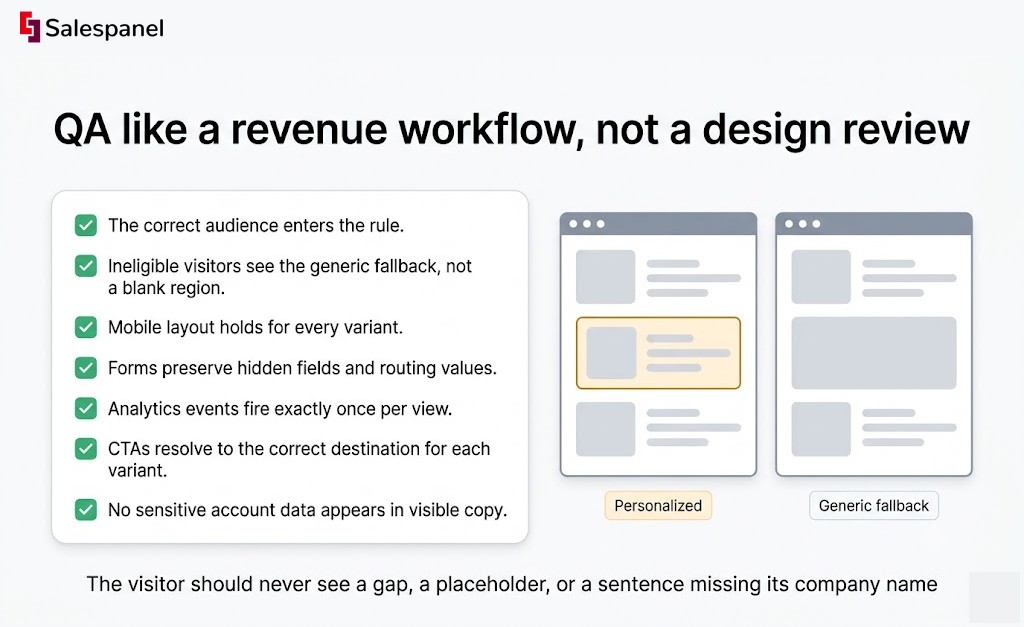
2. QA like a revenue workflow, not a design review
Run this checklist before launch:
- The correct audience enters the rule.
- Ineligible visitors see the generic fallback, not a blank region.
- Mobile layout holds for every variant.
- Forms preserve hidden fields and routing values.
- Analytics events fire exactly once per view.
- CTAs resolve to the correct destination for each variant.
- No sensitive account data appears in visible copy.
Then test performance. Client-side personalization scripts that run before render are a common source of layout shift and delayed LCP, and a 400ms delay applied to your highest-intent page can easily cost more conversions than the personalization gains.
Step 5: Measure Qualified Impact, Then Expand Deliberately
B2B website personalization earns its place when the personalized audience produces better qualified outcomes than a comparable non-personalized audience. A variant that increases clicks and nothing beyond that has not proven anything.
Use a three-level hierarchy:
- Leading — module views, CTA clicks, content engagement.
- Conversion — form completions, meetings booked, product tours completed.
- Quality — qualified lead rate, opportunities created, pipeline influenced.
Small audiences make the middle level noisy. If your target-account segment sends 300 visits a month to the security page, raw conversion-rate differences will swing wildly week to week, and chasing them will lead you to wrong conclusions. Extend the measurement window, accept directional learning, and lean harder on the quality tier where each data point carries more weight.
1. Create a simple measurement plan
Capture the baseline before launch: current conversion rate, qualified conversion rate, average time to conversion, and monthly traffic volume for that exact segment. Without it, you will be arguing about attribution in week five.
Where traffic allows, run a control — eligible visitors randomly receive either the generic or the personalized experience. Where it does not, compare against the pre-launch baseline and document every confounder you know about: seasonality, a paid campaign launch, a pricing change, a conference.
A scorecard with six rows is enough:
| Metric | Baseline | Current |
|---|---|---|
| Audience size | ||
| Exposure rate | ||
| CTA conversion rate | ||
| Qualified conversion rate | ||
| Meetings / opportunities created | ||
| Qualitative sales feedback |
That last row is not filler. Ask two reps whether the conversations changed. For a comprehensive view of connecting these outcomes across channels, see our B2B marketing attribution guide.
2. Decide whether to keep, revise, or stop a rule
Keep the rule when qualified outcomes improve and it has not created routing confusion or a content-maintenance burden nobody owns.
Revise when engagement climbs but qualification stays flat. That pattern usually means the offer is more visible, not more relevant — test the proof, the offer, and the audience definition in that order.
Stop when the underlying data proves unreliable, the segment is too small to learn from, or the experience cannot be maintained at current staffing. Retiring a rule is a legitimate outcome, and documenting why prevents someone rebuilding it next year.
Expand in sequence: one page and one audience, then that same audience on a second high-intent page, then a second segment — only after the first has a documented result.
Common B2B Website Personalization Mistakes to Avoid
Most failed programs break in one of five places: weak data, vanity metrics, unmaintainable variant counts, cosmetic changes, or missing ownership. Each has a specific fix.
Personalizing for a company without enough confidence
Named-account language built on uncertain IP resolution or stale enrichment lands badly when it is wrong — and it looks worse than a generic page, because the visitor now knows you guessed. Remote work, VPNs, and shared ISP ranges all degrade IP matching.
Fix: use industry or account-tier proof until match confidence is high enough to justify naming anyone.
Changing copy without changing the buyer’s path
A custom headline sitting above generic proof, a generic form, and an irrelevant CTA changes nothing about the buyer’s decision.
Fix: personalize the evidence and the next step alongside the message, or leave the message alone.
Treating all visits as equally valuable
A first-time blog reader and a third-time pricing page visitor from the same account are at different points entirely. Serving both the same demo CTA wastes one of them.
Fix: combine page context with behavioral thresholds — visit count, recency, and page sequence.
Measuring clicks instead of qualified pipeline
Click-through rate rises when an offer becomes more prominent. Lead quality can fall at the same time, and the dashboard will look excellent for about six weeks.
Fix: report the downstream CRM stage tied to each personalization audience, not just the on-page event.
Forgetting the operational owner
Rules rot. Content goes stale, a page template changes, a script breaks silently, and nobody notices because no name was attached.
Fix: assign an owner, a review date, and retirement criteria at launch — in the same brief where you defined the audience.
Put Your First Personalization Campaign Live
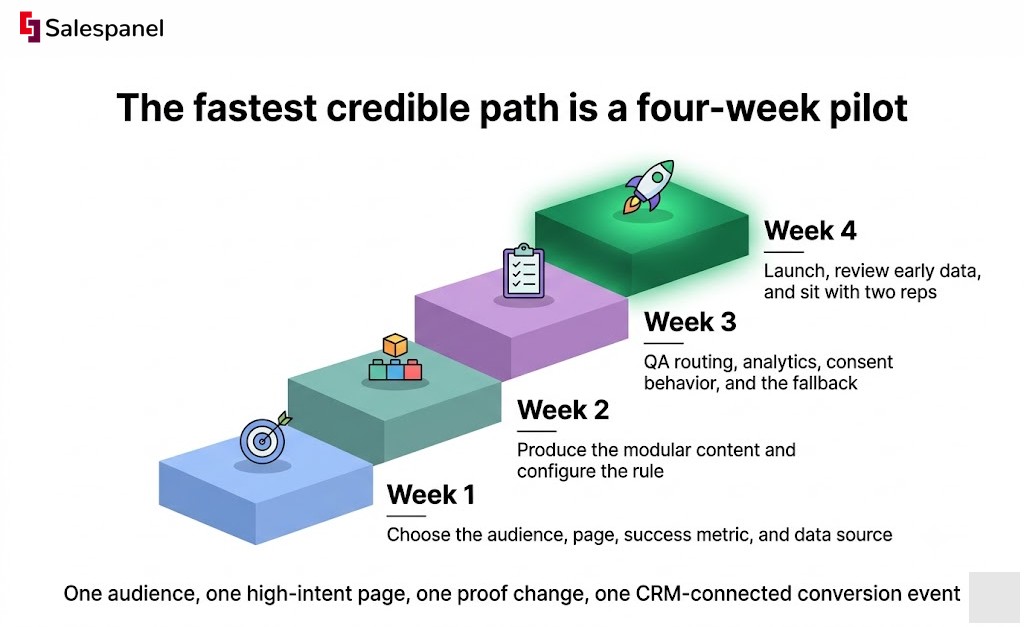
The fastest credible path is a four-week pilot: one audience, one high-intent page, one proof change, one CRM-connected conversion event.
- Week 1 — choose the audience, the page, the success metric, and the data source. Capture baseline numbers.
- Week 2 — produce the modular content and configure the rule, including the fallback.
- Week 3 — QA routing, analytics, consent behavior, and the fallback experience on mobile and desktop.
- Week 4 — launch, review early data, and sit with two reps to collect qualitative feedback.
Then document three things and keep documenting them: what the audience saw, why they saw it, and what happened after they converted. That record is what turns a one-off experiment into a program, and it is the part that makes the second and third campaigns dramatically cheaper to run than the first.
If the missing piece is account-level visibility — knowing which companies are on the page, what they have read, and which of them are worth a personalized experience at all — take a look at Salespanel’s visitor intelligence and lead scoring to see how identified account activity feeds qualification and routing.
FAQ
What is the rule of 7 in B2B?
The rule of 7 in B2B is a marketing heuristic suggesting buyers often need repeated, relevant interactions before taking action. It is not a fixed scientific threshold. B2B website personalization can make repeated visits more useful by changing proof, content, or calls to action based on known account, behavior, and lifecycle signals.
What are the four C’s of B2B marketing?
The four C’s are commonly described as customer, cost, convenience, and communication. For B2B website personalization, customer means segment needs, cost includes buying risk and implementation effort, convenience means easier access to relevant information, and communication means consistent messaging across website, sales outreach, and lifecycle campaigns.
What does B2B website mean?
A B2B website is a website designed to help one business evaluate, buy, manage, or partner with another business. Unlike consumer sites, B2B websites usually support longer sales cycles, multiple decision-makers, technical evaluation, procurement review, and sales-assisted conversion paths such as demo requests, pricing conversations, or consultations.
What are some good examples of B2B websites?
Good B2B websites make it easy for specific buyers to understand the product, verify fit, assess implementation requirements, and choose a next step. Useful examples typically include clear use cases, customer evidence, integration or security information, role-relevant content, and conversion paths matched to research, evaluation, or purchase stages.
Sell more, understand your customers’ journey for free!
Sales and Marketing teams spend millions of dollars to bring visitors to your website. But do you track your customer’s journey? Do you know who buys and why?
Around 8% of your website traffic will sign up on your lead forms. What happens to the other 92% of your traffic? Can you identify your visiting accounts? Can you engage and retarget your qualified visitors even if they are not identified?