Cold Calling by Email: Guide to Outreach That Gets Replies
By the end of this guide, you’ll be able to run cold calling by email as a repeatable system: a clean sending infrastructure that lands in the inbox, a segmented prospect list that doesn’t bounce, a five-part email structure that earns replies, and a follow-up cadence that stops before it annoys people. Everything here is built for practitioners doing the work.
The math has shifted. Average cold email reply rates in B2B now sit around 3.4%, per Instantly’s 2025-2026 benchmark report — down from roughly 5% in 2025 and 8.5% back in 2019. Top-quartile campaigns reach about 5.5%, and the top 10% clear 10-11%. Meanwhile, Google and Microsoft have tightened bulk-sender enforcement twice since early 2024, so the gap between a technically clean sender and a sloppy one is no longer a few percentage points of deliverability. It’s the difference between a working channel and a dead one.
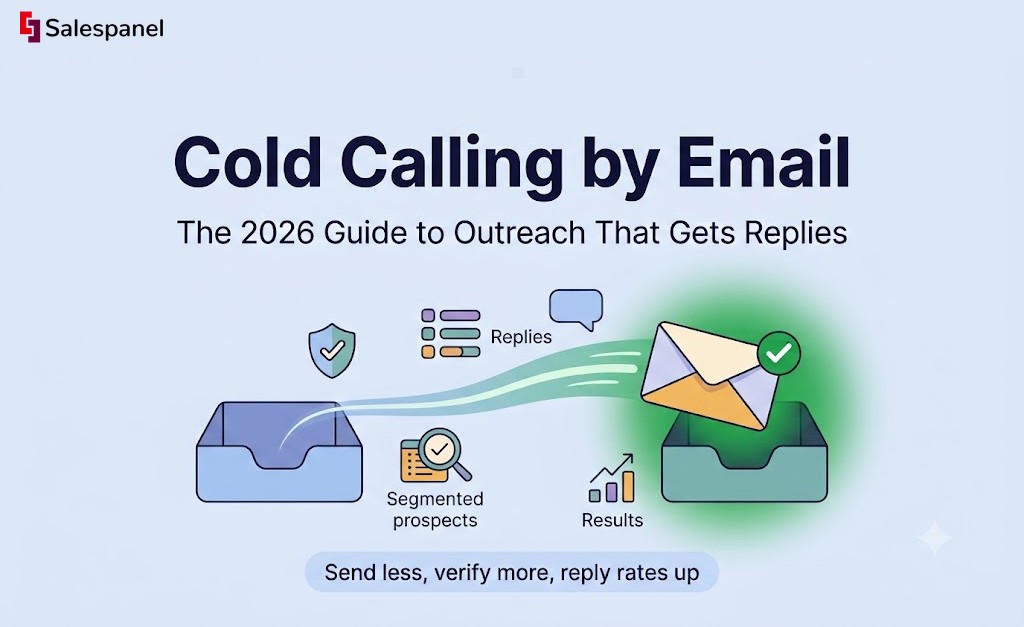
What that means operationally: volume alone stopped working somewhere around 2023. The teams booking meetings in 2026 send less, verify more, and treat every domain like an asset with a credit score.
You’ll get specific numbers throughout — sending caps per domain, bounce thresholds that trigger reputation damage, benchmark reply rates by touch number. No recycled 2019 templates, no “just add value” hand-waving.
Cold Calling by Email: Definitions, Terms, and Context
Cold calling by email means contacting a prospect over email with no prior relationship, permission, or inbound signal — the email equivalent of a cold phone call. The phrase survives mostly inside sales orgs that run both channels from the same sequence. Most practitioners just say cold emailing.
The distinction matters more than it sounds. Phone cold calling is synchronous: you get an answer, an objection, or a hang-up inside 90 seconds. Email is asynchronous, which means your message competes with 40 other unread threads and gets judged on a subject line and a preview pane.
A quick glossary, since these terms get used loosely:
- Outbound — any seller-initiated motion (email, phone, LinkedIn, direct mail).
- Prospecting — the research and list-building step that happens before outreach.
- Sales development — the function (SDRs/BDRs) that owns cold outreach and hands qualified meetings to AEs.
- Cold emailing — the tactic itself.
Where do the numbers land in 2026? Open rates for well-warmed domains typically run 40-60%, though Apple Mail Privacy Protection and Gmail’s image proxying have made opens directionally useful at best. Reply rates of 5-12% are normal. Meeting-booked rates from cold email hover around 1-3% of contacted prospects, and Gartner’s B2B buying research continues to show buyers spending only about 17% of their purchase journey with sellers at all.
Now the misconception. AI didn’t kill cold email — generic AI output did. When every SDR runs the same “I noticed you’re the VP of Marketing at {{company}}” prompt, personalization stops being a differentiator and becomes noise. What actually improved with AI: research speed, list enrichment, and reply classification. What got worse: message sameness. Teams that use AI for research and humans for the actual sentence structure are the ones still hitting double-digit reply rates.
Email Deliverability: How to Reach the Inbox, Not the Spam Folder
Deliverability in 2026 comes down to four things: authenticated DNS records (SPF, DKIM, DMARC), a warmed sending domain, a spam complaint rate below 0.10%, and sending volume that matches your domain’s history. Get those right and most other tactics work. Get them wrong and nothing else matters.
Google and Yahoo’s bulk sender requirements — live since February 2024 and enforced harder every quarter since — now demand DMARC on any domain sending more than 5,000 messages a day, one-click unsubscribe headers for bulk mail, and complaint rates under 0.30% with a hard target of 0.10%. Microsoft followed with its own bulk sender enforcement for Outlook.com in May 2025, rejecting unauthenticated bulk mail outright rather than routing it to junk. The practical result: cold email from a brand-new, unauthenticated domain gets filtered before a human ever sees it.
Warm up the domain before you use it
A fresh domain has no sending reputation. Providers treat sudden volume from an unknown domain as a spam signal, so you ramp gradually.
A workable schedule: register the domain, wait 7-14 days before sending anything, then start at 5-10 emails per day and increase roughly 30% every two or three days until you reach your target. Getting to 40 emails a day takes about three weeks. Rushing it is the single most common cause of a domain that never recovers.
Warm-up networks (Instantly, Smartlead, Mailreach) automate reply-and-open behavior between participating inboxes. They help, but they’re not a substitute for real conversations — mix in genuine sends to colleagues, partners, and existing customers.
The three DNS records, explained plainly
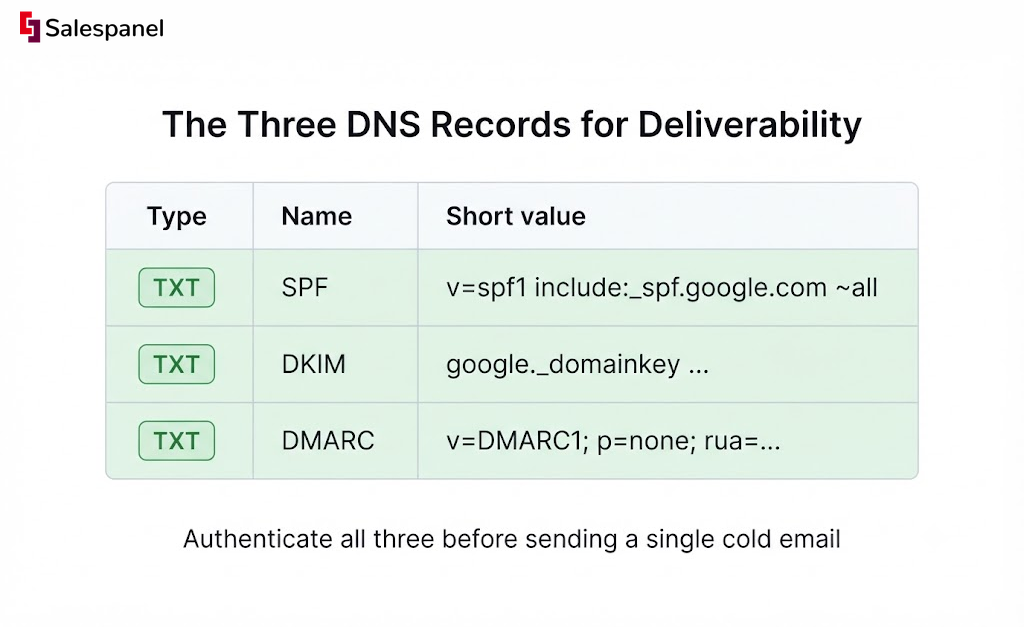
SPF is a list of servers allowed to send mail for your domain. It’s a single TXT record. If you send through Google Workspace and a sequencer, both need to be included: v=spf1 include:_spf.google.com include:sequencer-provider.com ~all. One SPF record per domain — two records break it entirely.
DKIM is a cryptographic signature that proves the message wasn’t altered in transit. Your email provider generates a public key; you publish it as a TXT record at a selector subdomain like google._domainkey.yourdomain.com. Copy-paste errors here are common because the key is long.
DMARC tells receiving servers what to do when SPF or DKIM fails, and where to send reports. Start permissive and tighten: v=DMARC1; p=none; rua=mailto:[email protected], then move to p=quarantine after you’ve reviewed a few weeks of reports.
What to watch out for
Sending cold email from your primary company domain. If it gets blacklisted, your invoices, support replies, and password resets go down with it. Use a separate but similar domain (getcompany.com alongside company.com).
Other repeat offenders: multiple SPF records, forgetting to authenticate a new sending tool added mid-campaign, tracking links on a shared subdomain that another sender already burned, and image-heavy HTML emails. Plain text with one link outperforms designed templates in cold contexts almost every time.
Building a Quality Prospect List
A prospect list is a deliverability decision before it’s a targeting decision. Every bad address you send to increases your bounce rate, and bounce rate is the fastest way to wreck a sender reputation. Keep hard bounces under 2% per campaign. Above 5%, providers start throttling. Above 15%, you’re looking at domain-level damage that takes months to undo.
Where to source emails
Apollo.io remains the default for volume — roughly 275 million contacts, decent filters, mediocre accuracy on smaller companies. LinkedIn Sales Navigator is better for building the account and persona list, even though it gives you no email addresses; export the company and title criteria, then enrich elsewhere. Clearbit (now part of HubSpot’s Breeze data layer) is strong on firmographic and technographic enrichment. Clay has become the connective tissue for a lot of teams, waterfalling across five or six providers to squeeze out the last 20% of coverage.
Regardless of source, run every list through a verifier — NeverBounce, ZeroBounce, or Millionverifier — immediately before sending. Not at import. Data decays roughly 22-30% per year as people change jobs, so a list verified three months ago is already stale.
Segment before you write
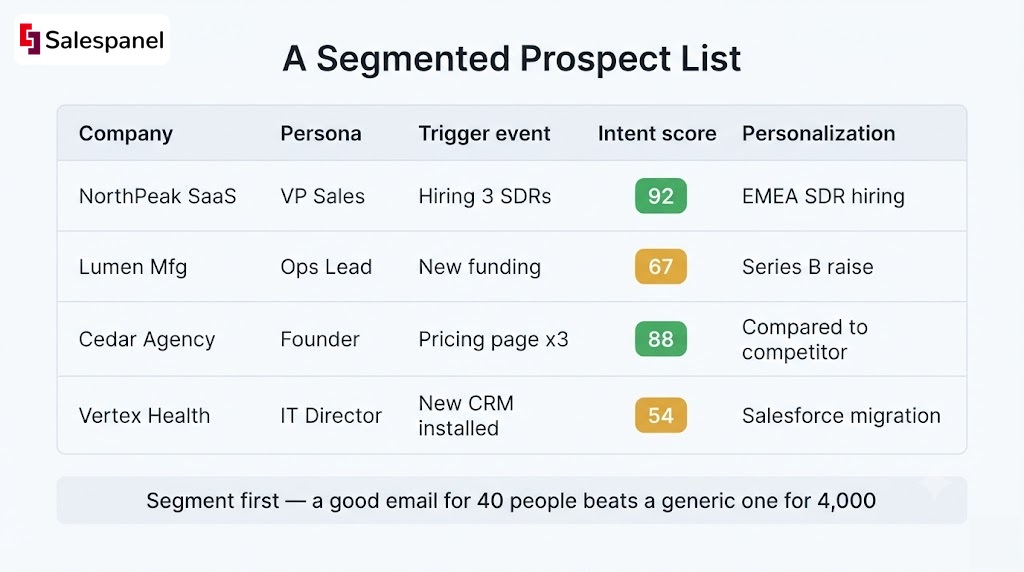
Writing a good cold email for 4,000 people is impossible. Writing a good one for 40 is easy. Segment first:
- ICP tier — split by employee count, industry, and tech stack. A 30-person agency and a 3,000-person manufacturer don’t share a pain point.
- Persona — separate the economic buyer from the practitioner. Same company, different email.
- Trigger — job change in the last 90 days, funding round, new tool installed, hiring for a relevant role.
- Intent signal — accounts already visiting your pricing page or comparing you against a competitor.
That last one is where visitor intelligence changes the sequence. If an account has been on your site three times this month, that isn’t a cold email anymore — it’s a warm one with a real reason to exist. Salespanel identifies anonymous company traffic and scores it, which lets you pull those accounts into a separate, higher-priority segment. Our lead scoring strategies for outbound teams guide covers how to weight those signals.
Crafting Emails That Get Replies (Not Ignored):
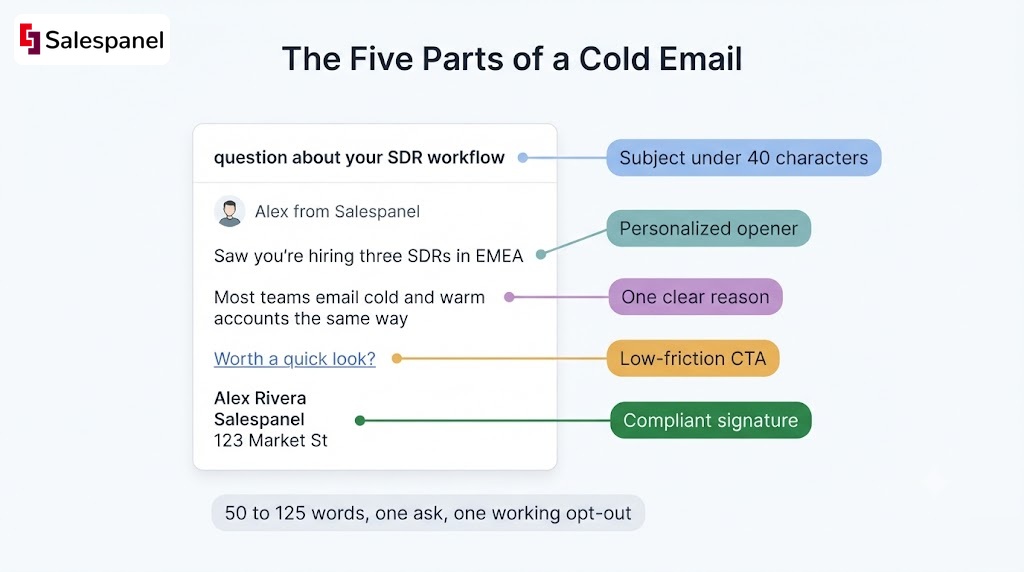
A cold email that works in 2026 has five parts: a subject line under 40 characters, an opening line that proves you looked, one clear reason for the message, a low-friction call to action, and a compliant signature with a working opt-out. Total length: 50-125 words. Anything longer gets skimmed and dropped.
1. Subject Line Formulas
Short and specific beats clever. Subject lines of two to four words consistently outperform longer ones in cold campaigns, and lowercase reads more like a human wrote it.
Formulas that hold up:
question about {{their process}}— plain, curiosity-driven{{competitor}} comparison— works when the account is actively evaluating{{mutual connection}} suggested I reach out— highest open rates when true, catastrophic when fabricatedre: {{their recent post}}— only if the post is real and you reference it in line one
Subject lines of two to four words see roughly 46% open rates versus about 34% for ten-word lines (Belkins, 2025 study of 5.5 million B2B cold emails). Skip anything with “quick,” “sync,” “touch base,” or emoji.
2. First Line Personalization
The first line has one job: prove a human made a decision to email this specific person. Generic merge fields fail this test because everyone recognizes them.
What works, ranked by effort-to-payoff:
- A specific line from their LinkedIn post or comment (last 30 days)
- A detail from a podcast, webinar, or conference talk they appeared in
- A hiring signal — “you’re hiring three SDRs in EMEA” implies a specific problem
- A product or pricing change announced on their site
What doesn’t: “Love what you’re building at {{company}}.” “I came across your profile.” “Congrats on the growth.” Those read as automated because they are.
3. Explaining the “Why” Clearly and Briefly
Two sentences. First, the problem you believe they have, stated in their language. Second, the specific outcome you produced for someone like them, with a number.
Example: “Most RevOps teams running Apollo sequences can’t tell which accounts already visited the site, so SDRs email cold accounts and warm ones the same way. One 40-person SaaS team we work with re-prioritized their queue by intent and moved meeting rate from 1.4% to 3.1% in six weeks.”
No feature lists. No mission statements. If you can’t name the problem in one sentence, your segmentation was too broad.
4. Call to Action
Micro-commitments outperform meeting requests in cold contexts. “Worth a look?” or “Should I send the two-line version?” get replies because they cost nothing to answer. “Do you have 15 minutes Thursday at 2pm?” asks for calendar time from someone who doesn’t know you yet.
Low-friction, interest-based CTAs consistently outperform direct meeting requests on reply rate, though a lower percentage of those replies convert to booked calls. Run both. One CTA per email, always — two questions gets you zero answers.
5. Signature and Compliance
Keep the signature to name, title, company, and a physical address. The address is a CAN-SPAM requirement, not a suggestion.
For opt-out: include a plain-language line (“Reply ‘no’ and I won’t follow up”). Bulk senders also need a functioning List-Unsubscribe header for Gmail and Yahoo. GDPR still requires a documented legitimate-interest assessment for EU contacts and a lawful basis for holding their data. California’s CPPA finalized additional data-broker registration and deletion mechanics in 2025, which affects purchased lists more than self-built ones. If you buy data, know where it came from.
Personalization at this level requires data you probably don’t have in your CRM yet. Our tutorial on enriching B2B contact data for personalization walks through the enrichment waterfall.
Sending at Scale: Tools, Automation, and Human Touch
Scale in cold email means more inboxes sending small volumes, not one inbox sending large ones. The ceiling is roughly 30-50 new contacts per day per inbox, with two to four inboxes per domain. To reach 500 sends a day you need infrastructure, not a bigger campaign.
Bulk sends — one message, one blast — are cheap and almost always underperform. Sequence-based sending (multi-step, conditional, spread across days) is the standard. Instantly and Smartlead both lean toward high-volume infrastructure management with built-in inbox rotation. Woodpecker skews toward agencies and smaller, more careful volumes. Lemlist sits in between with stronger multichannel steps.
The tradeoff is real: sequencers make it trivially easy to send bad email to 5,000 people. The tools have no opinion about your message quality.
Throttling and scheduling
- 30-50 new contacts per inbox per day, hard ceiling
- Randomized delays of 60-180 seconds between sends
- Business hours in the recipient’s timezone, Tuesday through Thursday for first touches
- Rotate across inboxes so no single one exceeds its warm-up ceiling
- Pause the campaign immediately if bounce rate crosses 3% mid-flight
Metrics and testing
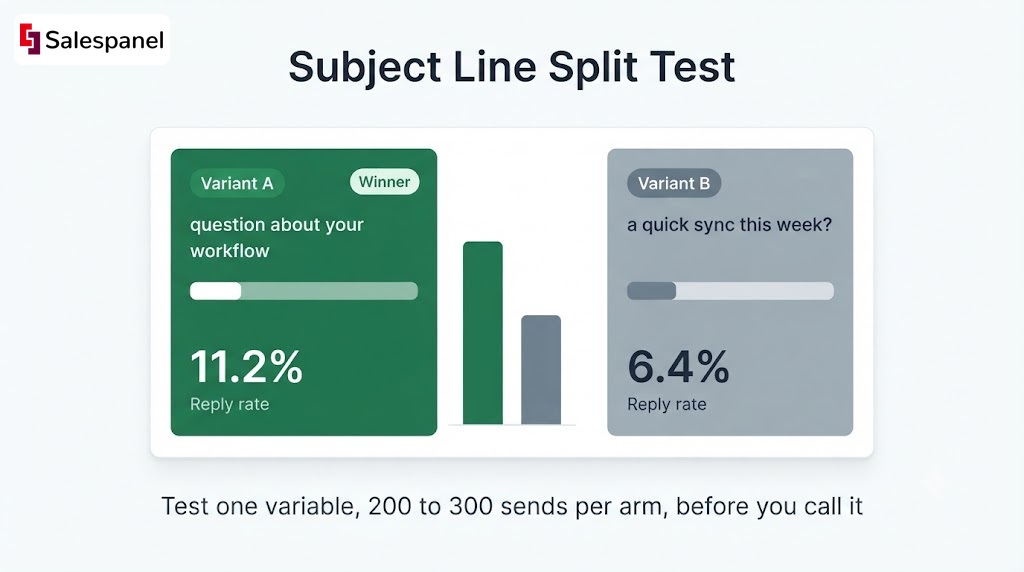
Test one variable at a time and give each variant at least 200-300 sends before reading results. Anything smaller is noise. Subject line first, then opening line, then CTA — in that order of impact.
Watch bounce rate, delivery rate, reply rate, and positive reply rate. Opens are increasingly unreliable thanks to privacy proxies, and clicks in cold email are low-signal because most cold emails shouldn’t contain a link. Where tracking gets genuinely useful is downstream: which sequences produce site visits from target accounts. Pairing sequence data with visitor tracking closes that loop — see understanding SDR email metrics for the reporting setup.
Follow-Up: How Persistence Pays (or Fails)
Most positive replies arrive early. Around 58-60% of replies come from the first email, with follow-ups contributing most of the rest, and the marginal return past touch five approaches zero while unsubscribe and complaint risk keeps climbing. Four to five touches over 14-18 days is the sweet spot for 2026.
A cadence that holds up:
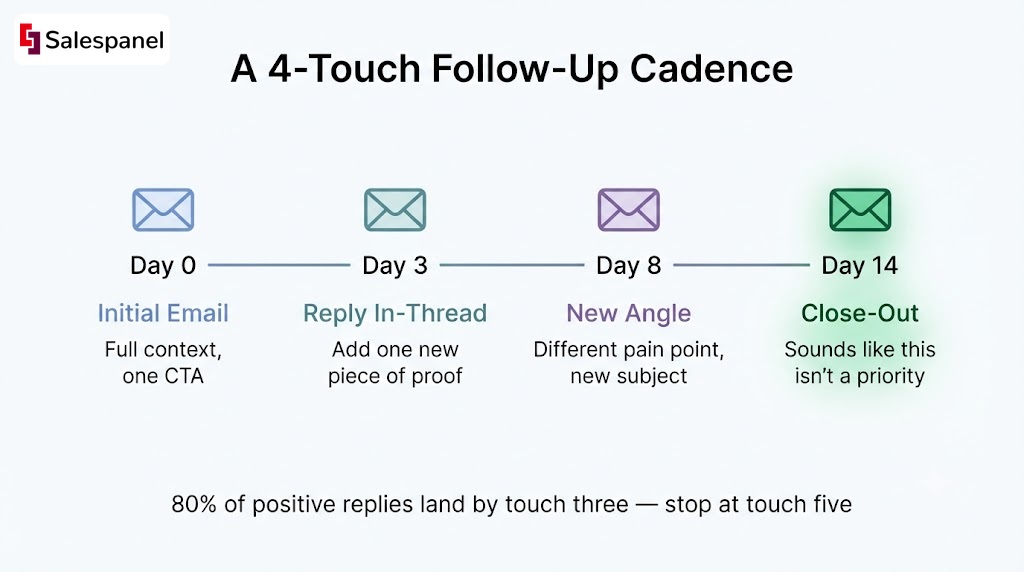
- Day 0 — Initial email. Full context, one CTA.
- Day 3 — Reply in-thread. Two sentences. Add one new piece of evidence, not a nudge.
- Day 8 — New thread, new angle. Different pain point, different subject line.
- Day 14 — Short close-out. “Sounds like this isn’t a priority — I’ll stop here.”
The close-out email reliably pulls replies, often more than touch two. People respond to the door closing.
Message progression matters as much as timing. Touch one makes a claim. Touch two adds proof (a metric, a customer name, a screenshot). Touch three changes the angle entirely — if you led with cost savings, try speed. Touch four releases them. Never send “just bumping this to the top of your inbox,” which adds nothing and signals automation.
When to change channel
Switch channels after touch two, not before. A LinkedIn connection request plus a one-line message referencing your email works well. Phone works if you have a mobile number and a real reason. SMS is high-risk in B2B and generally requires prior consent depending on jurisdiction — most teams should skip it.
Channel-switching backfires when it becomes surveillance. Email, LinkedIn, phone, and SMS in the same week reads as harassment regardless of your intent.
Common Mistakes in Cold Calling by Email (And How to Fix Them)
Three categories cause most cold email failure: technical setup errors that block delivery, messaging that’s too generic to earn a reply, and no measurement loop to catch either problem. Each has a fix that takes less than a day.
Technical errors
Sending from the primary domain, then getting listed on Spamhaus SBL or a Microsoft internal block list. Recovery involves a delisting request, weeks of reduced volume, and often a new domain anyway.
The fix: separate sending domain, full SPF/DKIM/DMARC, verified list, warm-up completed, complaint rate monitored via Google Postmaster Tools weekly. Set an alert at 0.08% complaint rate so you act before Gmail does.
Missing opt-out language is the other silent killer. An unsubscribe costs you nothing in reputation terms; a spam complaint actively damages it — which is why one complaint is far more expensive than one opt-out.
Messaging mistakes
The most common 2026 failure is an AI-generated opener that references something publicly available but irrelevant — “I saw your company was founded in 2011.” It signals automation without adding information.
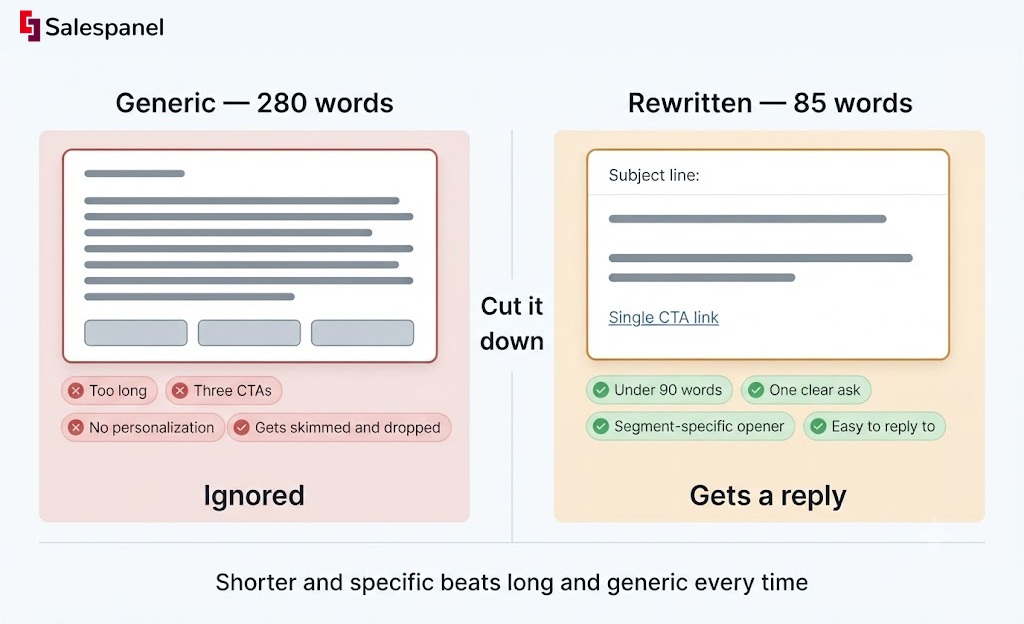
Second: the 300-word first email with three CTAs and a calendar link. Cut it to 90 words and one ask.
Third: mistargeting. Emailing a Head of Engineering about pipeline metrics. That’s a segmentation failure wearing a copywriting costume.
No measurement
“Spray and pray” persists because it feels productive. Sending 5,000 emails and booking two meetings looks like activity. Track reply rate by segment, not by campaign, and you’ll usually find one segment carrying the entire result while three others burn your domain.
Measuring Success and Continuous Improvement: What to Track
Six metrics tell you whether cold calling by email is working: delivery rate (target 97%+), reply rate (5-12% is normal, 15%+ is strong), positive reply rate (1-3% of sends), meeting-booked rate (1-3%), unsubscribe rate (under 1%), and spam complaint rate (under 0.10%). Track all six by segment.
Reply rate alone misleads. A campaign with 14% replies where most are “not interested” is worse than one at 7% with half positive. Positive reply rate is the number worth optimizing.
Running experiments
Pick one variable. Split the segment randomly, not by import order — alphabetical or upload-order splits correlate with company size and skew results. Run to at least 200-300 sends per arm. Woodpecker, Instantly, and Smartlead all support native A/B splits on subject and body.
Document what you tested and what happened, even when nothing moved. Most teams re-run the same failed test three times a year because nobody wrote it down.
Feedback loops
Internal: log reply reasons in the CRM as structured picklist values (“wrong person,” “no budget,” “bad timing,” “using competitor”). After 200 replies you’ll have a clear objection map that rewrites your messaging for you.
External: read the negative replies carefully. “We already use X” is targeting feedback. “Please remove me” is deliverability feedback.
Then connect email activity to site behavior. When a sequence recipient visits your pricing page two days after touch three, that’s a buying signal your sequencer can’t see on its own. Salespanel surfaces that account-level activity and feeds it back into scoring, so SDRs prioritize by intent rather than by sequence position.
FAQ: Cold Calling by Email
What is cold calling via email called?
Cold calling via email is most commonly called cold emailing. Some sales organizations still say “cold calling by email” when email and phone outreach run from the same sequence and the same rep, treating them as one hybrid motion. Related terms include outbound prospecting and email prospecting. The underlying activity is identical: contacting a prospect with no prior relationship or permission.
What is the 80/20 rule in cold calling?
The 80/20 rule in cold calling means roughly 20% of your outreach produces about 80% of your results. In practice, a small number of segments, personas, or trigger events drive most replies and meetings. The application is straightforward: track reply and positive-reply rates by segment, identify the top-performing 20%, then shift volume and personalization effort toward those accounts instead of spreading sends evenly.
What is the difference between cold emailing and cold calling?
Cold calling is synchronous — you speak with the prospect in real time, get immediate objections, and can adapt within seconds. Cold emailing is asynchronous — the prospect reads on their own schedule, and you get no live feedback. Calling produces faster qualification and higher per-conversation conversion. Email scales further, costs less per contact, and lets prospects respond without confrontation. Most 2026 B2B teams run both.
How do I address a cold call email?
Address a cold email using the recipient’s first name, then immediately reference a verifiable detail about their role, company, or recent activity. “Hi Sarah,” followed by a line about her team’s specific situation works better than any formal salutation. Keep the register semi-formal for B2B: no “Dear Sir/Madam,” no over-familiarity. Skip titles unless you’re emailing regulated industries or senior executives in formal markets.
When a sequence recipient hits your site after a send, that is a buying signal your sequencer cannot see. See how Salespanel connects those visits to the account and scores them so follow-up is ordered by intent, not sequence position.
Sell more, understand your customers’ journey for free!
Sales and Marketing teams spend millions of dollars to bring visitors to your website. But do you track your customer’s journey? Do you know who buys and why?
Around 8% of your website traffic will sign up on your lead forms. What happens to the other 92% of your traffic? Can you identify your visiting accounts? Can you engage and retarget your qualified visitors even if they are not identified?