6 Piwik PRO Alternatives for Privacy-First Analytics
Piwik PRO Alternatives: What to Compare Before You Switch
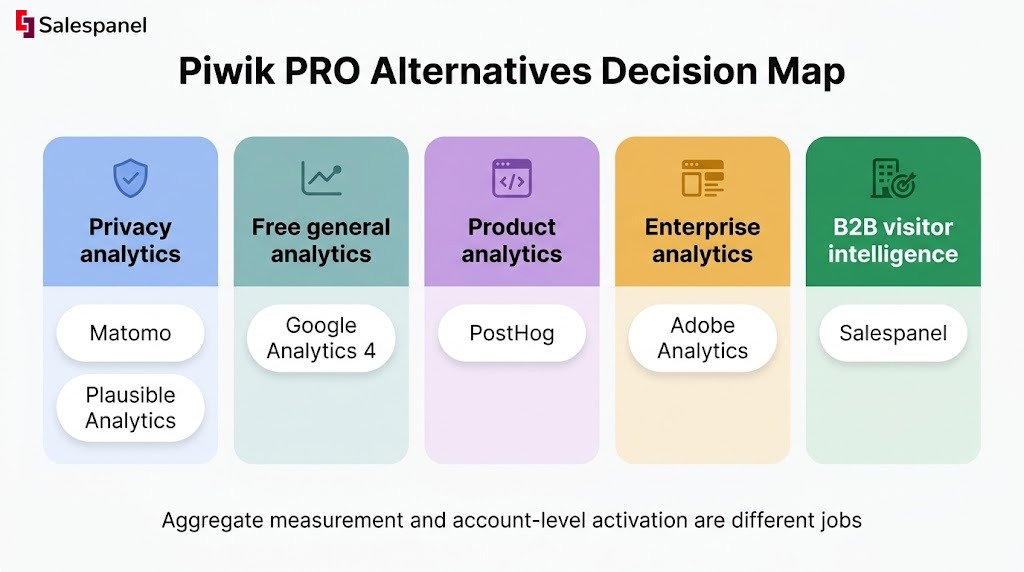
The best Piwik PRO alternatives in our opinion are Matomo, Google Analytics 4, Plausible Analytics, PostHog, Adobe Analytics, and Salespanel. These six tools solve four different jobs: privacy-first web analytics, product analytics, enterprise digital measurement, and B2B visitor identification. Picking correctly depends on which of those jobs your team actually needs solved first.
Most teams start looking for a Piwik PRO replacement for one of five reasons. Pricing moved outside what the budget supports. The implementation turned out heavier than expected and nobody internally owns it. Reporting doesn’t answer the questions leadership keeps asking. Security or legal wants a specific deployment model or storage region. Or, the one we see most often with B2B companies, the analytics stack reports traffic beautifully and tells sales nothing it can act on.
Now, there is a distinction worth settling before any feature comparison, because competitor-written listicles routinely blur it. Matomo, Plausible, and GA4 measure traffic and behavior in aggregate. Salespanel identifies, qualifies, and routes B2B website demand to the people who follow up on it. Salespanel is not a one-for-one swap for a web analytics suite, and we’ll say so again later in the article where it matters. If you are familiar with the difference between a reporting layer and an activation layer, you already know why that distinction changes the shortlist.
Seven criteria run through every comparison below: privacy and consent controls, deployment and data control, reporting depth, product analytics capability, B2B sales activation, integrations, and the pricing model. Verify plan limits on each vendor’s official pricing page before you buy anything. Packaging in this category changes several times a year, and a comparison table published in January is frequently wrong by June.
Quick Comparison of the Top Piwik PRO Alternatives
The right choice depends more on the measurement job than on any feature checklist. Two tools can both have “custom events” on the pricing page and still be useless for your actual question. Read the table below by starting from the “primary use case” column, not the feature columns.
| Tool | Primary use case | Hosting / deployment | Privacy & consent capabilities | Best-known strength | Key limitation | Pricing approach |
|---|---|---|---|---|---|---|
| Matomo | Privacy-focused web analytics | Cloud or self-hosted [1] | Data ownership, configurable retention, consent options | Closest functional match to a full web analytics suite with a self-hosted path | Self-hosting shifts ops burden to you; some features sit in paid plans or plugins | Open-source core + paid cloud/plugins [1] |
| Google Analytics 4 | Broad web and app measurement | Google-hosted only | Consent Mode, regional controls, retention settings — all require active configuration [2] | Native connections to Google Ads, Search Console, BigQuery | No self-hosting; governance work is real and ongoing | Standard product at no cost; Analytics 360 enterprise tier [2] |
| Plausible Analytics | Simple, privacy-focused traffic reporting | Cloud or self-hosted community edition [3] | Cookieless by design, lightweight script | Fast time-to-answer for standard traffic questions | Small measurement surface; limited for deep journey analysis | Usage-based subscription [3] |
| PostHog (not a direct replacement) | Product analytics | Cloud or self-hosted [4] | Self-host option, configurable data handling | Event instrumentation, funnels, session replay, feature flags | Built for product teams, not marketing-site reporting or account intelligence | Usage-based [4] |
| Adobe Analytics | Enterprise digital analytics | Adobe-hosted enterprise | Enterprise governance and contractual data terms | Depth across large multi-property digital estates | Needs specialist implementation and ongoing governance resource | Enterprise contract [5] |
| Salespanel (not a direct replacement) | B2B visitor intelligence | Cloud | Consent-aware tracking configuration | Turning account-level website activity into CRM-ready sales signals | Does not replace aggregate web analytics or in-app product analytics | Plan + usage based [6] |
Sources: [1] Matomo hosting documentation · [2] GA4 documentation · [3] Plausible privacy documentation · [4] PostHog product analytics docs · [5] Adobe Analytics · [6] Salespanel pricing
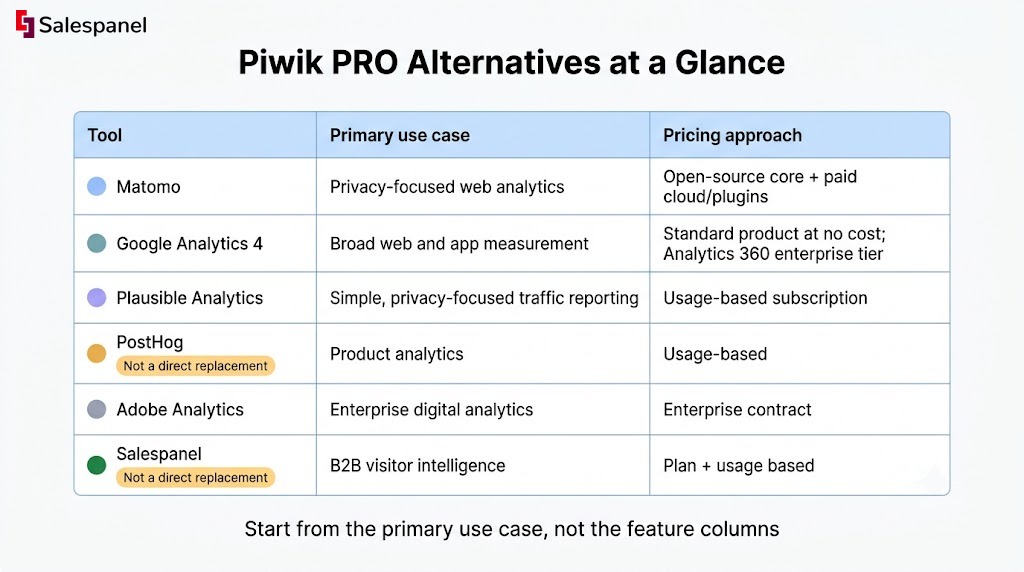
The two “not a direct replacement” markers are there on purpose. PostHog and Salespanel both get listed in Piwik PRO alternative roundups, and in both cases the comparison only holds for one slice of what Piwik PRO does.
How the Alternatives Compare on Privacy, Consent, and Data Control
Matomo is usually the closest Piwik PRO alternative for organizations that prioritize deployment control. Plausible wins on simplicity. GA4 wins on ecosystem breadth and loses on data residency flexibility, since there is no self-hosted path.
This dimension decides shortlists before anyone opens a reporting demo. If legal requires a specific storage region, or security won’t approve a third-party collector without server-side proxying, or the DPIA process has a six-week queue, then the analytics features barely matter. The constraint sets the candidate list and reporting preferences fill in the rest.
One caution that applies to every vendor named here. No tool makes you compliant with GDPR, HIPAA, ePrivacy, or anything else. Compliance lives in how you configure collection, what you write into your DPA, how consent is captured, and what your counsel signs off on. Vendors supply controls and contractual terms. Your implementation determines the outcome. Run the shortlist past legal before you run it past the marketing team.
Matomo: Closest Match for Self-Hosted Analytics Control
Matomo offers both a cloud service and a self-hosted open-source edition, documented on Matomo’s hosting page. That dual path is the main reason it shows up first in almost every Piwik PRO comparison — the two products share ancestry and a similar philosophy about data ownership.
Now, the trade-off with self-hosting is the part that gets undersold. Running Matomo on your own infrastructure gives you control over where data sits and who touches it. It also gives you responsibility for version upgrades, security patching, database growth, archiving performance on high-traffic sites, and the on-call rotation when the report processing job falls behind. If you have a platform team that already runs internal services, this is a reasonable addition. If your “IT department” is one person who also manages laptops, self-hosted Matomo will quietly become their problem.
Honest limitation: several of Matomo’s more advanced functions — heatmaps, session recording, certain attribution features — are packaged as paid plugins or cloud-plan inclusions rather than being part of the free core. Check the current plugin marketplace before you model total cost, because “open source” and “free in the configuration we need” are different statements.
Plausible Analytics: Minimalist Reporting With a Smaller Measurement Surface
Plausible made a deliberate choice to measure less. The script is small, the default setup avoids cookies, and the dashboard fits on one screen. For a marketing site where the weekly question is “which content brought traffic and did it convert,” that constraint is a feature.
Against Piwik PRO, the comparison splits cleanly. The simpler data model means a new team member can read the dashboard in about ten minutes, with no training session and no custom report build. It also means you will hit a ceiling if you need granular multi-step journey analysis, extensive custom dimensions, role-based governance across business units, or the kind of audit trail an enterprise security review expects.
Verify the current state of the self-hosted community edition and subscription tiers on Plausible’s own documentation — the self-hosting terms and feature parity with the cloud product have shifted over time.
Google Analytics 4: Broad Ecosystem, More Governance Work
GA4’s case is the ecosystem. Native links to Google Ads, Search Console, and a BigQuery export that is available on the standard tier give marketing teams a measurement path from ad click through to warehouse query without buying connectors.
That said, calling GA4 “free” without qualification is how teams end up surprised. The standard product carries no license fee. Implementation does carry cost: event taxonomy design, tag management, consent plumbing via Consent Mode, BigQuery storage and query spend, and the agency or analyst hours spent maintaining definitions when someone renames a conversion event and three dashboards break. Data retention settings default to shorter windows than many teams expect, and nobody gets an alert when historical data ages out.
For organizations that chose Piwik PRO specifically to get away from Google’s data handling, GA4 is obviously a step backward on that axis. For teams whose paid acquisition runs through Google and whose main pain is reporting fragmentation, it’s often the pragmatic answer.
Reporting, Attribution, and Behavioral Analysis
GA4 and Adobe Analytics offer the broadest digital-measurement ecosystems. Matomo offers familiar web-analysis depth in a layout most marketers can navigate on day one. Plausible intentionally limits complexity. PostHog answers a different class of question entirely.
Comparing on “ease of use” produces nothing useful, so the table below scores each option against concrete reporting tasks instead.
| Capability | Matomo | GA4 | Plausible | PostHog | Adobe Analytics |
|---|---|---|---|---|---|
| Standard website reporting | Strong | Adequate | Strong | Limited | Strong |
| Custom event analysis | Adequate | Strong | Limited | Strong | Strong |
| Marketing attribution | Adequate | Strong | Limited | Limited | Strong |
| Data export / warehouse workflows | Adequate | Strong | Adequate | Strong | Strong |
| Executive-friendly dashboards | Adequate | Adequate | Strong | Adequate | Strong |
Note what the table does not say: that any of these tools gives you “better attribution.” Attribution quality is a function of your event taxonomy, your identity resolution, your consent acceptance rate, and whether your campaign URLs are tagged consistently across six channels and two agencies. A tool with a sophisticated attribution model fed by 40% consent coverage and inconsistent UTMs will produce confident, wrong numbers. That is worth more attention than any vendor feature comparison.
GA4 and Adobe Analytics: Best for Complex Digital Measurement Programs
GA4 fits Google-centric marketing teams — the ones where paid search, YouTube, and organic Google traffic account for most of the acquisition story and the reporting needs to tie back to ad spend. Its event-based data model is flexible enough to track almost anything, provided someone maintains the schema.
Adobe Analytics serves a different buyer. Organizations running Adobe Experience Cloud, with multiple digital properties, segmentation needs across business units, and analysts whose full-time job is analytics, get real value from the depth — Analysis Workspace handles ad-hoc enterprise analysis better than anything else named in this article. The implementation documentation also makes the cost obvious: this is a platform with specialist implementation, governance processes, and usually a vendor or consultancy relationship attached.
For a six-person B2B marketing team, Adobe is overhead without payoff. We’d expect the evaluation to end quickly once someone prices the implementation partner.
Matomo and Plausible: Better for Teams That Need Clearer Web Reporting
Matomo carries the broader feature set — visitor logs, custom reports, goal funnels, segment builders, and a navigation structure that will feel familiar to anyone who used Universal Analytics. Plausible gives you one dashboard with sources, pages, countries, devices, and goals.
Consider two practitioners. A content marketer wants to know whether last month’s comparison post pulled organic traffic that converted to demo requests, broken down by landing page and source. Both tools answer that; Plausible answers it faster. A product analyst wants to model a five-step activation funnel with branch logic and cohort retention. Plausible will not do it, Matomo will do it awkwardly, and PostHog was built for it.
Here is the metric we’d actually use to separate Matomo and Plausible: time-to-trusted-report. How many minutes does it take a non-analyst to answer a routine weekly traffic question, without exporting to a spreadsheet, without rebuilding a saved report, and without asking someone whether the number is right? Plausible usually wins that measurement outright. Matomo wins the moment the weekly question gets a second or third dimension attached to it. Pick based on which situation describes your last six months of reporting requests.
PostHog: Better When Website Events Are Part of Product Analytics
PostHog belongs in this comparison for teams whose marketing site is one small surface in a larger product. If you are tracking authenticated in-app events, running experiments, watching session replays, and gating features behind flags, then pulling marketing-site events into the same product analytics instance keeps the user journey in one dataset.
The limitation is straightforward. PostHog does not identify the companies visiting your website, does not score account-level intent, and does not route qualified activity to a sales owner in your CRM. It was never designed to. Product analytics tells you what users do inside the application; B2B demand intelligence tells you which unknown companies are circling your pricing page before anyone signs up.
B2B Lead Identification and Sales Activation
If the objective is to help sales act on high-intent account activity, Salespanel addresses a different layer than Piwik PRO, Matomo, GA4, Plausible, or Adobe Analytics. Those tools report. This layer activates.
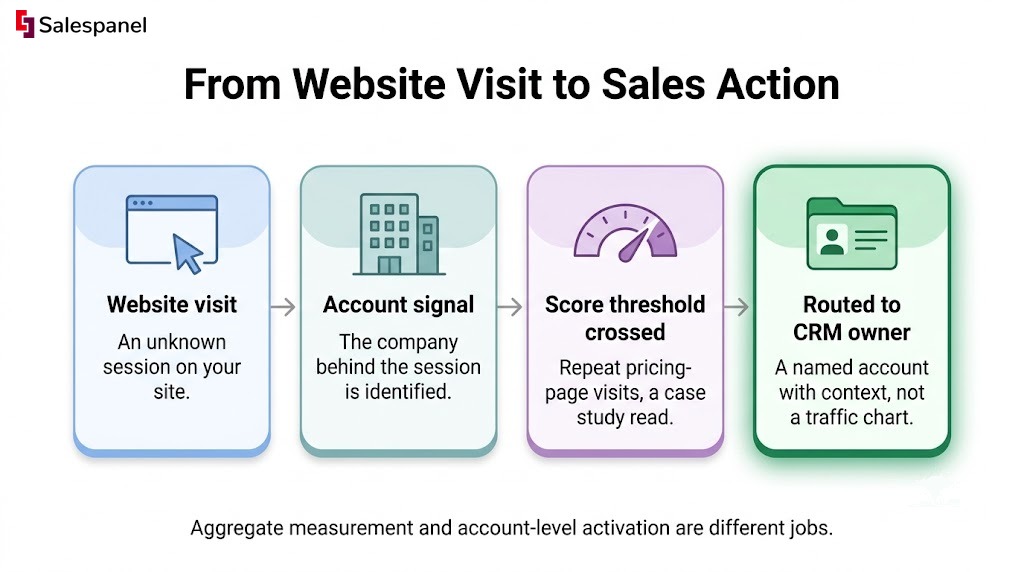
The gap shows up in a specific, recognizable way. Your analytics tool reports that the pricing page received 2,400 sessions last month, up 18% — and every one of those numbers is correct and none of them tells an SDR who to call. Conventional web analytics is built around sessions and aggregate behavior, which means it has no concept of an account, no prioritized list, no scoring threshold, and no path into a CRM record. That is the key idea here: aggregate measurement and account-level activation are different jobs, and a tool optimized for the first will not produce the second as a side effect.
First-party data intelligence (which means using Salespanel’s account reveal and journey tracking on your own site) changes what is possible downstream. If you can identify the company behind a session, then you can match it to your target account list. If you can match it, then you can score the behavior — repeat pricing-page visits, a case study read, three people from the same domain in one week. If you can score it, then you can route it, and sales gets a named account with context instead of a traffic chart.
Honesty about limits matters more than the pitch. Visitor identification depends on available identity signals, your consent configuration, the quality of the underlying firmographic data, and whether your traffic is actually B2B. A consumer site, or a site whose traffic comes mostly from residential ISPs, will see low match rates. Nobody can name every anonymous visitor, and any vendor implying otherwise is selling you a number they cannot deliver.
Where Salespanel Fits Alongside or Instead of Web Analytics
Salespanel is a B2B visitor intelligence product. It takes website activity and turns it into qualified lead and account signals that a revenue team can work.
There are two setups that make sense, and they are not the same decision.
Alongside Piwik PRO, GA4, or Matomo. Keep the web analytics suite for channel reporting, content performance, and the traffic numbers leadership reviews. Add Salespanel for account identification and sales activation. This is the common configuration, because the two tools answer different questions and neither degrades the other.
As the primary demand-intelligence layer. This fits when the team’s urgent question is “which target accounts should sales contact this week” rather than “which pages had the most sessions.” Some B2B teams with small marketing sites genuinely don’t need a full analytics suite — they need to know who showed up.
Practical examples of what the activation layer does: score a visitor who hits the pricing page three times in five days, flag any session from a company on the target account list, build an audience of accounts that read two or more bottom-funnel pages, and push the whole thing into the CRM so the account owner sees it without logging into another tool. Lead scoring sets the threshold, website visitor tracking supplies the journey, and CRM integrations deliver the signal to the person responsible for the follow-up.
See which companies are on your site right now. Connect Salespanel to your existing CRM and watch qualified account activity land where your sales team already works. Start a free trial.
When Salespanel Is Not the Right Replacement
Salespanel does not replace a product analytics platform. If you need in-app event modeling, retention cohorts, session replay, or feature flag experimentation, use PostHog. It does not replace an enterprise analytics suite either — multi-property reporting across a dozen brands with role-based governance is Adobe Analytics territory.
For broad traffic reporting, channel attribution, and the standard web analytics workload, Matomo, GA4, or Plausible will serve you better than any visitor intelligence tool, including ours. Vendor comparison pages tend to argue that every buyer belongs in the writer’s category. That is how teams end up with a tool that does one job well and the other three badly.
Deployment, Integrations, and Implementation Effort
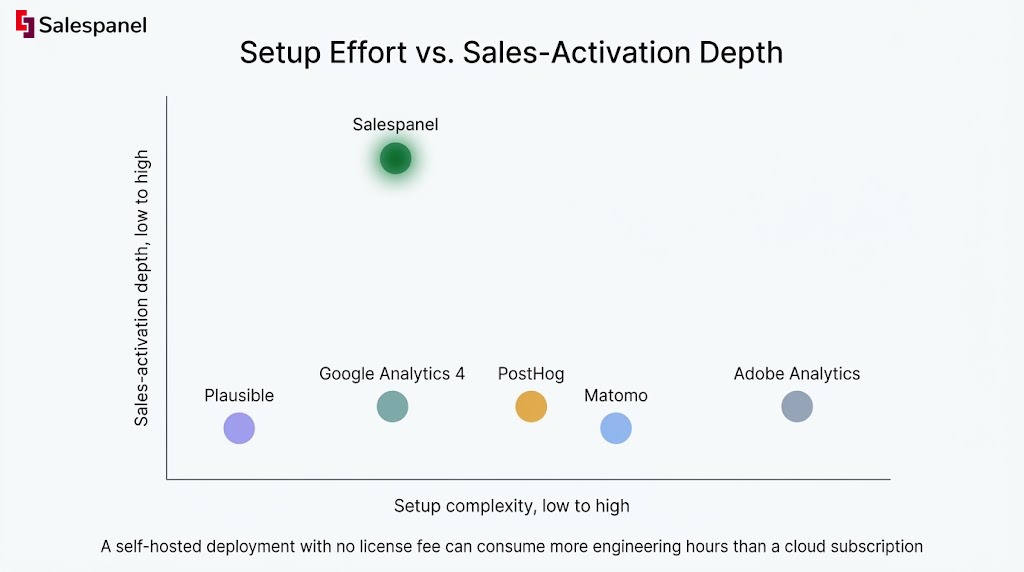
The lowest subscription price frequently becomes the highest-cost choice once implementation, maintenance, data exports, and CRM activation get counted. A self-hosted deployment with no license fee can consume more engineering hours in year one than three years of a cloud subscription.
Operational requirements differ sharply across this list. Client-side tagging is the baseline for all of them. Server-side collection adds a container to run and monitor, and it’s increasingly the default ask from security teams. Self-hosting adds infrastructure, upgrades, and database scaling. Custom event schemas add a maintenance obligation that nobody assigns and everybody inherits. Consent tooling usually means a CMP integration that has to be tested after every tag change. Destination integrations — CRM, marketing automation, warehouse — are where most of the real work hides.
Before you shortlist, answer these five:
- Who owns tag management? If the answer is “nobody specifically,” pick the tool with the simplest installation.
- Do you need self-hosting or a specific data region? This eliminates GA4 immediately and narrows the rest.
- Which CRM and marketing automation tools must receive data? Check the vendor’s integration directory rather than trusting a comparison article, including this one.
- Can the team maintain custom events and reporting definitions six months from now? Schemas rot without an owner.
- Does sales need real-time alerts, or are weekly reports sufficient? This single question usually separates the analytics decision from the activation decision.
Implementation Expectations by Team Type
- Lean content team, no dedicated analyst. Plausible or GA4. Both get to a usable standard report quickly, and Plausible needs essentially no ongoing maintenance.
- Privacy- or IT-led organization. Assess Matomo’s deployment options against your infrastructure capacity. Verify what your team can realistically operate, not what it could theoretically operate.
- Product-led SaaS team. PostHog, with the marketing site instrumented into the same project. Read the installation documentation before estimating effort.
- Enterprise analytics team already on Adobe Experience Cloud. Adobe Analytics, with the implementation partner priced into the business case.
- B2B demand generation team. Salespanel for account-level scoring and routing, typically alongside whatever web analytics tool already exists. Confirm CRM compatibility against the integrations directory rather than assuming it.
Pricing: Compare Total Operating Cost, Not Just the Plan Page
Piwik PRO pricing depends on the selected product plan, usage volume, deployment requirements, and enterprise support needs. Published limits and packaging change, so confirm current figures through Piwik PRO’s official pricing page or their sales team rather than relying on third-party comparisons.
We are deliberately not publishing dollar amounts for any vendor here. Stale pricing in comparison articles is one of the most common ways buyers get surprised in procurement, and every number in this category has a short shelf life. What’s stable is the pricing model, and models tell you more about long-term cost than a single quoted tier does.
- Piwik PRO — plan, usage, and enterprise tiers; verify directly.
- Matomo — free open-source software for self-hosting, with cloud plans and paid plugins as separate line items.
- GA4 — standard product at no license cost; real costs appear in BigQuery usage, implementation, and support.
- Plausible — subscription tied to monthly pageview volume.
- PostHog — usage-based, metered per event and per product feature.
- Adobe Analytics — enterprise contract, negotiated.
- Salespanel — plan and usage based; see Salespanel pricing.
Copy this worksheet into a spreadsheet and fill it in for each finalist. Subscription cost. Implementation cost, including agency or contractor hours. Engineering maintenance, estimated in hours per quarter. Warehouse and export costs. Consent tooling. Analyst time spent building and maintaining reports. And the line most teams omit entirely: the value of the CRM workflow the tool enables or fails to enable. A tool that saves an SDR team from working an unprioritized list has a different ROI profile than one that produces a prettier traffic chart.
Which Piwik PRO Alternative Is Right for Your Team?
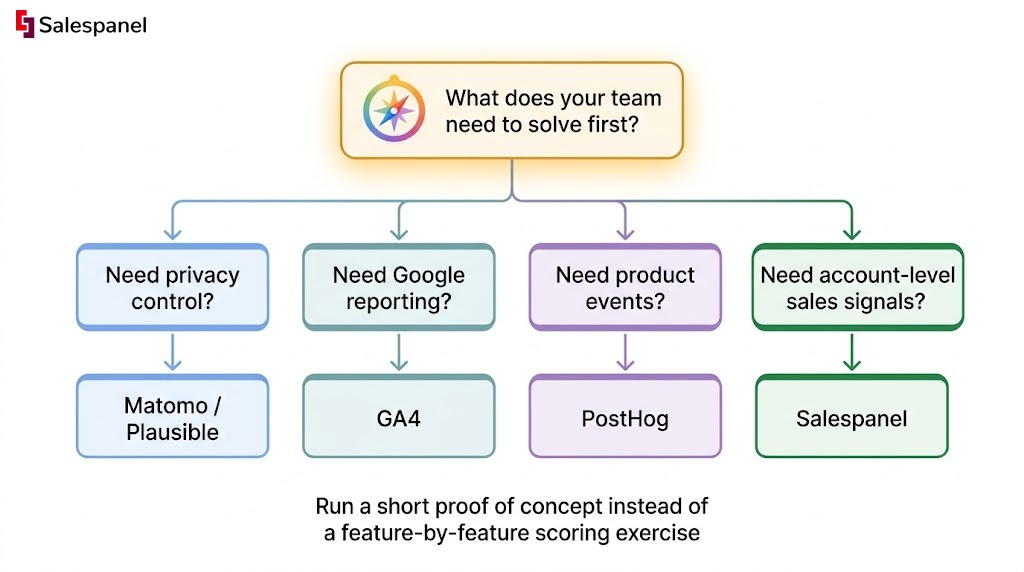
There is no universal winner, because Piwik PRO buyers differ on three axes that rarely align: privacy requirements, analytics maturity, and whether the pressing need is reporting or revenue activation.
| Your situation | Recommendation | Why |
|---|---|---|
| Need deployment control and full web analytics | Matomo | Closest functional and philosophical match, with a self-hosted path |
| Google-heavy acquisition and reporting | GA4 | Native Ads, Search Console, and BigQuery connections |
| Small site, want answers in one screen | Plausible | Lowest time-to-trusted-report, minimal maintenance |
| Growth driven by in-app behavior | PostHog | Event modeling, funnels, replay, and experiments in one place |
| Large enterprise already on Adobe | Adobe Analytics | Depth and governance across multiple properties |
| Sales needs to know which accounts to call | Salespanel | Account identification, scoring, and CRM routing |
Choose Matomo If You Need a Close Privacy-Focused Web Analytics Alternative
Matomo suits teams that want deployment control, detailed web analytics, and the option to run the software themselves. Caveat: self-hosted operation requires genuine internal technical ownership. Decide who patches it before you install it.
Choose GA4 If Google Marketing Measurement Is the Priority
GA4 makes sense when Google Ads, Search Console, and BigQuery workflows carry most of your measurement load. Caveat: clean implementation and ongoing governance are not optional. Unmanaged GA4 produces numbers that look authoritative and quietly aren’t.
Choose Plausible If Simple Reporting and Minimalism Matter Most
Plausible fits smaller sites and teams that want straightforward traffic and conversion reporting without learning a complex interface. Caveat: analysis requirements grow. If you expect custom dimensions and multi-step funnels within a year, plan for the migration now.
Choose PostHog If Product Events Drive Your Growth Model
PostHog fits SaaS and product teams measuring behavior inside the application. Caveat: product analytics is not B2B account identification. Knowing that user_8842 completed onboarding tells you nothing about which unknown company read your pricing page twice yesterday.
Choose Adobe Analytics If You Already Run an Enterprise Adobe Stack
Adobe Analytics fits large organizations with established analytics specialists and existing Experience Cloud dependencies. Caveat: for a lean B2B marketing team, the implementation and governance overhead will exceed the value delivered.
Choose Salespanel If Sales Needs Qualified Account Signals
Salespanel fits B2B teams that need to identify engaged companies, score their activity, and move qualified website intent into CRM-led follow-up. It complements web analytics rather than necessarily replacing it — most of our customers keep GA4 or Matomo running for channel reporting.
The practical way to evaluate it: connect Salespanel to your existing CRM, leave your analytics stack untouched, and see what shows up in two weeks of real traffic. Replacing an entire measurement stack to test one hypothesis is a bad trade.
Verdict: The Best Piwik PRO Alternative Depends on the Job
Matomo is the closest alternative for privacy-oriented web analytics and deployment control. GA4 is strongest for Google-centric marketing measurement. Plausible is the simple option for teams that want fast answers. PostHog fits product analytics. Adobe serves established enterprise stacks. Salespanel fits B2B revenue teams that need visitor activity they can act on.
The distinction running through this entire comparison holds at the end: web analytics for aggregate measurement, visitor intelligence for account-level identification and sales activation. Treating them as competing purchases is how teams end up with excellent reports and an SDR team working an unqualified list.
Run a short proof of concept instead of a feature-by-feature scoring exercise. Pick three to five questions your team actually has to answer, and see which tools can answer them with your real traffic:
- Which channels create qualified pipeline, not just sessions?
- Which target accounts returned to the pricing page this week?
- Can marketing and sales both act on the same visitor data without exporting anything?
- How long does it take a non-analyst to answer a routine traffic question?
If the second and third questions are the ones keeping you up, read how to identify anonymous website visitors and then test it against your own traffic.
Put qualified website activity in front of your sales team. Book a Salespanel demo or start a trial and connect it to the CRM you already use.
FAQ: Piwik PRO Alternatives
What is the new name for Piwik?
Piwik was renamed Matomo in 2018. Matomo is an open-source web analytics platform and remains separate from Piwik PRO, which is a different commercial analytics company. Buyers comparing Piwik PRO alternatives should evaluate Matomo on its own deployment, privacy, reporting, and pricing model rather than treating the two products as the same service. (Matomo’s announcement)
What is the best free web analytics tool?
Google Analytics 4 is the most widely used no-cost web analytics option for teams that need Google Ads, Search Console, and BigQuery connections. Matomo’s self-hosted edition can suit teams with technical resources, while Plausible may offer simpler privacy-focused reporting but uses a paid subscription model. The best choice depends on reporting, privacy, and maintenance requirements.
How much is Piwik PRO?
Piwik PRO pricing depends on the selected product plan, usage volume, deployment needs, and enterprise support requirements. Because plan limits and commercial terms can change, confirm current pricing through Piwik PRO’s official pricing page or sales team. Compare the full cost of implementation, consent tooling, maintenance, and reporting operations — not only subscription fees.
Who owns Piwik PRO?
Piwik PRO is operated as a separate commercial analytics company and should not be confused with Matomo, the renamed open-source Piwik project. Ownership and corporate-entity details can change through investment or restructuring, so use Piwik PRO’s current company page, legal notice, or official filings as the authoritative source before making a vendor-risk assessment.
Can Salespanel replace Piwik PRO?
Salespanel can replace the B2B visitor-identification and sales-activation layer for teams focused on qualified account activity, lead scoring, and CRM follow-up. Salespanel does not replace every web analytics use case covered by Piwik PRO, such as broad traffic reporting, privacy configuration, and detailed aggregate website analysis. Many B2B teams use both categories together.
Sell more, understand your customers’ journey for free!
Sales and Marketing teams spend millions of dollars to bring visitors to your website. But do you track your customer’s journey? Do you know who buys and why?
Around 8% of your website traffic will sign up on your lead forms. What happens to the other 92% of your traffic? Can you identify your visiting accounts? Can you engage and retarget your qualified visitors even if they are not identified?