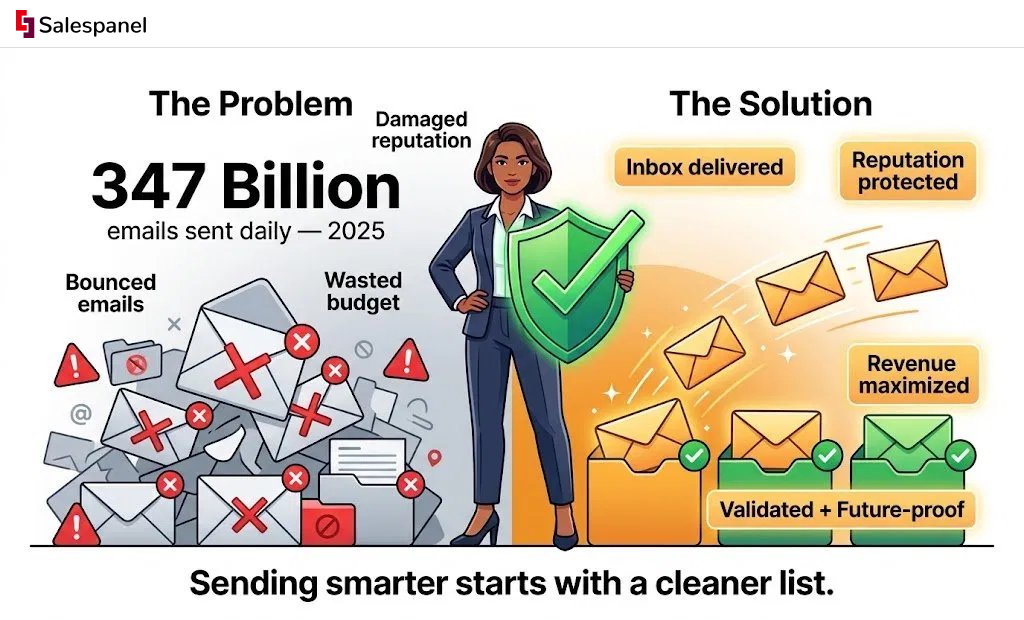
Email validation has evolved from a reactive chore into a critical, proactive strategy for business growth. In the early days of digital marketing, cleaning a list was an afterthought, something done only after a campaign bounced hard and damaged a sender’s reputation. Today, that approach is obsolete. With global email traffic having exceeded 347 billion messages daily as of 2025, meticulous, automated validation is no longer a best practice—it’s the price of entry for effective communication. The future of outreach isn’t just about sending more emails; it’s about sending smarter ones to the right inboxes.
This guide provides an in-depth, journalistic look at the technical layers of modern email validation. We will explore the journey from a simple syntax check to the definitive SMTP handshake, offering practical examples and a central theme: that a validated list is the foundation for protecting your reputation, ensuring your message is heard, and maximizing the return on every marketing dollar spent. Understanding how to validate email addresses is the first step toward shifting from broadcasting messages to building meaningful connections.
Why Email Validation Is No Longer Optional
A digital illustration showing a checkmark on an envelope, symbolizing the process of email validation.
In today’s crowded digital space, meticulous and automated email validation isn’t just a best practice; it’s a core business function you can’t afford to ignore. The sheer volume of emails exchanged daily makes precision an absolute necessity. In an environment this competitive, a clean list isn’t an advantage—it’s a fundamental requirement for effective communication.
The High Cost of Inaccurate Data
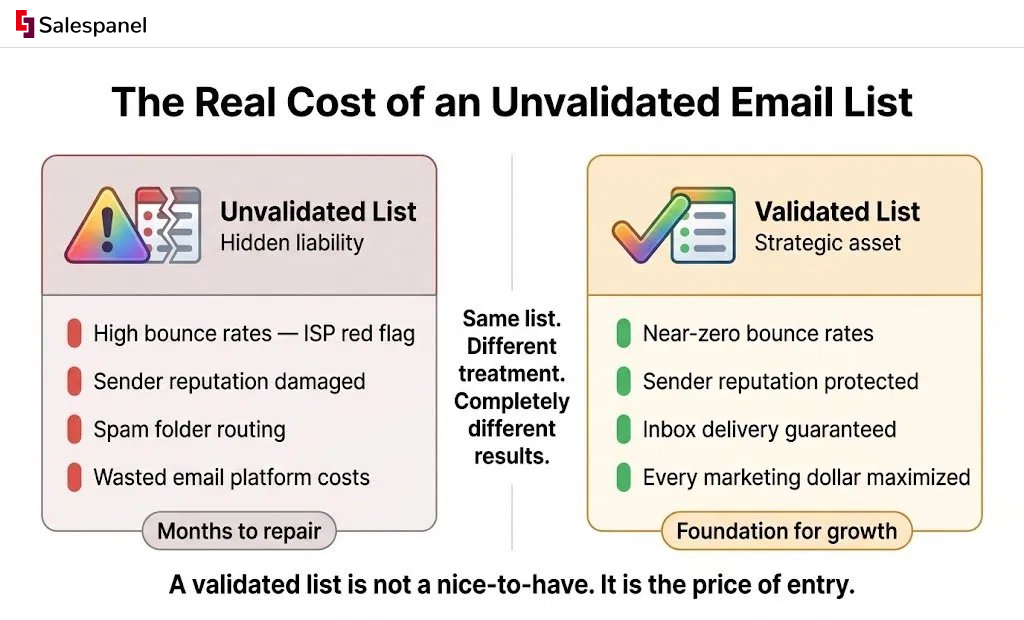
Every invalid email on your list carries a tangible cost. High bounce rates are more than just delivery failure notifications; they are significant red flags for Internet Service Providers (ISPs) like Google and Outlook. When ISPs detect a high percentage of bounced emails from a sender, they often conclude the list management is poor or, worse, that the sender is a spammer.
This directly damages your sender reputation, the critical score that determines whether your emails reach the inbox, are routed to the spam folder, or are blocked entirely. A compromised reputation can take months of diligent effort to repair, crippling your outreach capabilities in the process.
The financial consequences are just as severe:
- Wasted Resources: Email service providers typically charge based on the number of contacts. Sending messages to non-existent addresses is equivalent to paying postage for letters addressed to an empty lot.
- Skewed Analytics: Inaccurate data corrupts your metrics. Open rates and click-through rates become unreliable, making it impossible to accurately assess campaign performance or understand audience engagement.
- Lost Opportunities: A simple typographical error in a prospect’s email address can result in a lost connection. A valuable lead, acquired through significant investment, can vanish permanently.
A Modern, Multi-Layered Approach
Effective validation is a methodical, multi-layered process, not a single action. It involves a sequence of checks that progressively filter out bad data, ensuring you are left with only high-quality, deliverable addresses. This systematic approach is the foundation for any successful email marketing feature, as it guarantees that your messages reach their intended recipients.
The central theme is clear: maintaining a clean contact list is not merely about data hygiene. It’s about enabling sustainable growth. A validated list protects your reputation, ensures your message is heard, and maximizes the return on your marketing investment.
To provide a clearer picture, let’s break down the main techniques. This table offers a concise overview of each method and its importance.
Core Email Validation Techniques At a Glance
| Validation Technique | Primary Purpose | Common Issues Filtered |
|---|---|---|
| Syntax Check | Ensures the email address follows the standard local-part@domain format. | Obvious typos, missing “@” symbols, invalid characters (e.g., spaces). |
| DNS/MX Record Lookup | Confirms that the domain exists and has a mail server configured to receive emails. | Fake or expired domains, misspelled domain names. |
| SMTP Handshake | Communicates directly with the mail server to verify if a specific mailbox exists. | Non-existent user accounts, disabled mailboxes, some “catch-all” servers. |
| API Integration | Uses a third-party service to perform all checks and provide a clear deliverability status. | Disposable emails, role-based accounts (info@), high-risk addresses. |
Each of these steps builds upon the last, creating a comprehensive filtration system. This guide will walk you through the technical layers of modern validation, from the most basic syntax checks to the definitive SMTP handshake, empowering you to make every email count.
Your First Line of Defense: Syntax and Format Checks
Before delving into complex server handshakes or DNS lookups, the process of building a clean, high-performing email list begins with the fundamentals: syntax and format validation. This initial step serves as a digital gatekeeper, a cost-effective filter that identifies a significant number of errors before they can contaminate your CRM or marketing platforms.
At its core, syntax validation is a pattern-matching exercise. It is a straightforward process that confirms whether an email address adheres to the established structural rules—the “grammar” of email addresses. While the basic [email protected] structure is widely recognized, the technical standards governing it are far more detailed. This initial check is crucial for eliminating obvious human errors, such as a typo like [email protected], an entry with a space like jane [email protected], or an address with consecutive dots like [email protected]. These are precisely the types of mistakes that frequently occur during web form submissions and manual data entry.
A practical way to view syntax validation is as a spell-checker for your email list. It cannot confirm if the email address corresponds to an existing mailbox, but it can instantly determine if the format is structurally correct. It is a non-negotiable first pass that eliminates the most blatant errors.
Breaking Down the Anatomy of a Valid Email
Every valid email address consists of two primary components, separated by the @ symbol: the local-part and the domain. Each component is governed by a specific set of rules that a proper syntax check must enforce.
- The Local-Part: This is the segment preceding the @. It can contain uppercase and lowercase letters, numbers, and a range of special characters, including ! # $ % & ‘ * + – / = ? ^ _ { | } ~. However, strict rules apply, particularly for characters like the period (.), which cannot be the first or last character, nor can it appear consecutively.
- The Domain: This is the segment following the @. It must be composed of letters, numbers, and hyphens. Similar to the period in the local-part, a hyphen cannot be the first or last character of a domain label (the parts separated by dots). The domain must also conclude with a top-level domain (TLD), such as .com, .org, or .io, that is at least two characters in length.
This level of detail is what distinguishes a basic check from a truly robust validation process. It’s not merely about locating an @ symbol; it’s about ensuring the entire string adheres to established protocols.
Common Syntax Errors We See in the Wild
Let’s examine some practical examples that illustrate the importance of these rules. Consider the following entries submitted through a web form:
| Email Address Entered | The Problem | Validation Outcome |
|---|---|---|
| contact @mycompany.com | Contains a space, which is an illegal character. | Invalid |
| [email protected] | Contains consecutive periods in the local-part. | Invalid |
| [email protected] | The domain part ends with a hyphen. | Invalid |
| info@123company | The top-level domain (TLD) is missing. | Invalid |
Each of these examples would pass a superficial check that only looks for an @ symbol, but a proper syntax validator would correctly flag them as invalid immediately.
Catching these issues at the point of entry prevents bad data from being stored. This aligns with the philosophy of prioritizing data quality from the outset. For example, the effectiveness of website visitor tracking from Salespanel is greatly enhanced when you can be confident that the contact information being captured is correctly formatted from day one. Ultimately, while syntax checks cannot confirm deliverability, they are an essential first filter that improves the quality of your contact list and prepares it for more advanced validation methods.
Confirming the Mailbox Exists: DNS and MX Record Checks
Once an email address has passed the syntax check, the next critical step is to determine if the destination actually exists. A perfectly formatted address like [email protected] is useless if the domain acme-corp-solutions.net is non-existent or not configured to receive mail. This is where DNS and MX record checks become indispensable.
The Domain Name System (DNS) functions as the internet’s master directory, translating human-readable domain names into the IP addresses that computers use. A Mail Exchanger (MX) record is a specific type of DNS entry that acts as a digital post office for a domain. It explicitly declares, “If you have an email for this domain, deliver it to these specific mail servers.” Without a valid MX record, a sending server has no clear delivery instructions. This check is the crucial link between a well-formatted email address and a functional inbox.
The Role of MX Records in Deliverability
The validation process involves a DNS query that essentially asks two fundamental questions:
- Does this domain exist? This check immediately identifies common typos (e.g., [email protected] instead of [email protected]) and addresses associated with fabricated domains.
- If the domain is valid, does it have any MX records? This confirms whether the domain is configured to handle incoming email traffic.
It is entirely possible for a domain to host a website but lack MX records, indicating that the owner never intended for it to receive mail. Attempting to send an email to such a domain will result in a guaranteed hard bounce, which negatively impacts your sender reputation.
An MX record is a clear signal of intent from a domain owner. It signifies that the domain is “open for email business.” The absence of an MX record sends an equally clear message: your email has no destination.
Real-World Scenarios and Their Outcomes
A quick DNS and MX record lookup can prevent a significant portion of deliverability issues before an email is ever sent. Consider these common situations:
- The Expired Domain: A company ceases operations, and its domain, oldstartup.com, expires. Any email sent to @oldstartup.com will fail the DNS check because the domain no longer resolves. Practical Example: querying MX for oldstartup.com -> NXDOMAIN (Non-Existent Domain).
- The Website-Only Domain: An artist’s portfolio, janes-art.gallery, is live, but an email server was never configured. The DNS check finds the domain, but the MX query returns no records. Practical Example: querying MX for janes-art.gallery -> No records found.
- The Common Typo: A user hastily types [email protected]. The DNS check will instantly report that the domain yaho.com does not exist, flagging the email as invalid. Practical Example: querying MX for yaho.com -> NXDOMAIN.
This layer of verification provides a much higher degree of confidence than a simple syntax check. By confirming both the domain’s existence and its mail-handling instructions, you eliminate a large category of addresses that would otherwise result in guaranteed bounces. DNS and MX record checks serve as the essential second line of defense, taking you beyond basic formatting to verify that a valid delivery path exists. While this step cannot confirm a specific user’s mailbox, it confirms the “neighborhood” is real and has a post office ready to sort mail, setting the stage for the final, most definitive test.
The Ultimate Litmus Test: SMTP Protocol Verification
Having confirmed an email’s format is valid and its domain is configured to receive mail, we now arrive at the most definitive stage of the validation process. This is the point where we verify not just the address but whether the recipient actually exists. This is accomplished through an SMTP handshake.
The Simple Mail Transfer Protocol (SMTP) is the fundamental protocol for email communication on the internet. An SMTP verification leverages this protocol to simulate the initial steps of sending an email without actually delivering a message. The process is analogous to calling a company’s main telephone line (the MX server) and asking the operator, “Is there a John Doe working here?” before attempting to connect.
This direct communication with the recipient’s mail server provides the highest degree of certainty possible. It involves a brief, technical exchange that confirms whether an inbox, such as [email protected], is active and ready to receive messages.
The flowchart below illustrates how validation systems first check a domain’s mail records before proceeding to more direct verification methods like this.
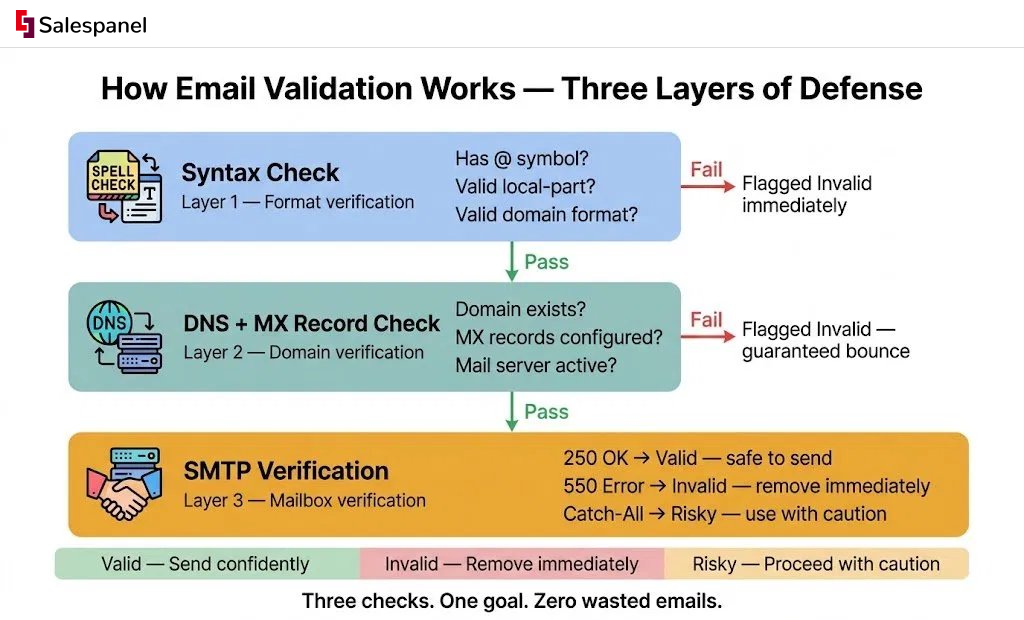
As shown, confirming the mail server is the critical intermediate step, bridging the gap between a syntax check and a direct query to the mailbox itself.
How The SMTP Handshake Works
At its core, the SMTP handshake is a sequence of commands and responses exchanged between two servers. Our validation system (the client) initiates a conversation with the target domain’s mail server. The sequence is as follows:
- HELO/EHLO: The client connects and introduces itself to the server.
- MAIL FROM: The client specifies a sender address, indicating the origin of the simulated message.
- RCPT TO: This is the crucial step. The client provides the email address being verified and asks, “Can you deliver a message to this recipient?”
The server’s response to the RCPT TO command determines the outcome. After receiving this response, the client issues a QUIT command, terminating the connection without ever sending an actual email.
What The Server’s Response Means
The mail server’s reply to the RCPT TO query categorizes the email address into one of three main buckets:
- Green Light (Code 250 OK): This response confirms that the mailbox exists and is ready to receive email. The address is valid and safe to add to a mailing list. Practical Example: 250 2.1.5 OK.
- Hard Stop (Code 5xx): The server returns a permanent failure code, such as 550 User unknown. This definitively indicates that the mailbox does not exist. Sending an email to this address will result in a hard bounce, and it should be removed from your list immediately. Practical Example: 550 5.1.1 The email account that you tried to reach does not exist.
- The “Catch-All” Conundrum: Some domains are configured as “catch-all” or “accept-all.” These servers will respond with a 250 OK for any address at their domain, regardless of whether it exists. This security measure prevents spammers from identifying valid email addresses but complicates the verification process.
A catch-all response renders the SMTP check inconclusive. The email might be deliverable, but there is a significant risk of it bouncing. Professional validation services use historical data and other signals to assign a risk score to these addresses, helping you decide if they are worth the potential negative impact on your deliverability.
The Dangers of DIY SMTP Checks
While SMTP verification is a powerful technique, attempting to perform it independently is risky. Mail servers are constantly monitoring for suspicious activity. Executing a large volume of RCPT TO commands from a single IP address closely resembles a directory harvest attack—a method used by spammers to find valid emails.
This activity can lead to your server’s IP address being blocklisted, which would cripple your ability to send any legitimate emails. For this reason, this advanced check is best left to professional services. They utilize vast networks of servers and carefully managed connections to perform these checks safely, allowing you to learn how to validate email addresses without jeopardizing your own sender reputation.
Scaling Your Validation With Automation and APIs
A person working on a laptop with API and automation symbols flowing out, representing an automated workflow.
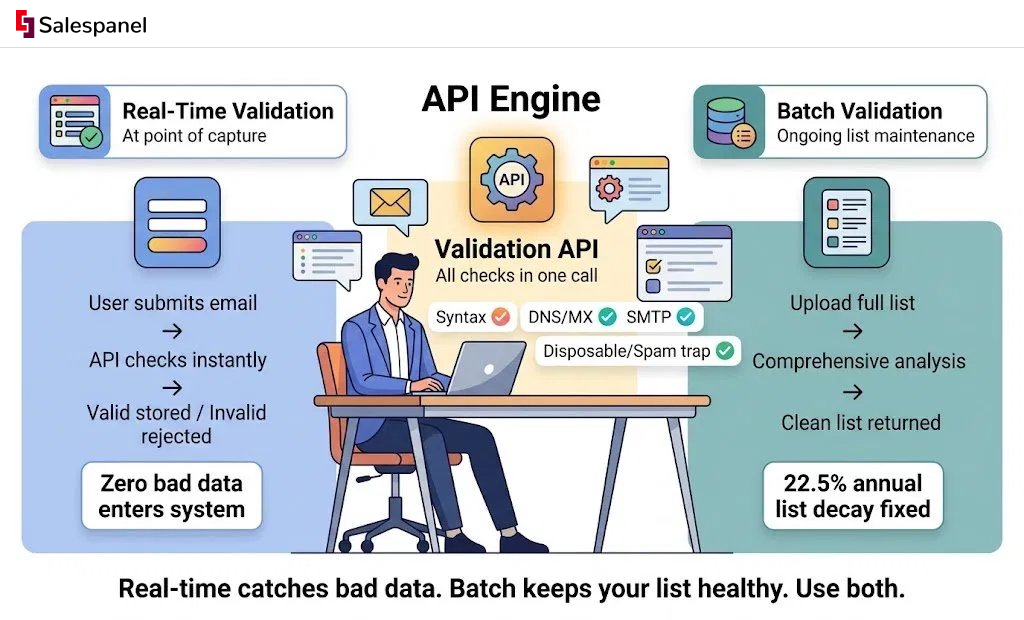
Verifying emails individually is not a scalable solution for any growing business. The methods discussed—syntax, DNS, and SMTP checks—are effective in principle but become unmanageable at scale. This is where automation and third-party validation APIs become essential, transforming a laborious task into an efficient, automated process.
By integrating with a specialized service, you delegate the entire validation workflow. These tools bundle all necessary checks into a single API call, returning a clear status for each email: valid, invalid, risky, or unknown. This represents a fundamental shift from manual theory to automated reality, which is crucial for maintaining data integrity without impeding operational efficiency.
Real-Time vs. Batch Validation: Which Is Better?
When implementing an automated solution, a key decision is whether to validate emails in real-time as they are collected or to clean existing lists in large batches. The optimal strategy incorporates both, as they serve distinct but equally critical functions.
Real-time validation is your primary line of defense. By integrating an API directly at points of data capture—such as sign-up forms, lead generation forms, or e-commerce checkout pages—you can check an email’s validity on the spot. When a user submits their email, the API verifies it before it is stored in your database. This approach instantly catches typos and invalid addresses at the source, ensuring only clean data enters your system.
Batch validation, in contrast, is your ongoing maintenance strategy. You can upload your entire email list to a service for comprehensive analysis and reporting. This is essential for cleaning legacy data and performing periodic health checks on your list. Email addresses naturally decay over time as people change jobs, domains expire, and mailboxes are deactivated.
The most effective strategy combines both approaches. Real-time validation acts as a gatekeeper for new contacts, while regular batch cleaning maintains the health of your existing database. This dual approach maximizes data quality and protects your sender reputation.
The Rise of AI in Email Verification
Modern validation services have evolved beyond simple server responses. Many now employ machine learning models to provide insights that manual checks cannot. AI has introduced a predictive layer to verification, making the process more intelligent and accurate.
As of 2025, AI-driven algorithms have become the standard for predicting email deliverability by analyzing complex patterns in historical data. These models assess not only whether an address can receive mail now but also help predict whether it represents a genuinely active and legitimate contact. You can explore these predictions for email validation services on Bouncify for more information.
This intelligent analysis enables platforms to:
- Spot Disposable Email Addresses: These are temporary inboxes from services like Mailinator, which are useless for building long-term relationships.
- Detect Spam Traps: These are email addresses used by ISPs to identify spammers. Sending to a spam trap can result in your domain being blocklisted.
- Flag Role-Based Accounts: Addresses like info@, support@, or sales@ are typically valid but often have low engagement rates. It is often better to segment them separately.
This is where a commitment to data quality yields significant returns. We at Salespanel understand that the effectiveness of advanced marketing tools depends on the quality of the underlying data. For instance, our Website visitor tracking from Salespanel is designed to identify high-intent leads, but this insight is rendered useless if the initial outreach email bounces. Pairing powerful lead identification with robust data validation creates a far more effective sales and marketing engine, turning email validation from a chore into a strategic advantage.
Keep Your Email List Clean With Proactive Hygiene
Effective email validation is not a one-time task but a continuous commitment to data quality that protects your business in the long term. Treating it as an ongoing program, rather than a reactive fix, is what distinguishes thriving marketing teams from those constantly struggling with deliverability issues. This proactive mindset is known as email hygiene. It involves not only cleaning your current list but also building systems that prevent bad data from accumulating in the first place.
Set a Schedule and Segment Your Contacts
A consistent schedule is central to any effective hygiene strategy. Email lists naturally decay by an average of 22.5% annually as people change jobs, create new accounts, and abandon old ones. To mitigate this, schedule a full re-validation of your entire contact database at least twice a year. For lists with high churn rates, a quarterly check may be more appropriate.
A more sophisticated approach involves segmenting your contacts based on their engagement levels. This allows you to apply different validation rules and frequencies to different groups.
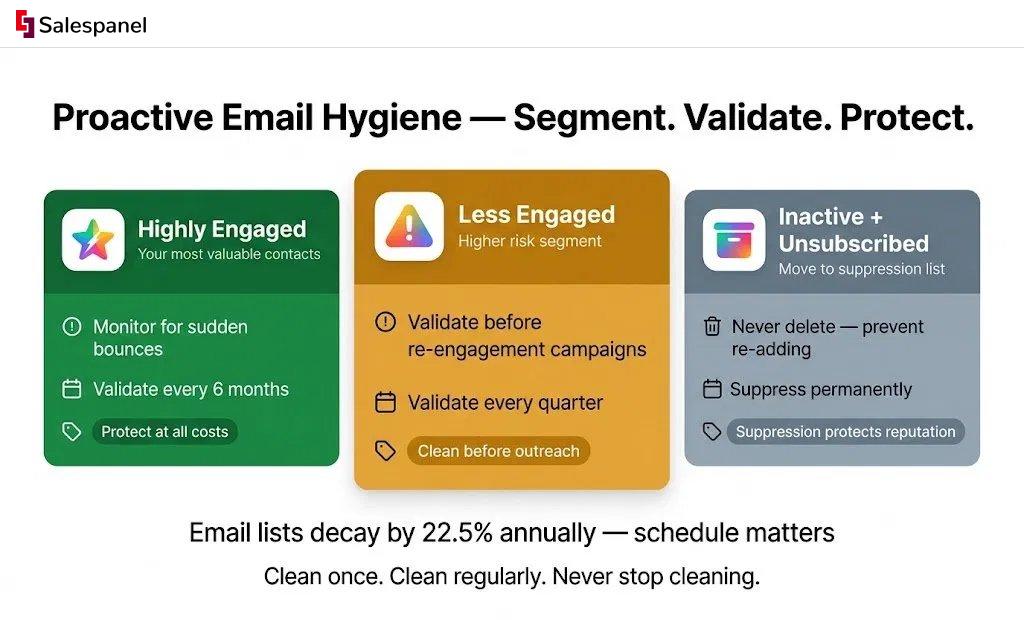
- Highly Engaged: These are your most valuable contacts. While you should monitor them for sudden bounces, they do not require aggressive, frequent cleaning.
- Less Engaged: This group poses a higher risk. Before launching a re-engagement campaign, run these contacts through a validation service to remove decayed addresses.
- Inactive/Unsubscribed: These contacts should be moved to a suppression list. It is crucial not to delete them, as a suppression list prevents them from being accidentally re-added to active campaigns in the future.
A proactive email hygiene strategy is the final, crucial component of learning how to validate email addresses effectively. It protects your sender reputation, enhances ROI, and maintains open communication channels for sustainable growth.
Ultimately, a clean list improves the performance of every tool in your marketing stack. When you have confidence in your data, advanced tools like the lead scoring framework from Salespanel can function optimally, accurately identifying and prioritizing high-quality leads that you can actually reach.
Common Questions About Email Validation, Answered
Have questions about maintaining a clean email list? You’re not alone. Here are concise answers to some of the most frequently asked questions about the email validation process.
How Often Should I Validate My Email List?
The optimal frequency for validating your email list depends on its rate of change. For lists in fast-paced industries with high employee turnover or rapid growth, a quarterly validation check is a sound practice. For more stable, established lists, a thorough cleaning every six months is generally sufficient.
However, the most effective approach is to prevent invalid emails from being added to your list in the first place. Implementing real-time validation on all data capture points, such as sign-up forms and demo requests, is a game-changer. This proactive strategy saves you from the need for extensive batch cleanups later on.
What Is a Catch-All Email Server?
If you have ever sent an email to an address you were certain was incorrect, yet it did not bounce, you likely encountered a catch-all server. These servers are configured to accept all email sent to a specific domain, even if the individual mailbox (e.g., ‘[email protected]’) does not exist. This causes a simple SMTP check to return a positive result, making it impossible to confirm the address’s legitimacy through that method alone.
Sending to a catch-all address is a gamble. Emails sent to non-existent mailboxes on a catch-all server can still result in a bounce later. For this reason, reputable validation services use advanced methods and historical data to assign a risk score to these addresses, helping you make an informed decision.
A catch-all address represents a calculated risk. While some may be valid, many will eventually bounce. It is far better to use a service that provides a risk score rather than a simple “valid/invalid” verdict.
Can I Harm My Sender Reputation by Validating Emails?
Yes, it is possible to harm your sender reputation if you perform validation incorrectly. Attempting to run a high volume of SMTP checks from your own IP address is a significant red flag for mail servers. This type of aggressive verification closely resembles a directory harvest attack, a technique commonly used by spammers to identify active email addresses.
If your activity is flagged, your IP address could be blocklisted, which would prevent all of your legitimate emails from being delivered. This is one of the primary reasons why we strongly recommend using a professional validation service. These services utilize distributed networks and “low and slow” checking methods to verify addresses safely, preserving your sender reputation while delivering accurate results.
Here at Salespanel, we know that great marketing and sales are built on a foundation of solid, high-quality data. When your contact information is accurate, every other tool in your stack—from analytics to outreach—works better. Check out our resources to start building a more effective, data-driven strategy. Learn more on salespanel.io.