Marketing automation has evolved from a simple email scheduler into the central nervous system of modern B2B growth. Not long ago, its primary function was task repetition. Today, it’s a sophisticated engine that methodically connects marketing activities to closed revenue, transforming scattered efforts into a predictable sales pipeline. This shift isn’t just a trend; it’s a fundamental change in go-to-market strategy. The market, valued at $6.62 billion in 2024, is projected to exceed $13 billion by 2030, underscoring its critical role. Businesses that master this discipline are not just improving efficiency; they are building a significant competitive advantage. This guide provides a technical, in-depth framework for setting up a system that produces measurable results, moving beyond simple tool configuration to architecting a true revenue engine. You can dig deeper into the latest marketing automation statistics to see just how big this trend has become.
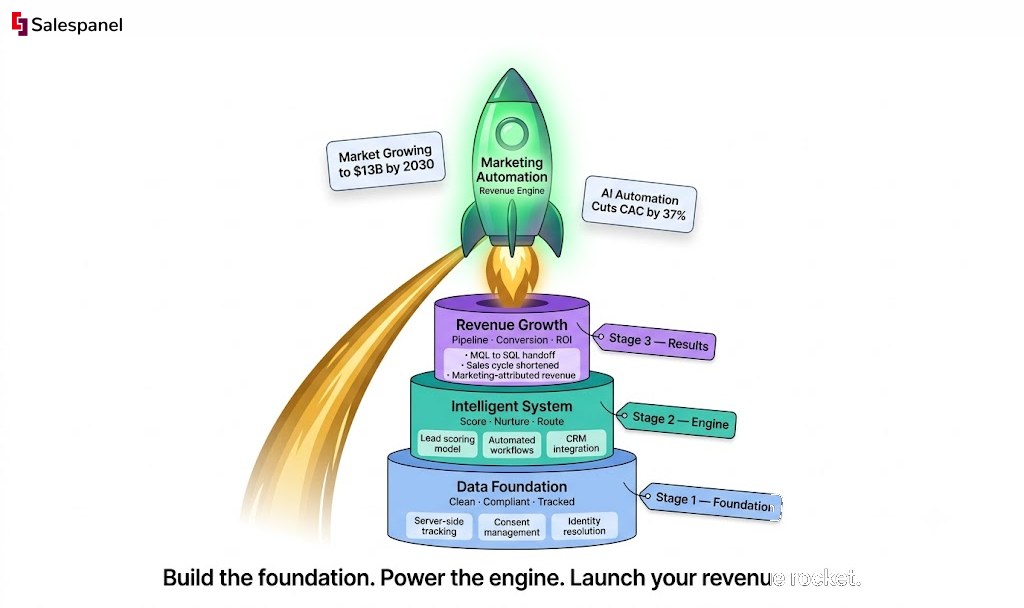
From Simple Email Tool to Full-Blown Revenue Engine
The central theme of any successful marketing automation setup is the deliberate construction of an intelligent system. This requires a methodical approach, beginning with clear goals, robust data tracking, a precise lead scoring model, and automated workflows designed to guide prospects through the buyer’s journey. Before we dissect the technical components, this table provides a high-level overview of the entire implementation process, from initial strategy to continuous optimization.
Marketing Automation Setup At a Glance
| Phase | Primary Goal | Key Activities |
|---|---|---|
| 1. Planning & Requirements | Define what success looks like and map out the technical needs. | Set clear KPIs, define the Ideal Customer Profile (ICP), map the buyer journey, audit the current tech stack. |
| 2. Data & Tracking Setup | Create a unified, reliable data foundation to fuel the system. | Implement tracking scripts (client-side & server-side), set up event tracking for key actions, integrate data sources. |
| 3. Consent & Compliance | Ensure all data collection practices are ethical and legally sound. | Configure consent management platform (CMP), create clear privacy policies, establish data governance rules. |
| 4. Identity & Scoring | Turn anonymous data into known contacts and prioritize them for sales. | Set up identity resolution rules, build a lead scoring model based on behavior and firmographics, define MQL criteria. |
| 5. CRM & Sales Integration | Create a seamless flow of data and leads between marketing and sales. | Configure bi-directional CRM sync, map data fields correctly, build automated lead handoff and task creation workflows. |
| 6. Campaign Creation | Build the automated workflows that will nurture and convert leads. | Design email nurture sequences, set up dynamic content personalization, create lead routing and assignment rules. |
| 7. Testing & QA | Ensure every part of the system works exactly as intended before going live. | Test tracking and form captures, validate CRM data sync, run end-to-end workflow tests with sample leads. |
| 8. Launch & Monitoring | Go live and establish a baseline for performance. | Activate workflows, monitor initial data flow, build performance dashboards with leading and lagging indicators. |
| 9. Governance & Optimization | Maintain system health and continuously improve performance. | Create operational checklists, schedule regular performance reviews, A/B test campaigns, refine scoring models. |
As the table illustrates, a successful deployment touches every part of the go-to-market motion. It demands a strategic, architectural mindset from the outset.
Building an Intelligent System, Not Just a Tech Stack
The core takeaway is that effective implementation is less about technical wizardry and more about thoughtful architecture. The objective is to build a framework that produces measurable, predictable results, moving beyond the “how-to” of a specific tool.
To achieve this, several components are non-negotiable:
- A Rock-Solid Data Foundation: Clean, reliable first-party data is the fuel. The principle of “garbage in, garbage out” is an absolute rule in this domain.
- Crystal-Clear Strategic Goals: Without specific, measurable objectives (e.g., “reduce sales cycle by 15%”), the technology becomes an expensive and underutilized asset.
- True Sales and Marketing Alignment: The system must bridge the gap between teams. This necessitates agreed-upon definitions (e.g., what constitutes a Marketing Qualified Lead) and a seamless, no-drop handoff protocol.
- A Culture of Constant Optimization: A marketing automation setup is never static. It is a living system that requires continuous testing, measurement, and refinement to maintain peak performance.
The ultimate goal is to create a closed-loop system where a direct line can be drawn from a specific marketing campaign to a closed-won deal. This is how marketing proves its value and transitions from a cost center to a revenue driver.
As a practical example, a B2B SaaS company aiming to shorten its sales cycle would use automation to track high-intent behaviors, such as repeated visits to a pricing page or viewing a product demo. A lead scoring model would instantly flag these prospects, triggering a targeted nurture sequence that addresses their likely questions before a sales representative even initiates contact. This is the process of transforming a collection of tools into a powerful revenue engine.
Building Your Data Foundation with Tracking and Compliance
Before a single workflow is designed or a lead is scored, the data infrastructure must be established. This is the foundation of the entire marketing automation setup. Without a consistent stream of clean, accurate, and ethically gathered data, the system is fundamentally flawed. The objective is to move beyond vanity metrics and collect meaningful first-party data that reveals buyer intent.
This begins with robust tracking on your website, your primary data collection asset. It is where anonymous visitors reveal their interests and pain points through their digital behavior. Tracking this activity, from page views to demo requests, is non-negotiable. This raw data is the material for building everything from personalized customer journeys to predictive lead scoring models.
You’re not just adding a tool; you’re building a system that eventually becomes a revenue-generating engine.
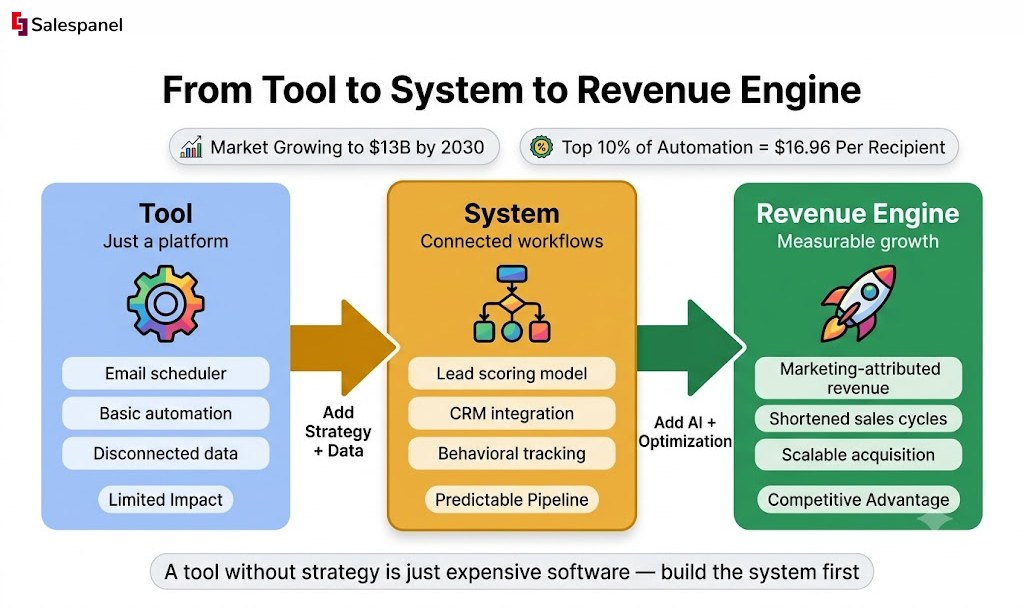
This graphic effectively illustrates the central theme: a technical tool, powered by a smart system and fueled by data, becomes the engine that drives growth.
Client-Side vs. Server-Side Tracking
The method of data collection is a critical technical decision. There are two primary approaches to tracking website visitors, each with distinct advantages and disadvantages.
Client-Side Tracking: This is the traditional method, where a JavaScript tag or “pixel” executes directly in the user’s browser. It is relatively easy to implement with tools like Google Tag Manager and is effective for capturing browser-based events like clicks and form submissions. However, its efficacy is declining due to ad blockers and browser privacy features like Intelligent Tracking Prevention (ITP), which can lead to data loss of up to 20-30%.
Server-Side Tracking: This is the modern, more robust approach. Instead of relying on the browser, data is sent from your web server directly to your marketing automation platform. Because it operates server-to-server, it completely bypasses ad blockers and browser restrictions, resulting in significantly more accurate and complete data. While it requires more technical effort to implement, it establishes a first-party data pipeline that you own and control—a far more resilient solution for the long term.
For a practical example, consider a prospect who downloads a whitepaper. With client-side tracking, their ad blocker might prevent the “download” event from ever firing. You would remain unaware of their interest. With server-side tracking, the request occurs on your server, which then reliably communicates with your marketing platform. The lead’s activity is logged accurately, every time.
Building a durable data infrastructure is no longer optional. A robust data collection framework ensures your data pipeline remains reliable regardless of evolving browser technologies and privacy regulations.
Navigating Consent and Privacy Compliance
Data collection carries significant responsibility. In the current regulatory environment, consent is a prerequisite, not an afterthought. Regulations like GDPR in Europe and CCPA in California have established strict rules for how user data can be collected, processed, and stored.
Non-compliance not only poses a risk of substantial fines but also erodes audience trust. Any modern marketing automation setup must integrate a Consent Management Platform (CMP) from the beginning. A CMP provides users with a clear and transparent choice regarding the data they are willing to share.
Your system must be configured to respect these choices. This means tracking scripts and marketing cookies should only activate after a user has provided explicit consent. For instance, if a user consents to analytics but opts out of marketing cookies, only your analytics tags should fire. This is not just a matter of legal compliance; it is the ethical foundation of a modern data strategy and is crucial for building lasting customer relationships.
Turning Anonymous Visitors into Qualified Leads
Once your data is clean and compliant, the process of transformation begins. Raw behavioral data—page views, clicks, downloads—is merely noise. The power of marketing automation lies in its ability to connect these disparate data points, converting anonymous digital footprints into actionable intelligence for your sales team. This is the stage where we transition from data collection to lead qualification.
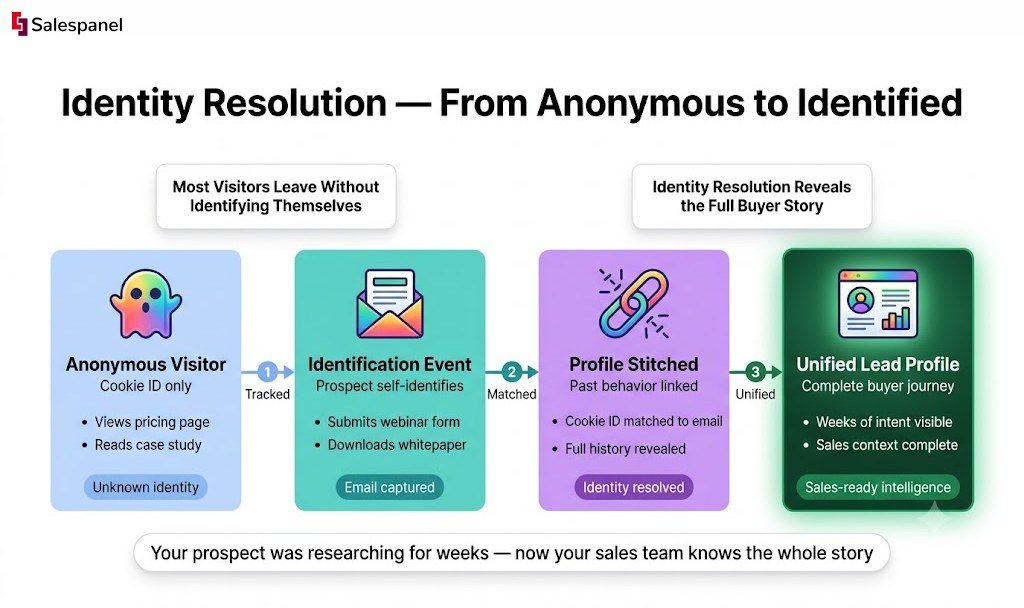
A significant portion of your website traffic is anonymous. A user might browse product pages, read blog posts, and then leave without identifying themselves. A week later, they might click an email link and download a whitepaper, finally providing their contact information. Without a proper system, these interactions are seen as activities from two separate individuals.
The Art of Identity Resolution
This is where identity resolution is critical. It is the technical process of stitching together every touchpoint from a single individual—both before and after they identify themselves—into one unified profile. Any competent marketing automation platform should perform this function seamlessly.
Consider this practical sequence:
- An anonymous user with a unique cookie ID visits your pricing page.
- The same individual later fills out a webinar registration form, providing an email address.
- The system instantly associates the previous cookie ID with the new email address.
- All past anonymous activity is retroactively linked to the newly identified lead.
This creates a complete, chronological history of their engagement. Your sales team no longer sees just a lead who downloaded a whitepaper; they see a prospect who has been researching your solution for weeks. This context is invaluable. For example, the Website visitor tracking from Salespanel is engineered for this exact purpose, linking pre-conversion behavior to a person’s identity to provide sales with the complete narrative.
Building a Powerful Lead Scoring Framework
With unified profiles established, the next step is prioritization. Not all leads are equal. A user who downloaded a top-of-funnel ebook is fundamentally different from a decision-maker who has visited your pricing page three times in a day. Lead scoring is the mechanism for distinguishing between passive browsers and active buyers.
A lead scoring framework assigns points to leads based on a combination of their profile (firmographics/demographics) and their behavior. It is a dynamic system that continuously re-evaluates a lead’s sales-readiness.
For B2B marketing, this is typically bifurcated:
1. Firmographic and Demographic Scoring (The “Who”) This component scores leads based on their alignment with your Ideal Customer Profile (ICP). Points are assigned—positive or negative—for attributes such as:
- Job Title: A C-level executive might receive +20 points, while an intern could be assigned -10.
- Company Size: If targeting enterprise clients, a company with over 1,000 employees might be worth +15 points.
- Industry: A lead from a core target industry gets +10 points.
- Location: If your operations are restricted to North America, leads from other regions might be disqualified or receive a lower score.
2. Behavioral Scoring (The “What”) This is where you score actions that signal purchase intent. High-intent actions receive higher scores.
- Requesting a demo: +30 points
- Visiting the pricing page: +15 points
- Attending a webinar: +10 points
- Downloading a case study: +5 points
- Opening an email: +1 point
The objective is to set a score threshold—for example, 100 points—that automatically designates a lead as a Marketing Qualified Lead (MQL) and routes them directly to the sales team. This prevents sales representatives from wasting time on unqualified leads and allows them to focus exclusively on prospects demonstrating clear buying signals.
This is not a static configuration. An effective framework requires continuous refinement. For instance, Salespanel’s lead scoring framework allows you to construct complex rules that weigh different behaviors, ensuring your model evolves as you gather more data. You might discover that users who view a specific product feature page convert at a higher rate, prompting you to increase the score for that action. By continuously tuning your model, you create a truly reliable pipeline of sales-ready leads.
Designing Workflows That Nurture and Convert
With a reliable stream of identified and scored leads, the focus shifts from data collection to active engagement. This is where you architect the automated journeys that guide prospects from initial interest to sales-readiness. Effective workflows are not merely about sending automated emails; they are about delivering the right message at the precise moment a prospect needs it, ensuring perfect alignment with their stage in the buying journey.
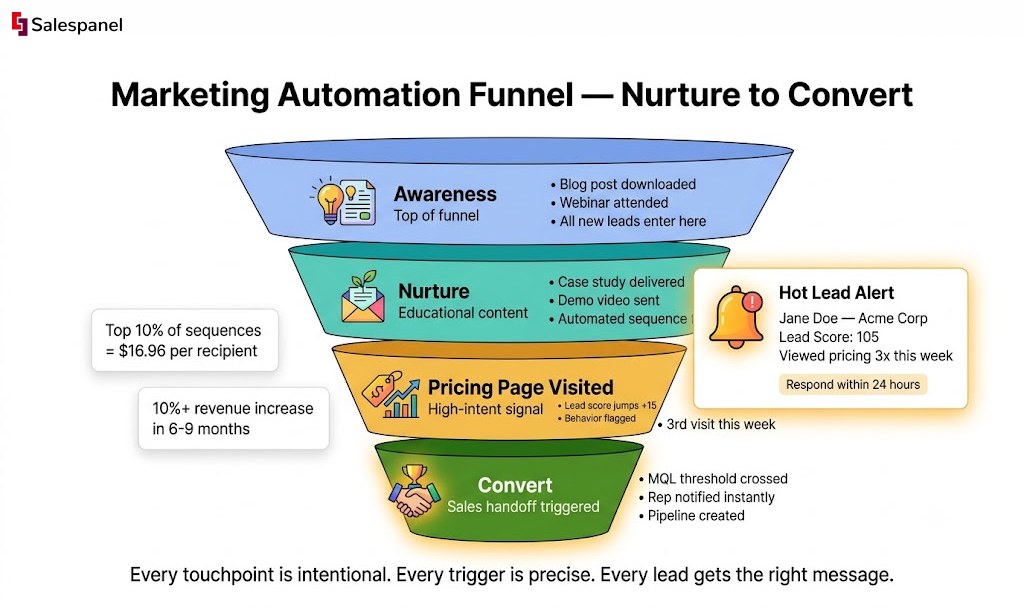
The financial impact of well-executed automation is substantial. Data shows that the top 10% of automated email sequences generate an average of $16.96 per recipient, dwarfing the $1.94 average from a standard, one-off campaign. Furthermore, implementing automated lead management can drive a revenue increase of over 10% in as little as six to nine months. You can explore more marketing automation performance statistics to validate this potential.
The Foundational Lead Nurture Sequence
Every B2B organization needs a foundational lead nurture sequence. This is your primary workhorse campaign, designed to engage new subscribers who have shown initial interest—such as downloading an ebook—but are not yet ready for a sales conversation. The goal is to build trust and provide value over time.
A practical nurture flow for a whitepaper download could be structured as follows:
- Immediate Trigger: A user submits the whitepaper download form.
- Email 1 (Instant): Deliver the requested content and set expectations. The copy should be concise, helpful, and focused on establishing your brand as a credible resource.
- Delay (3 Days): Allow time for the lead to consume the content.
- Email 2: Follow up with a related asset, such as a case study or a blog post that expands on a pain point mentioned in the whitepaper.
- Delay (4 Days): Continue the educational journey without overwhelming their inbox.
- Email 3: Introduce a middle-of-funnel offer with a lower commitment, such as an invitation to an upcoming webinar or a link to a recorded product demo.
- Exit Condition: This is a critical technical component. If the lead takes a high-intent action at any point (e.g., booking a demo), they must be immediately removed from this nurture flow and routed to sales.
This structured, methodical approach ensures every new lead receives a consistent, valuable experience that prepares them for a sales conversation. The right set of email outreach tools is essential to execute this at scale while maintaining a personal feel.
Advanced Workflows for Deeper Engagement
Once the fundamentals are in place, you can develop more sophisticated workflows to address specific scenarios and shorten the sales cycle. These advanced automations are typically triggered by more complex behavioral signals, creating a system that is highly responsive to prospect needs.
The core principle is that automation should react to prospect behavior in real-time. When a prospect’s actions signal intent, the system must respond instantly with the most logical next step.
Here are two practical examples of advanced workflows that deliver significant value.
Re-Engagement Campaigns for Dormant Leads
A re-engagement workflow can automatically identify and attempt to reactivate leads that have gone cold.
- Trigger: A lead has not opened an email or visited the website in 90 days.
- Action 1: Send an email with a compelling subject line (e.g., “Still interested in [Topic]?”) and offer a valuable new resource or a summary of recent updates.
- Condition: Did the user click the link? If Yes: Reset their “last activity” date and return them to a general nurturing pool. If No: Wait 14 days.
- Action 2: Send a final “break-up” email. Ask if they wish to remain subscribed, providing a simple one-click option to opt out. This improves list hygiene and email deliverability.
Internal Sales Alerts for High-Intent Actions
In sales, timing is paramount. An automated internal notification can provide the sales team with the timely intelligence needed to close a deal.
- Trigger: A lead’s score surpasses the MQL threshold of 100 points, resulting from a combination of actions (e.g., viewing the pricing page for the third time and having a “Director” level title).
- Action 1: Instantly send a notification to the assigned sales representative via Slack or email. Notification Content: “Hot Lead Alert: Jane Doe from Acme Corp (Lead Score: 105) just viewed the pricing page. View their full activity history here: [Link to CRM profile].”
- Action 2: Simultaneously, create a task in the CRM for the representative to follow up within 24 hours.
This workflow closes the gap between marketing activity and sales action, ensuring no high-value lead is overlooked. By designing workflows that nurture, re-engage, and alert, you build an automated system that actively drives leads toward conversion.
Getting Your Tech Stack to Talk to Each Other
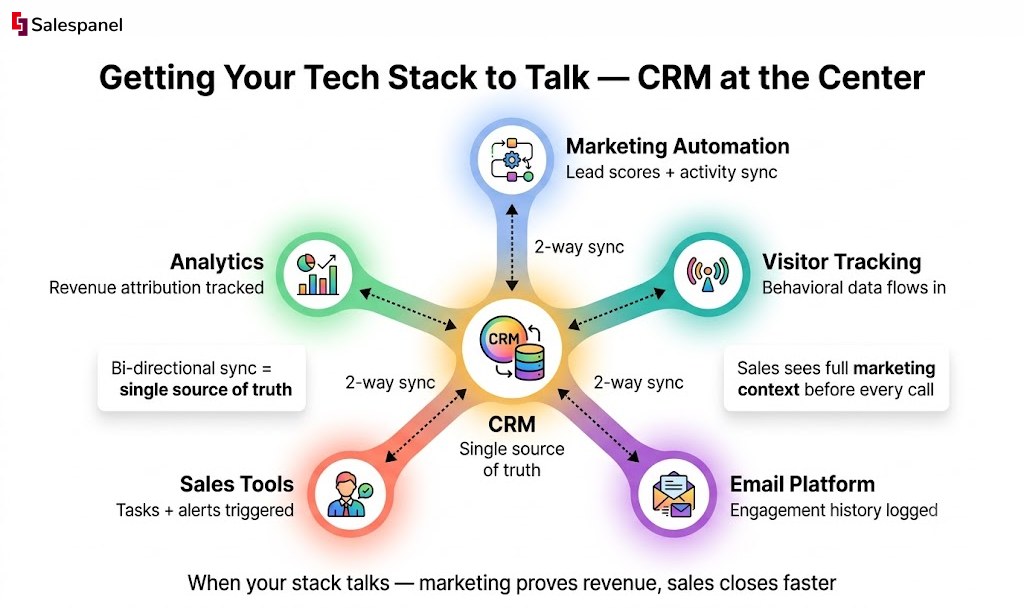
Your marketing automation platform, while powerful, operates in isolation until it is integrated with other core business systems. The most critical integration is with your Customer Relationship Management (CRM) platform. A seamless connection between marketing automation and CRM creates a powerful feedback loop, linking marketing engagement with actual sales outcomes. This step is what finally breaks down the silos between your teams.
Without this integration, marketing operates without visibility into which leads convert, while sales lacks the crucial context of a prospect’s digital journey. The objective is a bi-directional sync, a two-way data flow that establishes a single source of truth for both marketing and sales.
Forging the CRM Connection
A bi-directional sync means that updates in one system are automatically reflected in the other. For marketing, this involves pushing qualified leads—along with their rich activity history (pages visited, content downloaded, emails opened)—directly into the CRM. This provides the sales team with invaluable context before initiating contact.
The true power of this integration is realized when data flows in the opposite direction, allowing sales actions in the CRM to trigger automated marketing workflows.
Here is a practical, real-world example:
- A sales representative concludes a successful call with a new MQL and updates their status in the CRM from “New” to “Nurturing – Long Term.”
- This status change syncs instantly to the marketing automation platform.
- The platform’s workflow logic recognizes this new status and automatically enrolls the lead into a specialized, long-term nurture sequence designed to deliver low-pressure, high-value content on a quarterly basis, keeping the brand top-of-mind.
This automated hand-off ensures no lead is neglected. The sales representative does not need to manually inform marketing or add the lead to a list; the system handles it autonomously, freeing up both teams to focus on their core functions.
The Non-Negotiable Role of QA
Deploying an integrated system without rigorous testing is a recipe for failure. A minor error in data mapping or a faulty trigger can result in broken personalization, incorrect lead routing, or complete workflow failure. A thorough Quality Assurance (QA) process is therefore absolutely non-negotiable. Before any real contacts enter the system, every component must be tested end-to-end. This extends beyond simple proofreading to validating the entire data and logic flow.
Pre-launch QA should not be viewed as a final check, but as a strategic process that guarantees the automation performs precisely as designed. A well-tested system builds trust with the sales team and ensures a professional, seamless experience for prospects.
Utilize a checklist to systematically test every possible path in your workflows. What happens if a user performs action X? What about action Y? You must confirm that the system behaves as expected under all conceivable conditions.
Pre-Launch Integration and QA Checklist
This practical checklist will help ensure your system is ready for deployment:
Form and Tracking Validation
- Do all website forms correctly capture data and transmit it to the automation platform?
- Are hidden fields (e.g., UTM source, campaign name) being captured correctly?
- Is website activity (page views, clicks) being tracked and accurately associated with test contacts?
CRM Data Sync Verification
- When a new lead is created, does it appear in the CRM with all fields mapped correctly and without data loss?
- If a record is updated in the CRM (e.g., a phone number is added), is the change reflected back in the marketing platform?
- Does the lead score update in both systems in near real-time?
Workflow Logic and Trigger Testing
- Does the MQL trigger fire correctly when a test lead reaches the score threshold?
- Are internal notifications (e.g., a Slack alert to a sales channel) delivered to the correct person with the correct lead information?
- Do exit conditions function as intended? For example, is a lead correctly removed from a nurture sequence after booking a demo?
Email and Content Personalization
- Are personalization tokens like {{first_name}} and {{company_name}} populating with the correct data, or will emails be sent with placeholder text?
- Do dynamic content blocks display the correct version based on the established rules?
- Are all links within emails tracked and directed to the correct landing pages?
By methodically executing this QA process, you can launch with confidence. A well-integrated and rigorously tested system eliminates guesswork and aligns your marketing and sales teams around a single, unified playbook.
Measuring ROI and Using AI to Sharpen Your Edge
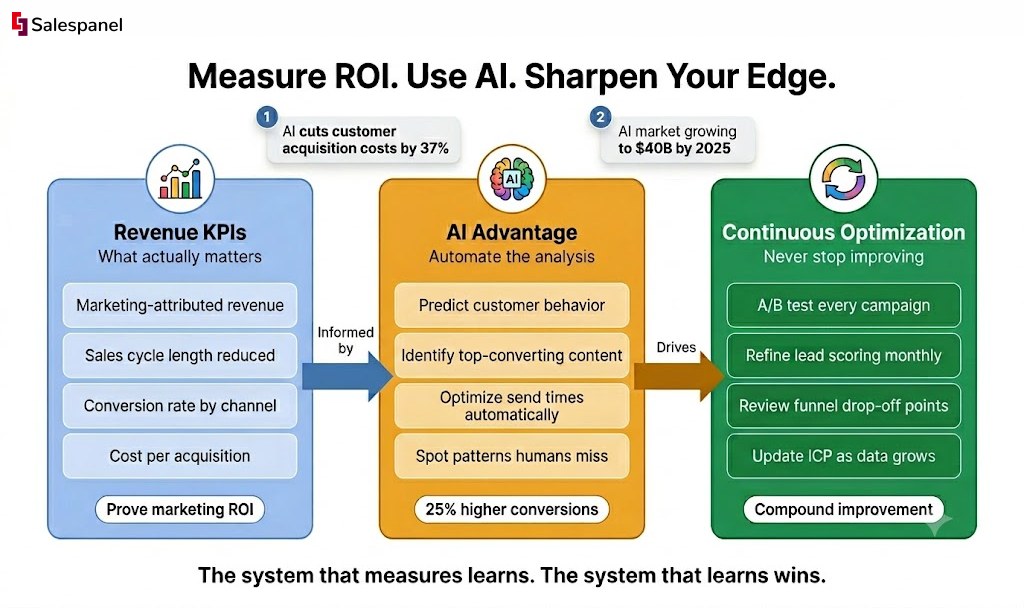
Deploying your marketing automation system is the beginning, not the end. The real work begins now: a continuous cycle of measurement, learning, and refinement. With workflows operational, the focus must shift from vanity metrics like open rates to demonstrating the tangible business impact of your efforts. To properly assess performance, you must concentrate on KPIs that resonate with the C-suite: revenue. You need to be prepared to answer strategic questions that directly link marketing activities to the bottom line.
- Marketing-Attributed Revenue: How much closed-won business can be directly traced back to marketing-generated leads?
- Sales Cycle Length: Is the system effectively reducing the time it takes to convert a new lead into a paying customer?
- Conversion Rate by Channel: Which channels are generating the highest quality leads and delivering the best return on investment?
The AI Advantage in Marketing Analytics
As data volume increases, a new challenge emerges: analysis. This is where Artificial Intelligence is fundamentally changing the landscape. AI-powered analytics can process massive datasets, identify patterns, and predict customer behavior in ways that are impossible for humans. AI is more than a reporting tool; it not only explains what happened but also suggests what actions to take next. For example, it might identify that a specific whitepaper is highly effective at moving leads from the “Awareness” to “Consideration” stage, providing a clear signal to amplify that asset.
This predictive capability is why the AI marketing market is projected to grow from $20 billion in 2022 to $40 billion by 2025. This is not speculative hype. Studies indicate that AI-powered automation can increase conversion rates by 25% and reduce customer acquisition costs by 37%. These figures represent a direct, measurable impact on business growth. You can discover more insights about AI marketing statistics to see how profoundly AI is reshaping the industry.
AI acts as a force multiplier for your marketing team. It automates complex analysis, identifies optimization opportunities that would otherwise be missed, and frees up your personnel to focus on high-level strategy and creativity rather than being mired in spreadsheets.
By integrating rigorous KPI tracking with the analytical power of AI, you are not just setting your team up for current success. You are building an adaptive system capable of thriving in an increasingly intelligent marketing environment. This forward-looking approach is what elevates a simple automation tool into a core engine for business growth.
Common Marketing Automation Questions
Even with a comprehensive playbook, practical questions inevitably arise during the setup process. This is entirely normal. Let’s address some of the most common challenges teams encounter to help you navigate the final stages with confidence.
How Long Does This Really Take?
This is a frequent and important question. The honest answer is that the timeline depends entirely on the complexity of the implementation. For a straightforward setup, such as a basic email nurture sequence for new leads, you can realistically expect to be operational in 2-4 weeks. However, for a full-scale B2B implementation involving deep CRM integration, a multi-layered lead scoring model, and several dynamic workflows, a more realistic timeline is 2-3 months.
Here is a general breakdown of how that time is allocated:
- Strategy and Planning: 1-2 weeks
- Technical Setup and Integration: 2-4 weeks
- Workflow Creation and Content: 2-4 weeks
- Testing and QA: 1-2 weeks
The most significant bottleneck is typically not the technology itself, but the foundational work: cleaning data and achieving strategic alignment between marketing and sales.
What Are the Most Common Mistakes to Avoid?
Newcomers often fall into the same traps. Avoiding these three common mistakes will place you ahead of the curve.
- No Clear Strategy: This is the most prevalent error. Teams acquire a powerful tool without first defining concrete goals for lead qualification, nurturing, and the critical sales handoff. Technology cannot fix a broken process.
- Poor Data Quality: The “garbage in, garbage out” principle applies. Syncing a messy, outdated CRM or failing to implement proper tracking from the outset will sabotage your efforts. Flawed data inevitably leads to flawed automation.
- Over-automating Too Soon: It is tempting to build highly complex, multi-path workflows immediately. Resist this temptation. It is far more effective to start with a few simple, high-impact campaigns, measure their performance, and iterate based on the data.
The key takeaway is to prioritize a solid data foundation and a clear, simple strategy. Complexity can be introduced later, once the fundamentals are proven.
Do I Need a Dedicated Developer for This?
For many core functions, a dedicated developer is likely not necessary. Modern marketing automation platforms are designed for marketers, not engineers. Most basic setup tasks—such as implementing a tracking script via Google Tag Manager, building email templates, or creating simple workflows—are designed to be user-friendly and can be handled by a marketing team.
However, for more advanced implementations, technical expertise becomes necessary. Tasks such as custom API connections, complex server-side tracking configurations, or unique CRM integrations that extend beyond standard connectors typically require the assistance of a developer.
Ready to turn anonymous website visitors into a predictable sales pipeline? Salespanel provides the tracking, identification, and scoring capabilities you need to build a revenue engine, not just another marketing tool. Explore our resources to see how.