How to Track Form Submissions Accurately in GA4 and Salespanel
In earlier days, just counting “Thank you” page views gave the impression of easy form submission tracking. But marketers know B2B lead submission goes well beyond such simple tracking. This is not to say that simple tracking is totally useless; only that B2B marketers may be missing 15-20% of untracked leads. So many marketers see this as a huge gap. It’s not just a ‘reporting error’ but it’s a strategical miss which goes all the up in the funnel. We need correct form submission tracking.
This guide provides you with everything that you need to know when it comes to tracking form submissions and historical activity tracking, assuming you have the visitor consent.
We will dissect why old methods fail, walk through the technical steps for setting up robust tracking in Google Analytics 4 and Salespanel, and ultimately, demonstrate how to connect a simple submission to the entire customer journey—transforming a single data point into a rich, actionable narrative. The central theme is achieving data clarity: moving beyond simply counting submissions to truly understanding the story behind each one.
What is Form Submission Tracking and Why Is It Challenging?
Form Submission Tracking keeps track of how many times one of your site visitors fills out one of your web forms and submits it. This is achieved through event-based tracking. This is done by sending an event to the analytics platform as soon as the form is submitted. Tracking form submissions can be done in many different ways. Some common ways are tracking the loading of submission confirmation web pages and tracking code events that are pushed to the browser’s data layer.
In the B2B marketing world, the reliability and precision of tracking submissions are the most significant challenges. The issues of complexities that claim to track form submissions are many and diverse.
- Dynamic Forms: Single-page applications and AJAX forms; no page refresh occurs, and a success message is shown after asynchronous form submission. A common AJAX form is the subscription newsletter. A user enters their email and pushes the subscribe button. The form then shows a success message that states “Thank You for Subscribing!” in place of the form. This is one example of many where traditional page-view strategies fail to track the conversion.
- Validation Complexity: Take, for example, a user who submitted a form without filling in all required fields. When they hit submit, an error pops up, and the form does not submit. In the absence of sophisticated tracking, this situation might be counted as a conversion. This scenario does not result in a conversion, and tracking this way will lead to junk data. This scenario inflates your lead count, and tracking inflates as a result.
- The B2B Journey: A form fill almost never happens after a single interaction. It comes after a series of multiple touchpoints across various channels over several weeks or months. Standard analytics tools fail to connect the dots by attributing the conversion to the last click without taking into consideration the LinkedIn ad, organic search, and email newsletter that created the path. This blindness to attribution makes allocating budget to top-of-funnel activities nearly impossible.

Marketers are now starting to adopt a more technical, holistic mindset. Marketers must think about what a person’s complete journey is to understand their intent. That means we don’t just need the information ‘where’ they submitted the form, we also need to understand what exactly they were looking for. We need to move beyond “How many submissions did we get?” to “Who submitted?
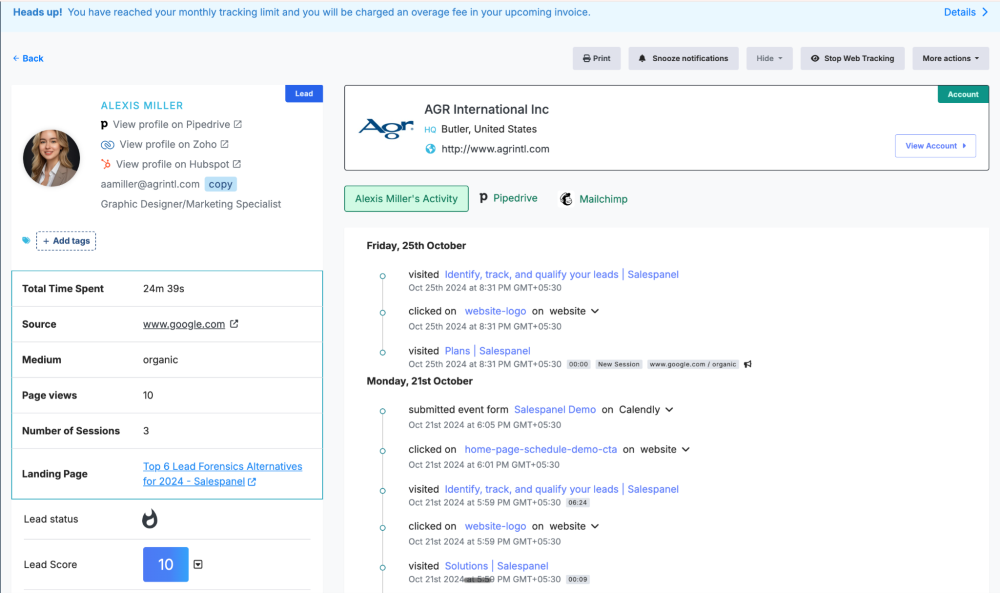
Did you know Salespanel captures automatically the entire customer journey of your B2B lead as soon as they submit the form?
Form Tracking Methods: Past vs Present
Form tracking has changed a lot over the years. Five years ago, our methods would have worked just fine, but now they’re outdated. Let’s discuss the changes and new methods to improve our tracking accuracy.
| Tracking Method | How It Works | Common Challenges | Best For |
|---|---|---|---|
| Thank You Page Views | Tracks when a user lands on a dedicated confirmation URL after submitting a form. | Fails on single-page apps and forms that show on-page success messages without a redirect. Easily inflated by direct traffic or page reloads. | Simple websites with traditional, static forms where every submission leads to a new page. |
| On-Page Element Visibility | Uses a tag manager to fire an event when a specific “success” message or element becomes visible on the screen. | It can be brittle and break with minor website design changes. May fire incorrectly if the element loads under certain conditions without a valid submission. | Dynamic forms where a success message appears on the same page, but data layer events aren’t available. |
| Form Submission Listener | Utilizes built-in listeners (like in GTM) that “listen” for a browser’s native form submit event. | Often fires on submission attempt, not successful validation. It can’t distinguish between a failed submission and a successful one. | Basic lead forms where validation happens server-side, and you just need to know an attempt was made. |
| Data Layer Events (Modern) | A developer pushes a custom event (e.g., ‘form_success’) to the data layer upon a successful, validated submission. This event is then used as a trigger. | Requires developer resources to implement correctly. It can be inconsistent if not implemented uniformly across all site forms. | The gold standard. Highly reliable, accurate, and flexible for modern web apps and complex forms. |
Older methods like page views aren’t enough to provide reliable insights. Modern methods, particularly those that leverage the data layer, offer the accuracy that helps one build confidence to make data-driven decisions.
How to Track Form Submissions in Google Analytics 4

Google Analytics 4, unlike Salespanel, lacks the ability to automatically track most form submissions, even though it is the most widely used website analytics tool. For any marketer focused on performance, this is a significant oversight. For conversion tracking, you need to set this up manually using Google Tag Manager (GTM).
While GA4 has an “Enhanced measurement” feature that tries to automatically detect form interactions, it is not reliable enough for any serious purpose. For instance, enhanced measurement on a multi-step form fires an event on the first step and logs a conversion erroneously before the user has finished the entire process. For this reason, we suggest disabling this feature for forms and using a trigger-based method in GTM that activates only upon successful final validation on the form.
Creating Reliable Form Submission Events
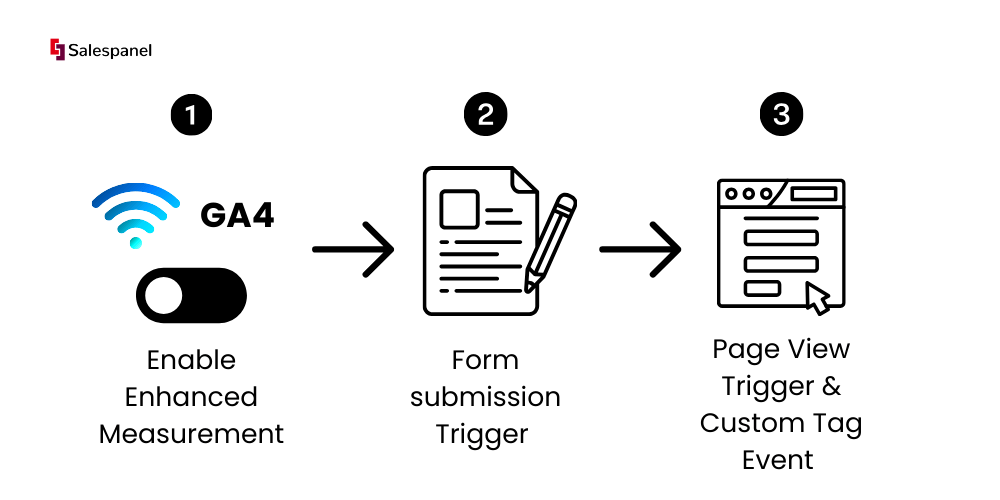
In Google Tag Manager (GTM) for Google Analytics 4 (GA4), there are two primary methods for tracking form submissions that guarantee clean, reliable data. This differs depending on the specific architecture of your website. Both methods are better than the default settings, and for tracking conversions, deliver conversion data you can trust.
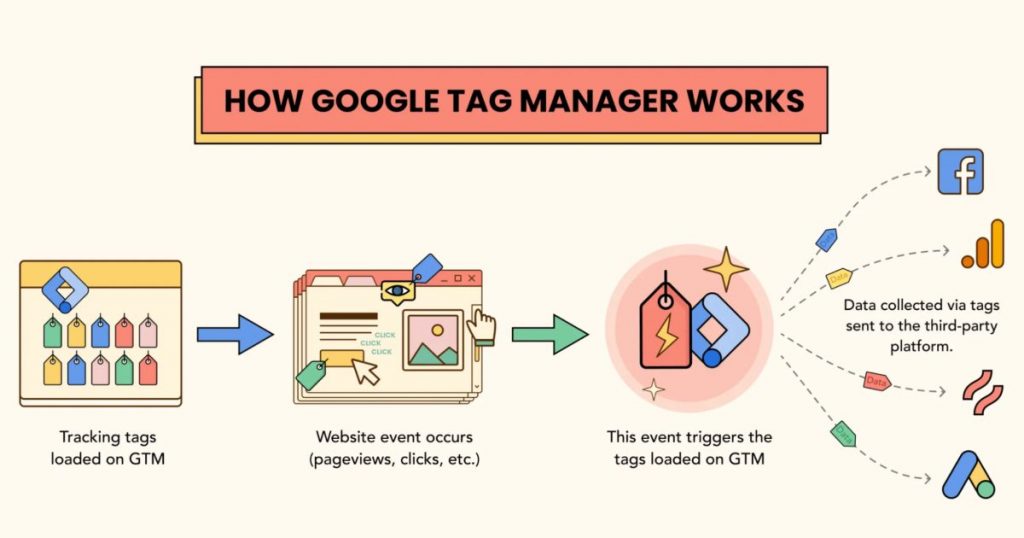
Here are the most common and effective techniques:
- Using the ‘Page View’ Trigger (for Redirects): The simplest and most reliable option is if your form redirects the user to a “thank you” page. For example, yourwebsite.com/thank-you. In GTM, you set a trigger to fire your GA4 event tag when the Page URL contains /thank-you. Easy and almost foolproof.
- Using a Custom Event Trigger (The Gold Standard): For dynamic forms that do not redirect, using a custom data layer event is the strongest. This entails a tiny JavaScript that your dev can add, which pushes an event to the data layer when a form has been successfully validated. An example is dataLayer.push({‘event’: ‘contact_form_success’}); is triggered. Then you set up a GTM “Custom Event” trigger that looks for the event name contact_form_success. This is incredibly precise as it is tied to your form’s internal logic.
GA4 can be an amazing tool, but for conversion tracking, it really relies on proper configuration through GTM. A properly configured setup is what separates ambiguous data from an accurate picture of your marketing performance. If you want to dive deeper, there are different usages of GA4 and instructions on form tracking.
Advanced Tracking for Dynamic and AJAX Forms
What occurs when the form on a webpage gets submitted without reloading the entire page? For websites with AJAX (Asynchronous JavaScript and XML), this is a piece of a larger, modern user experience.

Standard triggers upon a new page load are not effective for AJAX. This is where form tracking for AJAX becomes critical. As we move into 2025, tracking form submissions with AJAX will be a baseline expectation for tracking professionals on web applications. Most professionals will be equipped to handle a variety of form behaviors using multiple tracking techniques, even for the simplest AJAX (Asynchronous JavaScript and XML).
Advanced GTM Techniques for Dynamic Forms
Using Google Tag Manager (GTM) to track these “invisible” submissions requires some unique techniques. Look for new signals of a successful submission beyond a page change.
Here are three dependable methods to do this task:
- The Custom AJAX Listener: This involves greater technicality, using a custom HTML tag in GTM to actively listen to the network activity. When the form successfully “talks” to the server, this listener captures the “ajaxComplete” event and pushes it to the data layer, where it can be used as a custom trigger for your tags
- The Element Visibility Trigger: This method is technologically simple, and often surprisingly effective. You can get GTM to fire a built-in ‘Element Visibility’ trigger to fire an event the instant that success message – “Thanks, we’ll be in touch!” is present on the user’s screen.
- The Custom Data Layer Event: This is the most accurate and precise method and is the gold standard, but it requires a developer’s assistance. There needs to be a developer to provide a custom event to the data layer, and this should happen right after the form’s own validation confirms a successful submission, to make it more reliable and tied to the form’s logic, providing a custom event like {‘event’: ‘form_success’}.
If you’re dealing with complex forms inside ad platforms, it’s also worth exploring how server-side tracking can make your data more robust. For a deeper dive into that, check out these modern Facebook ad tracking methods that go beyond the browser.
From Submission Data to Customer Journey Intelligence with Salespanel

Seeing a form submission as a conversion event in GA4 doesn’t answer essential B2B questions: Who submitted it, and what history did they have with your brand before that click? The conversion data and customer intelligence gap is where most analytics strategies fall short. The complete customer journey is built when all the touchpoints are connected: every ad clicked, every blog post read, and every pricing page viewed right up to the point of conversion.
Stitching Together the Full Narrative
This is the challenge that specialized platforms are built to solve. The philosophy at Salespanel is that a form submission is not the end of the journey, but a key identification moment within a much longer story. Website visitor tracking from Salespanel works by capturing every anonymous activity a visitor performs across multiple sessions and sources. When a visitor submits a form, Salespanel ‘stitches’ their pre-conversion browsing history to their newly created contact profile.
This way, you don’t just get an isolated GA4 event. You get a chronological, actionable timeline
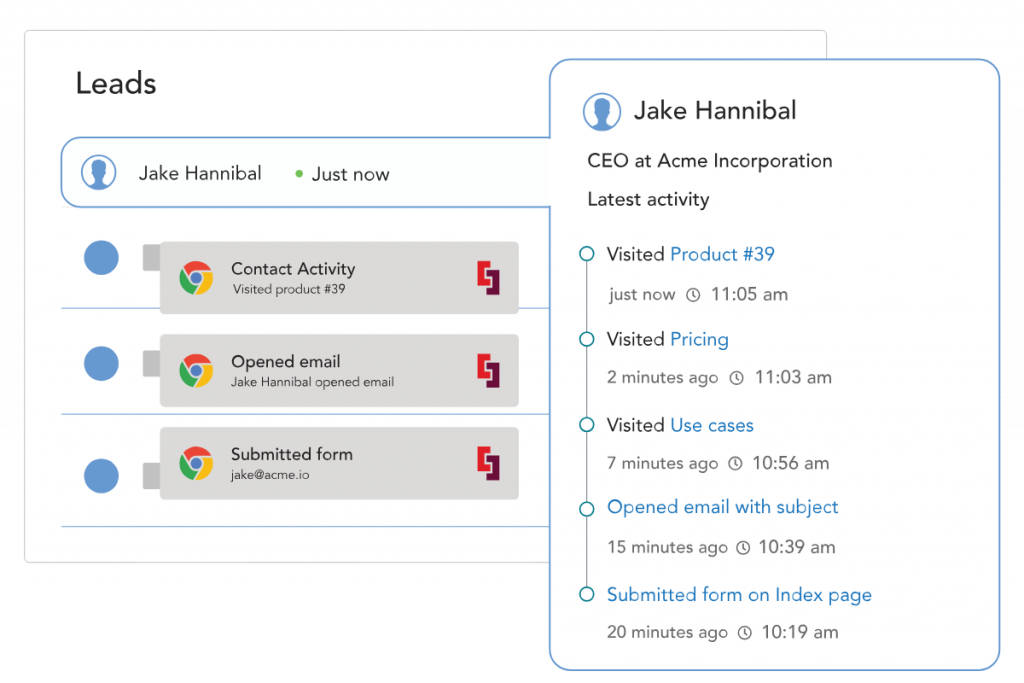
Here’s a real-life example. A lead submits a demo request. A standard tool would say this request relates to “Direct” traffic. But with a journey tracking tool, you see that the lead first clicked a LinkedIn ad two weeks ago, came back organically last week through a competitor comparison search, and then converted after viewing the pricing page three times. This insight is priceless. It gives the sales team the background needed for context and allows marketing to properly attribute the value of every channel using the multi-touch attribution data. This is the important lesson here: linking submissions to the complete customer journey enables you to convert idle data into actionable insight.
Still Have Questions About Form Tracking?
When you first start tracking form submissions, a few specific issues come up. This is totally normal. The most important thing is to have a clear, actionable response to each question you get. These are our most frequently asked questions to resolve issues you might face and get your data correct.
“Why Aren’t My Form Submissions Showing Up in Google Analytics?”
This is most likely one of the questions we receive most frequently, and there are a few likely sources. First of all, GA4 doesn’t track form submissions out of the box—you must set a custom event, which most people do via Google Tag Manager (GTM).
Another common error is a misconfigured GTM trigger. The standard ‘Form Submission’ trigger will fail on modern AJAX forms—those that submit without a full page reload. An ad blocker or strict privacy settings will stop tracking scripts from firing.
GTM’s Preview mode is your best friend in this case. Use Preview mode to ‘test’ submissions and see if your tags are firing when they are supposed to.
“What’s the Most Reliable Way to Track Form Submissions?”
If you set forms to redirect to a dedicated ‘thank you’ page, you only need to track a page view of that specific URL to track conversions. Simple.
Now, for those modern AJAX forms that don’t redirect, the gold standard is a ‘data layer push.’
A data layer push is when a developer places a bit of code that sends a custom event to the data layer immediately after a successful submission. Google Tag Manager uses this clean, unambiguous signal as a trigger. It’s better than estimating based on on-page changes; this method provides the cleanest data.
“How Can I Track Which Marketing Channel Actually Drove a Form Fill?”
While GA4 is excellent at identifying the source and medium for the session where the conversion happened, it’s only the last touchpoint. It’s rarely that straightforward in the B2B world. One lead might engage with a social media ad one week, click on a search result the next, and then convert through an email campaign.
To track the entire winding path, you need more specialized tools. This is where website visitor tracking from Salespanel comes in. It joins a user’s behavior over multiple sessions so you can view the first touch, the last touch, and every single influencing touchpoint in between. This is how you see all and every channel telling the story of how your business is moving.
With Salespanel, don’t settle for weak, empty, simple, and worthless conversion counts. Salespanel ties every form submission to the entire customer journey so you can see which channels bring your most valuable leads and where to focus your time.
Sell more, understand your customers’ journey for free!
Sales and Marketing teams spend millions of dollars to bring visitors to your website. But do you track your customer’s journey? Do you know who buys and why?
Around 8% of your website traffic will sign up on your lead forms. What happens to the other 92% of your traffic? Can you identify your visiting accounts? Can you engage and retarget your qualified visitors even if they are not identified?