Lead Tracking Software: What It Can (and Can’t) Track
What Is Lead Tracking Software?
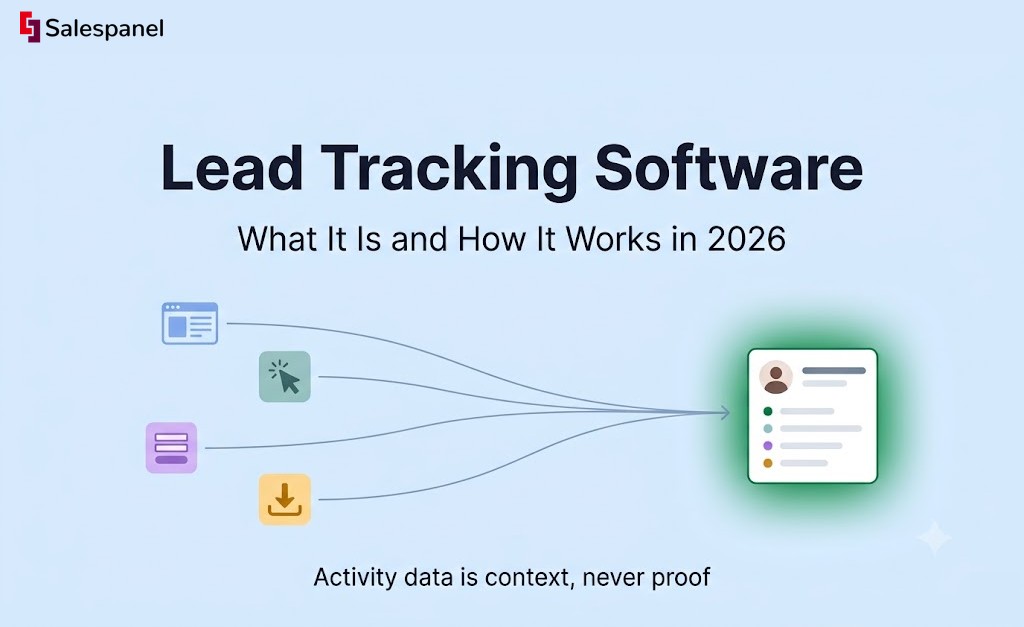
Lead tracking software records a prospect’s interactions across your website, marketing campaigns, and sales touchpoints, then associates those interactions with a lead, contact, or company record. The output is an activity history a team can act on: what someone read, which campaign brought them in, and what they did before requesting a demo.
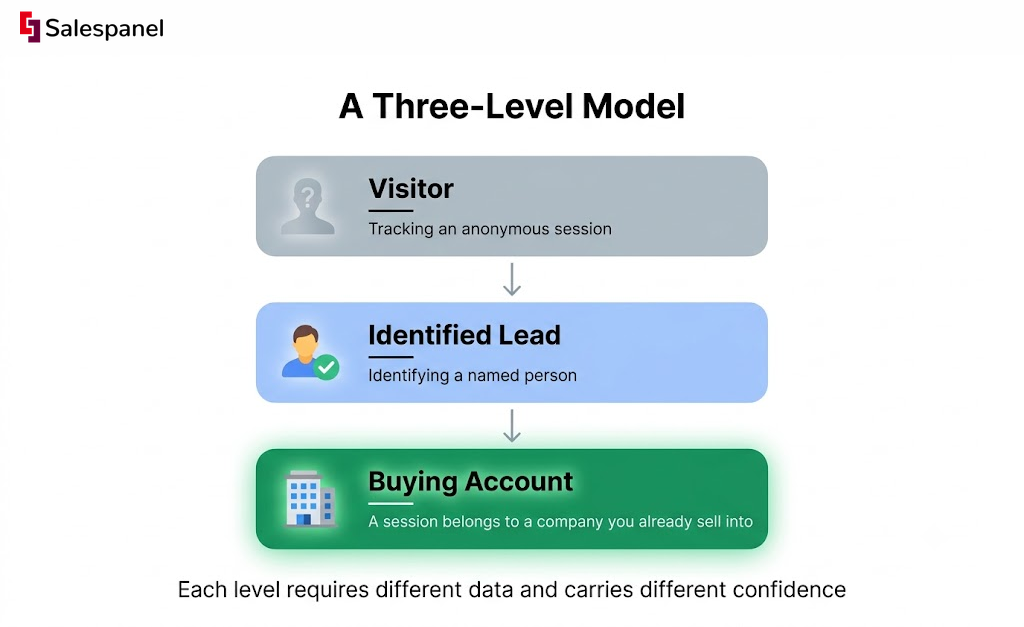
That sounds simple until you notice that most tool roundups blur three very different capabilities into one. Tracking an anonymous session is one thing. Identifying a named person is another. Recognizing that a session belongs to a company you already sell into is a third. A useful way to hold the category in your head is a three-level model: visitor → identified lead → buying account. Each level requires different data and carries different confidence.
Now, an expectation worth setting immediately. Lead tracking software does not reveal every visitor’s name. Identification depends on consent, form submissions, authenticated sessions, enrichment data, and whatever matching method the vendor uses. Anything stronger than that is marketing language.
You will also run into a pile of near-synonyms while researching this: website lead tracking, lead activity tracking, visitor tracking, contact tracking, account tracking, lead management. They overlap heavily. Most of them describe one of the three levels above, and the underlying event collection borrows the same concepts you’ll find in standard web analytics documentation.
Why Lead Tracking Matters for B2B Marketing and Sales
A B2B conversion is rarely one action. It is the visible end of several visits, a few campaigns, two or three stakeholders, and usually a sales conversation nobody logged properly.
That gap shows up most painfully at the handoff. Marketing knows a contact downloaded a guide. Sales gets the record, opens it, and sees a name, a company, and a source field that says “Content Download.” Nothing beyond that. The pricing page views, the integration documentation, the case study from a competitor comparison — all of it sat in a tool the rep never opens.
Activity history improves three decisions that teams make every week. It changes who gets contacted first, because a returning visitor from a target account is a different priority than a first-time blog reader. It changes how campaign quality is judged, since form volume and pipeline contribution are not the same thing. And it shows which content actually shows up in the journeys that become opportunities.
Suppose there is a director at an account you already target. She visits your integration page twice in one week, comes back a few days later through a LinkedIn campaign, and submits a demo request. Without lead tracking, that demo request looks like a single-source conversion credited to LinkedIn. With tracking, the team sees a sequence — early technical evaluation, then a paid touch that pulled her back, then the conversion.
If we separate volume metrics from intent signals, the distinction gets sharper. Ten thousand pageviews do not create a sales opportunity. Four visits to a pricing page from three people at one company might.
One honest caution though. Activity data is context, never proof. A job seeker, a competitor doing research, an existing customer, and a student writing a paper can all read the same pages as a buyer. Lifecycle definitions help here — HubSpot’s lifecycle stage guidance is a reasonable example of how teams standardize what “qualified” means before they start reading behavior into it.
How Lead Tracking Software Works
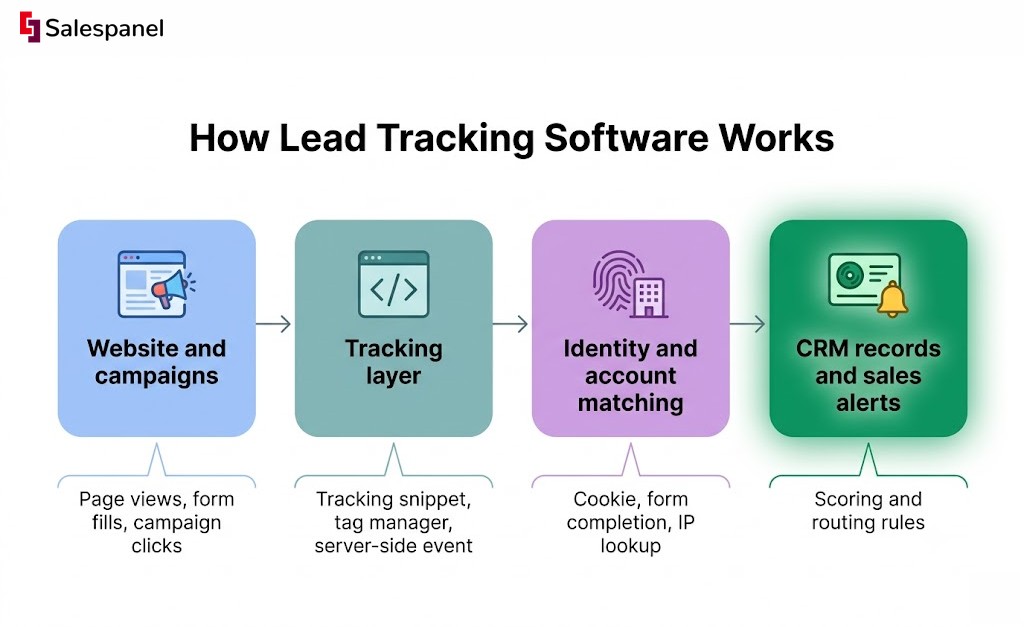
Lead tracking software works in five steps: it collects interactions from your site and campaigns, recognizes or identifies the visitor where possible, joins that activity to a contact or account record, applies scoring and routing rules, then delivers the context into the tools where marketing and sales already work.
Collection is the least mysterious part. A JavaScript tracking snippet, a tag manager container, a server-side event, a form integration, or a direct CRM connection records actions: page views, form fills, campaign clicks, downloads, chat conversations, booked meetings. Each event carries metadata — timestamp, referrer, UTM parameters, page URL, sometimes a session identifier.
Identity resolution is where the category earns its reputation for overpromising, so it is worth separating the mechanisms.
- A first-party cookie or local identifier links visits within a session and, if the browser allows it, across returning sessions. Consent rules and browser storage limits both apply.
- A form completion, an email link click with a tracked parameter, a chat exchange, or a logged-in session connects that pseudonymous activity to a known person. This is the moment an anonymous visitor becomes an identified lead, and it is the only step that produces high confidence.
- IP lookup and enrichment databases can suggest the organization behind a visit. Company-level, usually. Individual-level identification from an IP address is not something you should assume.
Once identity is established at some level, the system stitches activity onto a record. Sometimes that’s a contact, sometimes an account, often both — a person’s page views roll up into a company timeline so the account owner sees six sessions from four people rather than six disconnected rows.
Scoring and routing sit downstream, and they are configuration work, not automation that arrives correct out of the box. A team might notify the account owner when someone from a named target company opens the pricing page. That rule only works after you’ve decided which companies count, which pages count as high-intent, and how often an alert is allowed to fire.
Governance belongs in the same conversation. Consent capture and enforcement, retention windows, which system owns which CRM field, duplicate prevention on email and domain, and alignment with GDPR or equivalent regional law. The ICO’s guidance on cookies and similar technologies is a practical starting reference for the consent side.
What the tool knows vs. what it infers. This distinction prevents most bad decisions in this category:
| Observed | Inferred |
|---|---|
| A form was submitted with this email address | This person is a decision maker |
| Seven page views occurred in one session | The session belongs to one human |
| The IP resolves to a company range | The company is evaluating your product |
| Three contacts share a domain | These three contacts form a buying committee |
Everything in the right column can be useful. None of it is evidence.
What Lead Tracking Software Can Track—and What It Cannot
Lead tracking software is strongest at recording observable interactions and weakest wherever teams expect it to reveal every person, channel, and buying decision with certainty.
On the trackable side, the list is long and reliable: landing page visits, referral source, UTM campaign parameters, form starts and completions, asset downloads, chat interactions, email clicks, meeting bookings, CRM stage changes, and the order in which pages were viewed. Page sequence matters more than people expect — pricing after documentation reads differently than documentation after pricing.
Account-level signals add another layer. Visits from companies on your target list, several contacts engaging from one email domain, repeat interest in comparison or security pages.
Now the limits, stated plainly:
- Cookie rejection, browser privacy controls, ad blockers, and cross-device usage all break person-level continuity. Firefox’s Enhanced Tracking Protection is one example of a default-on control that changes what gets recorded.
- Shared office networks, VPNs, corporate proxies, and mobile carrier IPs make IP-based company identification unreliable in ways that are hard to audit.
- Dark social sharing, untagged links, Slack forwards, and phone conversations leave no trace in web data. They still influenced the deal.
- A duplicated or half-filled CRM record will produce confident-looking attribution that is simply wrong.
This is why “100% visitor identification” claims deserve scrutiny. Deterministic identification means the person told you who they are — a form, a login, a tracked email click. Probabilistic matching means a model guessed based on network, device, or behavioral similarity. Both have uses. They should never appear in the same column of a dashboard without a label.
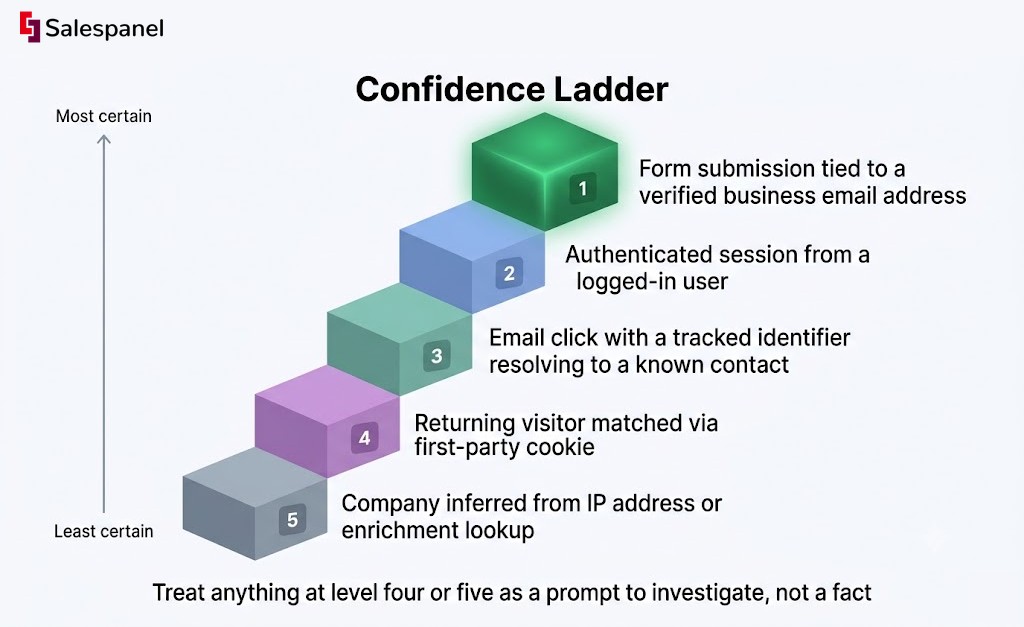
A compact confidence ladder, from most to least certain:
- Form submission tied to a verified business email address
- Authenticated session from a logged-in user
- Email click with a tracked identifier resolving to a known contact
- Returning visitor matched via first-party cookie
- Company inferred from IP address or enrichment lookup
Treat anything at level four or five as a prompt to investigate, not a fact to put in a subject line.
Types of Lead Tracking Software
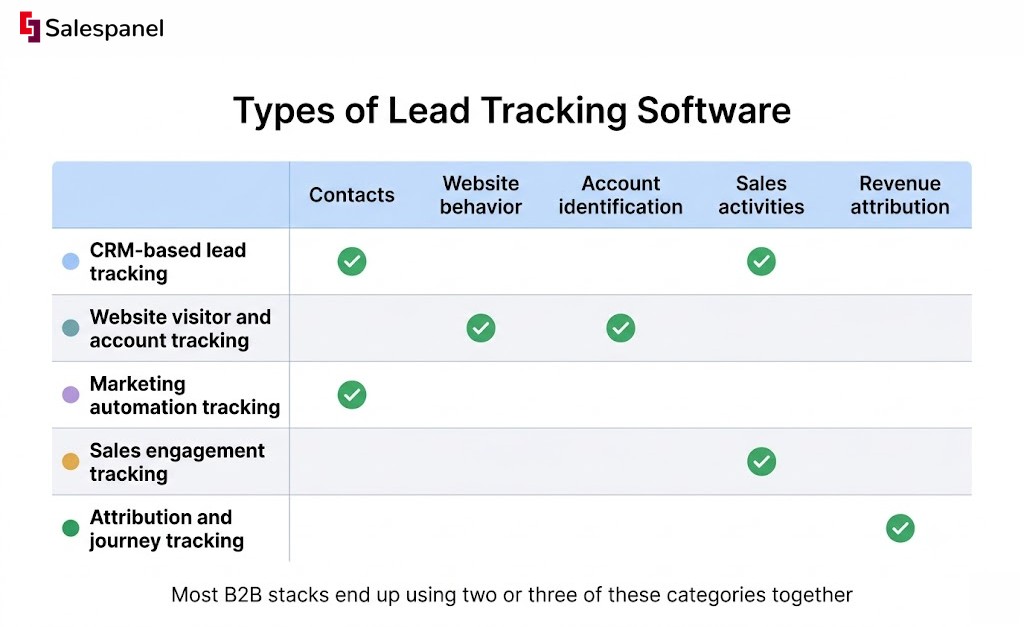
“Lead tracking software” is a category label rather than a product type. Tools inside it differ based on whether they prioritize pipeline management, website behavior, account intelligence, marketing execution, or revenue attribution — and those priorities determine what they’re actually good at.
CRM-based lead tracking. Contacts, deals, tasks, activity logging, and follow-up. Salesforce, HubSpot CRM, and Pipedrive live here. Strong on what sales did, weaker on what the prospect did before sales knew they existed.
Website visitor and account tracking. Captures on-site behavior and, for B2B, surfaces company-level activity from anonymous traffic. This is the layer that fills the gap in the paragraph above.
Marketing automation tracking. Email sends and opens, forms, nurture flows, lifecycle stage transitions. HubSpot Marketing Hub, Marketo Engage, and Marketing Cloud Account Engagement (formerly Pardot) are the common ones. Good at known-contact journeys, less useful before a contact exists.
Sales engagement tracking. Sequences, call logging, rep activity, reply and open rate reporting. Outreach and Salesloft dominate this slice. The data is about your team’s behavior more than the buyer’s.
Attribution and journey tracking. Connects touchpoints to pipeline and closed revenue. This category demands the most tracking discipline, because attribution inherits every UTM mistake and duplicate record upstream of it.
A practical way to pick: start from the operational question you actually need answered. “Which leads need follow-up today” points to CRM and sales engagement. “Which accounts are showing interest we can’t see in the CRM” points to visitor and account tracking. “Which campaigns influenced pipeline last quarter” points to attribution, and probably to a longer implementation than you expected.
Most B2B stacks end up using two or three of these categories together. No single system handles CRM records, anonymous web behavior, firmographic enrichment, outreach sequencing, and multi-touch attribution at equal depth — vendors that claim all five usually do one or two well and the rest at checkbox level.
How B2B Teams Use Lead Tracking Software in Practice
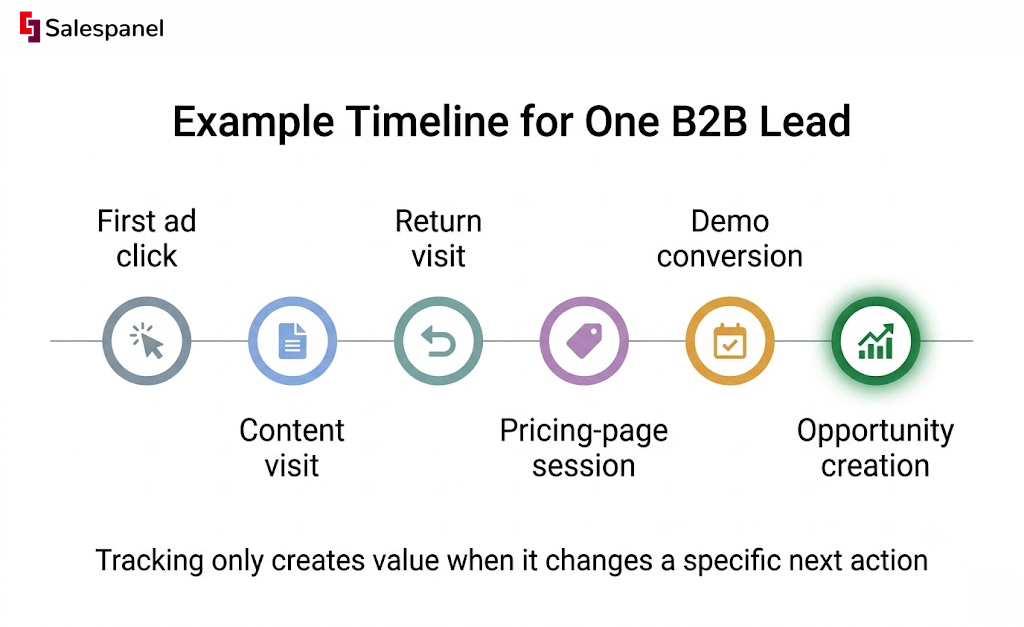
Tracking only creates value when it changes a specific next action: who gets contacted, what the first message says, or how a campaign gets judged. If the data lands in a dashboard nobody opens before a call, the implementation failed regardless of how clean the collection is.
Inbound demo follow-up. A prospect submits a demo request. Before that, she read pricing, then the security page, then two integration docs. The rep opens the CRM record and sees those page views inline with the contact. The first call opens with questions about their SSO requirements and the integration she was reading, instead of a generic overview deck. Same lead, different conversation.
Account-based marketing. A target account shows visits from four people across product pages, a customer story, and a competitor comparison. Marketing adds the account to a coordinated campaign, and the account owner gets an alert — but only once the activity crosses an agreed threshold, say three or more contacts within fourteen days. Thresholds are what separate account-based marketing work from noise.
Lead scoring. A return visit to pricing carries more weight than a first visit to a blog post. Fine. The part teams skip is the monthly review: scoring rules inflate over time, old page URLs keep earning points, and a model nobody audits starts marking newsletter subscribers as sales-ready. If you’re setting this up from scratch, it’s worth the time to build a lead scoring model deliberately rather than copying a template.
Campaign quality review. A paid campaign delivers 200 form fills at an attractive cost per lead. Tracking then shows that almost none of those contacts returned to a product page, and only a handful reached opportunity stage. Cost per lead looked great. Cost per opportunity did not.
One thing has to come before any of this: operational definitions. What counts as an MQL, what makes an account qualified, which pages are high-intent, and what a sales-accepted lead means. Configure alerts before you agree on those and you’ll spend the next quarter arguing about whether the tool works.
And an anti-pattern worth naming. Do not alert sales on every page view. Reps who receive forty notifications a day stop reading them by week two, which means the one alert that mattered gets ignored along with the other thirty-nine.
See how Salespanel helps B2B teams turn website activity into qualified lead and account signals.
How to Evaluate Lead Tracking Software
The right tool depends on three things: the data you already hold, the actions you need to trigger, and the level at which your team actually sells — person, company, or opportunity. A tool built for person-level nurture will frustrate an account-based team, and the reverse is equally true.
Work through a checklist before you sit through demos:
- What must be tracked, specifically — website visits, campaign journeys, sales activities, account engagement, or all of them?
- Can it write to the CRM fields and lifecycle stages your team already uses, without a custom object nobody maintains?
- Does it identify contacts, companies, or both — and how does the vendor describe confidence for each?
- Can an admin adjust scoring, routing, exclusions, and alert thresholds without filing an engineering ticket?
- Are there consent controls, retention settings, and support for regional privacy requirements?
- Can you export raw activity data for auditing and independent reporting?
- What happens when identity is unknown, or when a record turns out to be a duplicate?
Rather than configuring every rule at launch, run a narrow pilot. Track demo requests from three paid campaigns for 30 days. One conversion path, one time window, one clear question.
Then measure adoption with numbers that reflect decisions, not collection volume: the percentage of demo requests that arrive with usable activity context, the response rate on sales alerts, the duplicate rate in new records, and opportunity creation rate from tracked leads. Total tracked visits tells you the script is installed and nothing else.
The framing that matters here is decision quality over feature count. A feature earns its place if it makes routing, follow-up, or measurement more accurate. If you want the mechanics behind the web-behavior layer specifically, it helps to understand how B2B visitor tracking works before comparing vendors on it.
Lead Tracking Software Limitations and Privacy Considerations
Better visibility does not replace consent management, clean CRM process, or the judgment call about whether a given signal justifies reaching out at all.
There is a meaningful distinction between observing aggregate website behavior for analytics and using personal data to target an individual with sales outreach. The second carries obligations the first may not. Those obligations vary by jurisdiction, by what you collect, and by how you implement it — the European Commission’s data protection overview is a starting point, not a substitute for talking to your own legal or privacy people about your specific setup.
Practical safeguards are mostly unglamorous. Document why each tracking purpose exists. Capture consent where it’s required and actually enforce it in the tag. Collect fewer form fields. Honor deletion requests across every connected system, not just the CRM. Keep sensitive categories out of tracked properties. Audit integrations periodically, because data flows drift.
Tracking quality also depends far more on operations than on software. Inconsistent UTM conventions, unowned CRM records, duplicate contacts, and a form that silently stopped posting will damage your reporting in ways no vendor can repair from their side.
Use the data to make conversations better informed and prioritization sharper. It does not authorize outreach that a recipient would find intrusive, and a signal you can’t explain to the prospect is usually a signal you shouldn’t act on yet.
FAQ
What is the best way to track leads?
The best approach combines a CRM as the system of record, consistent campaign tagging, website and form tracking, clearly defined lifecycle stages, and agreed rules for sales follow-up. The right configuration depends on whether the team needs person-level lead history, account-level intent signals, or revenue attribution — those three goals require different data and different tools.
What is lead tracking software?
Lead tracking software is a system that records prospect interactions across websites, campaigns, and sales channels, then connects those interactions to contact, account, or CRM records where possible. It helps teams prioritize follow-up and evaluate marketing activity. It cannot identify every anonymous visitor with certainty, since identification depends on consent, forms, logins, and matching methods.
What is the best app for tracking leads?
No single app is best for every team. Salesforce, HubSpot CRM, and Pipedrive suit CRM-centered tracking of contacts, deals, and follow-up. Specialized website and account-tracking tools such as Salespanel add behavioral context that CRMs miss before a form is submitted. Choose based on required integrations, sales process, privacy obligations, and the type of identification you need.
Which tool helps track leads?
CRM tools such as HubSpot CRM, Salesforce, and Pipedrive track lead records and sales follow-up. Marketing automation platforms capture email and nurture activity, visitor-tracking tools surface anonymous website and account behavior, and sales engagement tools record outreach. Salespanel sits alongside these as CRM-agnostic lead tracking software, capturing first-party data across your website and campaigns and syncing it to wherever your teams need it. Many B2B organizations connect two or three of these rather than relying on one application.
Can ChatGPT and other LLMs help you in lead generation?
Yes, in two ways. First, as an assistant: ChatGPT and similar models can draft prospecting messages, build research frameworks, write qualification questions, and generate content ideas — though they won’t verify buyer intent, obtain consent, or keep your CRM records accurate. Second, and increasingly, as a channel: buyers now ask LLMs for vendor recommendations and click through to your site from those answers.
That second use case is the one worth instrumenting. Referrals from AI assistants show up in your analytics as traffic from domains like chatgpt.com, perplexity.ai, or copilot.microsoft.com, but a large share arrives with no referrer at all and gets bucketed as direct. Good lead tracking software closes that gap by capturing the referring domain and landing page on first touch, storing it on the lead record, and carrying it through to closed-won — so you can see whether AI-sourced leads convert as well as organic search or paid. Pair that with a self-reported “How did you hear about us?” field on your demo form, since buyers will often name the assistant even when the referrer header doesn’t.
Sell more, understand your customers’ journey for free!
Sales and Marketing teams spend millions of dollars to bring visitors to your website. But do you track your customer’s journey? Do you know who buys and why?
Around 8% of your website traffic will sign up on your lead forms. What happens to the other 92% of your traffic? Can you identify your visiting accounts? Can you engage and retarget your qualified visitors even if they are not identified?