What Is a Sales Cadence? A Practical B2B Guide
What Is a Sales Cadence?
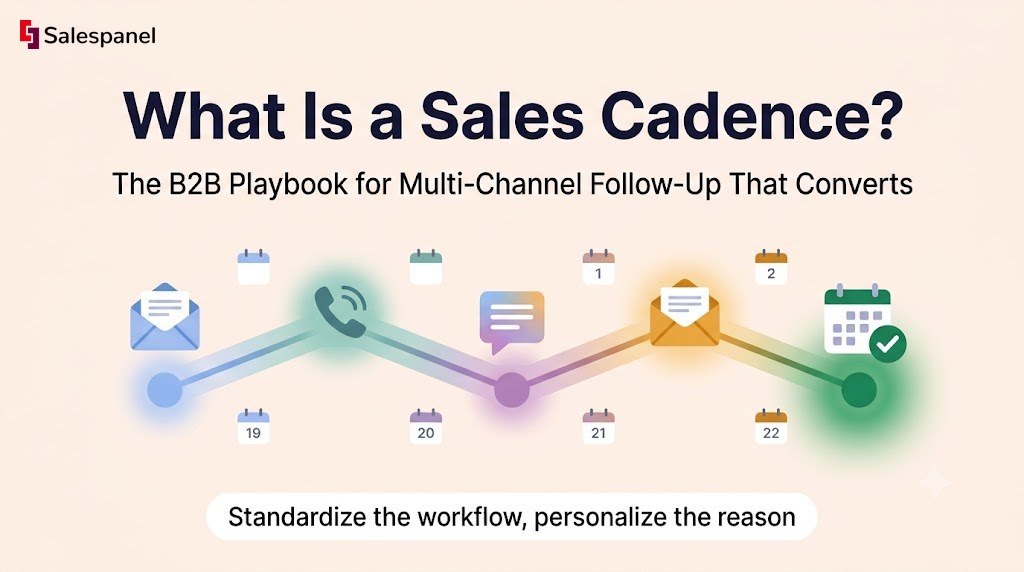
A sales cadence is a planned series of sales touches across channels — email, phone, LinkedIn, sometimes direct mail — delivered to a specific buyer segment over a defined period, where every touch has a stated objective. It tells a rep who to contact, when, on which channel, and what response counts as progress.
That definition is worth holding onto, because most teams treat a cadence as a list of touches. It works better as a decision system. Each step exists to do one job: create recognition, establish relevance, answer a likely objection, or ask for the meeting. If you cannot name the job of touch four, touch four should not exist.
Three terms get used interchangeably and shouldn’t be:
- Sales cadence — the outreach plan and its timing. The design layer.
- Sales sequence — the automated or manual workflow that actually delivers those steps inside HubSpot, Salesforce Sales Engagement, Outreach, or Salesloft. The execution layer. HubSpot’s own sequences documentation describes them this way.
- Sales play — the broader motion the cadence belongs to: inbound follow-up, event follow-up, outbound account penetration, renewal expansion.
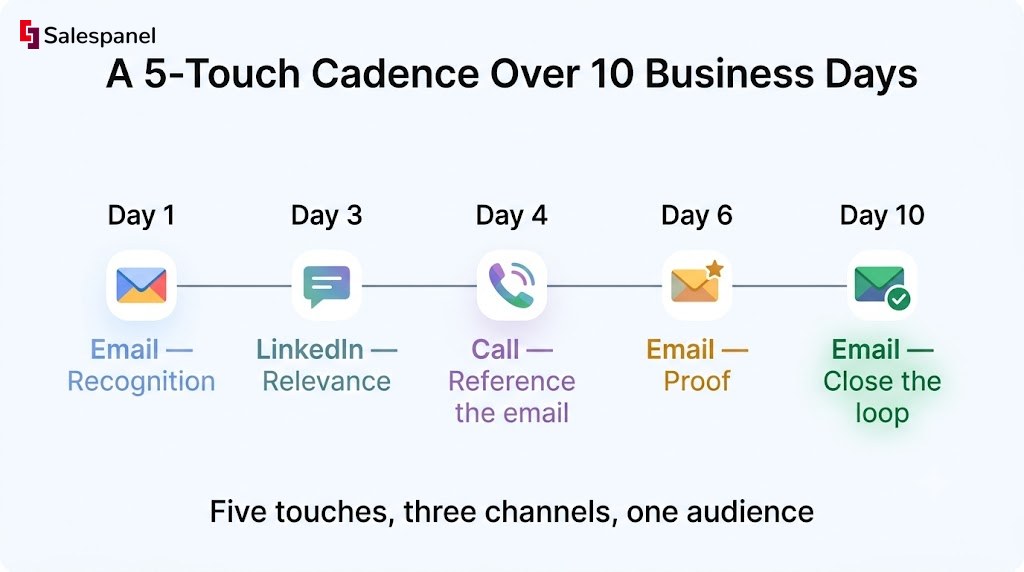
A compact example over ten business days: email on Day 1, LinkedIn interaction on Day 3, call on Day 4, value-led email on Day 6, close-the-loop email on Day 10. Five touches, three channels, one audience.
Now, structure alone does nothing. Sending the same paragraph five times through five different channels is not a multi-channel strategy — it is one message with extra delivery costs. The cadence supplies the skeleton; the reason for each outreach has to come from something true about that prospect. That’s also where your lead qualification process earns its keep, because a cadence pointed at unqualified people just fails faster.
Why Sales Cadences Matter in B2B Prospecting
Sales cadences matter because B2B buyers rarely respond to a first attempt, and unstructured follow-up produces inconsistent coverage, duplicate outreach from multiple reps, and reporting nobody trusts. A defined cadence makes follow-up repeatable across SDRs, AEs, and account managers — and makes failure diagnosable.
The operational benefits are unglamorous and real. Leads stop evaporating after one unanswered call. Every stage becomes measurable, so you can tell the difference between “nobody replies” and “people reply but never book.” Reps stop burning decision energy on what do I send next and spend it on what do I say to this person.
Measure the cadence on positive replies, qualified meetings, and pipeline created. Open rate is no longer a reliable standalone signal — Apple’s Mail Privacy Protection, shipped in 2021, pre-loads images and hides whether a recipient actually opened anything. Teams still reporting a 62% open rate as evidence of relevance are reporting a proxy metric with a hole in it.
When a standard cadence is the wrong tool:
- Active opportunities already in a live buying conversation. Enroll them and you interrupt your own deal.
- Existing customers with an open support escalation.
- High-intent inbound leads who need a specific, immediate reply — not a generic five-step nurture.
The rule to carry through the rest of this guide: standardize the workflow, personalize the reason for outreach. Structure belongs to the system. Relevance belongs to the rep. More on building the surrounding motion in our guide to B2B lead generation strategies.
Step 1: Define the Audience, Trigger, and Goal Before Writing Messages
Start a sales cadence by locking three things: one audience, one trigger, one conversion goal. A cadence aimed at “all SaaS companies” will produce generic messaging and performance data you cannot act on, because you will never know whether the audience, the timing, or the copy failed.
Narrow beats broad on your first attempt. Workable starting segments look like this: demand generation managers at B2B SaaS firms with 50–250 employees. VP-level operations leaders at accounts that visited a pricing page twice in a week. Webinar registrants who stayed at least 30 minutes but never requested a demo.
1. Define the ideal recipient
Filter on firmographics first — industry, headcount, geography, technology stack, revenue band where your data is actually trustworthy, and role. Then add buying-group context, because a single account contains several people with incompatible concerns. The economic buyer wants risk and cost. The champion wants a win. The technical evaluator wants integration detail. The end user wants to know how much of their day this changes.
One persona per cadence. Different roles need different proof, and mixing them means your reply data averages two audiences into a number that describes neither.
2. Choose an outreach trigger
Triggers fall into three buckets:
- Inbound: demo request, content download, webinar attendance, pricing-page visit.
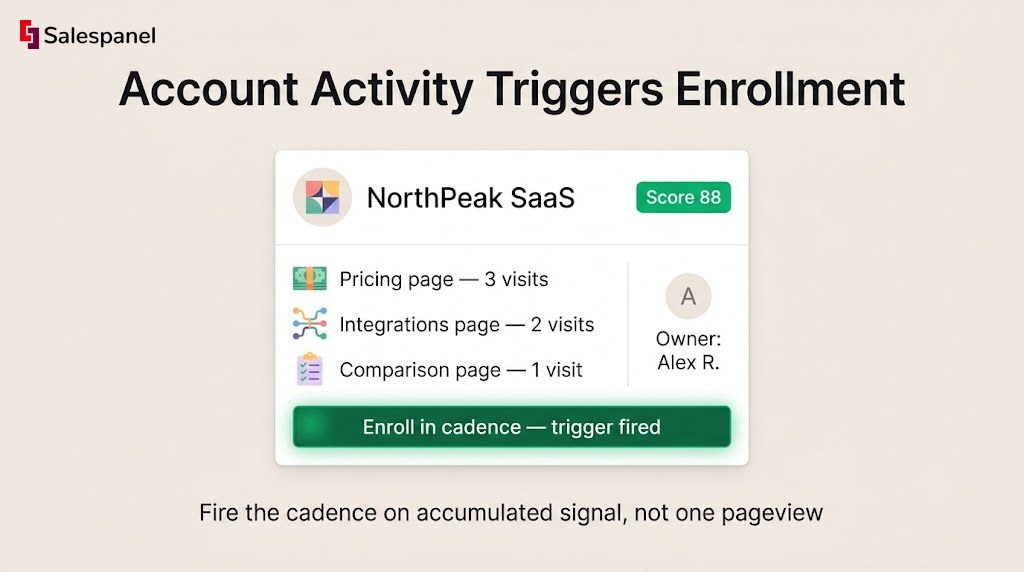
- Account intent: several people from one company hitting high-value pages inside a short window.
- Outbound: new funding, aggressive hiring in a relevant function, product launch, job change, or a known operational problem you can point to.
A trigger must be observable and actionable. “Company exists in our TAM” is a targeting criterion — it tells you who, not when. If the trigger cannot answer why this week, it isn’t a trigger.
3. Set one measurable conversion goal
Inbound: book a discovery call within seven days. Outbound: earn a positive response or a referral to the right owner. Expansion: secure a renewal-planning meeting 90 days before contract end.
One goal. Emails that ask the reader to book a demo, download a guide, and register for a webinar convert worse than any of those asks alone, because you’ve handed a busy person a decision instead of an action.
This is where first-party website visitor tracking becomes practically useful rather than decorative. Salespanel identifies the companies behind anonymous traffic, so a cadence can fire when an account repeatedly visits pricing, integrations, or comparison pages — and route that account to the owner who already covers the territory. Use identification to make outreach relevant, not to prove you were watching. Referencing granular browsing behavior in a cold email reads as creepy, and it costs you the reply. Pair it with a scoring model — see our lead scoring guide — so the trigger fires on accumulated signal rather than one pageview.
Watch out for: the same contact sitting in an outbound cadence and an inbound follow-up cadence simultaneously. Suppression rules and CRM lifecycle stages exist for exactly this. Check your CRM’s lead assignment documentation before you scale enrollment.
Want to see which companies are already on your pricing page this week? Explore how Salespanel identifies engaged B2B accounts and feeds them into your routing workflow.
Step 2: Map the Buying Friction to Each Touch
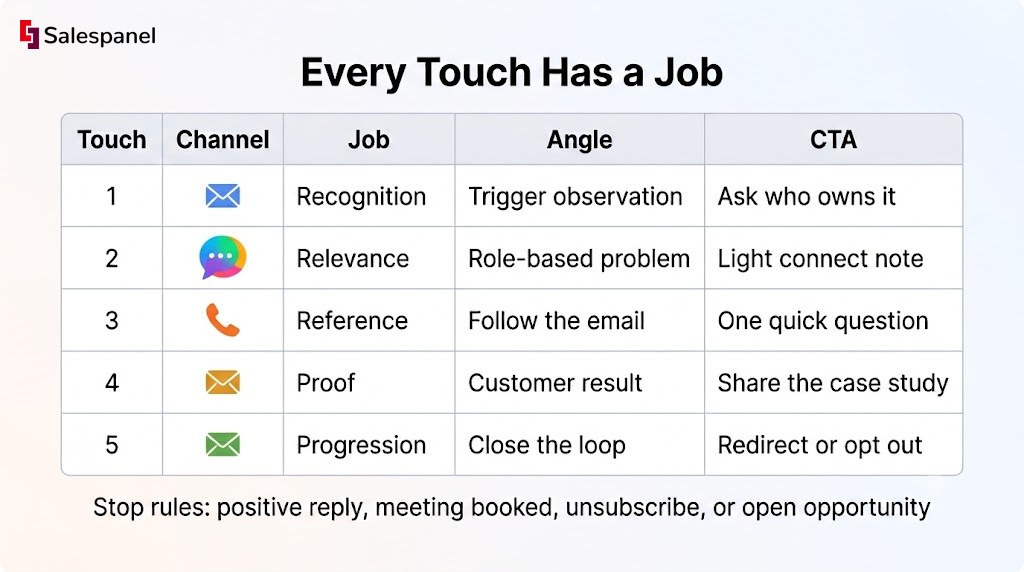
A useful sales cadence assigns a specific purpose to every touch, moving from relevance to proof to a low-friction next step. Repeating the same meeting request in five different fonts is the most common cadence failure, and it is entirely avoidable.
Four jobs a touch can do:
- Recognition — explain why this person is hearing from you at all.
- Relevance — connect their role, trigger, or known problem to an outcome they care about.
- Proof — supply a credible result, benchmark, or process insight.
- Progression — ask for one simple next action.
1. Write the first-touch message
Formula: relevant observation + likely operational problem + one outcome + specific CTA.
Worked example, writing to a demand generation manager:
- Observation: a meaningful share of their high-intent page traffic never converts into a form fill.
- Problem: paid and content teams have no way to prioritize which accounts deserve fast follow-up.
- Outcome: engaged accounts get routed to sales with a defined score attached.
- CTA: “Is visitor-to-lead routing owned by marketing ops or SDR leadership on your side?”
That CTA asks for information, not calendar time. It’s easier to answer, and the answer tells you who to talk to next.
Keep first-touch personalization verifiable. Do not invent a pain point you cannot substantiate, and do not narrate someone’s browsing session back to them.
2. Add a proof touch, not another pitch
Touch two or three should carry evidence: a short customer story with a number in it, a benchmark, a teardown of something they’d recognize, a checklist, a 40-second webinar clip, or a single sentence of process insight that is useful even if they never reply.
Every proof asset has to answer one question — why should this person believe the problem is worth solving? If the asset only argues that your product is good, it’s a pitch wearing a costume.
A call should follow an email and reference it. “Just checking in” gives the prospect nothing to react to. “I sent you a note about routing engaged accounts — wanted to ask one question about how your SDR coverage works” gives them a reason to stay on the line.
On LinkedIn, comment on something they actually posted or send a short connection note. Automated comment spam and copy-pasted DMs are pattern-matched and dismissed in under two seconds.
Channel availability varies by persona and region. Plant managers in manufacturing are not on LinkedIn the way SaaS marketers are. A cadence should never require a social touch for a prospect who has no social presence — build a fallback step.
4. Create an exit or pause condition
Stop rules: positive reply, meeting booked, unsubscribe, disqualification, an existing open opportunity, a confirmed competitor selection, or a no-fit account. Write them down before launch.
Stopping rules protect the prospect experience and, just as importantly, stop your own team from generating conflicting activity against the same account.
Step 3: Set Cadence Length, Timing, and Channel Mix
How long should a sales cadence be? Most initial B2B sales cadences should run 10 to 15 business days with five to eight touches — long enough to test several distinct angles without becoming harassment. Adjust for deal size, buyer seniority, inbound intent, and how time-sensitive the trigger is.
Length is not universal, and anyone quoting an “optimal touch count” is selling you their template.
- High-intent inbound: respond within minutes or hours, then concentrate follow-up across 3–7 days.
- Mid-market outbound: 10–15 business days, 5–8 considered touches.
- Enterprise outbound: 15–25 business days, because buying groups are larger and procurement adds its own clock.
Treat these as starting ranges to test, not as findings.
1. Build a sensible starting schedule
A twelve-business-day frame that holds up:
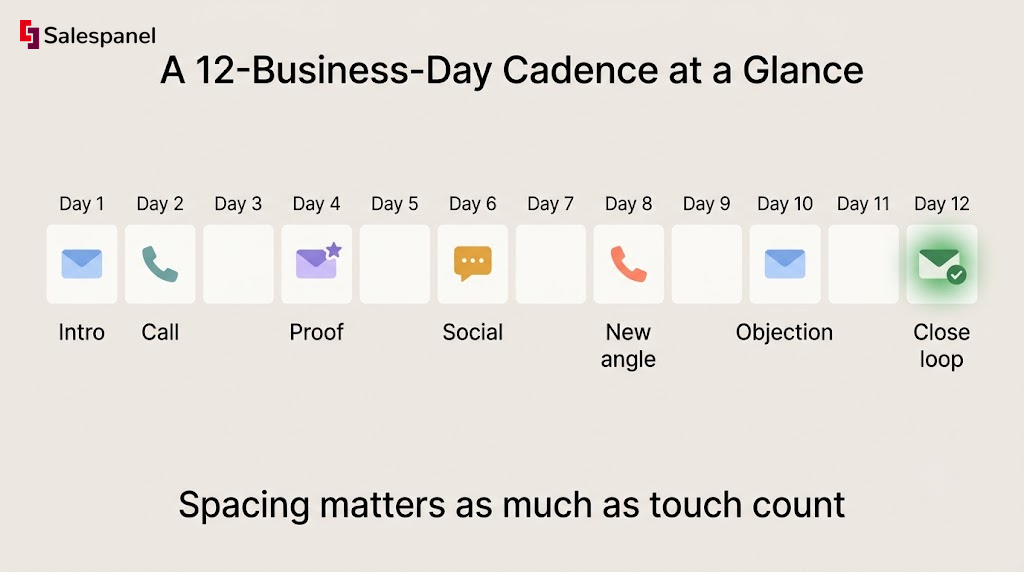
- Day 1: personalized email
- Day 2: call or voicemail, if the persona takes calls
- Day 4: proof-led email
- Day 6: LinkedIn touch
- Day 8: call with a new angle
- Day 10: objection-handling email
- Day 12: close-the-loop message
Spacing matters as much as count. Three generic messages in three days, sent to satisfy an activity quota, will damage the account for the next rep who touches it.
2. What a Two-Week Cadence Actually Means
A two-week cadence is an outreach schedule spanning roughly 10 business days. Teams should specify whether weekends count and how many total touches land inside that window, because “two weeks” describes duration and nothing else — not channels, not touch quality, not message relevance. Two very different cadences can both be two weeks long.
3. Match channels to the buyer and motion
Email carries detail and scales. Phone resolves ambiguity fastest and works best after context exists. LinkedIn builds recognition cheaply and converts poorly as a cold pitch channel. Direct mail justifies its cost only for named enterprise accounts. Events create warm triggers rather than replacing cadences. Retargeting keeps you visible between touches without consuming rep time.
Compliance is not optional before scaling. Honor unsubscribes immediately, keep suppression lists accurate, and check the rules that apply to your recipients — FTC CAN-SPAM guidance for US email, plus GDPR and PECR for the UK and EU, where the ICO’s direct marketing guidance is the reference point. Calling regulations vary by country and state.
Step 4: Launch the Cadence With Routing, Ownership, and Quality Controls
Before enrolling a single prospect, connect the cadence to clean CRM records, explicit owner rules, and suppression logic — so the right rep contacts the right person exactly once. Most launch failures trace back to data management, not copywriting.
1. Set enrollment rules
Define the conditions a record must satisfy: persona match, valid work email, account status, lifecycle stage, assigned lead owner, territory, consent or lawful-basis status where applicable, and no active opportunity on the account.
Duplicate prevention needs three checks, not one:
- Contact-level enrollment check (is this person in another cadence?)
- Account-level suppression (is a colleague already being worked?)
- A sequence-status field on the record that other reps can actually see
2. Define ownership and service-level expectations
A practical SLA: an inbound hand-raiser routes to the assigned owner immediately. If the lead sits unworked for 30 minutes during business hours, alert a team lead or reassign under documented coverage rules.
Match the SLA to real coverage. Publishing a five-minute response commitment that the team hits 40% of the time creates internal cynicism faster than having no SLA at all. This is one of the places where sales and marketing alignment stops being a slide and becomes a routing rule.
3. QA the experience before launch
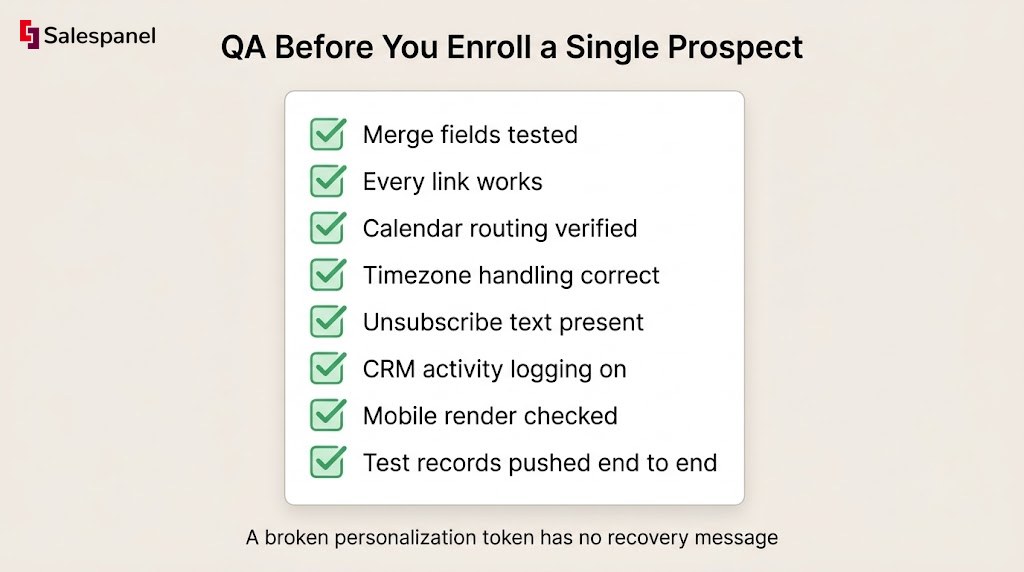
Test merge fields, every link, calendar routing, timezone handling, unsubscribe text, CRM activity logging, and how the email renders on a phone. Push two or three internal test records through the entire workflow — enrollment to exit — before real prospects see it.
Watch out for: a broken personalization token. “Hi {{First Name}}” tells the reader everything about how much attention they’re getting, and there is no recovery message that fixes it.
Step 5: Measure and Improve Sales Cadence Performance
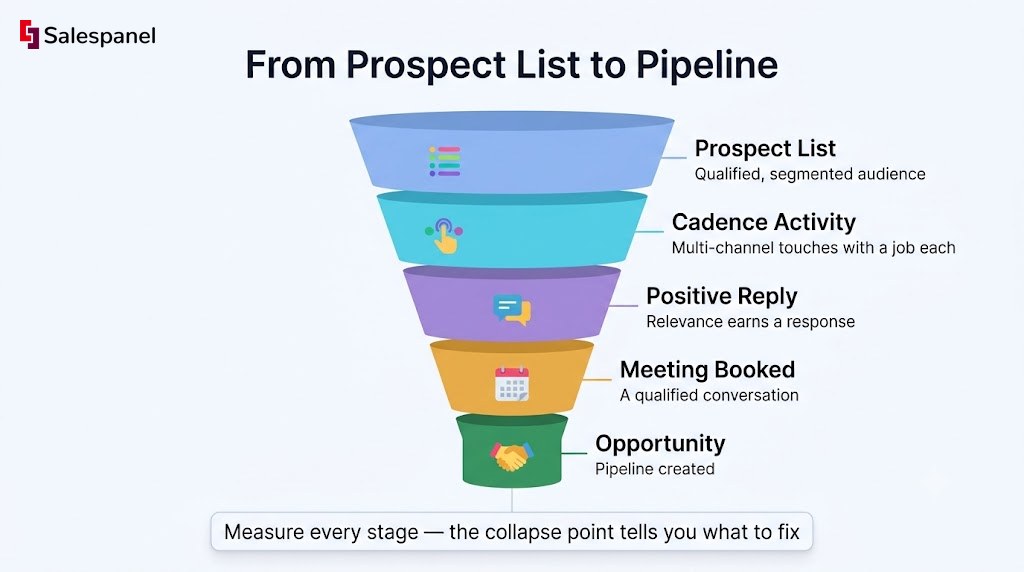
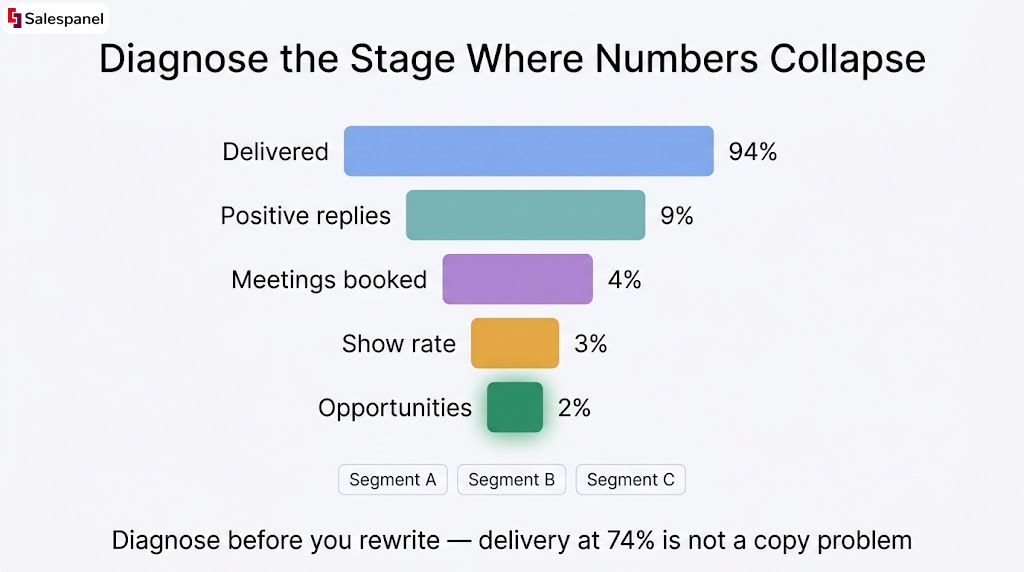
Measure a sales cadence from delivered messages through qualified pipeline, treating each stage as a diagnostic. The stage where numbers collapse tells you whether the problem is targeting, deliverability, message relevance, follow-up execution, or qualification — and each of those has a different fix.
The hierarchy, in order:
- Delivery rate — surfaces data quality and sending-domain problems.
- Reply rate and positive reply rate — indicates relevance far better than open rate.
- Meetings booked per enrolled prospect — conversion efficiency.
- Show rate — exposes weak expectation-setting and low-quality bookings.
- Opportunity creation and pipeline value — the link to revenue.
- Unsubscribe and spam-complaint rates — early warning for fatigue or bad targeting.
Formulas worth standardizing across the team:
- Positive reply rate = positive replies ÷ delivered prospects × 100
- Meeting rate = meetings booked ÷ enrolled prospects × 100
- Opportunity rate = opportunities created ÷ enrolled prospects × 100
1. Diagnose the weak stage
| Symptom | Likely cause | First action |
|---|---|---|
| Low delivery | Bad data, domain health, broken suppression | Validate list, check DMARC/SPF, audit suppression logic |
| Delivered, few replies | Wrong audience or weak opening relevance | Revise segment, first line, and CTA |
| Replies, few meetings | Qualification or booking friction | Fix handoff, calendar flow, reply handling |
| Meetings, no opportunities | ICP or promise-to-product mismatch | Revisit ICP definition and discovery structure |
2. Run controlled cadence tests
Change one variable at a time — first-email angle, CTA, proof asset, call timing, or persona. Hold the audience, the time window, and the success metric constant.
Volume matters. Two positive replies is an anecdote, and declaring a winner on that basis is how teams end up rewriting copy every three weeks with no cumulative learning.
3. Use intent data responsibly
Account-level engagement helps you prioritize a follow-up queue. It does not tell you someone is ready to buy. A single pageview is noise; six people from one account reading integration docs across four days is a signal worth acting on.
Salespanel tracks that account-level website engagement and scores it, so reps work the queue in order of accumulated activity rather than list position. Now — the discipline here is diagnosis before rewriting. If positive replies are flat but delivery is at 91% and the audience matches ICP, the copy is a fair suspect. If delivery is at 74%, no amount of new copy will help you.
Common Sales Cadence Mistakes to Avoid
Most sales cadence failures trace back to four causes: targeting that’s too broad, messages that repeat themselves, poor data hygiene, and measuring activity volume instead of buyer progress. Each has a specific fix.
- Mistake 1: Using one cadence for every persona
Fix: build separate versions whenever the role, trigger, or desired outcome changes materially. A VP of Ops and a marketing manager do not share a problem statement. - Mistake 2: Counting opens as engagement
Fix: report positive replies, meetings, and opportunity progression. Keep opens as directional context only. - Mistake 3: Sending every touch with the same ask
Fix: vary the value exchange across the cadence — insight, then proof, then a resource, then a question, then the meeting request. - Mistake 4: Ignoring account-level coordination
Fix: set account suppression rules. Three reps contacting three stakeholders with three different pitches makes the vendor look disorganized to the exact buying group you’re trying to impress. - Mistake 5: Automating without review
Fix: require manager QA on every new cadence, and hard-code pause rules for negative replies, unsubscribes, and active opportunities. - Mistake 6: Treating the breakup email as a guilt trip
Fix: write a respectful close-the-loop note that offers three easy outs — redirect me to the right person, tell me to come back next quarter, or opt out entirely. Guilt-based closers (“I guess this isn’t a priority”) generate replies, but rarely the kind that turn into pipeline.
Sales Cadence Examples for Common B2B Situations
The right sales cadence changes with the prospect’s trigger and buying stage. Inbound demo requests, cold outbound, and event follow-up need different message sequences, different speeds, and different exit rules — running one template across all three wastes your highest-intent leads.
What is a cadence example? A seven-touch outbound cadence over 12 business days: Day 1 personalized email, Day 2 call, Day 4 proof email, Day 6 LinkedIn engagement, Day 8 call with a new angle, Day 10 objection-handling email, Day 12 close-the-loop note.
Example 1: Demo-request follow-up cadence
Five days, front-loaded. Immediate acknowledgement with a calendar link. Contextual call within the hour, referencing the form and the pages they viewed. Day 2, a use-case email matched to their segment. Day 3, calendar follow-up. Day 5, a final routing check — confirm whether they’re the right owner or should hand you to someone else. Speed and context carry this one; the copy matters less than the response time.
Example 2: Cold outbound cadence for a defined ICP
Twelve business days, seven touches, email plus phone plus one social touch. Every touch takes a different angle: a trigger observation, a benchmark, a peer result, a specific objection, a referral request. No “bumping this to the top of your inbox” — that phrase adds a touch without adding a reason.
Example 3: Webinar attendee follow-up cadence
Segment three ways before you write anything: attended live, registered but no-show, and attended the high-intent product portion. No-shows get the recording and a light CTA. Live attendees get the resource that matches the session. The product-segment group gets a direct meeting ask, because their attendance behavior already answered the interest question.
FAQ: Sales Cadence Questions
A sales cadence is a repeatable outreach schedule, but its timing and channels should reflect the buyer’s intent, role, and stage rather than a fixed template. The questions below cover the details teams most often get wrong when moving from a cadence document to a live sequence.
Can you give me an example of a meeting cadence?
A meeting cadence is a recurring schedule of internal sales meetings. A common example: a 30-minute pipeline review every Monday, a weekly one-on-one with each rep, and a 90-minute account planning session on the first Tuesday of each month. A meeting cadence governs internal rhythm and is separate from a prospect outreach cadence, which schedules external touches.
How long should a sales cadence be?
For most B2B outbound motions, 10 to 15 business days is a sensible starting range, containing five to eight touches. High-intent inbound leads need a shorter, concentrated window of three to seven days with an immediate first response. Enterprise outbound can run 15 to 25 business days because larger buying groups and procurement steps extend decision timelines.
What does a two-week cadence mean?
A two-week cadence normally covers about 10 business days of outreach. The label alone is incomplete — a usable definition must also specify the total number of touches, which channels are used, whether weekends are included, and the stop conditions that remove a prospect from the sequence. Duration says nothing about message quality or relevance.
What is a cadence example?
A seven-touch cadence across 12 business days: Day 1 personalized email establishing relevance, Day 2 call referencing that email, Day 4 proof email with a customer result, Day 6 LinkedIn engagement, Day 8 call with a new angle, Day 10 email addressing a likely objection, Day 12 respectful close-the-loop message offering an easy redirect or opt-out.
How many touches should a sales cadence include?
Five to eight touches is a practical starting point for a mid-market outbound test. Touch count matters less than touch quality, channel fit for the persona, and clearly defined exit rules. Adding a ninth generic email rarely improves reply rates, while replacing a weak third touch with credible proof frequently does.
Put Your First Sales Cadence Into Production
Build one narrow cadence first. Launch it with clean routing and explicit stop rules, then improve it using positive replies, meetings, and opportunities — not activity counts that flatter the dashboard.
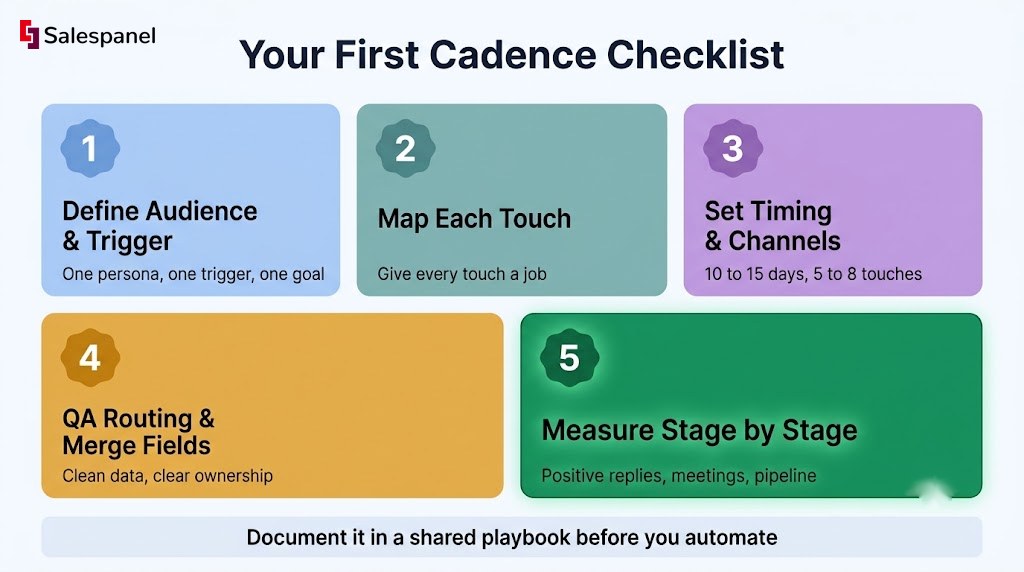
The sequence to follow: define the audience and trigger, map the purpose of each touch, set timing and channel mix, QA routing and merge fields, then measure stage by stage. Document all of it in a shared playbook before you automate anything, because a cadence living only inside a sales engagement tool cannot be reviewed, argued with, or improved by the next person who owns it.
From there, tighten the front end with a working lead scoring guide and a defined approach to B2B lead qualification.
Ready to build a follow-up queue ordered by real buying signals? See how Salespanel turns website engagement into a prioritized outreach workflow.
Sell more, understand your customers’ journey for free!
Sales and Marketing teams spend millions of dollars to bring visitors to your website. But do you track your customer’s journey? Do you know who buys and why?
Around 8% of your website traffic will sign up on your lead forms. What happens to the other 92% of your traffic? Can you identify your visiting accounts? Can you engage and retarget your qualified visitors even if they are not identified?